1. تعارف
This manual provides essential instructions for the safe and efficient operation, setup, and maintenance of your Displays2go Pedestal Display with Digital Sign (Model DF037NLB). Please read this manual thoroughly before using the product and retain it for future reference.
The DF037NLB is a versatile pedestal display featuring a 37-inch stretch LCD advertising screen, designed for indoor use. It includes a rear locking storage compartment for added functionality.
2. حفاظتی معلومات
- اس پروڈکٹ کا مقصد ہے۔ صرف اندرونی استعمال. Do not expose to moisture, rain, or extreme temperatures.
- اس بات کو یقینی بنائیں کہ یونٹ ٹپنگ کو روکنے کے لیے ایک مستحکم، سطح کی سطح پر رکھا گیا ہے۔
- وینٹیلیشن کے آغاز کو روکیں نہ۔
- صرف فراہم کردہ پاور اڈاپٹر استعمال کریں۔
- صفائی یا دیکھ بھال کرنے سے پہلے بجلی منقطع کریں۔
- اس پروڈکٹ میں کینسر اور پیدائشی نقائص یا دیگر تولیدی نقصان (تجویز 65 وارننگ) کی وجہ سے ریاست کیلیفورنیا کے نام سے جانا جاتا کیمیکل ہو سکتا ہے۔
3. پیکیج کے مشمولات
تصدیق کریں کہ تمام اجزاء پیکیجنگ میں موجود ہیں:
- Pedestal Display Unit (DF037NLB)
- پاور کیبل
- ریموٹ کنٹرول
- Set of Keys (for storage compartment)
- صارف دستی (یہ دستاویز)
4. سیٹ اپ
4.1 پیک کھولنا اور جگہ کا تعین کرنا
- Carefully remove the pedestal display from its packaging.
- Place the unit on a flat, stable surface in your desired indoor location. Ensure adequate space around the unit for ventilation.
4.2 پاور کنکشن
- Locate the power input port on the rear of the unit.
- Connect the provided power cable to the unit and then to a standard electrical outlet.
- The unit is now ready for initial power-on.
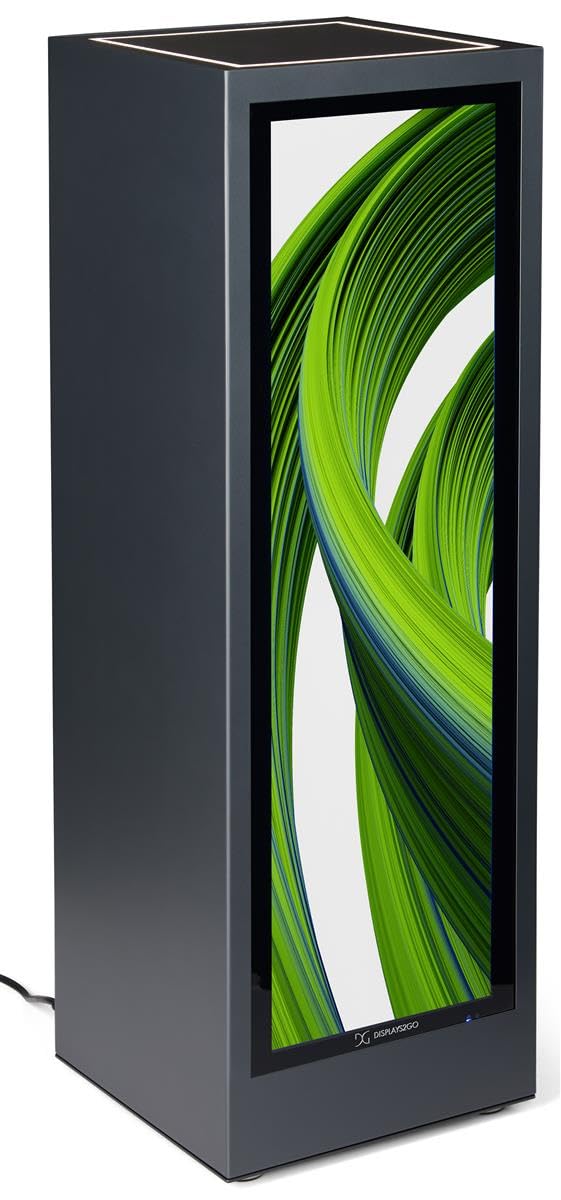
تصویر 4.1: سامنے view of the Displays2go Pedestal Display with Digital Sign.
5. آپریٹنگ ہدایات
5.1 Digital Signage Operation
The pedestal display features a 37-inch stretch LCD screen for displaying various media content.
- Content Formatting: For optimal display, format your marketing materials to a resolution of 720 پکسلز چوڑا x 2520 پکسلز اونچا.
- USB Content Transfer: Use the USB ports located on the rear of the unit to transfer images, videos, and other content to the display's internal storage.
- کنیکٹوٹی: The unit supports WiFi and Bluetooth connectivity. This allows for network access, content updates, and connection to external Bluetooth speakers or peripherals like a mouse and keyboard.
- Google Play Access: Access the Google Play app store to download and install business applications directly onto the display.
- آڈیو: The display includes two built-in speakers for audio playback.

Image 5.1: The digital display showcasing product advertisements for watches.

Image 5.2: The digital display showcasing product advertisements for headphones.

Image 5.3: The 37-inch diagonal measurement of the stretch LCD screen.
5.2 Rear Locking Storage Compartment
The unit features a rear-accessible storage compartment for securing personal items or product backstock.
- To open the compartment, insert one of the provided keys into the lock and turn.
- To lock, close the door, insert the key, and turn to secure. Remove the key to prevent unauthorized access.
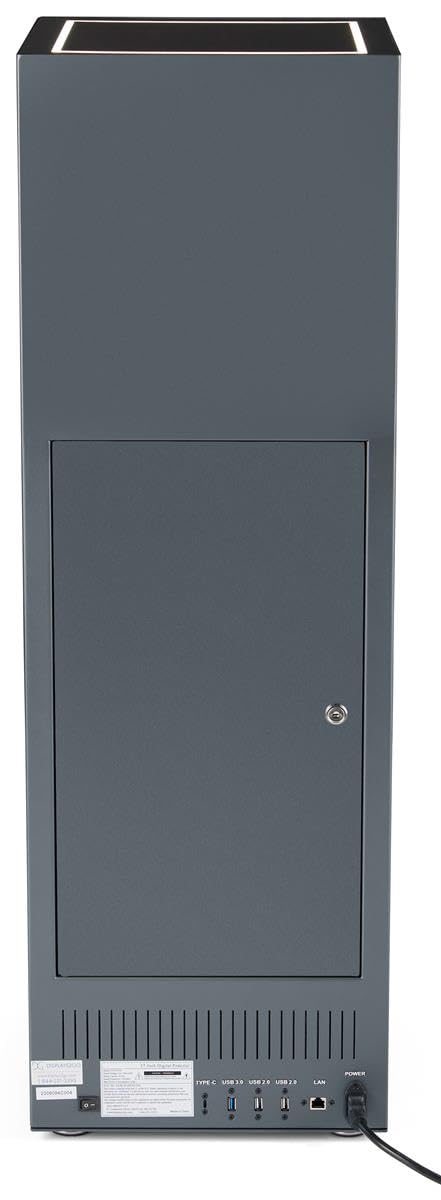
تصویر 5.4: پیچھے view of the pedestal display showing the closed locking storage compartment and connectivity ports.

تصویر 5.5: پیچھے view of the pedestal display with the locking storage compartment open, revealing interior space.
5.3 ایل ای ڈی الیومینیشن
The mirrored top surface of the pedestal features LED illumination to highlight products placed on top. This feature is integrated with the main power supply and activates when the unit is powered on.
6 دیکھ بھال
6.1 صفائی
- صفائی سے پہلے ہمیشہ پاور کیبل کو منقطع کریں۔
- Use a soft, dry, lint-free cloth to clean the exterior surfaces of the pedestal.
- For the screen, use a screen-specific cleaning solution and a microfiber cloth. Do not spray liquid directly onto the screen.
- Avoid abrasive cleaners or solvents, as they may damage the finish.
6.2 سافٹ ویئر اپ ڈیٹس
Periodically check for software updates through the unit's operating system settings to ensure optimal performance and access to the latest features. Refer to the on-screen instructions for update procedures.
7 خرابیوں کا سراغ لگانا
If you encounter issues with your pedestal display, refer to the following common problems and solutions:
| مسئلہ | ممکنہ وجہ | حل |
|---|---|---|
| ڈسپلے آن نہیں ہو رہا ہے۔ | بجلی کا کوئی کنکشن نہیں۔ | Ensure power cable is securely connected to the unit and a working outlet. |
| اسکرین پر کوئی تصویر نہیں ہے | Incorrect input source or no content loaded | Check display settings for input source. Ensure content is properly loaded via USB or network. |
| اسپیکر سے کوئی آواز نہیں۔ | والیوم بہت کم یا خاموش ہے۔ | Adjust volume using the remote control or on-screen settings. Check if external Bluetooth speakers are connected and overriding internal speakers. |
| Wi-Fi/Bluetooth سے منسلک نہیں ہو سکتا | Network issues or incorrect settings | Verify Wi-Fi network is active and password is correct. Ensure Bluetooth device is in pairing mode and within range. |
8. وضاحتیں
| فیچر | تفصیل |
|---|---|
| ماڈل نمبر | DF037NLB |
| مصنوعات کے طول و عرض (W x D x H) | 14 x 14 x 43 انچ |
| اسکرین کا سائز | 37 انچ (ترچھی) |
| Recommended Content Resolution | 720px (width) x 2520px (height) |
| کنیکٹوٹی | WiFi, Bluetooth, USB ports (Type-C, USB 3.0, USB 2.0), LAN |
| آڈیو | بلٹ ان اسپیکر |
| ذخیرہ | Rear locking compartment |
| آپریٹنگ سسٹم | Access to Google Play App Store |
| استعمال کا ماحول | صرف اندرونی استعمال |
9. وارنٹی اور سپورٹ
For warranty information, technical support, or service inquiries, please contact Displays2go customer service. Refer to your purchase documentation or the Displays2go official webرابطہ کی تفصیلات کے لیے سائٹ


