تعارف
This manual provides detailed instructions for the installation, operation, and maintenance of your CGOGC Android Car Stereo. Designed for Toyota Tacoma models from 2005 to 2015, this head unit offers advanced features including Wireless CarPlay, Android Auto, an 8-core processor, a 1280x720 touchscreen, Bluetooth, GPS navigation, FM/AM radio, 5G WiFi, and comprehensive multimedia capabilities. Please read this manual thoroughly before use to ensure proper functionality and safety.
حفاظتی معلومات
- Always ensure the vehicle is turned off and the parking brake is engaged before beginning installation or maintenance.
- Disconnect the vehicle's battery before installation to prevent electrical shorts or damage.
- Professional installation is recommended for optimal performance and to avoid damage to the vehicle or product.
- ڈیوائس کو اس انداز میں نہ چلائیں جس سے آپ کا دھیان ڈرائیونگ سے ہٹ جائے۔ سڑک کی حفاظت کو ہمیشہ ترجیح دیں۔
- آلے کو پانی، نمی اور انتہائی درجہ حرارت سے دور رکھیں۔
پیکیج کے مشمولات
تنصیب کے ساتھ آگے بڑھنے سے پہلے تصدیق کریں کہ تمام اجزاء موجود ہیں:

Image: Included components for the CGOGC Android Car Stereo.
- ہیڈ یونٹ
- پاور کیبل
- اڈاپٹر کیبل
- آرسیی کیبل
- Dual USB Cables
- بیک اپ کیمرہ
- کیمرہ ان پٹ کیبل
- GPS اینٹینا
- مائیکروفون
- کروبار (ٹرم ہٹانے کے لیے)
سیٹ اپ اور انسٹالیشن
The CGOGC Android Car Stereo is designed for direct plug-and-play installation in Toyota Tacoma models from 2005-2015. Follow these steps for proper installation:
- Remove the Original Radio: Carefully use the provided crowbar to pry open the trim around your original car radio player. Disconnect all cables from the back of the original unit.
- وائرنگ ہارنس کو جوڑیں: Connect the new wiring harness plug to the corresponding socket on the back of the CGOGC head unit. Ensure all connections are secure.
- متعلقہ اشیاء: Attach the GPS antenna, external microphone, USB cables, and RCA cables to their respective ports on the head unit.
- Connect Backup Camera: If installing the backup camera, connect the reversing image detection cable and video plug to the head unit.
- ہیڈ یونٹ انسٹال کریں: Carefully slide the CGOGC head unit into the center console opening. Ensure all cables are tucked away neatly and do not interfere with other components.
- محفوظ اور ٹیسٹ: Secure the head unit in place and reattach any removed trim pieces. Reconnect the vehicle's battery and power on the unit to test all functions.

Image: Comparison of the dashboard before and after installing the CGOGC Android Car Stereo, highlighting the integrated fit.
انسٹالیشن ویڈیو گائیڈ
Video: A detailed installation guide for the CGOGC Android Car Stereo, demonstrating the process of removing the old unit, connecting the wiring harness, and installing the new head unit. This video also includes a product demonstration.
آپریٹنگ ہدایات
وائرلیس کار پلے اور اینڈرائیڈ آٹو
Connect your smartphone wirelessly for seamless integration of navigation, music, calls, and messages. The system supports both Apple CarPlay and Android Auto.
- یقینی بنائیں کہ آپ کے اسمارٹ فون پر بلوٹوتھ فعال ہے۔
- On the head unit, navigate to the Bluetooth settings and pair with your phone.
- Once paired, the system will automatically prompt to activate CarPlay or Android Auto.

Image: Demonstrates the wireless and wired connection options for Apple CarPlay and Android Auto on the car stereo display.
DSP Sound Settings
The built-in Digital Signal Processing (DSP) chip allows for advanced audio customization. Access the DSP settings to adjust:
- Equalizer کی: Fine-tune audio frequencies with a 30-band equalizer.
- Loudness & Smart Bass: Enhance low and high frequencies for a richer sound.
- Sound Filter: Adjust High-Pass Filter (HPF) and Low-Pass Filter (LPF) settings for speakers.
- Sound Delay & Balance: آواز کو بہتر بنائیںtaging and balance for different seating positions.

Image: Visual representation of the DSP sound settings interface, showing equalizer, loudness, and sound field adjustments.
ملٹی میڈیا افعال
- ریڈیو: Access FM/AM radio with one-click search and station presets.
- میوزک پلیئر: Supports various audio formats for local playback.
- ویڈیو پلیئر: Enjoy 1080p HD video playback.
- اسپلٹ اسکرین: Run two applications simultaneously, such as navigation and video playback.
- نیویگیشن: Utilize built-in GPS or install preferred navigation apps from the Google Play Store.
- بلوٹوتھ: Hands-free calling and audio streaming.
- اسٹیئرنگ وہیل کنٹرول (SWC): Control essential functions directly from your steering wheel buttons.
- بیک اپ کیمرہ: پیچھے کا خودکار ڈسپلے view when reversing, with parking guidelines.
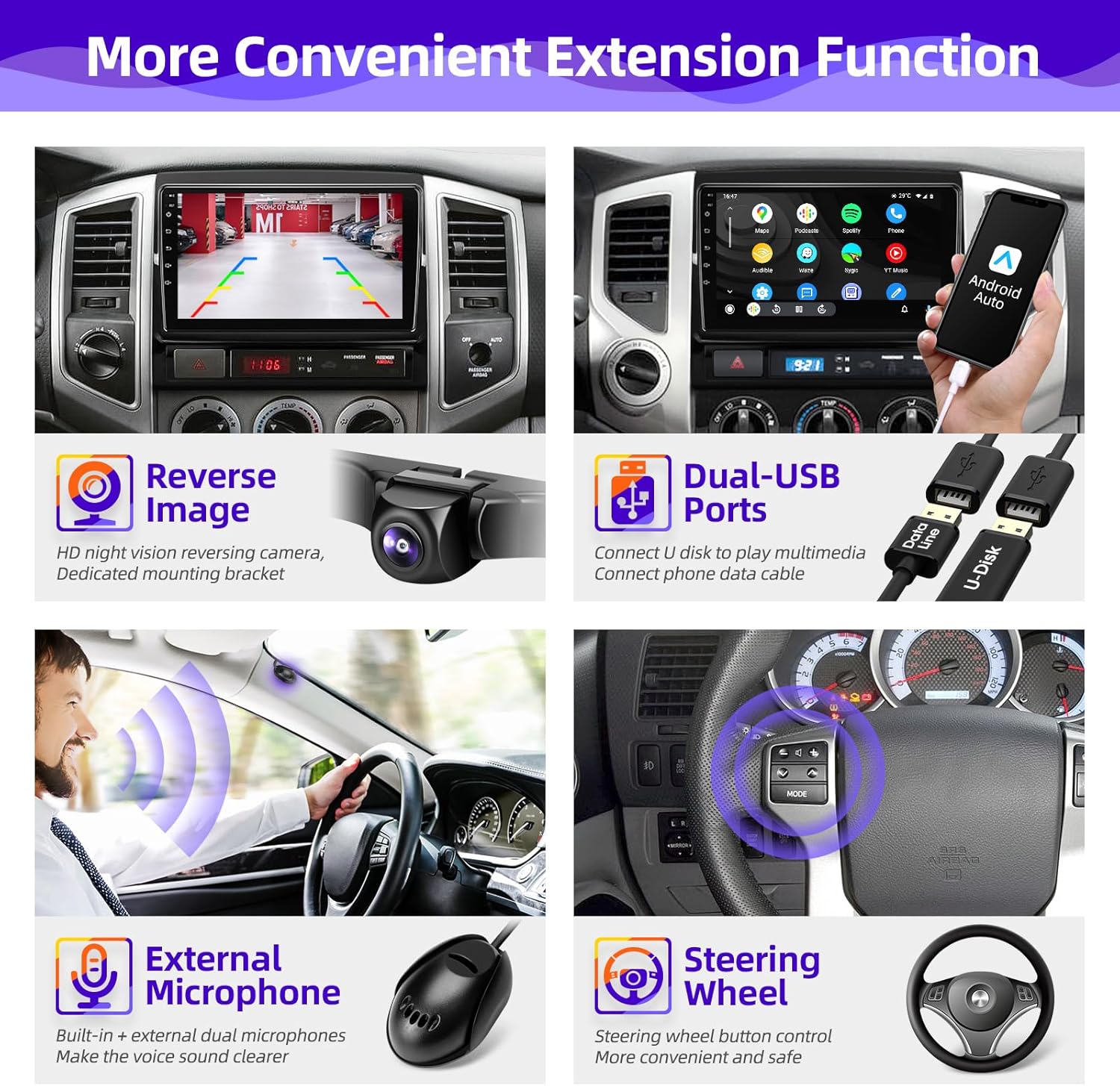
تصویر: ختمview of convenient extension functions such as reverse image display, dual USB ports, external microphone support, and steering wheel control compatibility.
دیکھ بھال
- اسکرین کی صفائی: ٹچ اسکرین کو آہستہ سے صاف کرنے کے لیے نرم، لنٹ سے پاک کپڑا استعمال کریں۔ ضدی smudges کے لئے، تھوڑا سا dampur کپڑے میں پانی یا سکرین سے محفوظ کلینر۔ سخت کیمیکلز سے پرہیز کریں۔
- سافٹ ویئر اپ ڈیٹس: وقتاً فوقتاً سسٹم سیٹنگز یا مینوفیکچررز کے ذریعے سافٹ ویئر اپ ڈیٹس کو چیک کریں۔ webبہترین کارکردگی اور نئی خصوصیات تک رسائی کو یقینی بنانے کے لیے سائٹ۔
- کیبل کنکشن: Ensure all cables remain securely connected. Loose connections can lead to intermittent functionality.
خرابی کا سراغ لگانا
- کوئی طاقت نہیں: تمام پاور کنکشن اور گاڑی کے فیوز باکس کو چیک کریں۔ یقینی بنائیں کہ اگنیشن آن ہے۔
- کوئی آواز نہیں: Verify speaker connections, volume settings, and audio source selection. Check DSP settings for any active filters or delays.
- CarPlay/Android آٹو کنیکٹ نہیں ہو رہا ہے: Ensure Bluetooth is on and paired. Try restarting both your phone and the head unit. Check for any software updates for the head unit.
- GPS سگنل کے مسائل: اس بات کو یقینی بنائیں کہ GPS اینٹینا صحیح طریقے سے نصب ہے اور اس کی نظر آسمان کی طرف واضح ہے۔
- سسٹم منجمد/دوبارہ شروع: Perform a system reset (refer to the device settings for the reset option). If the issue persists, contact customer support.
وضاحتیں
- آپریٹنگ سسٹم: Android Smart Operating System
- پروسیسر: Octa Core 2.0GHz
- رام: 2 جی بی
- ROM: 32 جی بی
- سکرین: 9-inch Super Clear IPS Screen
- قرارداد: 1280*720
- ریڈیو چپ: ٹی ڈی اے 7708
- طاقت Ampلائفائر چپ: ٹی ڈی اے 7388
- کنیکٹوٹی: Bluetooth, USB, 5G WiFi
- خصوصی خصوصیات: Wireless CarPlay, Android Auto, GPS Navigation, FM/AM RDS Radio, Bluetooth Music, Multi-format Music Player, 1080p Video Player, APP Download, Backup Camera Input, Audio Output, AUX Audio/Video Input, External Microphone, SWC Steering Wheel Control, DSP Digital Processing Audio Streaming (Smart Bass, Balance, Equalizer, Loudness, Filter)
- آئٹم کا وزن: 4.8 پاؤنڈ
- پیکیج کے طول و عرض: 13.73 x 11.8 x 3.54 انچ

Image: Highlights key hardware specifications and features such as the Octa-core CPU, IPS 1280x720 display, Android 12 system, DSP adjustment, Wi-Fi, navigation, Bluetooth, radio, and MFS control.
وارنٹی کی معلومات
یہ پروڈکٹ ایک کے ساتھ آتا ہے۔ 1 سال کی وارنٹی خریداری کی تاریخ سے. وارنٹی عام استعمال کے تحت مینوفیکچرنگ کی خرابیوں اور خرابیوں کا احاطہ کرتی ہے۔ وارنٹی کے دعووں کے لیے براہ کرم اپنی خریداری کا ثبوت اپنے پاس رکھیں۔ وارنٹی غلط تنصیب، غلط استعمال، حادثات، یا غیر مجاز ترمیم کی وجہ سے ہونے والے نقصان کا احاطہ نہیں کرتی ہے۔
کسٹمر سپورٹ
For any questions, technical assistance, or warranty inquiries, please contact CGOGC customer support:
- ای میل: CGOGCZCT@outlook.com
- When contacting support, please provide your product model number (B0DM25WTS6) and a detailed description of your issue.