1. تعارف
This manual provides detailed instructions for the FREEWOLF M68 60% Wireless Gaming Keyboard. Please read this manual carefully before using the product to ensure proper operation and longevity.

Figure 1: FREEWOLF M68 Wireless Gaming Keyboard (Shimmer color variant)
2. پروڈکٹ ختمview
اہم خصوصیات:
- ٹرائی موڈ کنیکٹیویٹی: Supports wired (USB-C), 2.4GHz wireless, and Bluetooth 5.0 connections.
- ملٹی ڈیوائس مطابقت: Connects to Windows, Mac, Linux, PC, Laptop, iPad, iOS, and Android devices.
- کومپیکٹ 60% لے آؤٹ: Features 67 keys, optimizing desktop space.
- پی بی ٹی کی کیپس: Durable Polybutylene Terephthalate keycaps with clear legends.
- رینبو ایل ای ڈی بیک لائٹنگ: Offers constant and breathing modes with adjustable brightness and speed.
- دیرپا بیٹری: Built-in 2000mAH battery provides extended usage.
- ایرگونومک ڈیزائن: Double leg braces allow for three adjustable typing angles.
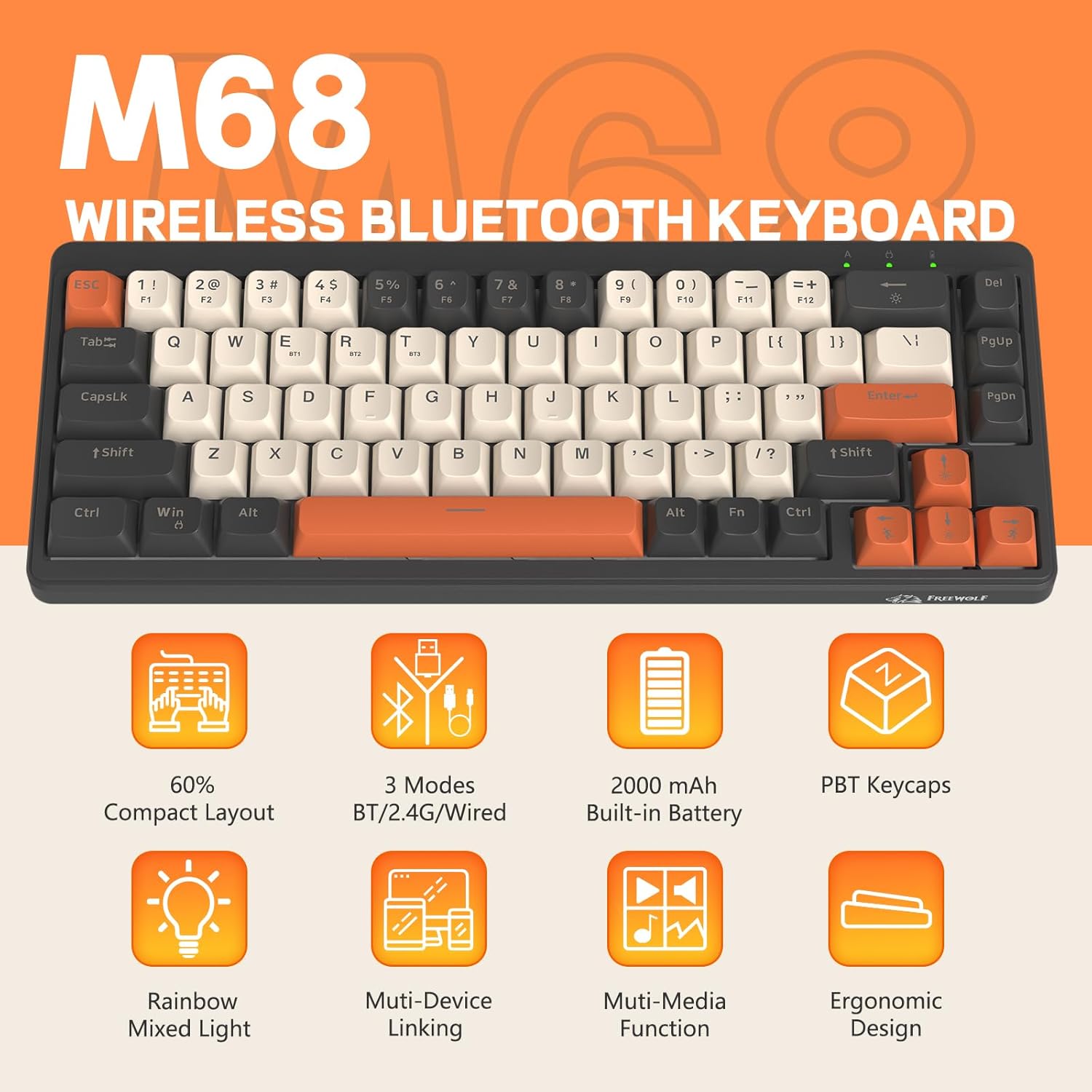
شکل 2: ختمview of FREEWOLF M68 key features.
3. سیٹ اپ اور کنکشن
3.1. Tri-Mode Connection Overview
The M68 keyboard supports three connection methods: wired via USB-C, 2.4GHz wireless via a USB receiver, and Bluetooth 5.0. You can switch between these modes using the dedicated switch on the keyboard.

شکل 3: تفصیلی view of the 3-mode connection options.
3.2. وائرڈ کنکشن۔
- کی بورڈ پر USB-C پورٹ تلاش کریں۔
- فراہم کردہ USB-C کیبل کو کی بورڈ سے اور دوسرے سرے کو اپنے کمپیوٹر کے USB پورٹ سے جوڑیں۔
- Ensure the mode switch on the keyboard is set to the wired (USB) position.
- کی بورڈ خود بخود آپ کے سسٹم کے ذریعہ پہچان لیا جائے گا۔
3.3. 2.4GHz وائرلیس کنکشن
- Locate the 2.4GHz USB receiver (often stored in a compartment on the keyboard).
- USB ریسیور کو اپنے کمپیوٹر پر دستیاب USB پورٹ میں لگائیں۔
- Set the mode switch on the keyboard to the 2.4GHz wireless position.
- کی بورڈ خود بخود جڑ جانا چاہیے۔ اگر نہیں، تو دبائیں ایف این + آر۔ جوڑا شروع کرنے کے لیے۔
3.4. بلوٹوت کنکشن
The M68 can connect to up to three Bluetooth devices simultaneously.
- Set the mode switch on the keyboard to the Bluetooth position.
- To enter pairing mode for a specific channel (BT1, BT2, or BT3), press and hold FN+Q (BT1 کے لیے) ایف این + ڈبلیو (BT2 کے لیے)، یا ایف این + ای۔ (for BT3) until the corresponding indicator light flashes rapidly.
- On your device (PC, laptop, tablet, phone), open Bluetooth settings and search for "FREEWOLF M68".
- جوڑا بنانے کے لیے کی بورڈ کو منتخب کریں۔ ایک بار منسلک ہونے کے بعد اشارے کی روشنی ٹھوس ہو جائے گی۔
- جوڑا بنائے گئے بلوٹوتھ آلات کے درمیان سوئچ کرنے کے لیے، دبائیں۔ FN + Q/W/E مختصر طور پر
4. آپریشن
4.1. بیک لائٹ کنٹرول
The M68 features customizable rainbow LED backlighting.
- FN + بیک اسپیس: Toggle backlight on/off or switch between constant and breathing modes.
- FN + Left Arrow: بیک لائٹ کی رفتار کو کم کریں۔
- FN + دائیں تیر: بیک لائٹ کی رفتار میں اضافہ کریں۔
- FN + اوپر تیر: بیک لائٹ کی چمک میں اضافہ کریں۔
- FN + نیچے تیر: بیک لائٹ کی چمک کو کم کریں۔

Figure 4: Backlight adjustment key combinations.
4.2 ایرگونومک ایڈجسٹمنٹ
The keyboard includes double leg braces on the back to adjust the typing angle for comfort.
- Flip the keyboard over to access the leg braces.
- Adjust the two-stage leg braces to achieve your preferred typing angle (flat, one stage, or two stages)۔

Figure 5: Ergonomic angle adjustments.
4.3. بیٹری کا انتظام
The keyboard has a built-in 2000mAH rechargeable battery.
- چارج کرنا: Connect the keyboard via the USB-C cable to a power source (computer USB port or wall adapter). The charging indicator will show status.
- بیٹری کی زندگی: Up to 60 hours with backlight on, and up to 200 hours with backlight off.
- بجلی کی بچت: The keyboard will enter sleep mode after a period of inactivity to conserve battery. Press any key to wake it up.

Figure 6: Battery capacity information.
5 دیکھ بھال
- صفائی: Use a soft, dry cloth to clean the keyboard surface. For keycaps, you may use a slightly damp کپڑا ضرورت سے زیادہ نمی سے بچیں۔
- کی کیپ ہٹانا: If necessary, use a keycap puller to carefully remove PBT keycaps for deeper cleaning or replacement.
- ذخیرہ: کی بورڈ کو براہ راست سورج کی روشنی اور انتہائی درجہ حرارت سے دور ٹھنڈی، خشک جگہ پر اسٹور کریں۔
- مائعات سے پرہیز کریں: Do not expose the keyboard to liquids to prevent damage to internal components.
6 خرابیوں کا سراغ لگانا
| مسئلہ | ممکنہ وجہ | حل |
|---|---|---|
| کی بورڈ جواب نہیں دے رہا ہے (وائرڈ) | ڈھیلا کیبل کنکشن، غلط موڈ۔ | Ensure USB-C cable is securely connected. Check if the mode switch is set to wired. Try a different USB port. |
| Keyboard not responding (2.4GHz) | USB receiver not connected, incorrect mode, pairing issue. | Ensure USB receiver is plugged in. Set mode switch to 2.4GHz. Re-pair by pressing ایف این + آر۔. Try a different USB port for the receiver. |
| کی بورڈ جواب نہیں دے رہا ہے (بلوٹوتھ) | Not paired, incorrect mode, device Bluetooth off. | Ensure device Bluetooth is on. Set mode switch to Bluetooth. Enter pairing mode (FN + Q/W/E) and re-pair. Forget the device on your system and re-pair. |
| بیک لائٹ کام نہیں کر رہی یا پھنس گئی۔ | Backlight off, low battery, software glitch. | دبائیں FN + بیک اسپیس to toggle. Charge the keyboard. Try resetting the keyboard (refer to advanced functions if available, or disconnect/reconnect). |
| کلیدیں رجسٹر یا ڈبل ٹائپنگ نہیں کر رہی ہیں۔ | Dust/debris under keycap, switch issue. | Carefully remove keycap and clean. If issue persists, contact support. |
7. وضاحتیں
| ماڈل | ایم 68 |
| برانڈ | فری وولف |
| کنیکٹوٹی | وائرڈ (USB-C)، 2.4GHz وائرلیس، بلوٹوتھ 5.0 |
| کلیدی لے آؤٹ | 60% (67 کلیدیں) |
| کیکیپ مواد۔ | PBT (Polybutylene Terephthalate) |
| بیک لائٹنگ | رینبو LED (RGB) |
| بیٹری کی صلاحیت | 2000mAH |
| ہم آہنگ آلات | Laptop, PC, Tablet (Windows, Mac, Linux, iOS, Android) |
| مصنوعات کے طول و عرض | 32.51 x 12.5 x 3.99 سینٹی میٹر |
| وزن | 600 گرام |
| خصوصی خصوصیات | Ergonomic (adjustable angles), Backlit |
8. وارنٹی اور سپورٹ
For warranty information, technical support, or customer service inquiries, please refer to the contact information provided with your purchase or visit the official FREEWOLF webسائٹ
کسی بھی وارنٹی دعووں کے لیے براہ کرم اپنے خریداری کا ثبوت اپنے پاس رکھیں۔


