تعارف
Thank you for choosing the FLEXISPOT EC5 Plus Electric Sit-Stand Desk Frame. This manual provides essential information for the safe and efficient assembly, operation, and maintenance of your new desk frame. Designed with ergonomics in mind, this dual-motor frame offers smooth and quiet height adjustment, allowing you to effortlessly switch between sitting and standing positions for a healthier work environment.
اہم حفاظتی ہدایات
براہ کرم اسمبلی اور استعمال سے پہلے تمام ہدایات کو احتیاط سے پڑھیں۔ ان ہدایات پر عمل کرنے میں ناکامی کے نتیجے میں مصنوعات کو چوٹ یا نقصان پہنچ سکتا ہے۔
- اس بات کو یقینی بنائیں کہ اسمبلی سے پہلے تمام اجزاء موجود ہیں اور بغیر کسی نقصان کے ہیں۔ اگر کوئی پرزہ غائب یا خراب ہو تو استعمال نہ کریں۔
- Keep children and pets away from the desk during operation to prevent injury from moving parts.
- Do not place hands or other body parts near the lifting columns or crossbar during height adjustment to avoid pinching.
- Ensure the desk is placed on a level surface to prevent tipping.
- Do not overload the desk. The maximum load capacity is 120 kg (265 lbs).
- صرف فراہم کردہ پاور اڈاپٹر اور کیبلز استعمال کریں۔
- صفائی یا دیکھ بھال سے پہلے بجلی منقطع کریں۔
- The anti-collision system is designed to prevent damage, but always exercise caution during operation.
پیکیج کے مشمولات
تصدیق کریں کہ آپ کے پیکیج میں درج ذیل تمام اجزاء شامل ہیں:
- ڈیسک ٹانگیں (2)
- کراس بار (1)
- سائیڈ بریکٹ (2)
- کنٹرول باکس (1)
- Handset/Control Panel (1)
- پاور اڈاپٹر (1)
- پاور کیبل (1)
- کیبل مینجمنٹ ٹرے (1)
- Hardware Kit (screws, tools, etc.)
- صارف دستی (یہ دستاویز)

سیٹ اپ گائیڈ
اسمبلی کی ہدایات
Assembly typically requires two people. Follow the steps below for a successful setup. Refer to the detailed diagrams in the included printed manual for visual guidance.
- ان پیک اجزاء: احتیاط سے پیکیجنگ سے تمام حصوں کو ہٹا دیں اور انہیں صاف، نرم سطح پر ڈالیں تاکہ خروںچ سے بچا جا سکے۔
- ٹانگوں کے ساتھ سائیڈ بریکٹ منسلک کریں: Secure the side brackets to the top of each lifting column (leg) using the provided screws.
- Assemble Crossbar: Connect the two halves of the crossbar, ensuring the motor cables are properly routed.
- ٹانگوں کو کراس بار سے جوڑیں: Attach the assembled legs to the crossbar. Ensure all connections are secure.
- کنٹرول باکس انسٹال کریں: Mount the control box to the designated area on the crossbar using the provided screws.
- Connect Motors and Handset: Plug the motor cables from each leg into the control box. Connect the handset/control panel cable to the control box.
- پاور اڈاپٹر منسلک کریں: Connect the power adapter to the control box and then to the power cable.
- Mount Tabletop: Carefully place your chosen tabletop (not included) onto the assembled frame. Ensure it is centered and aligned. Secure the tabletop to the frame using appropriate screws (ensure screw length is suitable for your tabletop thickness to avoid piercing through). The frame is compatible with tabletops from 120 to 180 cm in length and 60 to 80 cm in width.
- کیبل مینجمنٹ: Use the included cable management tray and ties to organize all cables neatly.
- ابتدائی پاور اپ: Plug the power cable into a wall outlet. The desk should be ready for initial calibration or operation.

آپریٹنگ ہدایات
کنٹرول پینل ختم۔view
The EC5 Plus features an intuitive control panel with an LED display and memory functions.
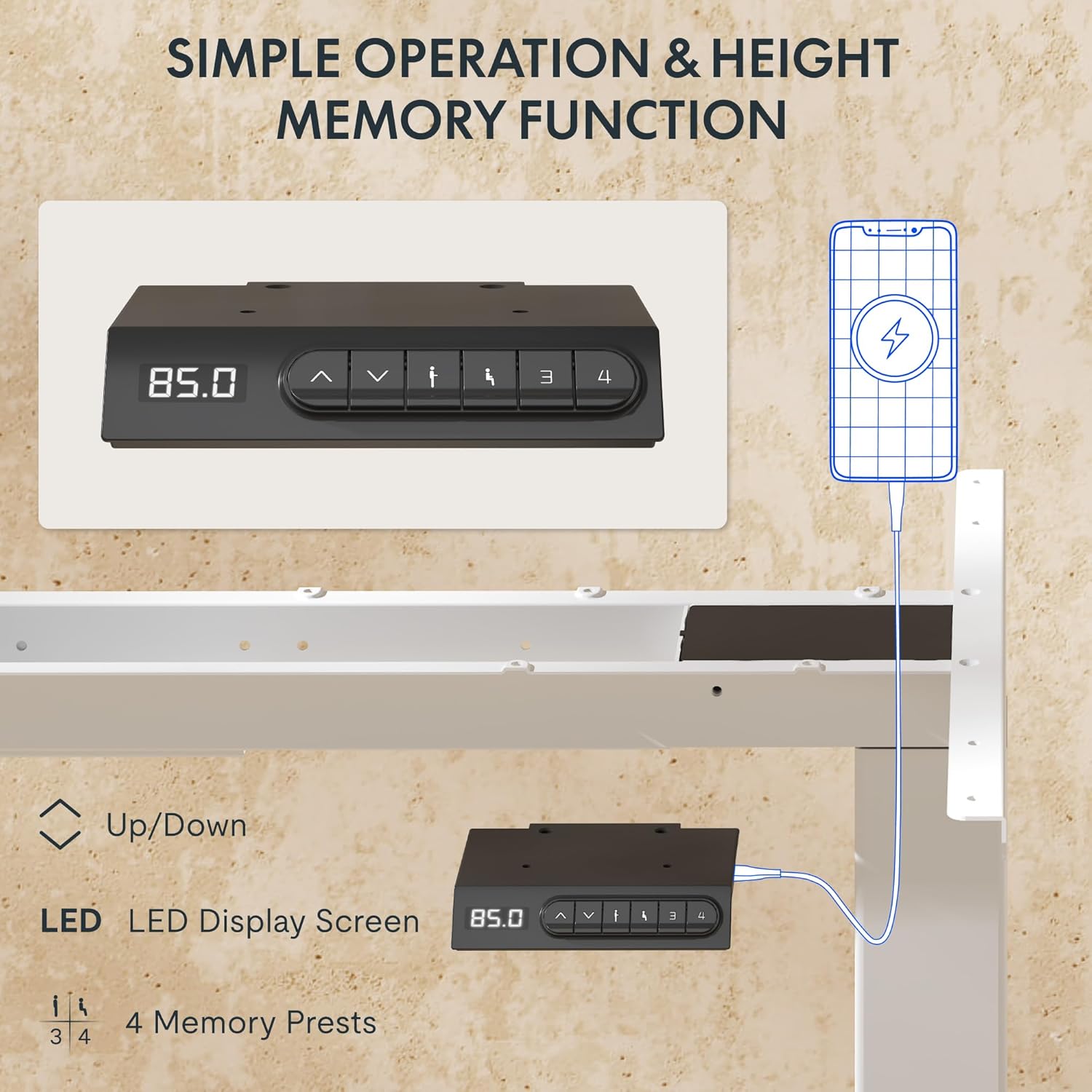
- ایل ای ڈی ڈسپلے: Shows the current height of the desk in centimeters.
- اوپر/نیچے تیر (▲ / ▼): Press and hold to manually adjust the desk height.
- میموری پرسیٹس (1, 2, 3, 4): ترجیحی اونچائی کی ترتیبات کو اسٹور اور یاد کریں۔
- USB-A اور USB-C پورٹس: Integrated charging ports for your devices.
اونچائی کی ایڈجسٹمنٹ
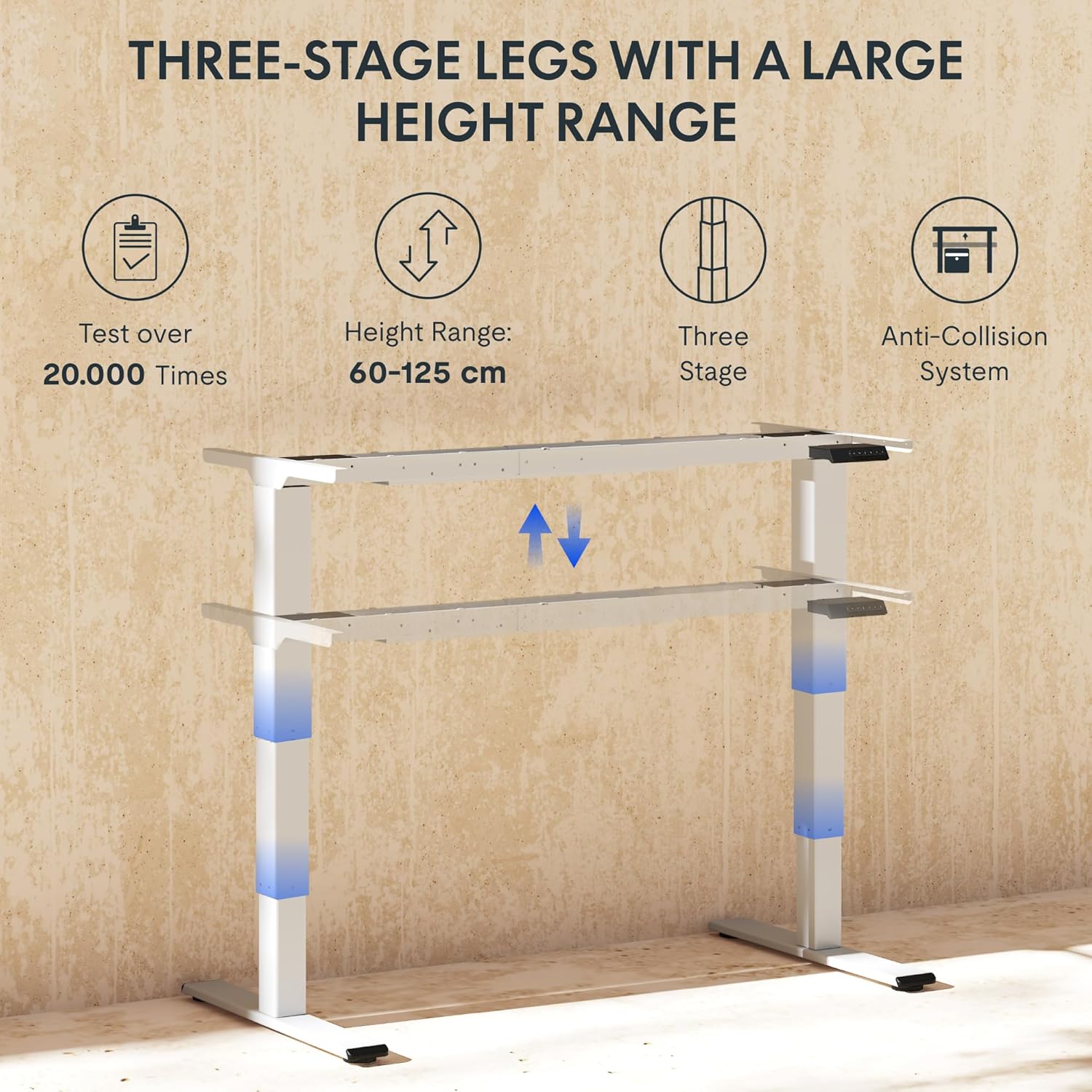
میز کی اونچائی کو ایڈجسٹ کرنے کے لیے، دبائیں اور دبائے رکھیں ▲ (اوپر) یا ▼ (Down) arrow button until the desk reaches your desired height. The LED display will show the current height in real-time. The desk frame supports a height range of 60 cm to 125 cm.
میموری پیش سیٹ
The desk allows you to save up to four preferred height settings for quick recall:
- اوپر/نیچے تیروں کا استعمال کرتے ہوئے ڈیسک کو اپنی مطلوبہ اونچائی پر ایڈجسٹ کریں۔
- Press the "M" or "SET" button (if available, otherwise proceed to step 3).
- Press one of the numbered memory preset buttons (1, 2, 3, or 4) within 3 seconds. The LED display will show "S-" followed by the number, indicating the height has been saved.
- To recall a saved height, simply press the corresponding numbered memory preset button. The desk will automatically move to the saved position.
اینٹی تصادم کا نظام
The EC5 Plus is equipped with an intelligent anti-collision system. If the desk encounters an obstacle during height adjustment, it will automatically stop and reverse slightly to prevent damage or injury. This system has adjustable sensitivity levels. Refer to the detailed manual for instructions on adjusting sensitivity.
USB چارجنگ پورٹس
The control panel includes integrated USB-A and USB-C charging ports. Simply connect your smartphone, tablet, or other compatible devices to these ports for convenient charging directly from your desk.
دیکھ بھال
Regular maintenance ensures the longevity and optimal performance of your FLEXISPOT EC5 Plus desk frame.
- صفائی: میز کے فریم کو نرم سے صاف کریں، ڈیamp cloth. Avoid using abrasive cleaners or solvents that may damage the finish. Ensure the desk is unplugged before cleaning.
- معائنہ: وقتاً فوقتاً تمام پیچ اور کنکشن چیک کریں تاکہ یہ یقینی بنایا جا سکے کہ وہ سخت ہیں۔ اگر ضروری ہو تو دوبارہ سخت کریں۔
- کیبل مینجمنٹ: اس بات کو یقینی بنائیں کہ کیبلز پنچ یا الجھ نہیں ہیں، جو ڈیسک کے آپریشن کو متاثر کر سکتی ہیں یا نقصان کا سبب بن سکتی ہیں۔
- چکنا: The lifting columns are designed to be maintenance-free and do not require lubrication.
خرابی کا سراغ لگانا
If you encounter any issues with your desk frame, refer to the table below for common problems and solutions.
| مسئلہ | ممکنہ وجہ | حل |
|---|---|---|
| ڈیسک حرکت نہیں کرتا۔ | Power cable disconnected; control box not connected; motor cables loose. | Check all power and motor connections. Ensure the power outlet is functional. |
| ڈیسک غیر مساوی طور پر حرکت کرتا ہے یا غیر معمولی شور کرتا ہے۔ | اوورلوڈ ڈھیلے کنکشن؛ رکاوٹ | Reduce weight on the desk. Check all screws and connections. Ensure no obstructions are present. Perform a reset (refer to manual for specific reset procedure). |
| Anti-collision system triggers too often or not at all. | Sensitivity setting incorrect. | Adjust the anti-collision sensitivity via the control panel (refer to manual for specific steps). |
| ایل ای ڈی ڈسپلے غلطی کا کوڈ دکھاتا ہے۔ | مخصوص خرابی | ایرر کوڈز کی فہرست اور ان کے متعلقہ حل کے لیے مکمل صارف دستی سے رجوع کریں۔ اگر مسئلہ برقرار رہتا ہے تو کسٹمر سپورٹ سے رابطہ کریں۔ |
وضاحتیں
Detailed technical specifications for the FLEXISPOT EC5 Plus Desk Frame:
| فیچر | تفصیل |
|---|---|
| برانڈ | فلیکسپوٹ |
| ماڈل نمبر | EC5W-PL-IE |
| رنگ | سفید |
| پروڈکٹ کے طول و عرض (L x W x H) | 80 x 180 x 125 cm (frame dimensions, adaptable to tabletop) |
| شے کا وزن | 22.6 کلوگرام |
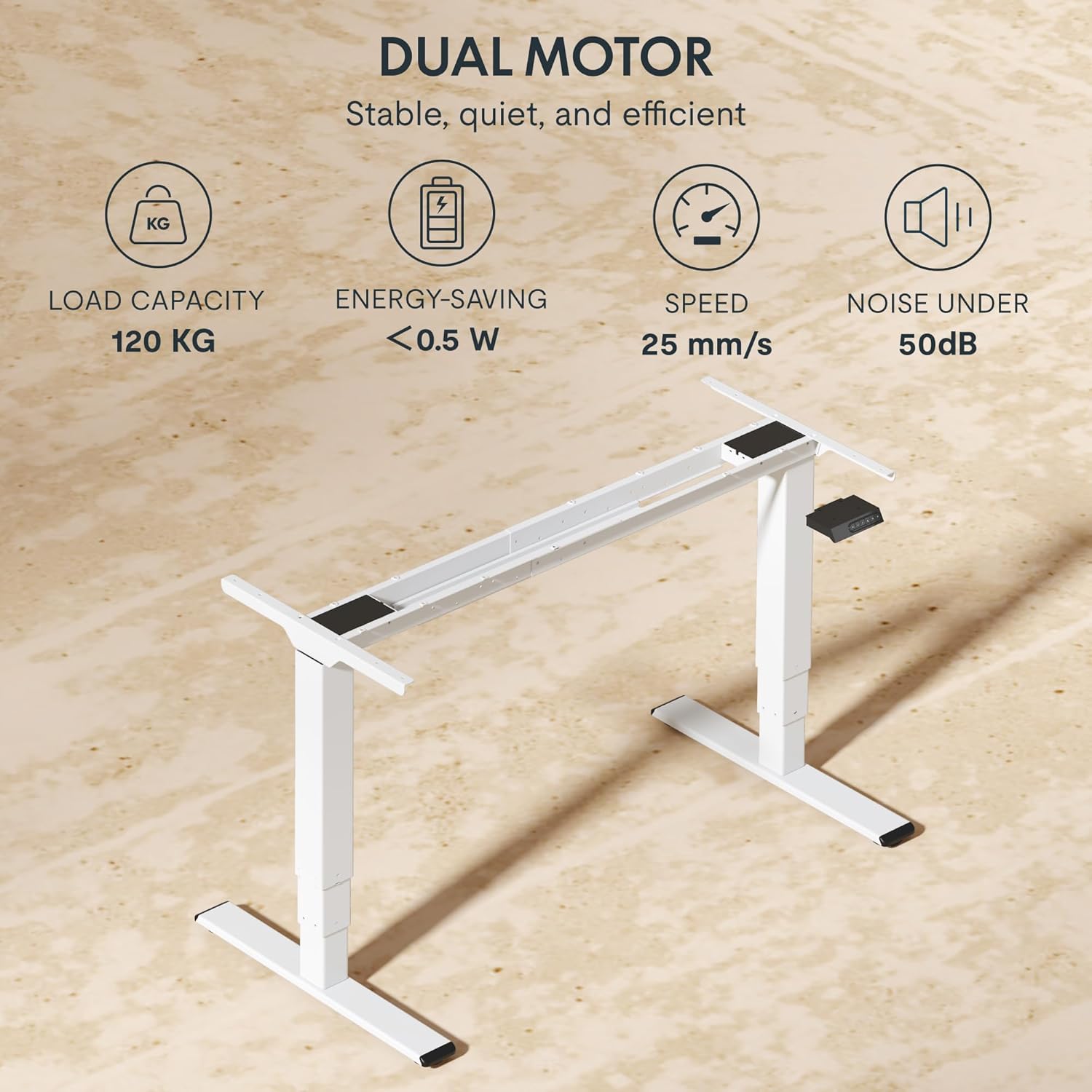
| لوڈ کی صلاحیت | 120 کلوگرام (265 پونڈ) |
| موٹر کی قسم | دوہری موٹر سسٹم |
| اونچائی کی ایڈجسٹمنٹ کی حد | 60 cm - 125 cm (23.6 inches - 49.2 inches) |
| لفٹ سپیڈ | 25 ملی میٹر فی سیکنڈ |
| شور کی سطح | 50 ڈی بی سے کم |
| ٹانگوںtages | تھری ایس۔tage telescopic legs |
| کنٹرول پینل | LED display, 4 memory presets, Up/Down buttons |
| چارجنگ پورٹس | Integrated USB-A and USB-C ports |
| خصوصی خصوصیات | Ergonomic design, Anti-Collision System, Energy-saving (<0.5W standby) |
| Compatible Tabletop Sizes | Length: 120-180 cm; Width: 60-80 cm |
| بنیادی مواد | دھات |
وارنٹی اور سپورٹ
FLEXISPOT stands behind the quality of its products. Your EC5 Plus Desk Frame comes with the following warranty:
- فریم وارنٹی: 5 سال
- موٹر وارنٹی: 3 سال
This warranty covers defects in materials and workmanship under normal use. For warranty claims or technical assistance, please contact FLEXISPOT customer support. Lifetime free technical support is provided.
For the most up-to-date contact information, please visit the official FLEXISPOT webسائٹ یا اپنی خریداری کی دستاویزات کا حوالہ دیں۔
Webسائٹ: www.flexispot.com


