تعارف
This manual provides detailed instructions for the safe and effective use of your Ourlife 5K30FPS WiFi Action Camera. Please read this manual thoroughly before operating the device to ensure optimal performance and longevity.
اوurlife M40TR is a versatile action camera designed to capture high-quality video and photos in various environments, including underwater, thanks to its robust waterproof casing. It features 5K 30fps video recording, a dual-screen display, a 170-degree wide-angle lens, and Wi-Fi connectivity.
باکس میں کیا ہے۔
ان باکس کرنے پر، براہ کرم تصدیق کریں کہ تمام اجزاء موجود ہیں:
- Ourlife M40TR Action Camera
- واٹر پروف کیس
- بڑھتے ہوئے لوازمات
- USB چارجنگ کیبل
- صارف دستی (یہ دستاویز)
- ریموٹ کنٹرول (اگر مخصوص پیکیج کے ساتھ شامل ہو)

Image: The Ourlife M40TR Action Camera shown with its waterproof housing and a small remote control. This image illustrates the primary components included with the camera.
پروڈکٹ ختمview
Familiarize yourself with the camera's main components and interfaces.
- سامنے کی سکرین: 1.3-inch display for quick status checks.
- Rear Screen: 2.0-inch IPS touch screen for menu navigation and playback.
- لینس: 170-degree wide-angle lens.
- پاور / موڈ بٹن: Used to power on/off and switch between modes.
- شٹر/اوکے بٹن: Used to start/stop recording or take photos, and confirm selections.
- مائیکروفون پورٹ: بیرونی مائیکروفون کو جوڑنے کے لیے۔
- USB پورٹ: چارج کرنے اور ڈیٹا کی منتقلی کے لیے۔
- مائیکرو ایس ڈی کارڈ سلاٹ: میموری کارڈ داخل کرنے کے لیے۔
- بیٹری ٹوکری: For battery insertion.

تصویر: ایک قریبی اپ view O کےurlife Action Camera highlighting its 2-inch responsive touch screen. This screen is used for controlling camera functions and reviewآئی این جی فوtage.
سیٹ اپ
1. بیٹری چارج کرنا
Before first use, fully charge the camera battery. Connect the camera to a USB power source (e.g., computer, wall adapter) using the provided USB cable. The charging indicator light will illuminate during charging and turn off when complete.
2. مائیکرو ایس ڈی کارڈ داخل کرنا
A MicroSD card (not included) is required for recording. Use a Class 10 or higher MicroSD card, up to 128GB. Insert the card into the MicroSD card slot with the contacts facing the correct direction until it clicks into place.
نوٹ: For optimal performance, format the MicroSD card within the camera before first use and periodically thereafter.
3. واٹر پروف کیس کو منسلک کرنا
The camera comes with a waterproof case for underwater use and protection against impacts. Ensure the camera is securely placed inside the case and the latch is firmly closed before submerging or exposing to harsh conditions.
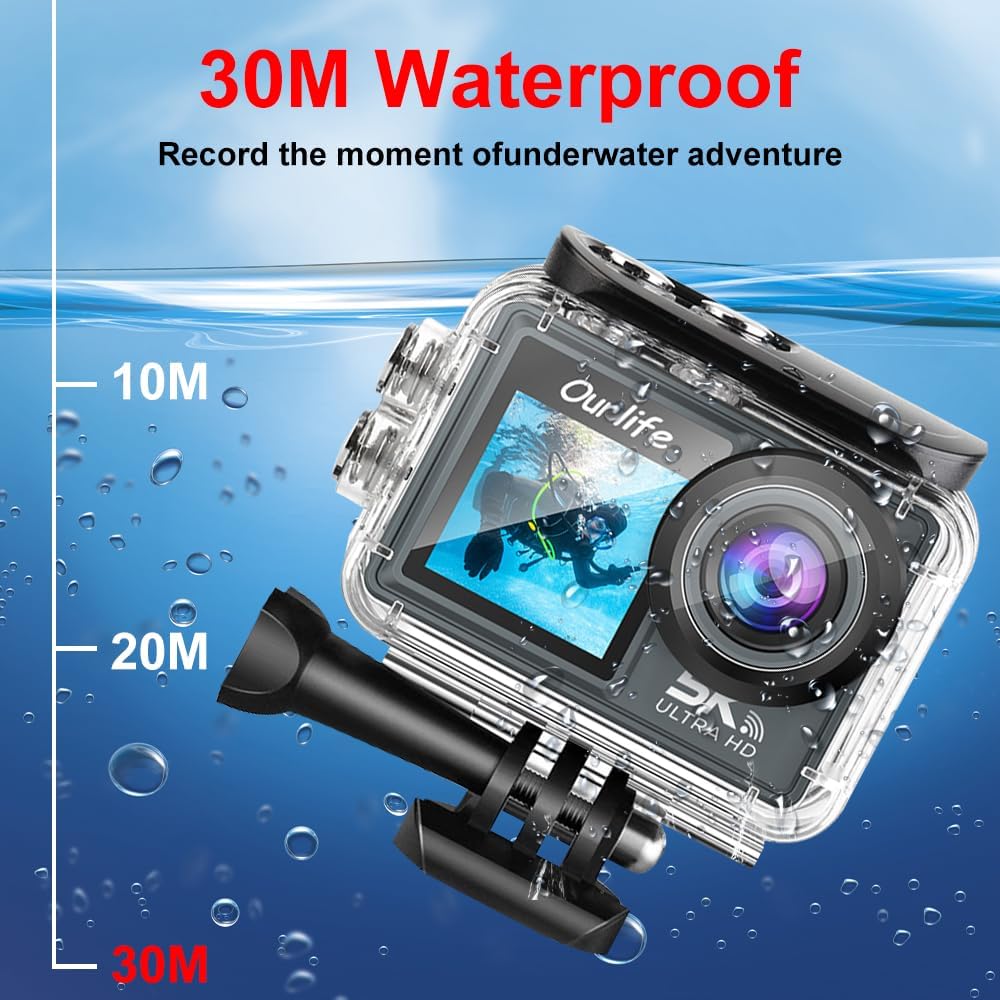
Image: The Ourlife Action Camera enclosed in its waterproof case, depicted underwater with depth markers indicating its 30-meter waterproof capability. This highlights the camera's suitability for aquatic activities.
4. پر / آف پاور
To power on, press and hold the Power/Mode button for a few seconds. To power off, press and hold the Power/Mode button again until the screen turns off.
کیمرہ آپریٹ کرنا
1 بنیادی کنٹرول اور نیویگیشن
Use the Power/Mode button to cycle through different shooting modes (Video, Photo, Playback, Settings). Use the touch screen for menu navigation and selecting options. The Shutter/OK button initiates recording or takes a photo in the respective modes.
2. ویڈیو ریکارڈنگ۔
In Video mode, press the Shutter/OK button to start recording. Press it again to stop. The camera supports resolutions up to 5K at 30 frames per second (fps), as well as 4K, 2.7K, 1080P, and 720P options. Adjust resolution in the settings menu.
3. تصویر کیپچر
In Photo mode, press the Shutter/OK button to take a single photo. The camera offers various photo modes including single shot, automatic shooting, burst mode, and timed photography.
4. Wi-Fi and App Connectivity
Enable Wi-Fi in the camera's settings. Download the official Ourlife app on your smartphone or tablet. Connect your device to the camera's Wi-Fi network. The app allows for remote control, live preview, playback, and sharing of your footage.
5. External Microphone Support
For enhanced audio quality, connect a compatible external microphone to the camera's microphone port. Ensure the microphone is securely connected before recording.
6. Enhanced Image Stabilization (EIS)
The camera features Electronic Image Stabilization (EIS) to reduce blur and shake in your videos, especially during action-packed activities. This feature can be toggled On or Off in the camera settings.

Image: A side-by-side comparison demonstrating the effect of Enhanced Image Stabilization (EIS). The left image shows a clear, stable shot with EIS enabled, while the right image shows a blurred shot with EIS disabled, illustrating the benefit of the feature.
7. Wide-Angle Lens
170 ڈگری کا وسیع زاویہ لینس ایک وسیع فیلڈ کو پکڑتا ہے۔ view, ideal for landscapes, group shots, and immersive action footage. Be aware that wide-angle lenses may exhibit some distortion at the edges of the frame.

تصویر: ایک مثالی نمائشasing the 170-degree ultra wide-angle capability of the Ourlife Action Camera, demonstrating how it captures a significantly broader scene compared to narrower angles, ideal for expansive views.
دیکھ بھال
- صفائی: Use a soft, lint-free cloth to clean the camera lens and screens. For the waterproof case, rinse with fresh water after saltwater use and allow to air dry.
- ذخیرہ: کیمرے کو ٹھنڈی، خشک جگہ پر براہ راست سورج کی روشنی اور انتہائی درجہ حرارت سے دور رکھیں۔ بیٹری کو ہٹا دیں اگر لمبے عرصے تک ذخیرہ کر رہے ہیں۔
- بیٹری کی دیکھ بھال: Avoid fully discharging the battery frequently. Charge the battery regularly, even if not in use, to maintain its lifespan.
خرابی کا سراغ لگانا
| مسئلہ | ممکنہ حل |
|---|---|
| کیمرہ آن نہیں ہوتا ہے۔ | Ensure the battery is charged. Reinsert the battery. |
| ویڈیو ریکارڈ نہیں کر سکتے/تصاویر نہیں لے سکتے۔ | Check if a MicroSD card is inserted and formatted. Ensure sufficient storage space. |
| ناقص ویڈیو/تصویر کا معیار۔ | Clean the lens. Check resolution settings. Ensure adequate lighting. |
| وائی فائی کنکشن کے مسائل۔ | Ensure Wi-Fi is enabled on the camera and your device. Restart both devices. Check app permissions. |
| کیمرا منجمد ہو جاتا ہے یا غیر ذمہ دار ہو جاتا ہے۔ | ہارڈ ری سیٹ کرنے کے لیے بیٹری کو ہٹائیں اور دوبارہ لگائیں۔ |
وضاحتیں
| فیچر | تفصیل |
|---|---|
| ماڈل نمبر | M40TR |
| ویڈیو ریزولوشن | Up to 5K 30fps (also 4K, 2.7K, 1080P, 720P) |
| واٹر پروف گہرائی | 30 میٹر تک (واٹر پروف کیس کے ساتھ) |
| مین سکرین کا سائز | 2.0 انچ آئی پی ایس |
| Secondary Screen Size | 1.3 انچ |
| لینس اینگل | 170-degree Wide-Angle |
| کنیکٹوٹی | وائی فائی، یو ایس بی |
| ذخیرہ | مائیکرو ایس ڈی کارڈ (کلاس 10 یا اس سے اوپر، 128 جی بی تک) |
| External Microphone Support | جی ہاں |
| تصویری استحکام | الیکٹرانک تصویری استحکام (EIS) |
| رنگ | سیاہ |
وارنٹی اور سپورٹ
For warranty information and technical support, please refer to the official Ourlife webسائٹ یا ان کی کسٹمر سروس سے براہ راست رابطہ کریں۔ وارنٹی دعووں کے لیے خریداری کے ثبوت کے طور پر اپنی خریداری کی رسید رکھیں۔
Official Ourlife Store: Visit the Ourlife Store on Amazon


