1. تعارف اور اوورview
This manual provides essential information for the safe and effective use of your Sharp Humidifying Air Purifier, model KI-TS50-W. This appliance combines air purification with humidification, featuring Sharp's unique Plasmacluster 25000 technology and an efficient Coanda airflow system. Its slim design is suitable for various room sizes, including single rooms and bedrooms.

Image: The Sharp KI-TS50-W Humidifying Air Purifier positioned in a modern living space, highlighting its slim profile.
2. حفاظتی معلومات
چوٹ یا نقصان کو روکنے کے لیے براہ کرم آلات کو چلانے سے پہلے تمام حفاظتی ہدایات کو احتیاط سے پڑھیں۔ اس دستی کو مستقبل کے حوالے کے لیے رکھیں۔
- Always connect the appliance to a power outlet with the specified voltage.
- ایئر انلیٹ یا آؤٹ لیٹ وینٹ کو مسدود نہ کریں۔ مناسب ہوا کے بہاؤ کے لیے یونٹ کے ارد گرد مناسب جگہ کو یقینی بنائیں۔
- Do not insert fingers or objects into any openings.
- آتش گیر گیسوں یا آتش گیر مواد کے قریب آلات کا استعمال نہ کریں۔
- Unplug the power cord before cleaning, maintenance, or when not in use for extended periods.
- آلات کو بچوں اور پالتو جانوروں کی پہنچ سے دور رکھیں۔
- Use only clean tap water in the water tank. Do not add chemicals or aromatic substances.
3. مصنوعات کے اجزاء
Familiarize yourself with the main parts of your air purifier:
- مین یونٹ: پنکھا، موٹر اور کنٹرول پینل رکھتا ہے۔
- پانی کا ٹینک: Removable tank for humidification.
- پری فلٹر: Captures large dust particles. Located on the rear panel.
- Electrostatic HEPA Filter: Captures fine particles.
- Double Deodorizing Filter: Absorbs various odors.
- Humidifying Filter: Used for humidification.

تصویر: سامنے view of the Sharp KI-TS50-W Humidifying Air Purifier, showing the main unit and control panel.

تصویر: پیچھے view of the Sharp KI-TS50-W Humidifying Air Purifier, showing the air intake and pre-filter location.

تصویر: پھٹا view of the internal filter assembly, showing the pre-filter, electrostatic HEPA filter, and double deodorizing filter.
4. سیٹ اپ
اپنے ایئر پیوریفائر کو ترتیب دینے کے لیے ان اقدامات پر عمل کریں:
- پیک کھولنا: یونٹ کو احتیاط سے اس کی پیکیجنگ سے ہٹا دیں۔ مستقبل کی نقل و حمل یا اسٹوریج کے لیے پیکیجنگ کو برقرار رکھیں۔
- فلٹر کی تنصیب: Open the rear panel. Ensure all filters (pre-filter, HEPA filter, deodorizing filter) are correctly installed and any protective plastic bags are removed. Close the rear panel securely.
- جگہ کا تعین: Place the unit on a stable, flat surface. Ensure there is at least 20 cm of space from walls or furniture to allow for optimal airflow. Avoid placing it in direct sunlight or near heat sources.
- Fill Water Tank (for humidification): Remove the water tank from the side of the unit. Fill it with clean tap water up to the maximum fill line. Reinsert the tank firmly into the unit.
- پاور کنکشن: پاور کورڈ کو گراؤنڈڈ برقی آؤٹ لیٹ میں لگائیں۔
5. آپریٹنگ ہدایات
The control panel on top of the unit allows you to manage various functions.

Image: Close-up of the top control panel with various buttons and indicators.
- پاور آن/آف: یونٹ کو آن یا آف کرنے کے لیے پاور بٹن دبائیں۔
- موڈ کا انتخاب: Cycle through available modes such as Air Purification Only, Humidifying Air Purification, and various fan speed settings.
- پنکھے کی رفتار: Adjust the fan speed (e.g., Silent, Medium, High, Auto). The 'Silent' mode operates at a low noise level, ideal for bedrooms.
- Plasmacluster Operation: The Plasmacluster 25000 function operates automatically in most modes to release ions into the air, helping to purify and deodorize.
- Coanda Airflow: The unit utilizes Coanda airflow to efficiently draw in dust and particles from a wide area, enhancing air purification performance.

Image: Diagram showing the Coanda airflow pattern, where air is circulated to draw in dust from a wide area, combined with Plasmacluster ion release.
The unit is designed for low-noise operation, achieving approximately 43dB even during strong humidification, ensuring a comfortable environment.

Image: Visual representation of humidification mist being released from the top of the unit, emphasizing quiet operation.
6 دیکھ بھال
باقاعدگی سے دیکھ بھال آپ کے ایئر پیوریفائر کی بہترین کارکردگی اور لمبی عمر کو یقینی بناتی ہے۔
- فلٹر سے پہلے کی صفائی: The large pre-filter on the rear panel can be easily cleaned by vacuuming directly without removing the panel. Clean approximately once a month or as needed.

Image: A person demonstrating how to clean the pre-filter on the rear of the air purifier using a vacuum cleaner attachment.
- پانی کے ٹینک کی صفائی: Clean the water tank regularly to prevent mold and bacteria growth. Rinse with clean water and wipe dry.
- Humidifying Filter Cleaning: The humidifying filter should be cleaned periodically. Refer to the detailed instructions in the full manual for specific cleaning methods and frequency.
- Electrostatic HEPA Filter & Double Deodorizing Filter: These filters are not washable and should be replaced according to the recommended schedule (typically every 10 years, depending on usage and environment).

Image: Diagram showing the three filter layers: the pre-filter, the double deodorizing filter, and the electrostatic HEPA filter.

Image: Illustration of the double deodorizing filter and various odors it is designed to absorb, such as tobacco smoke, pet odors, cooking smells, and VOCs.
7 خرابیوں کا سراغ لگانا
اگر آپ کو اپنے ایئر پیوریفائر کے ساتھ مسائل کا سامنا ہے، تو درج ذیل عام مسائل اور حل دیکھیں:
- یونٹ آن نہیں ہوتا ہے: Check if the power cord is securely plugged into the outlet. Ensure the rear panel and water tank are correctly installed.
- No humidification: Check if the water tank is filled with water and correctly inserted. Ensure the humidification mode is selected.
- غیر معمولی شور: Check for any foreign objects in the air inlets or outlets. Ensure filters are properly seated. If the noise persists, contact customer support.
- Reduced airflow or purification: Clean the pre-filter. Check if other filters need replacement.
- Indicator lights flashing: Refer to the full instruction manual for specific error codes or indicator light patterns. This often indicates a need for cleaning or water refill.
اگر ان حلوں کو آزمانے کے بعد بھی مسئلہ برقرار رہتا ہے، تو براہ کرم تیز کسٹمر سپورٹ سے رابطہ کریں۔
8. وضاحتیں
| فیچر | تفصیلات |
|---|---|
| ماڈل نمبر | KI-TS50-W |
| برانڈ | تیز |
| Recommended Plasmacluster Area (approx.) | 13 tatami mats (approx. 21.5 m²) |
| Recommended Air Purification Area (approx.) | 23 tatami mats (approx. 38 m²) |
| Maximum Humidification Capacity | 600 ملی لیٹر / گھنٹہ |
| Air Purification Time (8 tatami mats) | 12 منٹ |
| آپریشن شور کی سطح | 17-51 ڈی بی |
| طول و عرض (W x D x H) | 38.4 x 23 x 61.9 سینٹی میٹر |
| پروڈکٹ کا وزن | 7.9 کلوگرام |
| طاقت کا منبع | AC پاور کورڈ |
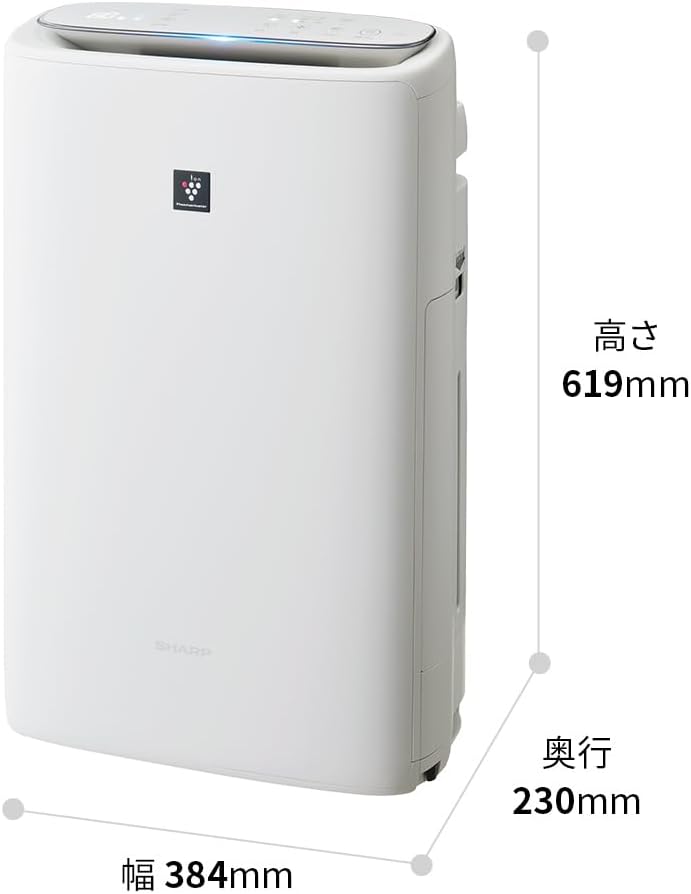
Image: Diagram illustrating the width (384mm), depth (230mm), and height (619mm) of the Sharp KI-TS50-W unit.
9. وارنٹی اور سپورٹ
For warranty information, please refer to the separate warranty card included with your product. For technical support, replacement parts, or further assistance, please contact Sharp customer service. Contact details can typically be found on the manufacturer's webسائٹ یا وارنٹی دستاویزات میں۔


