1. تعارف
The SHIDU Portable Voice Amplifier S617 is designed to project your voice clearly and effectively in various settings such as classrooms, meetings, tours, and outdoor events. This compact and lightweight device features a wired microphone, an 1800mAh rechargeable battery, and a 15W output for reliable performance.

Image 1.1: The SHIDU S617 ampلائفائر کے لیے ڈیزائن کیا گیا ہے۔ ampاپنی آواز کو دبائیں
2. پیکیج کے مشمولات
تمام اشیاء کی موجودگی کو یقینی بنانے کے لیے براہ کرم پیکیج چیک کریں:
- 1 x SHIDU Voice Amplifier (S617)
- 1 x Wired Headset Microphone
- 1 x Type-C چارجنگ کیبل
- 1 ایکس سایڈست پٹا
- 5 x Extra Microphone Sponges

Image 2.1: SHIDU S617 amplifier with dimensions and included accessories.
3. پروڈکٹ ختمview
Familiarize yourself with the components of your SHIDU S617 Voice Ampزندہ:
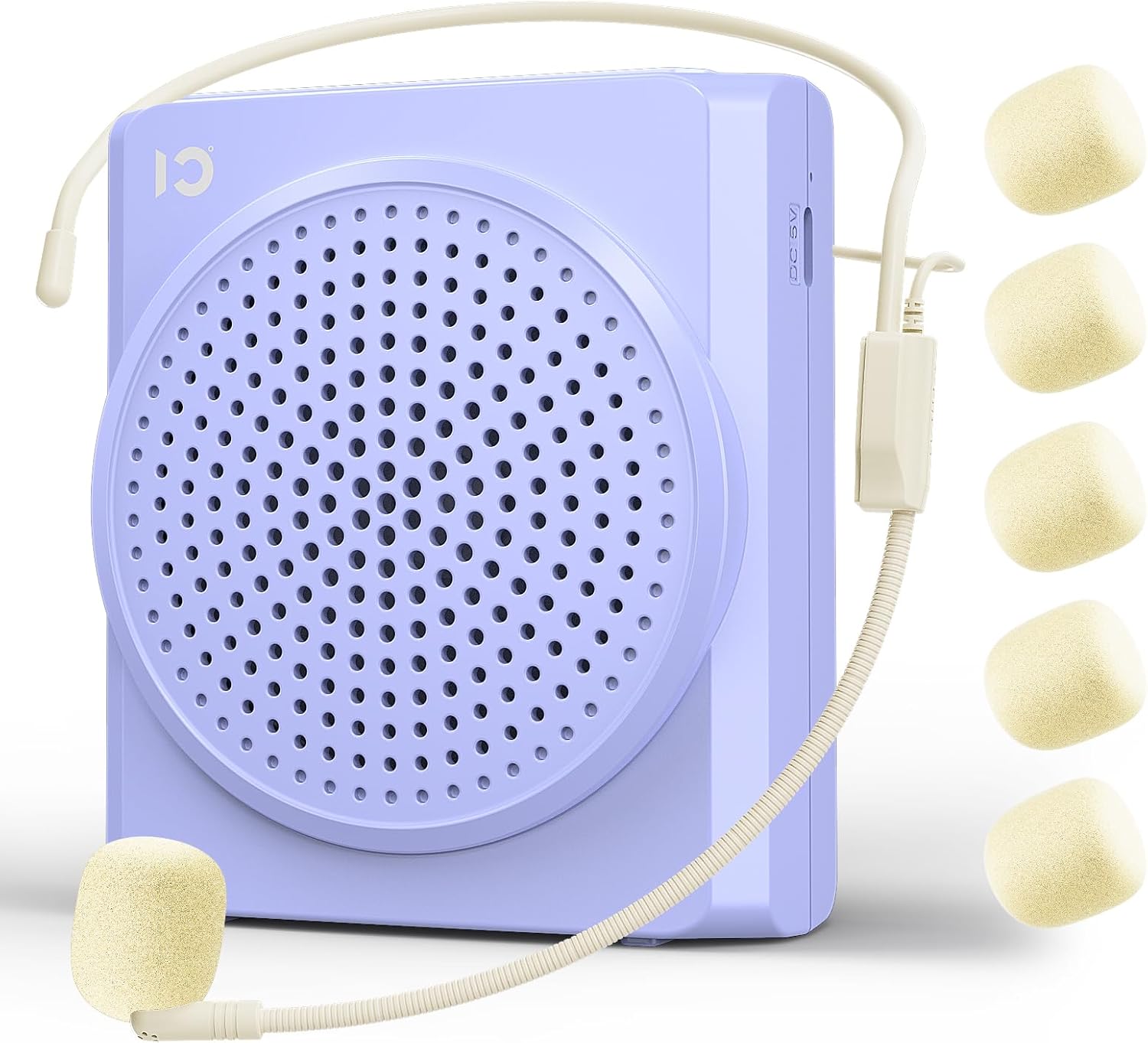
تصویر 3.1: سامنے view of the SHIDU S617 Portable Voice Amplifier with headset microphone.

Image 3.2: Control panel of the SHIDU S617 ampزندگی
- اسپیکر گرل: Main sound output.
- ON/OFF/Volume Knob: Rotary switch to power on/off and adjust volume.
- MIC ان پٹ پورٹ: Connects the wired headset microphone.
- AUX ان پٹ پورٹ: Connects external audio devices (e.g., phone, MP3 player).
- DC 5V چارجنگ پورٹ: اندرونی بیٹری چارج کرنے کے لیے۔
- بٹن خاموش کریں: مائیکروفون کو خاموش/آن خاموش کرنے کے لیے دبائیں۔
- بیلٹ کلپ: For attaching the amplifier to clothing or a belt.
4. سیٹ اپ
- چارج کریں۔ Ampزندہ: پہلے استعمال سے پہلے، مکمل طور پر چارج کریں amplifier using the provided Type-C charging cable and a DC 5V power adapter (not included). The charging indicator light will show charging status.
- مائیکروفون کو جوڑیں: Insert the 3.5mm plug of the wired headset microphone into the MIC input port on the ampزندگی
- ہیڈسیٹ پہنیں: Position the headset microphone comfortably on your head, ensuring the microphone is close to your mouth (within 1-2 inches) for optimal voice pickup.
- پوزیشن Ampزندہ: Use the integrated belt clip to attach the amplifier to your belt or pocket. Alternatively, use the adjustable strap to wear it around your waist or neck.
5. آپریٹنگ ہدایات
5.1 پاور آن/آف اور والیوم کنٹرول
- To power on, rotate the ON/OFF/Volume knob clockwise until you hear a click and the indicator light illuminates.
- Continue rotating clockwise to increase the volume.
- Rotate counter-clockwise to decrease the volume.
- To power off, rotate the knob counter-clockwise until you hear a click and the indicator light turns off.
5.2 مائیکروفون کا استعمال
Ensure the headset microphone is positioned correctly near your mouth for clear voice amplification. Avoid placing the microphone too close to the amplifier speaker to prevent feedback.

Image 5.1: Teacher demonstrating use of the SHIDU S617 amplifier in a classroom.
5.3 خاموش فنکشن
- Press the dedicated Mute button on the control panel to temporarily silence the microphone output.
- Press the Mute button again to unmute the microphone and resume ampبندھن
5.4 AUX Audio Input
دی amplifier can also function as a portable speaker for external audio sources:
- Connect an external audio device (e.g., smartphone, MP3 player) to the AUX input port using a 3.5mm audio cable (not included).
- دی amplifier will play audio from the connected device.

Image 5.2: SHIDU S617 amplifier showing AUX and MIC input ports.
5.5 بیٹری چارج کرنا
The SHIDU S617 features a built-in 1800mAh rechargeable lithium-ion battery.
- Connect the Type-C charging cable to the DC 5V port on the amplifier and to a USB power source.
- مکمل چارج کرنے میں عام طور پر 3-4 گھنٹے لگتے ہیں۔
- مکمل چارج ہونے کے بعد، amplifier provides approximately 8-12 hours of voice amplification or 6-10 hours of music playback.

Image 5.3: Battery specifications for the SHIDU S617 ampزندگی
6 دیکھ بھال
- صفائی: مسح کریں۔ amplifier and microphone with a soft, dry cloth. Do not use harsh chemicals or abrasive cleaners.
- ذخیرہ: آلے کو براہ راست سورج کی روشنی اور انتہائی درجہ حرارت سے دور ٹھنڈی، خشک جگہ پر اسٹور کریں۔
- مائیکروفون سپنج: Replace the microphone sponge covers periodically to maintain hygiene and sound quality.
- بیٹری کی دیکھ بھال: بیٹری کی زندگی کو طول دینے کے لیے، بیٹری کو کثرت سے مکمل طور پر ڈسچارج کرنے سے گریز کریں اور اسے باقاعدگی سے چارج کریں، چاہے طویل مدت تک استعمال میں نہ ہوں۔
7 خرابیوں کا سراغ لگانا
If you encounter issues with your SHIDU S617 Voice Amplifier, refer to the following common solutions:
- کوئی آواز آؤٹ پٹ نہیں:
- یقینی بنائیں ampلائفائر آن ہے۔
- Check that the volume knob is turned up.
- Verify the microphone is securely plugged into the MIC input port.
- یقینی بنائیں کہ مائیکروفون خاموش نہیں ہے۔
- Feedback (Squealing Sound):
- This typically occurs when the microphone is too close to the amplifier speaker. Increase the distance between the microphone and the ampزندگی
- حجم کی سطح کو کم کریں۔
- Adjust the angle of the microphone away from the speaker.
- کم والیوم:
- Ensure the microphone is positioned close to your mouth.
- Increase the volume using the ON/OFF/Volume knob.
- Check the battery level; low battery can affect output volume.
- بیٹری چارج نہیں ہو رہی:
- Verify the Type-C charging cable is properly connected to both the ampلائفائر اور طاقت کا منبع۔
- Ensure the power source (e.g., USB wall adapter) is functional.
- ایک مختلف چارجنگ کیبل یا پاور اڈاپٹر آزمائیں۔
8. وضاحتیں
| فیچر | تفصیلات |
|---|---|
| ماڈل نمبر | S617 |
| آؤٹ پٹ پاور | 15W |
| بیٹری کی صلاحیت | 1800mAh لی آئن |
| Working Time (Ampliification) | 8-12 گھنٹے |
| Working Time (Music Playback) | 6-10 گھنٹے |
| چارج کرنے کا وقت | 3-4 گھنٹے |
| طاقت کا منبع | بیٹری سے چلنے والا |
| کنیکٹر کی قسم | Aux, Microphone |
| مواد | Acrylonitrile Butadiene Styrene (ABS) |
| شے کا وزن | 0.41 پاؤنڈ (13.7 اونس) |
| پیکیج کے طول و عرض | 7.13 x 5.63 x 2.24 انچ |
9. وارنٹی اور سپورٹ
SHIDU products are designed for reliability and effectiveness. If you have any questions or encounter issues with your SHIDU Portable Voice Amplifier S617, please contact SHIDU customer service for prompt assistance. Refer to your purchase documentation for specific warranty details.


