1. تعارف
This manual provides detailed instructions for the setup, operation, maintenance, and troubleshooting of your Keychron Q6 HE QMK Wireless Custom Mechanical Keyboard. Please read this guide thoroughly to ensure optimal performance and longevity of your device.
The Keychron Q6 HE is a full-size layout wireless QMK custom keyboard featuring Hall Effect Gateron 2.0 magnetic switches, offering advanced customization and a premium typing experience.
2. پیکیج کے مشمولات
تصدیق کریں کہ تمام اشیاء آپ کے پیکیج میں موجود ہیں:
- Keychron Q6 HE Keyboard
- Keyboard PCB
- کیس
- ایلومینیم پلیٹ
- Keycaps (Mac & Windows compatible)
- USB-C سے USB-C کیبل
- USB-A سے USB-C اڈاپٹر
- سوئچ پلر
- کیکپ پلر
- صارف دستی

Image: Keychron Q6 HE keyboard with included accessories, showcasing the full package contents.
3. سیٹ اپ
3.1 ابتدائی کنکشن
The Keychron Q6 HE supports three connection modes: 2.4 GHz Wireless, Bluetooth 5.1, and Wired (USB-C).
3.1.1 وائرڈ کنکشن
- فراہم کردہ USB-C کیبل کو کی بورڈ کے USB-C پورٹ سے مربوط کریں۔
- Connect the other end of the cable to your computer's USB port.
- Ensure the mode switch on the back of the keyboard is set to 'Cable' mode.
- کی بورڈ آپ کے آپریٹنگ سسٹم کے ذریعہ خود بخود پہچان لیا جائے گا۔
3.1.2 2.4 GHz وائرلیس کنکشن
- Locate the 2.4 GHz receiver (dongle) included with your keyboard.
- 2.4 گیگا ہرٹز ریسیور کو اپنے کمپیوٹر پر دستیاب USB پورٹ میں لگائیں۔
- Set the mode switch on the back of the keyboard to '2.4G' mode.
- The keyboard should automatically connect to the receiver. If not, press and hold the 'Fn' + '4' keys for 4 seconds to initiate pairing.
3.1.3 بلوٹوتھ کنکشن
- Set the mode switch on the back of the keyboard to 'Bluetooth' mode.
- To enter pairing mode, press and hold 'Fn' + '1' (for device 1), 'Fn' + '2' (for device 2), or 'Fn' + '3' (for device 3) for 4 seconds until the indicator light flashes rapidly.
- On your computer, smartphone, or tablet, enable Bluetooth and search for 'Keychron Q6 HE'.
- جوڑا بنانے کے لیے کی بورڈ کو منتخب کریں۔ ایک بار منسلک ہونے پر اشارے کی روشنی چمکنا بند کر دے گی۔
- آپ 'Fn' + '1'، 'Fn' + '2'، یا 'Fn' + '3' کو مختصر طور پر دبا کر جوڑی والے بلوٹوتھ آلات کے درمیان سوئچ کر سکتے ہیں۔
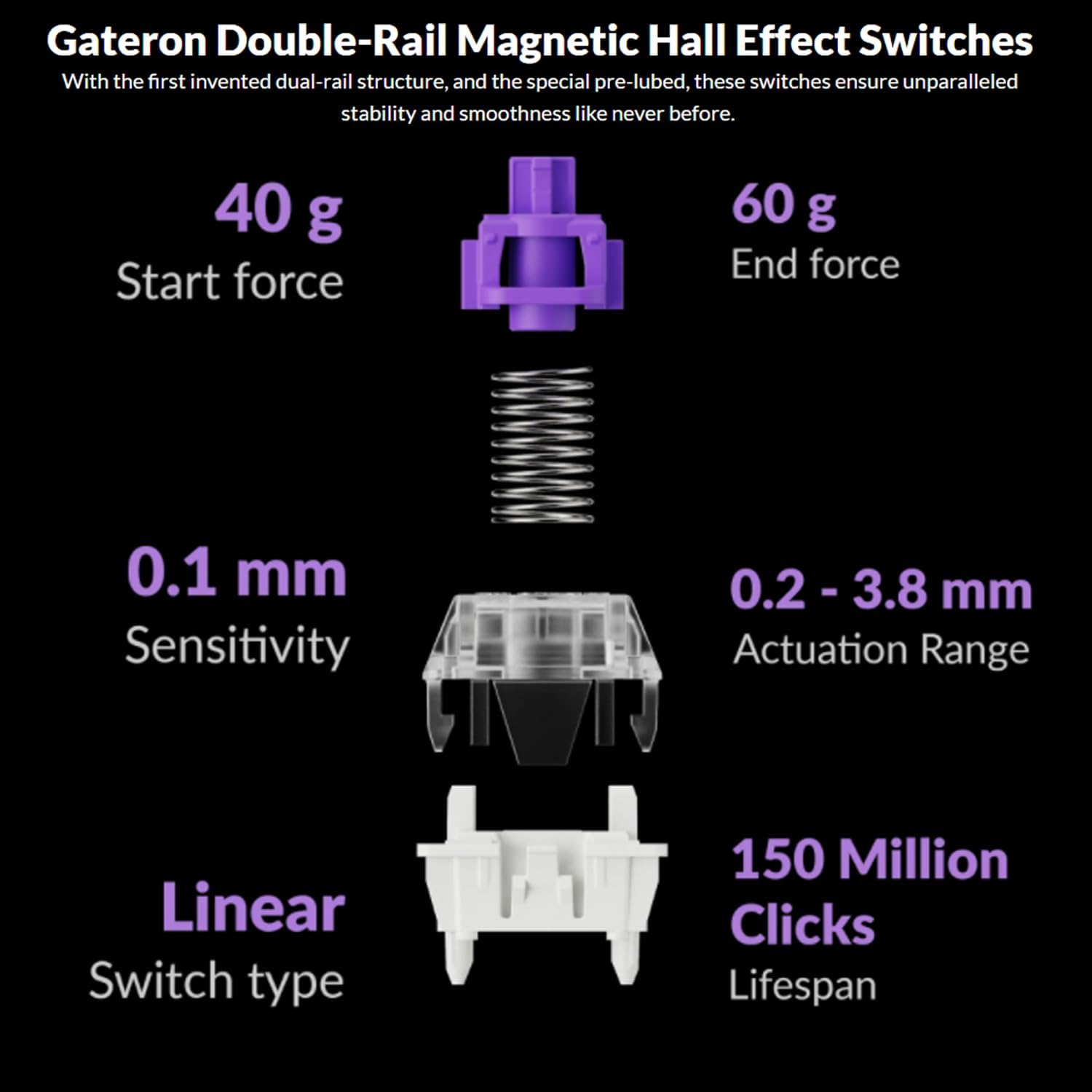
Image: The Keychron Q6 HE keyboard connected to a computer and a tablet, demonstrating its multi-device connectivity.
3.2 آپریٹنگ سسٹم سوئچ
The keyboard has a switch to toggle between Mac and Windows layouts. Ensure this switch, located on the back of the keyboard, is set to your current operating system for correct key mapping.
3.3 بیٹری چارج کرنا
The keyboard is equipped with a 4000 mAh Lithium Ion battery. Connect the USB-C cable to the keyboard and a power source (computer USB port or USB wall adapter) to charge. The charging indicator light will show the charging status.
4. آپریٹنگ ہدایات
4.1 بنیادی کلیدی افعال
The Q6 HE features a standard 100% layout. All keys function as labeled. Use the 'Fn' key in combination with other keys for secondary functions (e.g., media controls, backlight adjustments).
4.2 Programmable Knob
The rotary knob on the top right of the keyboard is programmable. By default, it controls volume (rotate) and media play/pause (press). Its functions can be customized using the Keychron Launcher web ایپ
4.3 Gateron Magnetic Hall Effect Switches
The Q6 HE utilizes Gateron Double-Rail Magnetic Hall Effect Switches, which allow for dynamic customization of key behavior.

Image: Diagram illustrating the adjustable actuation points of the magnetic switches, ranging from 0.5mm to 3.5mm.
4.3.1 Adjustable Actuation Points
The actuation point (the distance a key needs to travel to register a press) can be adjusted from 0.1 mm to 3.8 mm using the Keychron Launcher web app. This allows for personalized typing and gaming sensitivity.
4.3.2 Rapid Trigger
Rapid Trigger functionality allows a key to reactivate instantly upon reset, without needing to return to its original position. This feature is highly beneficial for competitive gaming and can be configured via the Keychron Launcher.

Image: Detailed breakdown of Gateron Double-Rail Magnetic Hall Effect Switches, showing components and specifications like start force, end force, sensitivity, actuation range, switch type, and lifespan.
4.4 آر جی بی بیک لائٹنگ
The keyboard features south-facing RGB LED lights. You can cycle through various lighting effects and adjust brightness using 'Fn' key combinations or through the Keychron Launcher web ایپ
4.5 Keychron Launcher Web ایپ
Keychron لانچر ہے a web-based application for advanced customization. It allows you to:
- چابیاں دوبارہ بنائیں
- Adjust actuation points for magnetic switches
- Create personalized macro commands
- Set shortcuts and key combinations
- آرجیبی روشنی کے اثرات کو حسب ضرورت بنائیں

تصویر: کیکرون لانچر کا اسکرین شاٹ web app interface, showing options for key remapping, actuation point adjustment, and macro creation.
5 دیکھ بھال
5.1 کی بورڈ کی صفائی
اپنے کی بورڈ کو صاف کرنے کے لیے:
- Disconnect the keyboard from all power sources and devices.
- تھوڑا سا نرم، لنٹ سے پاک کپڑا استعمال کریں۔ampکی کیپس اور کیس کو صاف کرنے کے لیے پانی یا ہلکے صفائی کے محلول سے بند کریں۔
- گہری صفائی کے لیے، کی کیپس کو ہٹانے کے لیے فراہم کردہ کی کیپ پلر کا استعمال کریں اور کمپریسڈ ہوا یا چھوٹے برش سے نیچے صاف کریں۔
- کی بورڈ پر براہ راست مائع چھڑکنے سے گریز کریں۔
5.2 گرم تبدیل کرنے کے قابل سوئچز
The Q6 HE features hot-swappable magnetic switches, allowing you to replace individual switches without soldering.

تصویر: کلوز اپ view of the Keychron Q6 HE keyboard with several keycaps and switches removed, highlighting the hot-swappable magnetic switch design.
5.2.1 سوئچز کو تبدیل کرنا
- Use the switch puller to carefully remove the desired switch. Grip the switch firmly and pull straight up.
- پی سی بی کے سوراخوں کے ساتھ نئے سوئچ کے پنوں کو سیدھ میں رکھیں۔
- Gently press the new switch into place until it clicks. Ensure it is seated correctly and not bent.
5.3 بیٹری کی دیکھ بھال
بیٹری کی زندگی کو طول دینے کے لیے:
- بیٹری کو بار بار مکمل طور پر خارج کرنے سے گریز کریں۔
- کی بورڈ کو ٹھنڈی، خشک جگہ پر ذخیرہ کریں جب طویل مدت تک استعمال نہ ہو۔
- کی بورڈ کو انتہائی درجہ حرارت کے سامنے نہ رکھیں۔
6 خرابیوں کا سراغ لگانا
6.1 کی بورڈ جواب نہیں دے رہا ہے۔
- وائرڈ موڈ: یقینی بنائیں کہ USB-C کیبل کی بورڈ اور کمپیوٹر دونوں سے محفوظ طریقے سے جڑی ہوئی ہے۔ ایک مختلف USB پورٹ یا کیبل آزمائیں۔
- 2.4 GHz وضع: Verify the 2.4 GHz receiver is plugged in and the keyboard is set to '2.4G' mode. Re-pair by holding 'Fn' + '4' for 4 seconds.
- بلوٹوت وضع: Check if Bluetooth is enabled on your device and the keyboard is paired. Re-pair if necessary by holding 'Fn' + '1/2/3' for 4 seconds.
- بیٹری: Ensure the keyboard battery is charged. Connect it to a power source.
6.2 کلیدیں رجسٹر نہیں ہو رہی ہیں یا ڈبل ٹائپنگ نہیں کر رہی ہیں۔
- ایکٹیویشن پوائنٹ: Adjust the actuation point for the affected keys using the Keychron Launcher. A higher actuation point (e.g., 2.0mm or 3.0mm) can help prevent accidental presses or double typing.
- Switch Issue: If a specific key consistently malfunctions, the magnetic switch might be faulty. Consider replacing the hot-swappable switch.
- فرم ویئر: Ensure your keyboard firmware is up to date via the Keychron Launcher.
6.3 RGB بیک لائٹ کے مسائل
- چمک: Adjust backlight brightness using 'Fn' key combinations.
- اثرات: Cycle through different RGB effects using 'Fn' key combinations.
- سافٹ ویئر: Use the Keychron Launcher to customize and troubleshoot RGB settings.
7. وضاحتیں
| ماڈل نمبر | Q6H-P1 |
| برانڈ | کیکرون |
| کنیکٹوٹی ٹیکنالوجی | 2.4 GHz وائرلیس، بلوٹوتھ 5.1، USB-C وائرڈ |
| کی بورڈ کی تفصیل | Full-size, Ergonomic |
| خصوصی خصوصیات | Hall Effect Magnetic Switches, Programmable Knob, Large Battery Capacity, Hot-Swappable |
| ہم آہنگ آلات | PC, Mac, Smartphone, Tablet, Gaming Console |
| کی بورڈ بیک لائٹنگ | آر جی بی (جنوب کی طرف) |
| مواد | 6063 Aluminum (Case) |
| بیٹری | 4000 mAh لتیم آئن (شامل) |
| شے کا وزن | 6.49 پاؤنڈ (تقریباً 2.94 کلوگرام) |
| پیکیج کے طول و عرض | 19 x 8.5 x 3 انچ |

Image: An exploded diagram showing the internal layers and components of the Keychron Q6 HE keyboard, including keycaps, knob, magnetic switches, top case, sound absorbing foam, gaskets, plate, PCB, latex bottom pad, bottom case PET film, bottom case acoustic foam, battery, and silicone gaskets.
8. وارنٹی کی معلومات
Keychron products typically come with a limited manufacturer's warranty. For specific warranty terms, conditions, and duration, please refer to the official Keychron webسائٹ یا وارنٹی کارڈ آپ کے پروڈکٹ کے ساتھ شامل ہے۔ وارنٹی کے دعووں کے لیے اپنی خریداری کا ثبوت رکھیں۔
9. سپورٹ
For further assistance, technical support, or to download the latest firmware and software, please visit the official Keychron webسائٹ:
You can also visit the Keychron store on Amazon for product information and customer service:


