1. تعارف
خریداری کے لیے آپ کا شکریہasing the ELECOM LBT-ECOWS01MBK Open-Ear Bluetooth 5.4 Wireless Headphones. These headphones are designed to allow you to enjoy audio content while remaining aware of your surroundings. This manual provides essential information for the safe and effective use of your new device.

Image: The ELECOM LBT-ECOWS01MBK open-ear wireless headphones and their transparent charging case.
2. پیکیج کے مشمولات
- ELECOM LBT-ECOWS01MBK Open-Ear Wireless Headphones (Left and Right)
- چارجنگ کیس
- USB Charging Cable (USB-A to USB Type-C™)
- کوئیک اسٹارٹ گائیڈ
3. مصنوعات کی خصوصیات
- کھلے کان کا ڈیزائن: Listen to music or videos while simultaneously hearing ambient sounds, ensuring awareness of your surroundings.
- ہلکا پھلکا آرام: Each earbud weighs approximately 9.8g, providing a comfortable fit for extended wear without pressure or stuffiness.
- اعلی معیار کی آڈیو: Equipped with a large 16mm diameter driver for clear sound and supports AAC codec for high-quality audio on compatible devices like iPhones.
- آواز موڈ: Optimizes audio frequencies to make human voices clearer, ideal for radio, audiobooks, and conversations.
- کم لیٹنسی موڈ: Reduces audio-visual delay, enhancing the experience for videos and games.
- توسیعی پلے بیک: Up to 10 hours of continuous playback on a single charge, and up to 25 hours with the charging case.
- ٹچ سینسر کنٹرولز: Conveniently manage music playback, volume, and calls directly from the earbuds.
- وائس اسسٹنٹ سپورٹ: Compatible with Siri and Google Assistant for hands-free control.
- سنگل ایئربڈ کا استعمال: یا تو ایئربڈ کو آزادانہ طور پر استعمال کیا جا سکتا ہے۔
- USB Type-C™ Charging: The charging case features a USB Type-C™ port for convenient charging.

Image: A man wearing the open-ear headphones, demonstrating the ability to hear ambient sounds while enjoying media.
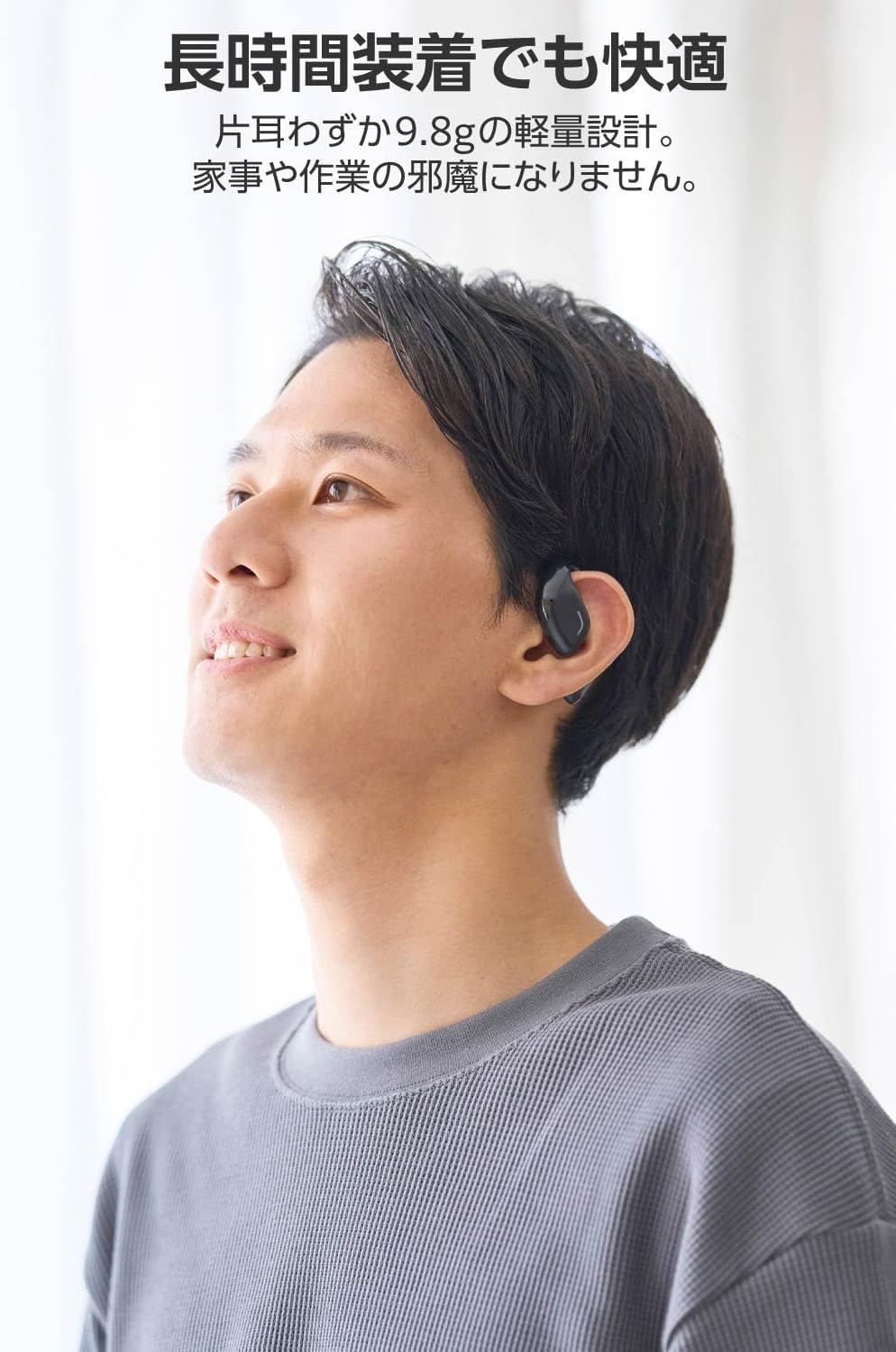
Image: A man wearing the lightweight open-ear headphones, highlighting their comfortable design for long-term use.
4. سیٹ اپ
4.1. ہیڈ فون اور کیس چارج کرنا
پہلے استعمال سے پہلے، ہیڈ فون اور چارجنگ کیس کو پوری طرح سے چارج کریں۔
- دونوں ایئربڈز کو چارجنگ کیس میں رکھیں۔
- Connect the supplied USB Type-C™ cable to the charging port on the case and a USB power adapter (not included).
- چارجنگ کیس پر ایل ای ڈی انڈیکیٹر چارجنگ سٹیٹس دکھائے گا۔
چارج کرنے کا وقت:
- Headphones: Approximately 1.5 hours
- چارجنگ کیس: تقریباً 1.5 گھنٹے

Image: Illustration of the charging process for the headphones and case, showing the USB-C port and LED indicators.
4.2. بلوٹوتھ ڈیوائس کے ساتھ جوڑا بنانا
- یقینی بنائیں کہ ہیڈ فون چارج ہیں۔
- Open the charging case. The headphones will automatically enter pairing mode. The LED indicator on the earbuds will flash.
- On your device (smartphone, PC, tablet), enable Bluetooth and search for available devices.
- Select "LBT-ECOWS01MBK" from the list of found devices.
- ایک بار منسلک ہونے کے بعد، ایئربڈز پر LED اشارے چمکنا بند کر دے گا۔
- After initial pairing, the headphones will automatically connect to the last paired device when removed from the case.
4.3. ہیڈ فون پہننا
The headphones are designed to hook over your ears.
- بائیں (L) اور دائیں (R) ایئربڈز کی شناخت کریں۔
- With the LED facing outwards, hook the earbud over the top of your ear.
- Adjust the earbud for a comfortable and secure fit.

Image: Step-by-step guide on correctly wearing the open-ear headphones.
5. آپریٹنگ ہدایات
5.1. Touch Sensor Controls
The headphones feature touch sensors on each earbud for various functions.
| فنکشن | ایکشن | ایئربڈ |
|---|---|---|
| چلائیں/روکیں۔ | ایک نل | L یا R |
| اگلا ٹریک | دو بار تھپتھپائیں۔ | R |
| پچھلا ٹریک | دو بار تھپتھپائیں۔ | L |
| والیوم اپ | دیر تک دبائیں (تقریباً 2 سیکنڈ) | R |
| والیوم کم | دیر تک دبائیں (تقریباً 2 سیکنڈ) | L |
| جواب / کال ختم کریں۔ | ایک نل | L یا R |
| کال کو مسترد کریں۔ | دیر تک دبائیں | L یا R |
| وائس اسسٹنٹ کو فعال کریں۔ | ٹرپل نل | L یا R |

Image: Visual representation of the touch sensor areas and corresponding music and volume controls.
5.2. Switching Audio Modes
The headphones offer three distinct audio modes:
- نارمل موڈ: Standard audio playback.
- کم لیٹنسی موڈ: Reduces audio-visual delay, suitable for watching videos or playing games.
- آواز موڈ: Enhances human voice frequencies for clearer dialogue, ideal for audiobooks, podcasts, or calls.
To switch between modes, refer to the quick start guide or the official product page for specific touch gestures, as these can sometimes be customized.

تصویر: ایک اوورview of the three available audio modes and their recommended uses.
5.3 سنگل ایئربڈ کا استعمال
You can use either the left or right earbud independently. When using only one earbud, ensure the other earbud is powered off or stored in the charging case.
6 دیکھ بھال
اپنے ہیڈ فون کی لمبی عمر اور بہترین کارکردگی کو یقینی بنانے کے لیے:
- ائیر بڈز اور چارجنگ کیس کو نرم، خشک کپڑے سے باقاعدگی سے صاف کریں۔
- کھرچنے والے کلینر یا سالوینٹس کا استعمال نہ کریں۔
- ہیڈ فون کو انتہائی درجہ حرارت، نمی، یا براہ راست سورج کی روشنی کے سامنے لانے سے گریز کریں۔
- چارجنگ کانٹیکٹس کو ایئربڈز پر اور کیس کے اندر صاف اور ملبے سے پاک رکھیں۔
- ہیڈ فونز کو ان کے چارجنگ کیس میں محفوظ کریں جب ان کی حفاظت اور چارج رکھنے کے لیے استعمال میں نہ ہوں۔
7 خرابیوں کا سراغ لگانا
اگر آپ کو اپنے ہیڈ فون کے ساتھ مسائل کا سامنا ہے، تو درج ذیل عام حل سے رجوع کریں:
- کوئی آواز نہیں:
- یقینی بنائیں کہ ہیڈ فون چارج ہیں۔
- چیک کریں کہ ہیڈ فون آپ کے آلے سے مناسب طریقے سے جوڑا اور جڑے ہوئے ہیں۔
- ہیڈ فونز اور اپنے منسلک ڈیوائس دونوں پر والیوم کو ایڈجسٹ کریں۔
- جوڑا نہیں بن سکتا:
- Ensure the headphones are in pairing mode (LED flashing).
- Turn off Bluetooth on other nearby devices that may have previously connected.
- اپنا آلہ دوبارہ شروع کریں اور دوبارہ جوڑا بنانے کی کوشش کریں۔
- وقفے وقفے سے رابطہ:
- یقینی بنائیں کہ ہیڈ فون اور آپ کے آلے کے درمیان کوئی رکاوٹ نہیں ہے۔
- Move closer to your device (maximum communication distance is approximately 10m).
- مضبوط برقی مقناطیسی مداخلت والے ماحول سے پرہیز کریں۔
- ٹچ کنٹرولز جواب نہیں دے رہے ہیں:
- یقینی بنائیں کہ آپ کی انگلیاں صاف اور خشک ہیں۔
- Try restarting the headphones by placing them in the case and then taking them out again.
- Low Battery Voice Prompt: If you hear a repeated "Low Battery, please charge" prompt, place the earbuds in the charging case immediately.
If the issue persists, please refer to the official ELECOM support webمزید مدد کے لیے سائٹ۔
8. وضاحتیں
| فیچر | تفصیلات |
|---|---|
| ماڈل کا نام | LBT-ECOWS01MBK |
| کنیکٹوٹی ٹیکنالوجی | Wireless (Bluetooth® Version 5.4) |
| بلوٹوتھ پرو۔files | A2DP، AVRCP، HFP |
| تعاون یافتہ کوڈیکس | اے اے سی، ایس بی سی |
| Max Communication Distance | Approx. 10m (without obstacles) |
| Frequency Response (A2DP) | 20-20,000Hz |
| مسلسل پلے بیک وقت | Approx. 10 hours (Approx. 25 hours with charging case) |
| چارجنگ ٹائم (ہیڈ فون) | تقریبا 1.5 گھنٹے |
| چارج کرنے کا وقت (کیس) | تقریبا 1.5 گھنٹے |
| مائکروفون کی قسم | MEMS کی قسم |
| ڈرائیور یونٹ | φ16mm Full Range |
| وزن (فی ایئربڈ) | تقریبا 9.8 گرام |
| وزن (چارج کیس) | تقریبا 59.0 گرام |
| رنگ | میٹ بلیک |
| پانی کی مزاحمت | غیر واٹر پروف |
| آپریٹنگ درجہ حرارت | 5 ℃ سے 35 ℃ |
| آپریٹنگ نمی | 20% سے 80% (غیر گاڑھا) |
9. وارنٹی اور سپورٹ
9.1. وارنٹی کی معلومات
یہ پروڈکٹ ایک کے ساتھ آتا ہے۔ 1 سال کی وارنٹی from the date of purchase. Please retain your proof of purchase for warranty claims. The warranty covers manufacturing defects but does not cover damage caused by misuse, accidents, unauthorized modifications, or normal wear and tear.
9.2. کسٹمر سپورٹ
For further assistance, technical support, or detailed product information, please visit the official ELECOM webسائٹ:
You may also find additional FAQs and troubleshooting tips on the product support pages.


