1. پروڈکٹ ختمview
The Grandstream WP816 is a compact, portable Wi-Fi phone designed for clear communication. It features dual-band Wi-Fi 6 for reliable connectivity, supports two SIP accounts and two lines, and delivers HD voice quality with dual microphones, Acoustic Echo Cancellation (AEC), and Noise Shield Technology. The phone includes integrated Bluetooth for headset connectivity, a long-lasting 1500mAh rechargeable battery providing 6 hours of talk time and 120 hours of standby time, and a configurable push-to-talk button. It is equipped with a Type C USB port for fast charging and a 3.5mm headset jack. Additional features include an accelerometer and an emergency button.
اہم خصوصیات:
- Dual-band Wi-Fi 6 with efficient antenna design and advanced roaming support.
- Supports 2 SIP accounts and 2 lines.
- HD voice with dual MIC design, AEC, and Noise Shield Technology.
- Integrated Bluetooth for headset connection.
- Rechargeable 1500mAh battery: 6 hours talk time, 120 hours standby.
- Configurable button for push-to-talk functionality.
- Type C USB port (supports fast charging) and 3.5mm headset jack.
- Built-in accelerometer and emergency button.
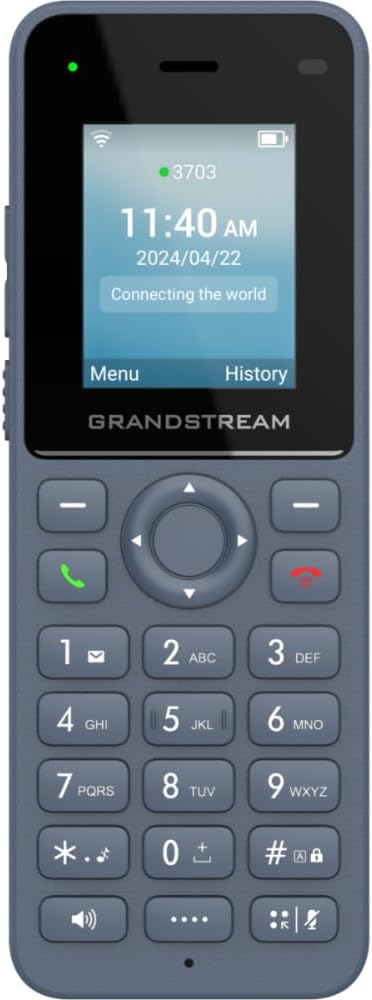
شکل 1: سامنے view of the Grandstream WP816 Wi-Fi Phone, displaying its screen, keypad, and branding.
2. سیٹ اپ
2.1 باکس میں کیا ہے:
- Grandstream WP816 Wi-Fi Phone
- (Additional accessories such as power adapter, charging cradle, and battery are typically included but not explicitly detailed in the provided 'whats_in_the_box' field, which only states "Phone". Assuming standard phone accessories.)
2.2. فون چارج کرنا:
- Connect the power adapter to the charging cradle and a power outlet.
- Place the WP816 phone into the charging cradle. Ensure the phone is seated correctly and the charging indicator illuminates.
- Allow the phone to charge fully before initial use. This typically takes several hours. The Type C USB port also supports fast charging.
2.3. ابتدائی سیٹ اپ:
- پاور آن: پاور/اینڈ کال بٹن کو دبائے رکھیں جب تک کہ اسکرین روشن نہ ہو۔
- وائی فائی کنکشن: Navigate to the "Settings" menu, then "Wi-Fi". Select your desired Wi-Fi network and enter the password if prompted. The phone supports dual-band Wi-Fi 6.
- SIP Account Configuration: Access the "Settings" menu to configure your SIP accounts. The phone supports 2 SIP accounts. Refer to your VoIP service provider for specific SIP settings (SIP server, User ID, Password).
- تاریخ اور وقت: Ensure the date and time are correctly set, either manually or via network synchronization.
3. آپریٹنگ ہدایات
3.1. کال کرنا:
- ڈائلنگ: کی پیڈ کا استعمال کرتے ہوئے فون نمبر درج کریں۔
- کال شروع کریں: Press the Green Call button to place the call.
- کال ختم کریں: Press the Red End Call button to terminate the conversation.
3.2. Receiving Calls:
- When the phone rings, press the Green Call button to answer.
- To reject an incoming call, press the Red End Call button.
3.3. Speakerphone Function:
- During a call, press the Speaker button (often indicated by a speaker icon) to activate the speakerphone.
- Press the Speaker button again to switch back to the earpiece.
3.4. Push-to-Talk (PTT):
- The WP816 features a configurable button for Push-to-Talk functionality.
- Consult your system administrator or service provider for configuration details and usage of the PTT feature.
3.5. Bluetooth Headset Connectivity:
- Ensure your Bluetooth headset is in pairing mode.
- On the WP816, navigate to "Settings" > "Bluetooth".
- Turn Bluetooth on and scan for available devices.
- Select your headset from the list and follow any on-screen prompts to complete pairing.
4 دیکھ بھال
4.1. بیٹری کی دیکھ بھال:
- بیٹری کی زندگی کو زیادہ سے زیادہ کرنے کے لیے، انتہائی درجہ حرارت سے بچیں۔
- Charge the phone regularly. Do not let the battery completely drain for extended periods.
- If the phone will not be used for a long time, charge it to about 50% and store it in a cool, dry place.
4.2. صفائی:
- Use a soft, dry cloth to clean the phone's exterior.
- سخت کیمیکلز، صفائی سالوینٹس یا مضبوط صابن کے استعمال سے پرہیز کریں۔
5 خرابیوں کا سراغ لگانا
5.1 کوئی طاقت نہیں:
- یقینی بنائیں کہ بیٹری درست طریقے سے داخل اور چارج کی گئی ہے۔
- Verify the charging cradle is properly connected to a power source.
5.2. Cannot Connect to Wi-Fi:
- Check if the Wi-Fi network is active and within range.
- Confirm the Wi-Fi password is entered correctly.
- Restart the phone and the Wi-Fi router.
5.3. Poor Call Quality:
- Ensure you are within good Wi-Fi signal range.
- اپنے انٹرنیٹ کنکشن کی رفتار اور استحکام کو چیک کریں۔
- Verify SIP account settings with your service provider.
5.4. Phone Not Responding:
- بیٹری کو ہٹا کر اور دوبارہ ڈال کر نرم ری سیٹ کریں۔
- If the issue persists, a factory reset might be necessary (refer to advanced settings, note this will erase all data).
6. وضاحتیں
| فیچر | تفصیل |
|---|---|
| ماڈل | ڈبلیو پی 816 |
| برانڈ | گرینڈ اسٹریم |
| مصنوعات کے طول و عرض | 7 x 5 x 4 انچ |
| شے کا وزن | 13.8 اونس (390 گرام) |
| بیٹریاں | 1 غیر معیاری بیٹری درکار ہے۔ |
| کنیکٹوٹی | Dual-band Wi-Fi 6, Integrated Bluetooth |
| ایس آئی پی اکاؤنٹس | 2 SIP اکاؤنٹس، 2 لائنیں۔ |
| آواز کی خصوصیات | HD voice, Dual MIC design with AEC and Noise Shield Technology |
| بیٹری کی صلاحیت | 1500mAh |
| ٹاک ٹائم | 6 گھنٹے |
| اسٹینڈ بائی ٹائم | 120 گھنٹے |
| بندرگاہیں | Type C USB (fast charging support), 3.5mm headset jack |
| اضافی خصوصیات | Accelerometer, Emergency button, Configurable Push-to-Talk button |
| رنگ | گرے |
| مواد | پلاسٹک |
| ٹیلی فون کی قسم | بے تار |
| ڈائلر کی قسم | ٹون ڈائلنگ |
| ملٹی لائن آپریشن | ملٹی لائن آپریشن |
7. وارنٹی اور سپورٹ
وارنٹی کی معلومات اور تکنیکی مدد کے لیے، براہ کرم اپنی خریداری کے ساتھ فراہم کردہ دستاویزات دیکھیں یا آفیشل گرینڈ اسٹریم دیکھیں webسائٹ وارنٹی کے دعووں کے لیے اپنی خریداری کا ثبوت رکھیں۔


