1. تعارف
This manual provides comprehensive instructions for the installation, operation, maintenance, and troubleshooting of your NIVIAN Professional WiFi SuperHD Surveillance Camera Kit. This system is designed to provide reliable and efficient security monitoring for your home or business.
Please read this manual carefully before using the product to ensure proper setup and optimal performance. Keep this manual for future reference.
2. پروڈکٹ ختمview
The NIVIAN CCTV Kit is a professional 2K SuperHD WiFi surveillance system featuring 6 IP cameras and a 10-channel Network Video Recorder (NVR) with a pre-installed 1TB hard drive. Key features include:
- 2K SuperHD Image Resolution: واضح اور تفصیلی ویڈیو foo فراہم کرتا ہے۔tage (3MP).
- AI انسانی کھوج: Intelligent motion detection to reduce false alarms.
- دو طرفہ آڈیو: ریئل ٹائم مواصلت کے لیے بلٹ ان مائکروفون اور اسپیکر۔
- Dual Night Vision: Infrared mode for discreet monitoring and white LED mode for full-color night vision activated by motion.
- WiFi-6 Long Range Connectivity: Stable wireless connection up to 250 meters with repeater function.
- IP66 ویدر پروف کیمرے: پائیدار دھات casing suitable for outdoor use.
- پیشہ ورانہ ریکارڈنگ: Continuous or event-based recording to the included 1TB hard drive.
- HDMI آؤٹ پٹ: لائیو کے لیے مانیٹر یا ٹی وی سے جڑیں۔ viewing
- EseeCloud App: Remote access and control from mobile devices.
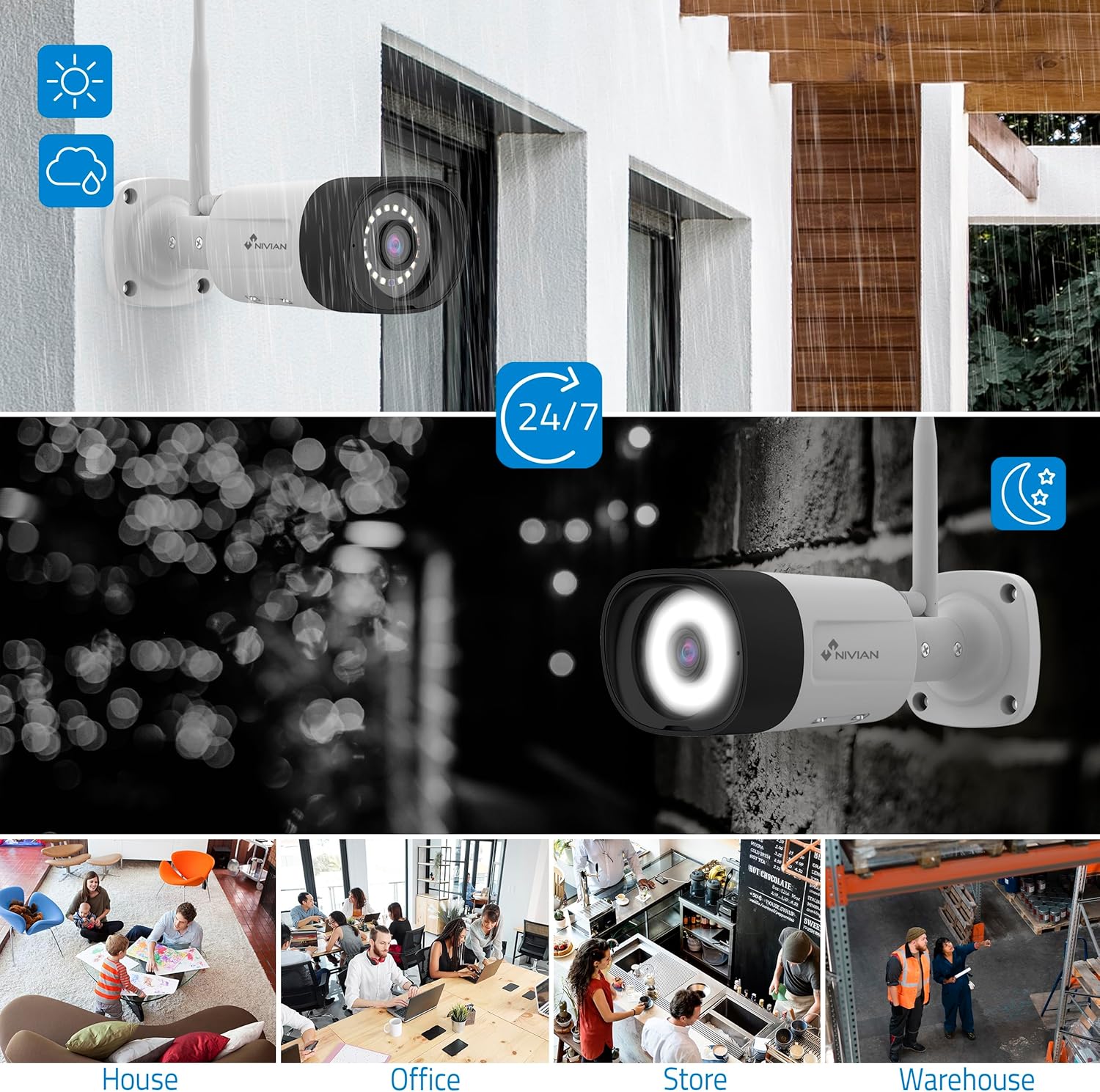
Image: NIVIAN CCTV Camera with day and night vision capabilities, showing weatherproof design and application in various environments like house, office, store, and warehouse.

Image: Comparison of 1080p Full HD video quality versus 2K Super HD video quality, demonstrating enhanced detail with 2K resolution.
3. پیکیج کے مشمولات
تصدیق کریں کہ تمام اشیاء آپ کے پیکیج میں موجود ہیں:
- 1x 10-Channel NVR (Network Video Recorder) with 1TB Hard Drive
- 6x NIVIAN 2K SuperHD WiFi IP Cameras
- NVR اور کیمروں کے لیے پاور اڈاپٹر
- USB ماؤس
- ایتھرنیٹ کیبل
- بڑھتے ہوئے پیچ اور پلگ
- کوئیک اسٹارٹ گائیڈ (تفصیلی ہدایات کے لیے اس دستی سے رجوع کریں)
4. سیٹ اپ
4.1. NVR Installation
- NVR کو مربوط کریں:
- فراہم کردہ پاور اڈاپٹر کا استعمال کرتے ہوئے NVR کو پاور آؤٹ لیٹ سے جوڑیں۔
- Connect the NVR to a monitor or TV via the HDMI port for local viewing
- USB ماؤس کو NVR کے USB پورٹ سے جوڑیں۔
- For internet access, connect the NVR to your router using the Ethernet cable.
- پاور آن: Turn on the NVR. Follow the on-screen prompts for initial setup, including language selection and network configuration.
4.2. کیمرہ تنصیب
- چڑھنے کا مقام: Choose suitable locations for your cameras, ensuring they have a clear field of view and are within range of the NVR's WiFi signal. The IP66 rating allows for outdoor installation.
- کیمروں کو طاقت دیں: ہر کیمرے کو اس کے مخصوص پاور اڈاپٹر کا استعمال کرتے ہوئے پاور آؤٹ لیٹ سے جوڑیں۔
- جوڑا بنانا (خودکار): The cameras are pre-paired with the NVR. Once powered on, they should automatically connect to the NVR's WiFi network. You will see the camera feeds appear on the connected monitor.
- Signal Repetition Function: If a camera is too far from the NVR, you can use another camera as a repeater to extend the WiFi range up to 250m. Refer to the NVR's on-screen menu for configuring this feature.

Image: Diagram illustrating various connection options for the NIVIAN CCTV system, including direct WiFi-6 connection to NVR, HDMI output to a monitor, and NVR connection to a router via LAN for remote access via Eseecloud app. Also shows signal repetition function.
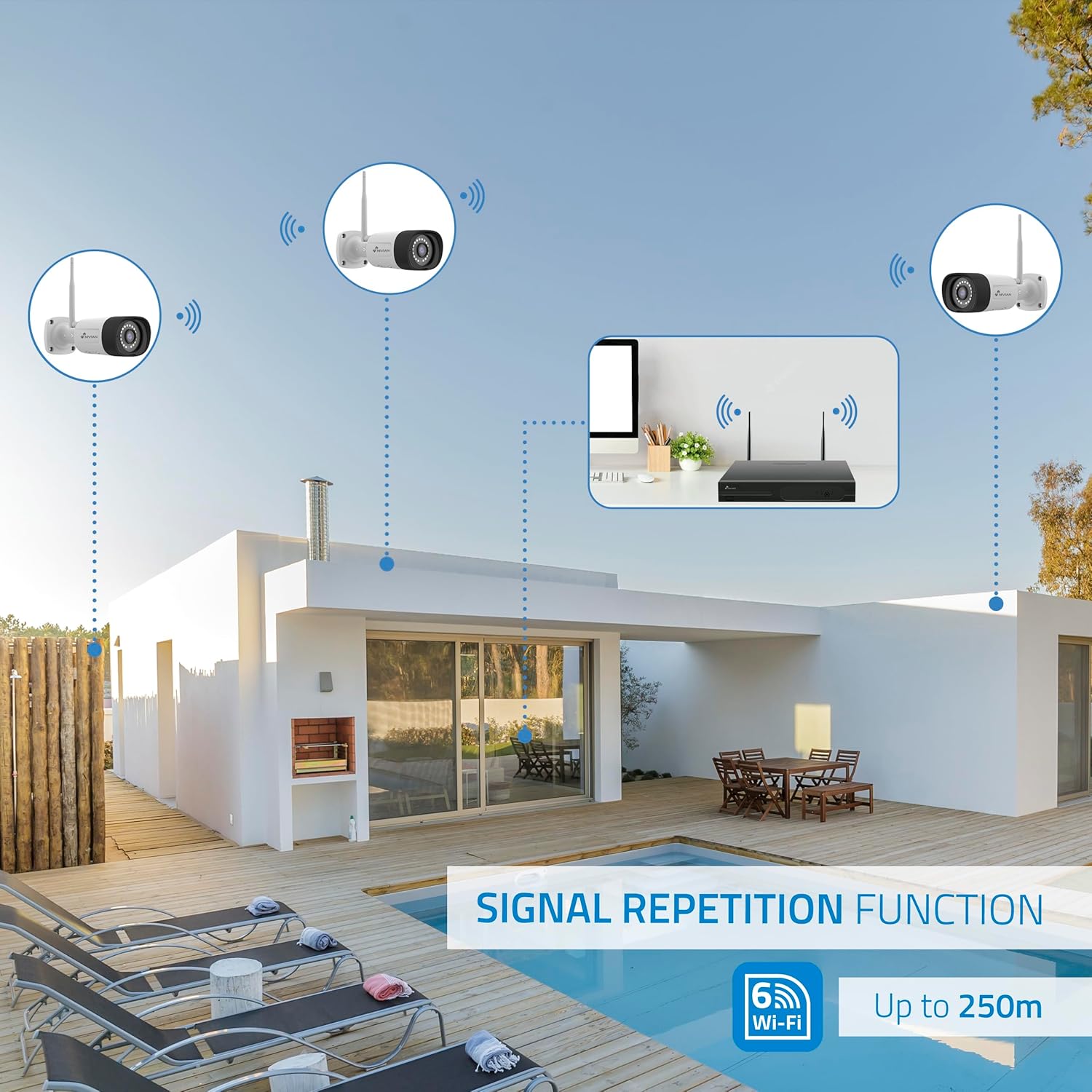
Image: Diagram showing the signal repetition function of the NIVIAN WiFi CCTV system, where cameras can extend the WiFi range up to 250 meters from the NVR.
4.3. EseeCloud App Setup
- اپلی کیشن ڈاؤن لوڈ کریں: Download the "EseeCloud" app from your mobile device's app store (available for iOS, Android).
- اکاؤنٹ رجسٹر کریں: ایپ کھولیں اور ایک نیا اکاؤنٹ رجسٹر کریں یا اگر آپ کے پاس پہلے سے موجود ہے تو لاگ ان کریں۔
- ڈیوائس شامل کریں: Follow the in-app instructions to add your NVR system. This typically involves scanning a QR code displayed on the NVR's monitor or entering the device ID manually.
- ریموٹ Viewing: ایک بار شامل ہونے کے بعد، آپ کر سکتے ہیں۔ view live feeds, access recordings, and configure settings remotely.

Image: Smartphone screen displaying the EseeCloud app interface for managing the security system, showing live camera feeds and control options, with NIVIAN cameras and a laptop in the background.
5. آپریٹنگ ہدایات
5.1. لائیو View
Access live camera feeds through the NVR connected to a monitor or via the EseeCloud mobile app. The NVR interface allows you to switch between single-camera view اور ملٹی کیمرہ گرڈ view.
5.2. ریکارڈنگ
- مسلسل ریکارڈنگ: The system is configured for continuous recording by default to the 1TB hard drive.
- تحریک کا پتہ لگانے کی ریکارڈنگ: Configure cameras to record only when motion is detected. This can be scheduled via the NVR settings or EseeCloud app.
- H.265+ Codec: The system uses H.265+ video compression to optimize storage space while maintaining video quality.
5.3. پلے بیک
ریکارڈ شدہ foo تک رسائی حاصل کریں۔tage through the NVR's playback menu or the EseeCloud app. You can search recordings by date, time, and event type (e.g., motion detection).
5.4. AI Human Detection
The cameras feature advanced AI human detection to differentiate human movement from other objects, significantly reducing false alarms. When human motion is detected, the system can trigger recordings, send notifications, and activate the white LED night vision for color footage.

Image: NIVIAN camera detecting a person at night, with the white LED light activated for color night vision, and a mobile notification indicating motion detection.
5.5. دو طرفہ آڈیو
Use the EseeCloud app to utilize the two-way audio feature. This allows you to listen to audio from the camera's location and speak through the camera's built-in speaker.
5.6. نائٹ ویژن موڈز
- انفراریڈ (IR) موڈ: Provides black and white video in low-light conditions for discreet surveillance.
- White LED Mode: When motion is detected in low light, the camera's white LEDs activate, providing full-color video and acting as a deterrent.
6 دیکھ بھال
- کیمرے کی صفائی: باقاعدگی سے کیمرہ لینز کو نرم سے صاف کریں، ڈیamp واضح تصویر کے معیار کو یقینی بنانے کے لیے کپڑا۔ سخت کیمیکل استعمال نہ کریں۔
- فرم ویئر اپ ڈیٹس: Check for firmware updates for the NVR and cameras through the EseeCloud app or NVR settings. Keep your system updated for optimal performance and security.
- ہارڈ ڈرائیو مینجمنٹ: The 1TB hard drive will automatically overwrite the oldest recordings when full. If you need to preserve specific footage, back it up to an external device.
- پاور سپلائی چیک: یقینی بنائیں کہ تمام پاور اڈاپٹر محفوظ طریقے سے جڑے ہوئے ہیں اور نقصان سے پاک ہیں۔
7 خرابیوں کا سراغ لگانا
7.1. No Camera Feed
- پاور چیک کریں: Ensure the camera is powered on and its adapter is working.
- وائی فائی سگنل: Verify the camera is within the NVR's WiFi range. Use the signal repetition function if necessary.
- Re-pair Camera: If issues persist, try re-pairing the camera with the NVR through the NVR's menu.
7.2 ناقص امیج کوالٹی
- صاف لینس: کسی بھی گندگی یا دھوئیں کے لیے کیمرے کے لینس کو صاف کریں۔
- لائٹنگ: تصویر کے بہترین معیار کے لیے مناسب روشنی کو یقینی بنائیں، خاص طور پر رات کے وقت۔
- وائی فائی مداخلت: Reduce potential WiFi interference by moving the camera or NVR, or by using the signal repetition function.
7.3. Remote Access Issues (EseeCloud App)
- انٹرنیٹ کنکشن: Ensure both your NVR and mobile device have a stable internet connection.
- NVR Network Settings: Verify the NVR is correctly connected to your router and has internet access.
- ایپ ورژن: Ensure your EseeCloud app is updated to the latest version.
7.4. Hard Drive Full / Recording Issues
- ذخیرہ چیک کریں: Verify the hard drive status in the NVR settings.
- ریکارڈنگ کا شیڈول: Ensure recording schedules are correctly configured.
- ہارڈ ڈرائیو صحت: If issues persist, the hard drive may need to be checked or replaced.
8. وضاحتیں
| برانڈ | نیویان |
| ماڈل نمبر | NV-KIT830W-8CAM |
| پروڈکٹ کے طول و عرض (L x W x H) | 23 x 12 x 8 سینٹی میٹر؛ 6.2 کلوگرام |
| کنیکٹوٹی ٹیکنالوجی | Wireless (WiFi-6) |
| ویڈیو ریکارڈنگ ریزولوشن | 2K (3MP) |
| چینلز کی تعداد | 10 (NVR) |
| کیمروں کی تعداد | 6 |
| ذخیرہ کرنے کی صلاحیت | 1 TB Hard Drive (included) |
| کیمرے کی خصوصیات | IP Cameras SuperHD with PTZ, Night Vision, AI Human Detection, Two-Way Audio |
| فریم ریٹ | 15 ایف پی ایس، 24 ایف پی ایس، 30 ایف پی ایس |
| ہم آہنگ آلات | Television (via HDMI) |
| پاور پلگ کی قسم | وال ماؤنٹ |
| اصل ملک | چین |
9. وارنٹی اور سپورٹ
NIVIAN offers technical support to all customers. If you have any questions, suggestions, or encounter any issues with your WiFi surveillance camera kit, please do not hesitate to contact us.
You can reach us through Amazon messages or via any official NIVIAN brand channel. Please refer to your purchase documentation for specific warranty terms and contact details.


