اہم حفاظتی معلومات
انتباہ: This desk must be assembled by an adult. Please read the enclosed instructions carefully. Ensure the desk is stable and that the height and tilt adjustments are used correctly to prevent injuries. The desk has a maximum load capacity of 50 kg.
پروڈکٹ ختمview
The Juskys Fietje Plus Children's Desk is an ergonomic and versatile workstation designed to grow with your child. It features adjustable height and a tiltable desktop, making it suitable for various activities from drawing to studying. Constructed from robust, scratch-resistant wood, it ensures durability and safety. The desk also includes two practical drawers and an open compartment for organized storage of school supplies and craft materials.

Image: The Juskys Fietje Plus Children's Desk, shown in a child's room, highlighting its design and suitability for young users. The desk features a white top and natural wood legs, with a child's drawing on the tiltable surface.

تصویر: ایک تفصیلی view of the Juskys Fietje Plus desk, emphasizing its child-friendly design with rounded corners, robust and durable construction, and a scratch-resistant surface for long-lasting use.
وضاحتیں
| برانڈ | جسکیس |
| ماڈل | 301452 |
| رنگ | White, Natural Wood |
| پروڈکٹ کے طول و عرض (چوڑائی x گہرائی x اونچائی) | 93 x 59 x 76 سینٹی میٹر |
| وزن | 24 کلوگرام |
| مواد | Pine Wood, Engineered Wood (Melamine coated particle board) |
| خصوصیات | Adjustable Height, Tiltable Desktop, Ample Storage, Durable, Scratch-resistant |
| Drawer Dimensions (each, LxHxD) | 23 x 7 x 45 سینٹی میٹر |
| Compartment Dimensions (LxHxD) | 27 x 11 x 49 سینٹی میٹر |
| جھکاؤ کا زاویہ | 45° تک |
| Working Height (4 levels) | 54 - 76 سینٹی میٹر |
| زیادہ سے زیادہ لوڈ کی گنجائش | 50 کلوگرام |

Image: A diagram illustrating the precise dimensions of the Juskys Fietje Plus desk, including overall width (94 cm), depth (63 cm), and adjustable height (54-76 cm working height, 80-117 cm when tilted), along with drawer and compartment sizes.
سیٹ اپ اور اسمبلی
The Juskys Fietje Plus Children's Desk is delivered as a self-assembly kit. Please ensure all components are present before beginning assembly. An adult must perform the assembly.
- ان پیک اجزاء: Carefully unpack all parts and hardware from the packaging. Verify against the included parts list in the assembly instructions.
- حصوں کی شناخت: Familiarize yourself with the different desk components and hardware.
- فریم جمع کریں: Follow the step-by-step instructions in the provided manual to assemble the main frame of the desk. Ensure all screws and fasteners are tightened securely.
- ڈیسک ٹاپ منسلک کریں: Secure the desktop to the assembled frame. Pay attention to the mechanism for height and tilt adjustment during this step.
- دراز انسٹال کریں: Assemble and install the two drawers into their designated slots.
- فائنل چیک: Once assembled, ensure the desk is stable and all moving parts (height adjustment, tilt mechanism, drawers) operate smoothly and safely.
نوٹ: The included assembly instructions contain detailed diagrams and steps. Refer to them for precise guidance.
آپریٹنگ ہدایات
میز کی اونچائی کو ایڈجسٹ کرنا
The Juskys Fietje Plus desk features 4 levels of height adjustment, allowing it to adapt as your child grows.
- Unlock Adjustment: Locate the height adjustment mechanism on the desk legs. This typically involves loosening specific fasteners or engaging a lever.
- مطلوبہ اونچائی مقرر کریں: Carefully raise or lower the desktop to one of the four available height settings (54 cm to 76 cm). Ensure both sides are adjusted evenly.
- محفوظ پوزیشن: Once the desired height is reached, securely fasten the adjustment mechanism to lock the desk in place. Verify stability before use.

Image: The Juskys Fietje Plus desk illustrating its height adjustment feature. An arrow indicates the vertical movement of the desktop, and an inset shows the mechanism on the desk leg for setting one of the four height levels.
Adjusting Desktop Tilt
The desktop can be tilted up to 45° for comfortable drawing, reading, or writing.
- Release Lock: Locate the tilt adjustment mechanism, usually found on the underside or side of the desktop. Release the locking mechanism.
- Set Tilt Angle: Gently lift the front edge of the desktop to the desired angle. The mechanism should allow it to hold in place.
- محفوظ پوزیشن: Ensure the desktop is securely locked at the chosen tilt angle before placing items on it.

Image: The Juskys Fietje Plus desk demonstrating its tilt function. The desktop is shown raised at an angle, with a checkmark indicating an adjustable tilt up to 45 degrees for ergonomic use.
Using Storage Drawers and Compartment
The desk includes two drawers and a central open compartment for organizing school supplies, art materials, and other items.
- دراز: Use the two pull-out drawers for storing smaller items like pens, pencils, and notebooks.
- Central Compartment: The open compartment provides easy access storage for frequently used items or larger supplies.
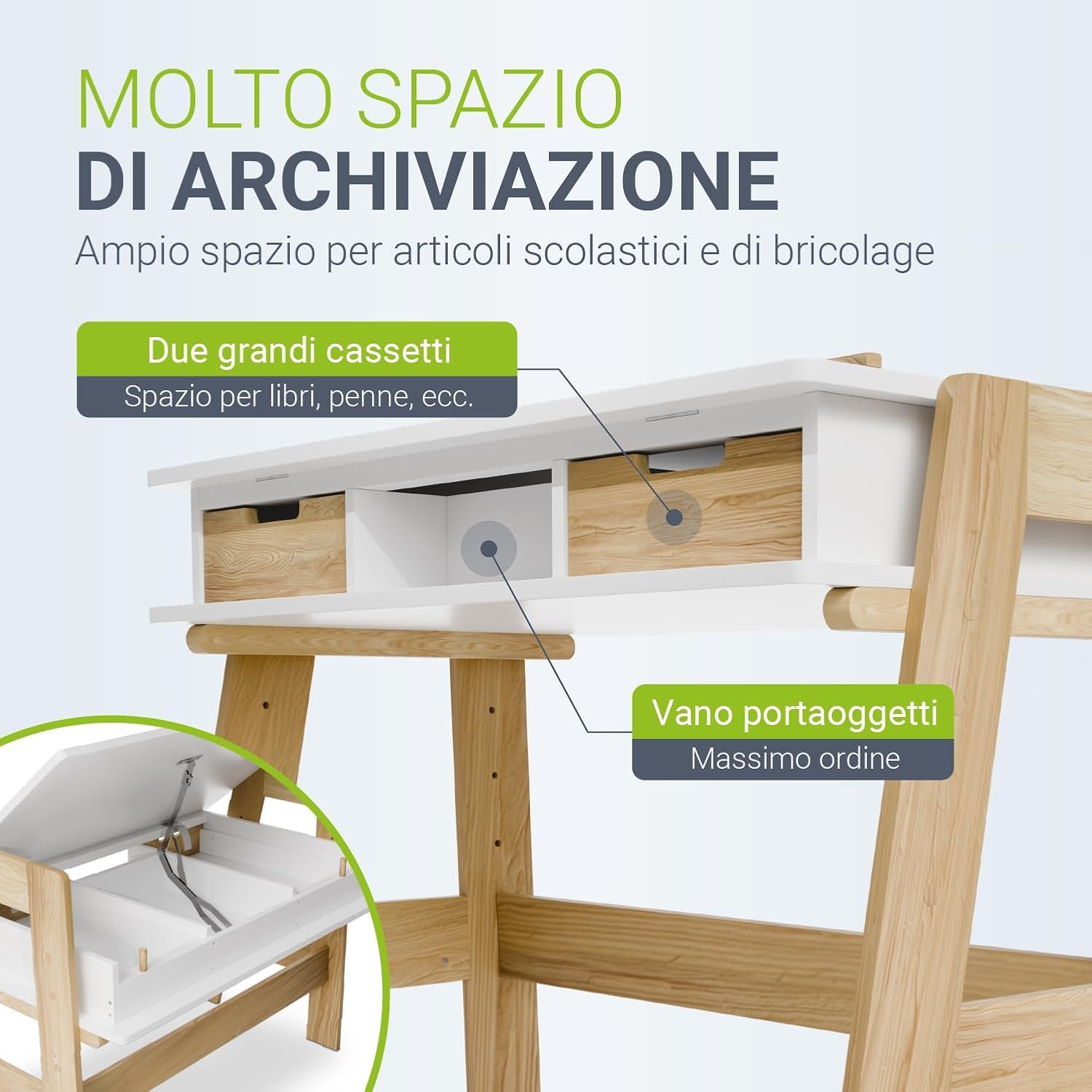
Image: A close-up of the Juskys Fietje Plus desk's storage capabilities, highlighting the two spacious drawers for books and pens, and a central open compartment for maximum organization of school and craft supplies.
دیکھ بھال
To ensure the longevity and appearance of your Juskys Fietje Plus Children's Desk, follow these maintenance guidelines:
- صفائی: میز کی سطحوں کو نرم سے صاف کریں، ڈیamp کپڑا کھرچنے والے کلینر یا سخت کیمیکل سے پرہیز کریں، جو ختم کو نقصان پہنچا سکتے ہیں۔
- پھیلاؤ: داغدار ہونے یا لکڑی کو پہنچنے والے نقصان کو روکنے کے لیے چھلکوں کو فوری طور پر صاف کریں۔
- تحفظ: Use placemats or desk pads to protect the surface from scratches, heat, and moisture, especially during art activities.
- ہارڈ ویئر چیک: وقتاً فوقتاً تمام پیچ اور فاسٹنرز کو چیک کریں تاکہ یہ یقینی بنایا جا سکے کہ وہ سخت ہیں۔ استحکام کو برقرار رکھنے کے لئے اگر ضروری ہو تو دوبارہ سخت کریں۔
- براہ راست سورج کی روشنی سے بچیں: Prolonged exposure to direct sunlight can cause fading or discoloration of the wood.
خرابی کا سراغ لگانا
If you encounter any issues with your Juskys Fietje Plus Children's Desk, refer to the following common problems and solutions:
- ڈیسک ڈوبتا ہے:
- اس بات کو یقینی بنائیں کہ اسمبلی کے تمام پیچ اور بندھن محفوظ طریقے سے سخت ہیں۔
- Check that the desk is placed on a flat, even surface.
- Verify that the height adjustment mechanisms on both legs are locked evenly.
- Desktop Tilt Mechanism Not Holding:
- Ensure the tilt locking mechanism is fully engaged after setting the desired angle.
- Check for any obstructions or damage to the mechanism.
- Drawers Stick or Don't Slide Smoothly:
- Check for any items obstructing the drawer slides.
- Ensure the drawers were assembled correctly and are aligned within their tracks.
- Lightly apply a silicone-based lubricant to the drawer slides if friction persists.
اگر ان اقدامات سے مسئلہ حل نہیں ہوتا ہے، تو براہ کرم کسٹمر سپورٹ سے رابطہ کریں۔
وارنٹی کی معلومات
براہ کرم اپنی خریداری کی دستاویزات یا مینوفیکچررز کا حوالہ دیں۔ website for detailed warranty information regarding the Juskys Fietje Plus Children's Desk.
کسٹمر سپورٹ
For further assistance, spare parts, or any questions not covered in this manual, please contact Juskys customer service.
- مینوفیکچرر: جسکیس
- Webسائٹ: Visit Juskys Store on Amazon
- رابطہ کی معلومات: Please refer to the contact details provided with your purchase or on the official Juskys webسائٹ


