1. تعارف
This manual provides essential information for the proper use and maintenance of your HOTWAV R9 Pro Rugged Tablet. Please read it thoroughly before operating the device to ensure optimal performance and longevity.

تصویر: سامنے اور پیچھے view of the HOTWAV R9 Pro Rugged Tablet, highlighting its robust design and 11-inch display.
2. باکس میں کیا ہے۔
تصدیق کریں کہ تمام اشیاء پیکیجنگ میں موجود ہیں:
- 1x HOTWAV R9 Pro Rugged Tablet
- 1x Manual (this document)
- 1x پیکنگ باکس
- 1x Explosion-proof Film
- 1x USB Type-C کیبل
- 1x OTG کیبل
3. پروڈکٹ ختمview اور کلیدی خصوصیات
3.1 ناہموار ڈیزائن اور استحکام
The HOTWAV R9 Pro is engineered for extreme environments, featuring IP68/IP69K waterproof and dustproof ratings, and MIL-STD-810H certification for shock resistance. Its construction includes a double-shot TPU+PC+glass fiber back cover for enhanced protection.

Image: Visual representation of the tablet's ruggedness, showing it submerged in water, covered in dust, and surviving a drop, alongside its LED camping light in use.
3.2. بیٹری اور چارجنگ
Equipped with a large 20080mAh battery, the R9 Pro offers extended usage times. It supports 20W fast charging to quickly replenish power.

Image: Diagram illustrating the 20080mAh battery capacity and 20W fast charging capability of the tablet.
3.3. ڈسپلے
The tablet features an 11-inch FHD+ display with a resolution of 1200x1920 pixels and 450cd/m² brightness. It is protected by Corning Glass 3 and supports glove touch functionality, making it suitable for outdoor use.

Image: The tablet's 11-inch display showing various applications, alongside icons indicating FHD+ resolution, 60Hz refresh rate, and dual SIM support.
3.4 کارکردگی اور اسٹوریج
Powered by an Octa-Core Unisoc T606 processor, the R9 Pro includes 20GB RAM (6GB physical + 14GB virtual) and 256GB internal storage. Storage can be expanded up to 2TB using a T-flash card.

Image: A visual representation of the Unisoc T606 octa-core chipset, detailing 20GB RAM and 256GB ROM with 2TB expandable memory.
3.5 کیمرہ سسٹم
The tablet features a 64MP rear camera with PDAF and f/1.8 aperture, and a 16MP front camera for photography and video calls.

تصویر: سابقamples of photos taken with the 64MP rear camera and the 16MP front camera, demonstrating their capabilities.
3.6 انٹیگریٹڈ سیampING لائٹ
A unique 6W camping light with 350 lumens and 246 LEDs is integrated into the tablet, providing illumination for various outdoor activities or emergencies.
4. سیٹ اپ
4.1. ٹیبلٹ چارج کرنا
Before first use, fully charge the tablet using the provided USB Type-C cable and a compatible 20W power adapter (not included). Connect the cable to the tablet's USB-C port and the adapter to a power outlet. The charging indicator will show the charging status.
4.2. Installing SIM and T-flash Cards
The tablet supports dual SIM cards and a T-flash (microSD) card for expandable storage.
- ٹیبلیٹ کے سائیڈ پر سم/SD کارڈ ٹرے کا پتہ لگائیں۔
- ٹرے کو کھولنے کے لیے فراہم کردہ سم ایجیکٹر ٹول استعمال کریں۔
- Carefully place your Nano-SIM cards and/or T-flash card into the designated slots. Ensure correct orientation.
- آہستہ سے ٹرے کو ٹیبلیٹ میں واپس دھکیلیں جب تک کہ یہ جگہ پر کلک نہ کرے۔
4.3. پر / آف پاور
- پاور آن کرنے کے لیے: Press and hold the Power button until the HOTWAV logo appears.
- پاور آف کرنا: پاور بٹن کو دبائے رکھیں جب تک کہ پاور آپشنز مینو ظاہر نہ ہو، پھر "پاور آف" کو منتخب کریں۔
- دوبارہ شروع کرنے کے لیے: پاور بٹن کو دبائے رکھیں جب تک کہ پاور آپشنز مینو ظاہر نہ ہو، پھر "دوبارہ شروع کریں" کو منتخب کریں۔
5. آپریٹنگ ہدایات
5.1. Android 14 آپریٹنگ سسٹم
The HOTWAV R9 Pro runs on Android 14, offering a user-friendly interface and access to a wide range of applications via the Google Play Store.
5.2. نیویگیشن
Navigate the tablet using touch gestures:
- تھپتھپائیں: ایک آئٹم منتخب کریں۔
- سوائپ: اسکرینوں یا فہرستوں کے ذریعے سکرول کریں۔
- چوٹکی: تصاویر کو زوم ان یا آؤٹ کریں۔ web صفحات
- لانگ پریس: سیاق و سباق کے مینو تک رسائی حاصل کریں یا آئیکنز کو منتقل کریں۔
5.3. Glove Touch Mode
The display supports glove touch, allowing you to operate the tablet while wearing gloves. This feature is automatically enabled.
5.4. فیس انلاک
For convenient and secure unlocking, set up Face Unlock:
- پر جائیں۔ ترتیبات > سیکیورٹی اور رازداری > فیس انلاک.
- اپنے چہرے کو رجسٹر کرنے کے لیے اسکرین پر دی گئی ہدایات پر عمل کریں۔
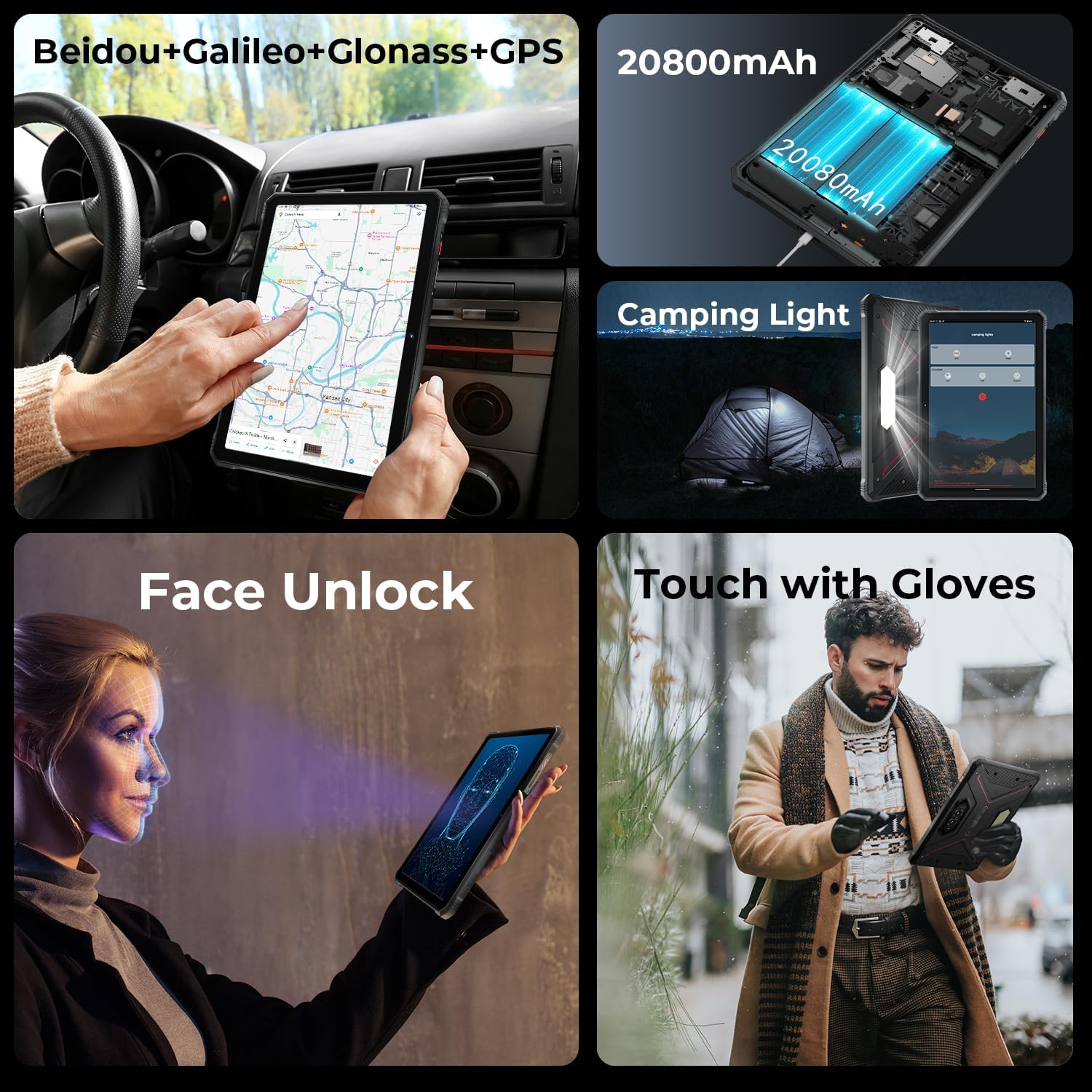
Image: A collage showing the tablet's GPS navigation, camping light in action, face unlock in progress, and a user operating the tablet with gloves.
5.5. Dual SIM Functionality
The tablet supports two SIM cards, allowing you to manage two different phone numbers or network providers simultaneously. You can configure preferred SIM for calls, messages, and data in ترتیبات > نیٹ ورک اور انٹرنیٹ > سمز.
6. کیمرے کا استعمال
The HOTWAV R9 Pro is equipped with a 64MP rear camera and a 16MP front camera.
- کیمرہ کھولنا: Tap the Camera icon on the home screen or app drawer.
- کیمروں کو تبدیل کرنا: سامنے اور پیچھے والے کیمروں کے درمیان ٹوگل کرنے کے لیے کیمرہ سوئچ آئیکن کو تھپتھپائیں۔
- فوٹو کھنچوانا: تصویر کیپچر کرنے کے لیے شٹر بٹن کو تھپتھپائیں۔
- ریکارڈنگ ویڈیوز: ویڈیو موڈ پر سوئچ کریں اور ریکارڈنگ شروع/بند کرنے کے لیے ریکارڈ بٹن کو تھپتھپائیں۔
- کیمرے کی ترتیبات: Access various settings like resolution, flash, and modes from within the camera app.
7. سیamping Light Functionality
The integrated 6W camping light provides powerful illumination.
- Activating the Light: سیamping light can typically be activated via a dedicated button (if present) or through a quick settings toggle in the notification panel.
- Adjusting Brightness/Modes: Some models may offer adjustable brightness levels or different lighting modes. Refer to the on-screen controls once the light is activated.
8. کنیکٹیویٹی
- وائی فائی: کے ذریعے وائرلیس نیٹ ورکس سے جڑیں۔ ترتیبات > نیٹ ورک اور انٹرنیٹ > انٹرنیٹ.
- بلوٹوتھ: Pair with Bluetooth devices (headphones, speakers) via ترتیبات > منسلک آلات > کنکشن کی ترجیحات > بلوٹوتھ.
- GPS: The tablet supports Beidou, Galileo, Glonass, and GPS for accurate location services. Ensure location services are enabled in ترتیبات > مقام.
9 دیکھ بھال
- صفائی: ایک نرم استعمال کریں، ڈیamp cloth to clean the tablet's surface. Avoid harsh chemicals or abrasive materials.
- پانی کی نمائش: While waterproof, ensure all ports are securely closed before exposing the tablet to water. After water exposure, dry the tablet thoroughly, especially the charging port, before charging.
- درجہ حرارت: Avoid exposing the tablet to extreme temperatures (hot or cold) for prolonged periods.
- ذخیرہ: جب لمبے عرصے تک استعمال نہ ہو تو گولی کو ٹھنڈی، خشک جگہ پر محفوظ کریں۔
10 خرابیوں کا سراغ لگانا
| مسئلہ | ممکنہ حل |
|---|---|
| ٹیبلٹ آن نہیں ہوتا ہے۔ | یقینی بنائیں کہ بیٹری چارج ہے۔ کم از کم 30 منٹ کے لیے چارجر سے جڑیں۔ اگر اب بھی جواب نہ دیا جائے تو پاور بٹن کو 10-15 سیکنڈ تک پکڑ کر جبری دوبارہ شروع کریں۔ |
| سست کارکردگی۔ | Close unused applications. Clear cache regularly. Consider uninstalling unnecessary apps. Restart the tablet. |
| وائی فائی کنکشن کے مسائل۔ | Wi-Fi کو آف اور آن ٹوگل کریں۔ اپنا راؤٹر دوبارہ شروع کریں۔ نیٹ ورک کو بھول جائیں اور دوبارہ جڑیں۔ |
| بیٹری تیزی سے ختم ہو جاتی ہے۔ | Reduce screen brightness. Close background apps. Disable unused features like GPS, Bluetooth, or Wi-Fi when not needed. Check battery usage in settings to identify power-hungry apps. |
| کیمرہ کام نہیں کر رہا ہے۔ | Ensure the camera app has necessary permissions. Restart the tablet. Clear the camera app's cache and data in ترتیبات > ایپس. |
11. وضاحتیں
| فیچر | تفصیل |
|---|---|
| ماڈل | R9 پرو |
| آپریٹنگ سسٹم | اینڈرائیڈ 14 |
| ڈسپلے سائز | 11 انچ |
| اسکرین ریزولوشن | 1200 x 1920 پکسلز (FHD+) |
| پروسیسر | Unisoc T606 Octa-core (1.6 GHz) |
| گرافکس کا پروسیسر | Mali G57 MP1@650MHz |
| رام | 20 جی بی (6 جی بی فزیکل + 14 جی بی ورچوئل) |
| اندرونی اسٹوریج | 256 جی بی |
| قابل توسیع اسٹوریج | Up to 2TB (T-flash card) |
| پیچھے والا کیمرہ | 64MP (PDAF, f/1.8 aperture) |
| سامنے والا کیمرہ | 16MP |
| بیٹری کی صلاحیت | 20080mAh |
| چارج ہو رہا ہے۔ | 20W فاسٹ چارج |
| ناہمواری ۔ | IP68/IP69K Waterproof & Dustproof, MIL-STD-810H |
| کنیکٹوٹی | Dual SIM, Wi-Fi, Bluetooth, GPS (Beidou, Galileo, Glonass) |
| CampING لائٹ | 6W (350 lumens, 246 LEDs) |
| طول و عرض (LxWxH) | 10.61 x 0.7 x 7.16 انچ |
| وزن | 2.35 پاؤنڈ |
12. وارنٹی اور سپورٹ
HOTWAV offers comprehensive after-sales service for the R9 Pro Rugged Tablet:
- واپسی کی پالیسی: 30-day no-reason return.
- وارنٹی: 2 سال کی مفت وارنٹی۔
- تکنیکی معاونت: زندگی بھر تکنیکی مدد۔
- آن لائن سروس: 24/7 آن لائن کسٹمر سروس۔
For support, please contact HOTWAV customer service through their official channels or visit their webسائٹ


