1. تعارف
Thank you for choosing the GOBOULT Astra Neo Bluetooth In-Ear Earbuds. This manual provides essential information for setting up, operating, and maintaining your earbuds to ensure optimal performance and longevity. Please read this manual thoroughly before use.
2. حفاظتی معلومات
- ایئر بڈز یا چارجنگ کیس کو انتہائی درجہ حرارت، نمی یا مائعات کے سامنے نہ رکھیں۔
- ڈیوائس کو گرانے، اثر انداز کرنے یا الگ کرنے سے گریز کریں۔
- چارج کرنے کے لیے صرف فراہم کردہ چارجنگ کیبل یا تصدیق شدہ Type-C کیبل استعمال کریں۔
- سماعت کو پہنچنے والے نقصان کو روکنے کے لیے اعتدال کے حجم کی سطح پر سنیں۔
- بچوں اور پالتو جانوروں کی پہنچ سے دور رکھیں۔
3. پیکیج کے مشمولات
تصدیق کریں کہ تمام اشیاء آپ کے پیکیج میں موجود ہیں:
- GOBOULT Astra Neo Earbuds (Left and Right)
- چارجنگ کیس
- ٹائپ سی چارجنگ کیبل
- کان کے کشن (مختلف سائز)
- صارف دستی
- وارنٹی کارڈ
4. پروڈکٹ ختمview
The GOBOULT Astra Neo earbuds feature a sleek design with touch controls and a compact charging case. The case includes breathing LED lights for status indication.

Image: GOBOULT Astra Neo Earbuds and Charging Case. The image displays the black earbuds removed from their charging case, which features a glowing blue LED strip.

Image: GOBOULT Astra Neo Comfort Grip Case and Earbuds. This image highlights the textured surface of the charging case and earbuds, along with the breathing case lights.
5. سیٹ اپ
5.1 ایئربڈز اور کیس کو چارج کرنا
پہلے استعمال سے پہلے، ایئربڈز اور چارجنگ کیس کو پوری طرح سے چارج کریں۔
- ایئربڈز کو چارجنگ کیس میں رکھیں۔ یقینی بنائیں کہ وہ صحیح طریقے سے بیٹھے ہیں۔
- Type-C چارجنگ کیبل کو کیس پر چارجنگ پورٹ اور پاور سورس سے جوڑیں۔
- The LED indicator on the case will illuminate during charging and turn off or change color when fully charged.
A 10-minute charge provides approximately 100 minutes of playtime.

Image: GOBOULT Astra Neo Fast Charging Feature. This image illustrates the 70-hour playtime and the fast charging capability: 10 minutes of charge equals 100 minutes of playtime.
5.2 Pairing with a Device (Bluetooth 5.4)
The Astra Neo uses Bluetooth 5.4 with Blink & Pair technology for quick and stable connections.
- چارجنگ کیس کھولیں۔ ایئربڈز خود بخود پیئرنگ موڈ میں داخل ہو جائیں گے۔
- اپنے آلے پر (اسمارٹ فون، ٹیبلیٹ، لیپ ٹاپ)، بلوٹوتھ کو فعال کریں۔
- تلاش کریں۔ available Bluetooth devices and select "GOBOULT Astra Neo" from the list.
- ایک بار منسلک ہونے کے بعد، ایک صوتی اشارہ کامیاب جوڑی کی تصدیق کرے گا۔

Image: GOBOULT Astra Neo Bluetooth 5.4 Pairing. This image shows a smartphone screen displaying a successful Bluetooth 5.4 connection to 'Astra Neo', emphasizing power efficiency and stable connection.
6. آپریٹنگ ہدایات
6.1 ٹچ کنٹرولز
The Astra Neo earbuds feature intuitive touch controls on each earbud:
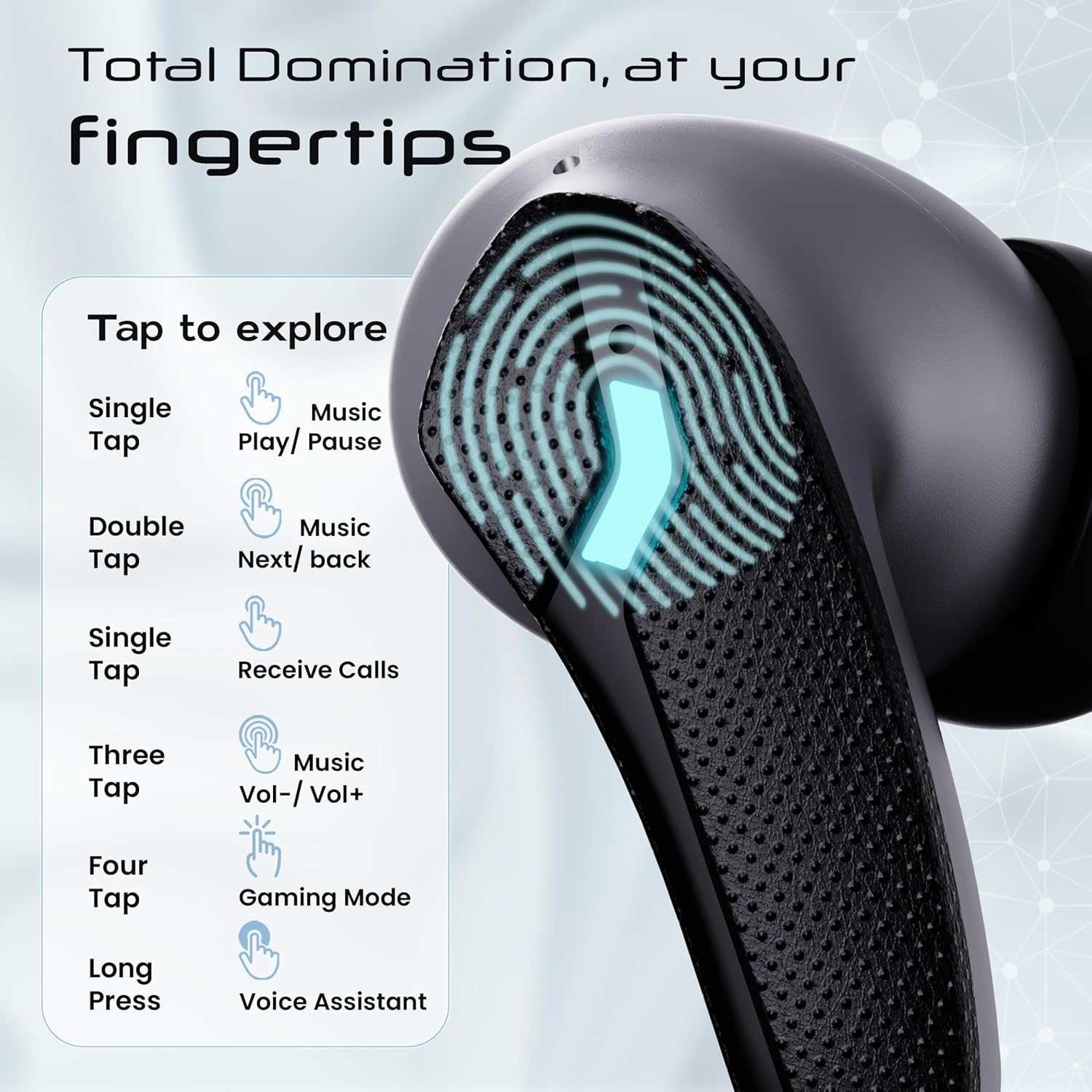
Image: GOBOULT Astra Neo Touch Controls Guide. This graphic details the various touch gestures for controlling music, calls, gaming mode, and voice assistant.
- سنگل نل: Play/Pause music, Receive Calls.
- ڈبل تھپتھپائیں: Music Next/Back (specific earbud for each function).
- Three Tap: Music Volume Up/Down (specific earbud for each function).
- Four Tap: گیمنگ موڈ کو فعال کریں۔
- لانگ پریس: Activate Voice Assistant (Google Assistant/Siri).
6.2 Gaming Mode (40ms Low Latency)
Activate Gaming Mode for a synchronized audio experience during gameplay, reducing audio delay to 40ms.
- To activate: Four tap on either earbud.
- To deactivate: Four tap again on either earbud.

Image: GOBOULT Astra Neo Gaming Mode with 40ms Low Latency. This image depicts a user playing a mobile game with the earbuds, highlighting the ultra-low latency feature for an immersive gaming experience.
6.3 ZEN Quad Mic ENC for Calls
The ZEN Quad Mic Environmental Noise Cancellation (ENC) system ensures clear voice calls by filtering out background noise.

Image: GOBOULT Astra Neo ZEN Quad Mic ENC Technology. This image illustrates the internal components and the function of the 4 microphones for clear in-game communication and crystal-clear calling with Acoustic Echo Cancellation (AEC).
6.4 EQ موڈز
The Astra Neo earbuds support 4 EQ modes for customized audio experiences. Refer to the product packaging or official GOBOULT website for specific instructions on how to switch between these modes, as this functionality is typically managed via a companion app or specific touch gestures not detailed here.
7 دیکھ بھال
7.1 صفائی
- نرم، خشک، لنٹ سے پاک کپڑے سے ایئر بڈز اور چارجنگ کیس کو آہستہ سے صاف کریں۔
- سخت کیمیکلز ، صفائی سالوینٹس ، یا مضبوط ڈٹرجنٹ استعمال نہ کریں۔
- Clean the charging contacts on both the earbuds and the case regularly to ensure proper charging.
7.2 پانی کی مزاحمت (IPX5)
The Astra Neo earbuds are IPX5 water-resistant, meaning they are protected against sweat, rain, and splashes. They are not designed for submersion in water.
- جان بوجھ کر ایئربڈز کو پانی میں نہ ڈوبیں۔
- If exposed to sweat or rain, wipe them dry before placing them back in the charging case.

Image: GOBOULT Astra Neo IPX5 Water Resistance and Voice Assistant. This image highlights the earbuds' sweatproof, rainproof, and splashproof capabilities, along with compatibility with Google Assistant and Hey Siri.
7.3 اسٹوریج
استعمال میں نہ ہونے پر، ایئربڈز کو ان کے چارجنگ کیس میں محفوظ کریں تاکہ ان کی حفاظت ہو اور انہیں چارج کیا جا سکے۔
8 خرابیوں کا سراغ لگانا
- ایئربڈس جوڑا نہیں بن رہے ہیں: یقینی بنائیں کہ دونوں ایئربڈز چارجنگ کیس میں ہیں، پھر جوڑا بنانے کے موڈ میں دوبارہ داخل ہونے کے لیے ڈھکن کھولیں۔ اپنے آلے کی بلوٹوتھ سیٹنگز چیک کریں اور دوبارہ کنیکٹ کرنے کی کوشش کریں۔
- صرف ایک ایئربڈ کام کر رہا ہے: دونوں ایئربڈز کو کیس میں واپس رکھیں، ڈھکن بند کریں، چند سیکنڈ انتظار کریں، پھر اسے دوبارہ کھولیں۔ یہ اکثر ان کو دوبارہ ہم آہنگ کرتا ہے۔
- کوئی آواز نہیں: اپنے آلے اور ایئربڈز دونوں پر والیوم لیول چیک کریں۔ یقینی بنائیں کہ ایئربڈز آپ کے آلے سے مناسب طریقے سے جڑے ہوئے ہیں۔
- چارجنگ کے مسائل: Clean the charging contacts on the earbuds and inside the case. Ensure the charging cable is securely connected and the power source is active.
- ناقص کال کا معیار: Ensure the microphones are not obstructed. Try moving to a quieter environment.
9. وضاحتیں
Key technical specifications for the GOBOULT Astra Neo Earbuds:
| فیچر | تفصیلات |
|---|---|
| ماڈل کا نام | Astra Neo |
| بلوٹوتھ ورژن | 5.4 |
| پلے ٹائم | 70 گھنٹے تک (چارجنگ کیس کے ساتھ) |
| فاسٹ چارجنگ | 10 منٹ چارج = 100 منٹ پلے ٹائم |
| کم تاخیر | 40ms (گیمنگ موڈ) |
| ڈرائیور کا سائز | 13mm BoomX Drivers |
| مائیکروفون | ZEN Quad Mic ENC |
| پانی کی مزاحمت | IPX5 |
| کنٹرول کا طریقہ | چھوئے۔ |
| کنیکٹوٹی ٹیکنالوجی | بلوٹوتھ، وائرلیس |
| ہیڈ فون جیک | ٹائپ سی فاسٹ چارجنگ جیک |
| شے کا وزن | 47 گرام |
| مصنوعات کے طول و عرض | 6.2 x 5.3 x 3.2 سینٹی میٹر |
| بیٹری کی قسم | لتیم پولیمر |
| بلوٹوتھ رینج | 10 میٹر |
| رکاوٹ | 32 اوہم |

Image: GOBOULT Astra Neo 13mm BoomX Drivers. This image highlights the 13mm BoomX drivers, emphasizing crystal clear sound and support for MSBC, SBC, and AAC codecs.
10. وارنٹی اور سپورٹ
The GOBOULT Astra Neo Earbuds come with a 1 سال کی صنعت کار وارنٹی from the date of purchase. This warranty covers manufacturing defects. For warranty claims or technical support, please refer to the contact information provided on your warranty card or visit the official GOBOULT webسائٹ


