1. تعارف
خریداری کے لیے آپ کا شکریہasing the ZEBRONICS Juke BAR 200A Soundbar. This manual provides essential information for the safe and correct operation of your device. Please read it thoroughly before use and retain it for future reference.
پیکیج کے مشمولات
- ساؤنڈ بار - 1 یونٹ
- سب ووفر - 1 یونٹ
- QR کوڈ گائیڈ - 1 یونٹ
- پاور اڈاپٹر - 1 یونٹ
- ریموٹ کنٹرول - 1 یونٹ
2. حفاظتی ہدایات
محفوظ آپریشن کو یقینی بنانے اور نقصان کو روکنے کے لیے، براہ کرم درج ذیل حفاظتی تدابیر پر عمل کریں:
- آلے کو بارش یا نمی کے سامنے نہ رکھیں۔
- وینٹیلیشن کے کسی بھی سوراخ کو مسدود نہ کریں۔
- آلہ کو ایک مستحکم، چپٹی سطح پر رکھیں۔
- صرف مینوفیکچرر کی طرف سے فراہم کردہ پاور اڈاپٹر استعمال کریں۔
- سی کو نہ کھولیں۔asing; تمام خدمات کو اہل اہلکاروں کو بھیجیں۔
- Keep the device away from direct sunlight, heat sources, and strong magnetic fields.
- صرف خشک کپڑے سے صاف کریں۔
3. پروڈکٹ ختمview
The ZEBRONICS Juke BAR 200A is a compact soundbar system designed to enhance your audio experience. It features a soundbar with dual drivers and a dedicated subwoofer for powerful bass.
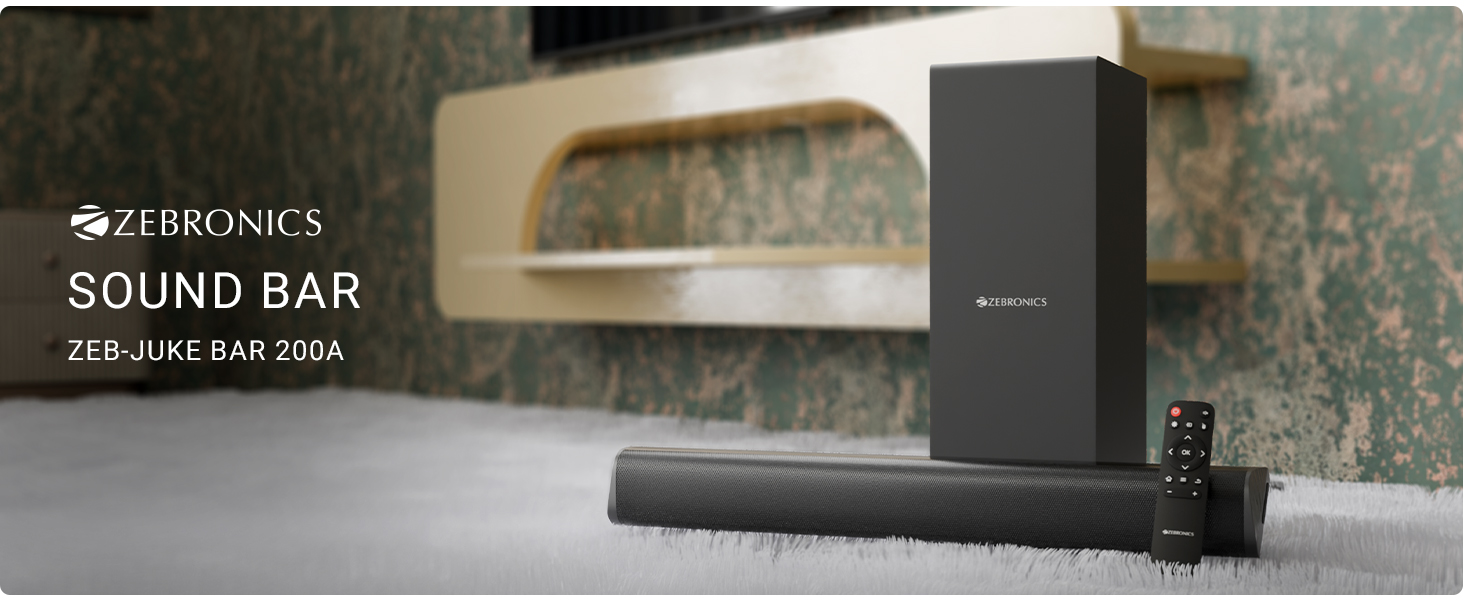
تصویر 3.1: ZEBRONICS Juke BAR 200A Soundbar, Subwoofer, and Remote Control. This image displays the complete sound system, including the main soundbar unit, the separate subwoofer, and the remote control, providing a visual representation of all primary components.
کلیدی خصوصیات
- 90W RMS آؤٹ پٹ: طاقتور اور واضح آڈیو فراہم کرتا ہے۔
- Dual Driver Soundbar: Equipped with 5.08cm x 2 drivers for balanced sound.
- 11.43 سینٹی میٹر سب ووفر: Provides deep, rich bass.
- کثیر رابطہ: Supports Bluetooth v5.1, HDMI ARC, and USB.
- Dolby Audio Decoding: Built-in Dolby Digital and Dolby Digital+ decoding for versatile audio.
- وال ماؤنٹ ایبل: Designed for flexible placement options.
- ریموٹ کنٹرول: Full control over audio settings.

تصویر 3.2: Soundbar Media and Volume Controls and Remote Control. This image highlights the physical control buttons on the soundbar for power, volume up, and volume down, alongside a detailed view of the included remote control, illustrating all available buttons for comprehensive audio management.

تصویر 3.3: Soundbar Rear Panel with Connectivity Ports. This image provides a close-up view of the soundbar's rear panel, clearly labeling the HDMI ARC, USB, DC IN, and SW OUT ports, essential for understanding connection options.
4. سیٹ اپ
4.1 جگہ کا تعین
Place the soundbar on a stable surface in front of your television or mount it on the wall below your TV. Position the subwoofer on the floor, ideally near the soundbar, for optimal bass performance.
4.2 سب ووفر کو جوڑنا
Connect the subwoofer to the soundbar using the provided SW OUT cable. Ensure a secure connection.
4.3 پاور کنکشن
- پاور اڈاپٹر کو ساؤنڈ بار پر DC IN پورٹ سے جوڑیں۔
- پاور اڈاپٹر کو کسی مناسب وال آؤٹ لیٹ میں لگائیں۔
4.4 آڈیو کنکشن
اپنے آڈیو ماخذ کو مربوط کرنے کے لیے درج ذیل طریقوں میں سے ایک کا انتخاب کریں:
- HDMI ARC: For optimal audio quality and control, connect an HDMI cable from your TV's HDMI ARC port to the HDMI ARC port on the soundbar. This allows your TV remote to control the soundbar's volume.
- بلوٹوتھ: For wireless connection, refer to the "Bluetooth Pairing" section in Operating Instructions.
- USB: آڈیو پر مشتمل USB ڈرائیو داخل کریں۔ files into the USB port for direct playback.
5. آپریٹنگ ہدایات
5.1 پاور آن/آف
- دبائیں طاقت یونٹ کو آن یا آف کرنے کے لیے ساؤنڈ بار یا ریموٹ کنٹرول پر بٹن۔
- The LED indicator on the soundbar will illuminate when powered on.
5.2 ان پٹ موڈ کا انتخاب
دبائیں ان پٹ button on the remote control to cycle through available input modes: Bluetooth (BT), HDMI ARC, and USB.
5.3 بلوٹوتھ جوڑی
- Turn on the soundbar and select Bluetooth mode. The LED indicator will flash, indicating pairing mode.
- Enable Bluetooth on your mobile device or computer and search for "ZEB-JUKE BAR 200A".
- Select the device to pair. Once connected, the LED indicator will glow steadily.
5.4 والیوم کنٹرول
- استعمال کریں۔ والیوم اوپر (+) اور آواز کم (-) والیوم کو ایڈجسٹ کرنے کے لیے ساؤنڈ بار یا ریموٹ کنٹرول پر بٹن۔
- دبائیں خاموش button on the remote to mute or unmute the audio.
5.5 USB پلے بیک
Insert a USB flash drive into the USB port. The soundbar will automatically switch to USB mode and begin playing compatible audio files. Use the remote control for playback functions (Play/Pause, Next/Previous Track).
6. وال ماونٹنگ
The ZEBRONICS Juke BAR 200A is designed to be wall-mountable. Ensure you use appropriate screws and wall plugs for your wall type. It is recommended to consult a professional for wall mounting to prevent damage or injury.
- Measure the distance between the mounting holes on the back of the soundbar.
- Mark the corresponding positions on the wall.
- سوراخ ڈرل کریں اور دیوار کے پلگ ڈالیں (اگر ضروری ہو)۔
- Secure the soundbar to the wall using suitable screws.
7 دیکھ بھال
- صفائی: ساؤنڈ بار اور سب ووفر کی سطحوں کو صاف کرنے کے لیے نرم، خشک کپڑا استعمال کریں۔ مائع کلینر یا کھرچنے والے مواد کا استعمال نہ کریں۔
- ذخیرہ: اگر یونٹ کو لمبے عرصے تک ذخیرہ کر رہے ہیں، تو اسے بجلی سے منقطع کریں اور اسے ٹھنڈی، خشک جگہ پر محفوظ کریں۔
- وینٹیلیشن: اس بات کو یقینی بنائیں کہ زیادہ گرمی سے بچنے کے لیے وینٹیلیشن کے سوراخوں کو مسدود نہیں کیا گیا ہے۔
8 خرابیوں کا سراغ لگانا
| مسئلہ | ممکنہ وجہ | حل |
|---|---|---|
| کوئی طاقت نہیں۔ | پاور اڈاپٹر منسلک نہیں یا ناقص آؤٹ لیٹ۔ | بجلی کے کنکشن چیک کریں۔ ایک مختلف آؤٹ لیٹ آزمائیں۔ |
| کوئی آواز نہیں۔ | Incorrect input mode, low volume, or incorrect cable connection. | Select the correct input mode. Increase volume. Check audio cables. |
| بلوٹوتھ کنیکٹ نہیں ہو رہا ہے۔ | ساؤنڈ بار جوڑا بنانے کے موڈ میں نہیں ہے، آلہ بہت دور ہے، یا پہلے جوڑا بنا ہوا ہے۔ | Ensure soundbar is in BT pairing mode. Move device closer. Forget device on your phone and re-pair. |
| ریموٹ کنٹرول کام نہیں کر رہا ہے۔ | Low battery or obstruction. | Replace remote batteries. Ensure no obstructions between remote and soundbar. |
9. وضاحتیں
| فیچر | تفصیل |
|---|---|
| ماڈل کا نام | Zeb - Juke Bar 200A |
| اسپیکر کی قسم | سب ووفر کے ساتھ ساؤنڈ بار |
| کل آؤٹ پٹ پاور | 90 Watts RMS (Soundbar: 20W x 2, Subwoofer: 50W) |
| سب ووفر قطر۔ | 11.43 سنٹی میٹر |
| ساؤنڈ بار ڈرائیور کا سائز | 5.08 سینٹی میٹر x 2 |
| کنیکٹوٹی | Bluetooth v5.1, HDMI ARC, USB |
| سراؤنڈ ساؤنڈ چینل | 2.1 |
| آڈیو ڈیکوڈنگ | Dolby Digital, Dolby Digital+ |
| کنٹرول کا طریقہ | Remote, Control Buttons |
| مصنوعات کے طول و عرض | 6.3D x 50W x 6.3H Centimeters (Soundbar) |
| شے کا وزن | 2.5 کلوگرام |
| شامل اجزاء | Sound Bar, Subwoofer, QR Code Guide, Power Adapter, Remote |
10. وارنٹی کی معلومات
This product is covered by a manufacturer's warranty. Please refer to the QR Code Guide included in your package or visit the official ZEBRONICS website for detailed warranty terms and conditions. Retain your purchase receipt as proof of purchase for warranty claims.
For extended warranty options, please check with your retailer or the ZEBRONICS official channels.
11. سپورٹ
For technical assistance, product inquiries, or service requests, please contact ZEBRONICS customer support:
- سرکاری Webسائٹ: www.zebronics.com
- کسٹمر سروس: Refer to the QR Code Guide or the official webتازہ ترین رابطے کی معلومات (فون نمبرز، ای میل سپورٹ) کے لیے سائٹ۔
Please have your product model number (Juke BAR 200A) and purchase details ready when contacting support.


