1. تعارف
This manual provides detailed instructions for the safe and effective use of your Proster MS6252A Digital Anemometer and Proster RD630 3-in-1 EMF Detector. Please read this manual thoroughly before operating the devices and retain it for future reference. These instruments are designed for accurate measurement and detection in various environments.
2. Proster MS6252A Digital Anemometer
2.1 پروڈکٹ اوورview اور خصوصیات
The Proster MS6252A is a multi-functional digital anemometer designed to measure wind speed and airflow. It features a large LCD display with backlight for easy reading in various lighting conditions.
- ہوا کی رفتار کی پیمائش: Measures in m/s, ft/m, km/h, mile/h, and Knots.
- Airflow Measurement: Measures CFM, CMM, and CMS.
- ڈیٹا ہولڈ فنکشن: ڈسپلے پر موجودہ پڑھنے کو منجمد کرتا ہے۔
- MAX/MIN پیمائش: زیادہ سے زیادہ اور کم سے کم اقدار کو ریکارڈ کرتا ہے۔
- بیک لائٹ ڈسپلے: کم روشنی والے حالات میں مرئیت کو بہتر بناتا ہے۔

Figure 2.1: The Proster MS6252A Digital Anemometer being used in diverse settings such as marine environments, HVAC system checks, outdoor sports, and wind farm monitoring.
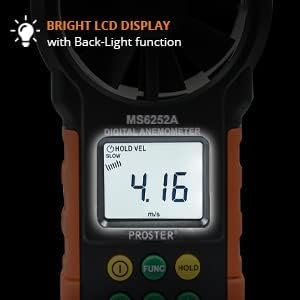
شکل 2.2: تفصیلی view of the anemometer's bright LCD display, highlighting the backlight feature for enhanced readability.
2.2 سیٹ اپ
بیٹری کی تنصیب: Open the battery compartment cover on the back of the device. Insert the required batteries (typically AAA, refer to device markings) ensuring correct polarity. Close the cover securely.
2.3 آپریٹنگ ہدایات
پاور آن/آف: پاور بٹن دبائیں (①آلہ کو آن یا آف کرنے کے لیے۔
یونٹ کا انتخاب: دبائیں یونٹ button to cycle through different wind speed units (m/s, ft/m, km/h, mile/h, Knots) and airflow units (CFM, CMM, CMS).
پیمائش: Hold the anemometer with the fan facing the airflow. The current wind speed/airflow will be displayed on the LCD.

Figure 2.3: Measuring airflow from an air conditioning unit using the Proster MS6252A Anemometer.
ڈیٹا ہولڈ: دبائیں پکڑو موجودہ پڑھنے کو منجمد کرنے کے لئے بٹن۔ جاری کرنے کے لیے دوبارہ دبائیں۔
MAX/MIN Reading: دبائیں MAX/MIN بٹن کو view the maximum or minimum recorded values. Press repeatedly to cycle through MAX, MIN, and current readings.
بیک لائٹ: Press the backlight button (often integrated with power or a dedicated light icon) to turn the LCD backlight on or off.
2.4 Specifications (MS6252A Anemometer)
- ہوا کی رفتار کی حد:
- m/s: 0.40-30
- ft/m: 80-5900
- km/h: 1.4-108
- mile/h: 0.9-67.0
- Knots: 0.8-58.0
- ہوا کے بہاؤ کی حد:
- CFM: 0 to 99990 (0 to 9.999ft²)
- CMM: 0 to 99990 (0 to 9.999ft²)
- CMS: 0 to 9999 (0 - 9.999 m²)
- ڈسپلے: بیک لائٹ کے ساتھ LCD
- طاقت: (Refer to device for specific battery type, typically AAA)
3. Proster RD630 3-in-1 EMF Detector
3.1 پروڈکٹ اوورview اور خصوصیات
The Proster RD630 is a 3-in-1 EMF detector capable of detecting three types of electromagnetic field pollution: AC magnetic (MF), AC electric (EF), and Radio Frequency/Microwave (RF). It features a tri-color LCD display and an automatic alarm system.
- 3-ان-1 کا پتہ لگانا: Measures EF (Electric Field), MF (Magnetic Field), and RF (Radio Frequency).
- Tri-Color LCD Display: Visually indicates safety levels (Green: Safe, Yellow: Warning, Red: Excessive).
- خودکار الارم: Sounds an alarm when EMF levels exceed preset safety thresholds.
- خاموش فنکشن: Allows for silent operation, useful in sensitive environments.
- ڈیٹا ہولڈ: Freezes the current reading.
- MAX Measurement: Records the maximum detected value.
- خودکار بند: Powers off after 15 minutes of inactivity to conserve battery.

Figure 3.1: The Proster RD630 EMF Detector showing its capability to measure Electric Field (EF), Magnetic Field (MF), and Radio Frequency (RF) simultaneously.

شکل 3.2: سابقamples of everyday items that emit different types of electromagnetic fields detectable by the RD630.
3.2 سیٹ اپ
بیٹری کی تنصیب: Open the battery compartment cover on the back of the device. Insert the required batteries (typically AAA, refer to device markings) ensuring correct polarity. Close the cover securely.
3.3 آپریٹنگ ہدایات
پاور آن/آف: پاور بٹن دبائیں (①آلہ کو آن یا آف کرنے کے لیے۔
پیمائش: Hold the detector in the area you wish to test. The EF, MF, and RF readings will be displayed simultaneously on the screen.
ڈسپلے کو سمجھنا: The LCD changes color (Green, Yellow, Red) and the buzzer sounds to indicate the level of EMF detected. Refer to the alarm threshold table below.
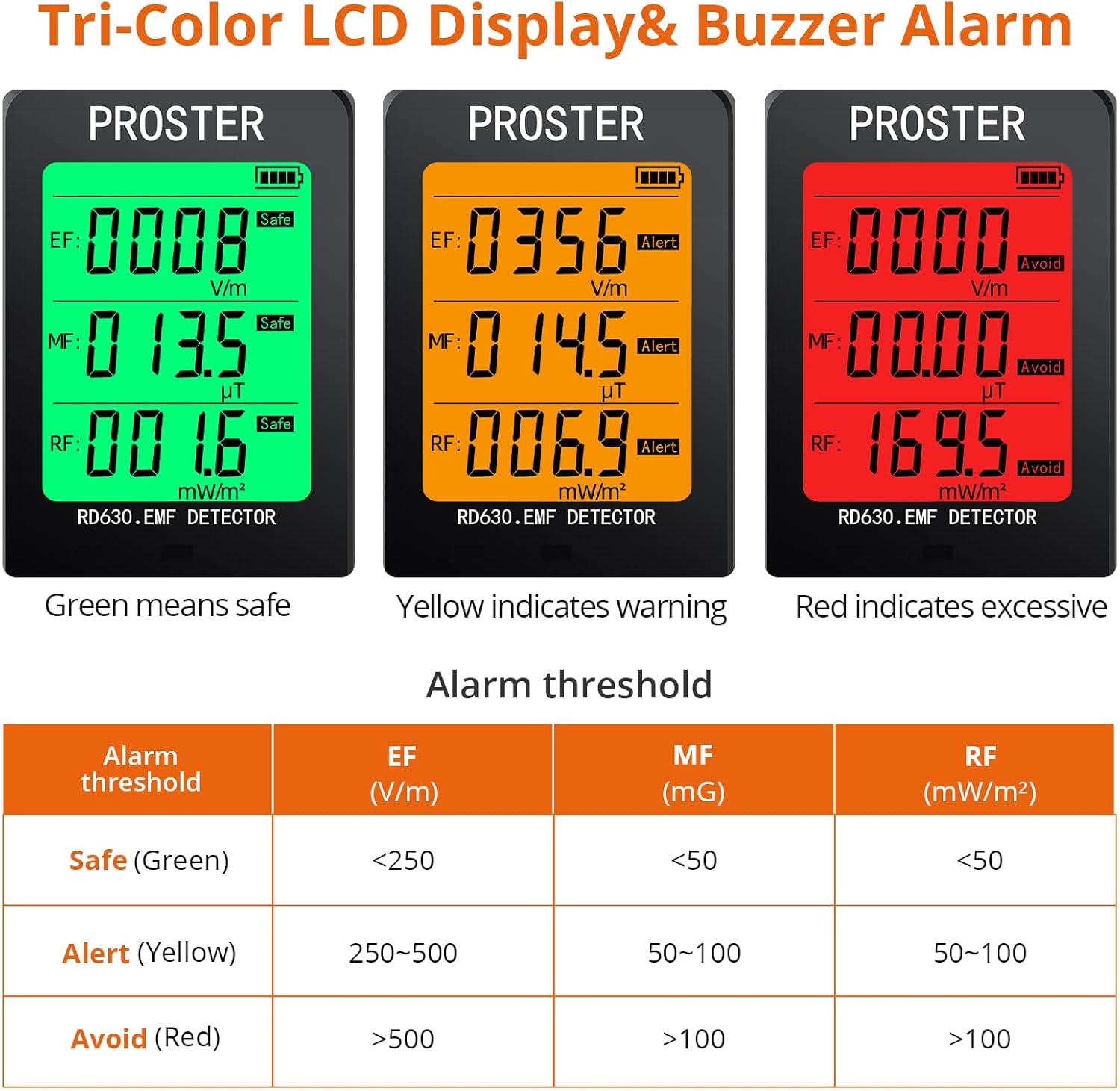
Figure 3.3: The tri-color display and alarm thresholds for the Proster RD630 EMF Detector, indicating safe, warning, and excessive levels.
Alarm Threshold Table:
| الارم کی حد | EF (V/m) | MF (mG) | RF (mW/m²) |
|---|---|---|---|
| Safe (Green) | <250 | <50 | <50 |
| Alert (Yellow) | 250~500 | 50~100 | 50~100 |
| Avoid (Red) | >500 | >100 | >100 |
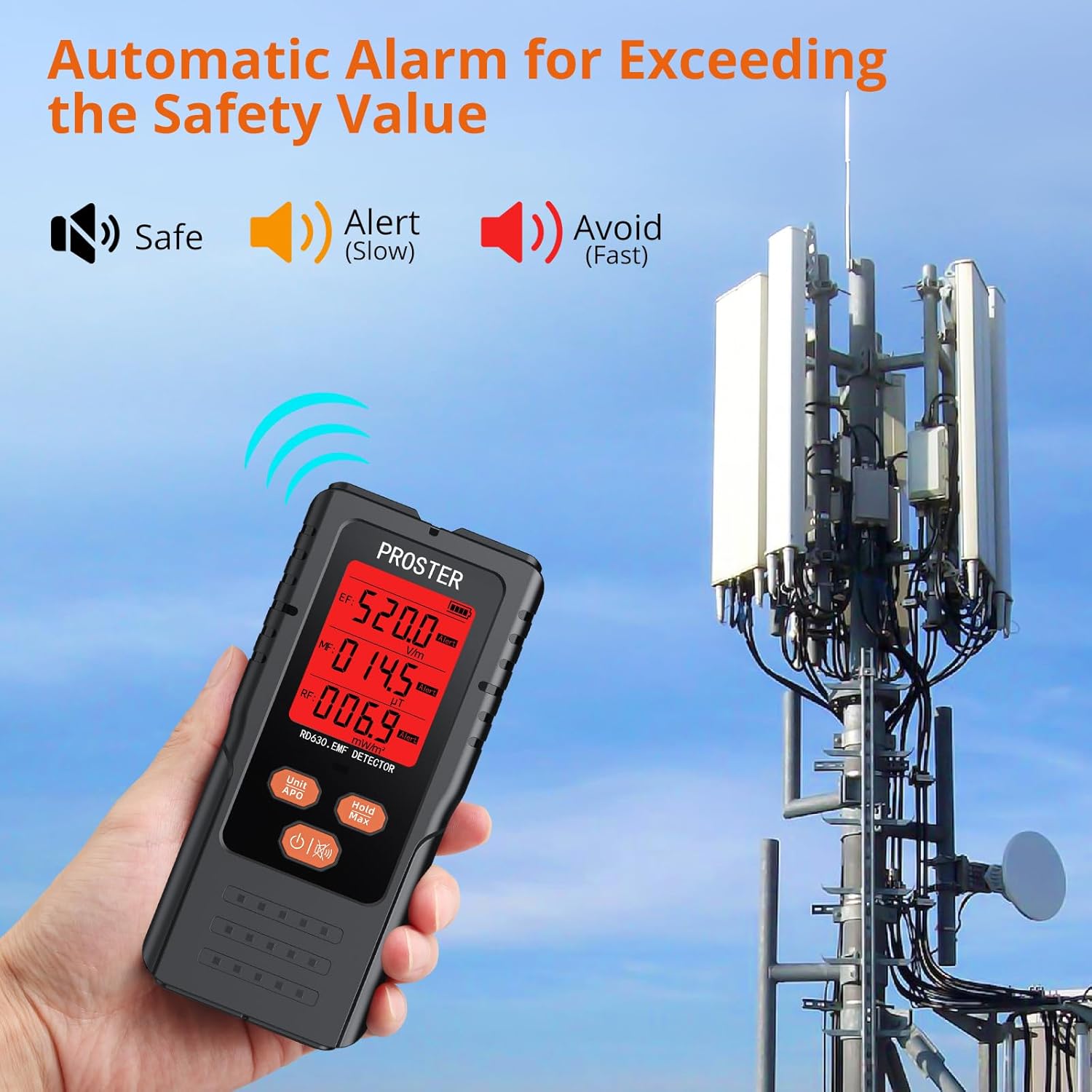
Figure 3.4: The EMF Detector indicating an 'Avoid' level with a red display and alarm, demonstrating its automatic safety warning feature.
خاموش فنکشن: Press the mute button (often indicated by a speaker icon) to turn the buzzer alarm on or off. This is useful in situations where audible alerts are undesirable.
ڈیٹا ہولڈ: دبائیں پکڑو button to freeze the current readings. Press again to release.
MAX Reading: دبائیں MAX button to display the maximum recorded EMF values. Press again to return to real-time measurement.
3.4 Specifications (RD630 EMF Detector)
- پتہ لگانے کی اقسام: EF (Electric Field), MF (Magnetic Field), RF (Radio Frequency)
- حساسیت:
- EF: 1V/m
- MF: 0.1mG / 0.01µT
- RF: 0.1mW/m²
- قرارداد:
- EF: 1~1999V/m
- MF: 0.1~999.9mG / 0.01~99.99µT
- RF: 0.1~999.9mW/m²
- ڈسپلے: Tri-Color LCD with backlight
- الارم: Audible and visual (tri-color display)
- خودکار بند: 15 منٹ بغیر آپریشن
- طاقت: (Refer to device for specific battery type, typically AAA)
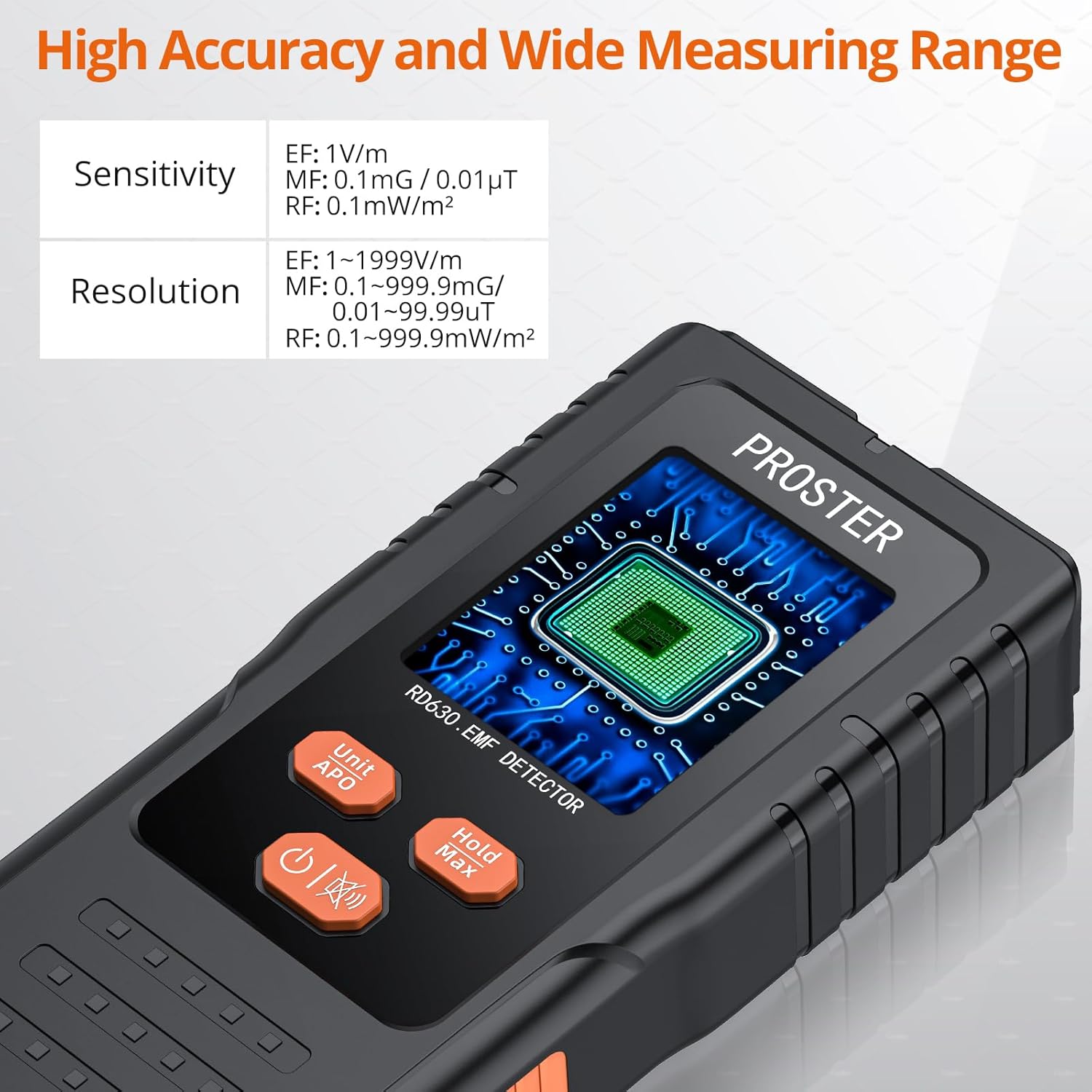
Figure 3.5: Detailed specifications for the RD630 EMF Detector, including sensitivity and resolution ranges.
4. عمومی دیکھ بھال
- صفائی: Use a soft, dry cloth to clean the device surfaces. Do not use abrasive cleaners or solvents.
- ذخیرہ: When not in use for extended periods, remove the batteries to prevent leakage. Store the devices in a cool, dry place away from direct sunlight and extreme temperatures.
- ہینڈلنگ: آلات کو گرانے سے گریز کریں یا انہیں شدید اثرات کا نشانہ بنائیں۔
5 خرابیوں کا سراغ لگانا
- ڈیوائس آن نہیں ہے: بیٹری کی تنصیب کو چیک کریں اور یقینی بنائیں کہ بیٹریاں ختم نہیں ہوئی ہیں۔ اگر ضروری ہو تو تبدیل کریں۔
- Inaccurate readings (Anemometer): Ensure the fan is unobstructed and facing the airflow directly. Avoid measuring in turbulent air.
- No EMF readings: Ensure the device is powered on and held correctly. Move closer to potential EMF sources.
- Alarm sounds continuously (EMF Detector): This indicates high EMF levels. Move away from the source or investigate the source of radiation. Use the mute function if an audible alarm is not desired.
- ڈسپلے مدھم یا ٹمٹماہٹ ہے: بیٹریاں کم ہو سکتی ہیں۔ ان کی جگہ لے لیں۔
6. حفاظتی معلومات
- Do not attempt to open or modify the devices. This may void the warranty and pose safety risks.
- Keep devices away from water and high humidity.
- These devices are for measurement and detection purposes only and should not be used as a substitute for professional safety assessments or medical advice.
- When using the EMF detector, be aware that high readings indicate potential exposure to electromagnetic fields. While the device provides thresholds, consult relevant safety guidelines and experts for comprehensive understanding and mitigation strategies.
- بیٹریاں اور الیکٹرانک فضلہ کو مقامی ضابطوں کے مطابق ذمہ داری سے ٹھکانے لگائیں۔
7. وارنٹی اور سپورٹ
Proster products are designed for reliability and performance. For warranty information, technical support, or service inquiries, please refer to the contact information provided with your purchase or visit the official Proster website. Please have your model number (MS6252A for Anemometer, RD630 for EMF Detector) and purchase details ready when contacting support.


