1. تعارف
The AOCHUAN Smart M3 is a versatile 3-in-1 device combining a selfie stick, desktop stand, and floor tripod, featuring advanced AI face tracking and remote control capabilities. Designed for content creators and everyday users, it offers hands-free video recording and photography without the need for a dedicated application. This manual provides comprehensive instructions for setting up, operating, and maintaining your Smart M3 tripod.
2. حفاظتی معلومات
- آلے کو انتہائی درجہ حرارت یا لمبے عرصے تک براہ راست سورج کی روشنی کے سامنے نہ رکھیں۔
- آلے کو پانی اور دیگر مائعات سے دور رکھیں۔
- آلے کو گرانے یا اسے سخت اثرات کے تابع کرنے سے گریز کریں۔
- آلہ کو خود سے جدا کرنے یا مرمت کرنے کی کوشش نہ کریں۔ مدد کے لیے کسٹمر سپورٹ سے رابطہ کریں۔
- Ensure your smartphone is securely mounted in the holder before use.
3. پیکیج کے مشمولات
تصدیق کریں کہ تمام اشیاء آپ کے پیکیج میں شامل ہیں:
- Smart M3 AI Face Tracking Tripod
- ریموٹ کنٹرول (x1)
- USB-C چارجنگ کیبل (x1)
- Product Manual (x1)

4. پروڈکٹ ختمview
The AOCHUAN Smart M3 features an integrated design with several key components:
- فون ہولڈر: Securely holds smartphones from 1.8 to 3.8 inches in width.
- AI Tracking Camera: Located on the main unit, it detects and follows faces.
- پاور بٹن: ڈیوائس کو آن/آف کرنے کے لیے۔
- USB-C چارجنگ پورٹ: اندرونی بیٹری کو ری چارج کرنے کے لیے۔
- Remote Control Slot: Stores the detachable Bluetooth remote.
- قابل توسیع قطب: Made from aluminum alloy, extends up to 57 inches.
- تپائی ٹانگیں: Four-legged design with anti-slip rubber pads for enhanced stability.


5. سیٹ اپ
5.1 تپائی کو کھولنا
- Gently pull the bottom of the device to extend the tripod legs. Ensure they are fully spread for maximum stability.
- Extend the telescopic pole to your desired height. The pole can reach up to 57 inches.
5.2 اپنا اسمارٹ فون منسلک کرنا
- Open the phone holder by pulling the top clip upwards.
- Carefully place your smartphone into the holder, ensuring it is centered and securely gripped. The holder accommodates devices from 1.8 to 3.8 inches wide.
5.3 پاور آن
Press and hold the power button on the main unit until the indicator light illuminates.
5.4 ریموٹ کنٹرول جوڑی بنانا
The remote control uses Bluetooth. To pair, ensure the remote is charged and the tripod is powered on. Activate Bluetooth on your smartphone and select the Smart M3 remote from the list of available devices. The remote is typically pre-paired or automatically connects upon activation.
6. آپریٹنگ ہدایات
6.1 AI Face Tracking
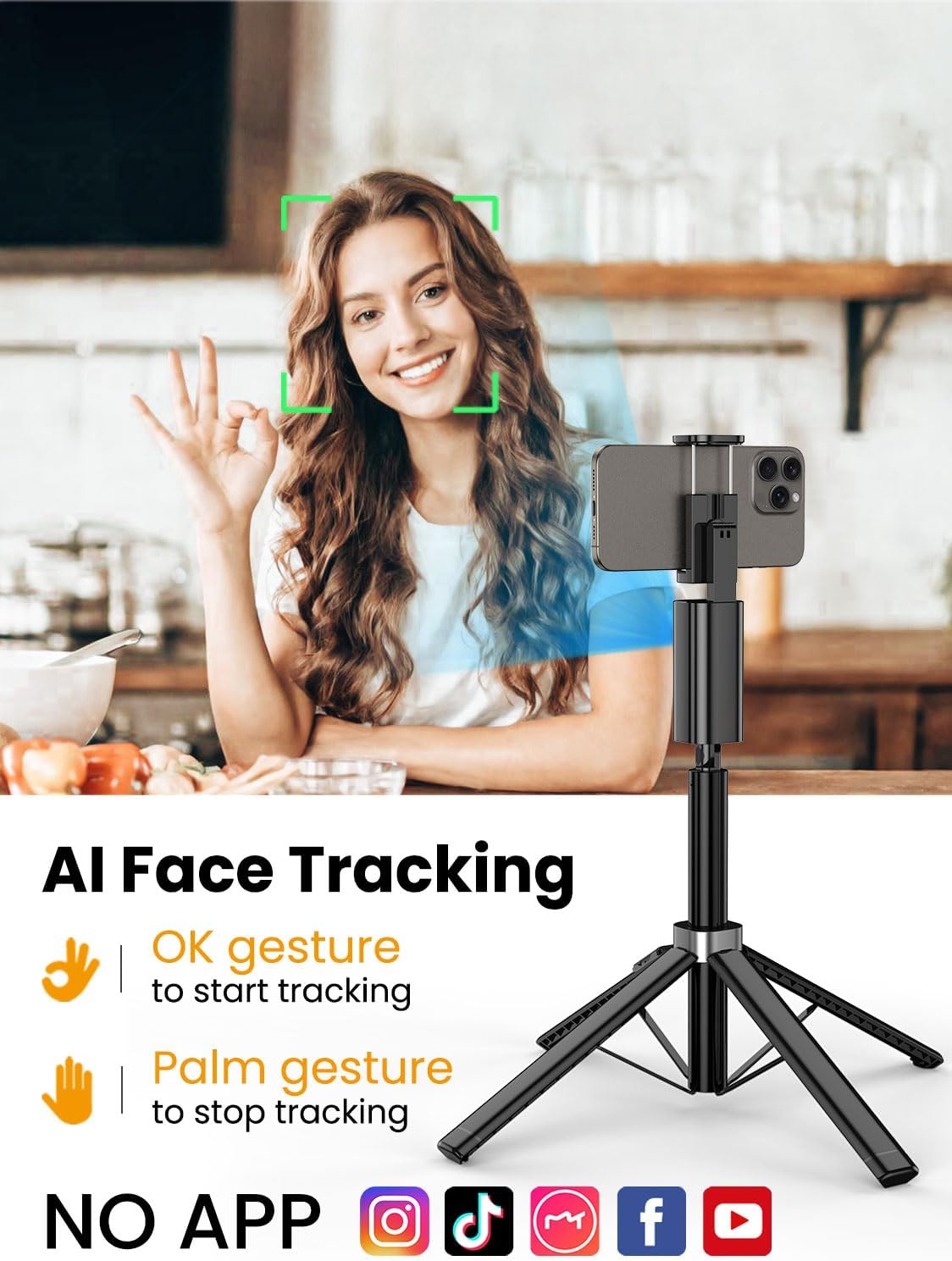
The Smart M3 features an integrated AI tracking camera that does not require an app. It automatically detects and follows faces.
- To Start Tracking: Make an "OK" gesture with your hand towards the AI tracking camera. The device will begin to rotate and follow your face.
- To Stop Tracking: Show your open palm to the AI tracking camera. The device will pause tracking.

6.2 ریموٹ کنٹرول فنکشن
The detachable remote control allows you to operate your smartphone's camera from a distance of up to 10 meters (32 feet). Use it to trigger photos or start/stop video recording, ideal for group shots or solo content creation.

6.3 Extendable Pole
The built-in aluminum alloy extension pole can be adjusted to a maximum height of 57 inches, providing flexibility for various shooting scenarios and wider fields of view.

6.4 ملٹی اینگل شوٹنگ
The Smart M3 offers extensive adjustability for capturing unique perspectives:
- 360° گھومنے والا سر: Allows for panoramic shots and seamless tracking.
- 270° جھکاؤ ایڈجسٹمنٹ: Adjust the vertical angle of your smartphone.
- 360° Balanced Handle: Provides additional rotational flexibility.

6.5 استعمال کے طریقے
The Smart M3 can be used in three primary modes:
- ڈیسک ٹاپ اسٹینڈ: Compact mode for stable placement on flat surfaces.
- Extended Selfie Mode: Use the extended pole for wider selfie shots.
- Floor Tripod Mode: Fully extend the pole and legs for stable, elevated recording.

7 دیکھ بھال
- آلے کو نرم، خشک کپڑے سے صاف کریں۔ کھرچنے والے کلینر یا سالوینٹس کا استعمال نہ کریں۔
- Store the tripod in a cool, dry place when not in use.
- Ensure the remote control is securely stored in its slot to prevent loss.
8 خرابیوں کا سراغ لگانا
- ڈیوائس آن نہیں ہو رہی ہے: یقینی بنائیں کہ فراہم کردہ USB-C کیبل کا استعمال کرتے ہوئے آلہ پوری طرح سے چارج ہے۔
- AI Face Tracking not working: Check for sufficient lighting. Ensure your face is clearly visible to the AI tracking camera. Avoid rapid movements that might cause the tracker to lose focus.
- Remote Control not connecting: Verify that the remote's battery is functional and that Bluetooth is enabled on your smartphone. Re-pair the remote if necessary.
- تپائی عدم استحکام: Ensure the four legs are fully extended and placed on a flat, stable surface. Avoid using in strong winds.
9. وضاحتیں
| فیچر | تفصیلات |
|---|---|
| مصنوعات کے طول و عرض | 1.77 x 1.57 x 57 انچ |
| شے کا وزن | 1.08 پاؤنڈ (0.49 کلوگرام) |
| بیٹریاں | 1 لیتھیم آئن بیٹری درکار ہے (شامل) |
| کارخانہ دار | آوچان |
| برانڈ | آوچان |
| رنگ | سیاہ |
| ہم آہنگ آلات | اسمارٹ فون |
| مواد | ایلومینیم |
| زیادہ سے زیادہ اونچائی | 57 انچ |
| تپائی سر کی قسم | پین ہیڈز |
| ٹانگوں کے حصوں کی تعداد | 4 |
| فولڈ سائز | 12.41 انچ |
10. وارنٹی اور سپورٹ
For warranty information and customer support, please refer to the contact details provided on the product packaging or visit the official AOCHUAN webسائٹ وارنٹی کے دعووں کے لیے اپنی خریداری کی رسید اپنے پاس رکھیں۔


