1. پروڈکٹ ختمview
The Kavey 6.0 Cubic Feet Safe Box is designed to secure your valuables with advanced features including a digital keypad, dual alarm system, and robust construction. This manual provides detailed instructions for installation, operation, and maintenance.
اہم خصوصیات:
- بڑی صلاحیت: 6.0 cubic feet with a double-door design for organized storage.
- اعلی درجے کی سیکورٹی: Digital keypad with 3D glowing buttons, dual alarm system (70dB), and five solid live bolts.
- پائیدار تعمیر: Reinforced low carbon alloy steel with laser-cut precision for anti-prying and anti-drilling resistance.
- سہولت کی خصوصیات: Internal LED lights, mute function, deposit slot, and emergency power jack.
- اندرونی تحفظ: Soft lining and flannel decoration to prevent scratches to valuables.

2. پیکیج کے مشمولات
براہ کرم تصدیق کریں کہ نیچے دی گئی تمام اشیاء آپ کے پیکیج میں شامل ہیں:
- 1 x Kavey 6.0 Cubic Feet Safe Box
- 4 ایکس ایمرجنسی کیز
- 6 ایکس توسیعی پیچ
- 1 x USB Type-C کیبل
- 4 ایکس نان سلپ پیڈ
- 1 ایکس یوزر مینوئل (یہ دستاویز)
3. سیٹ اپ اور انسٹالیشن
3.1 پیک کھولنا
Carefully remove the safe from its packaging. Inspect the safe for any signs of damage. Retain packaging materials for future transport if needed.
3.2 سیف کو لگانا
The Kavey safe is designed for secure mounting to a wall or floor to prevent unauthorized removal. It features pre-drilled holes for easy installation.
- Choose a suitable location for the safe, such as a wall or floor, ensuring it is a stable surface.
- Position the safe and mark the locations for the pre-drilled holes on the mounting surface.
- Drill pilot holes into the marked locations using an appropriate drill bit for your wall/floor material.
- Align the safe's pre-drilled holes with the pilot holes.
- Insert the provided expansion screws through the safe's holes and into the mounting surface.
- سیف کو مضبوطی سے لنگر انداز کرنے کے لیے پیچ کو محفوظ طریقے سے سخت کریں۔

3.3 Installing Non-slip Pads
Attach the four non-slip pads to the bottom of the safe to prevent scratching surfaces and provide stability if not mounted.
4. آپریٹنگ ہدایات
4.1 ابتدائی افتتاح (ایمرجنسی کلید کا استعمال کرتے ہوئے)
Upon first use, or if the batteries are depleted, you will need to use the emergency key.
- Locate the hidden keyhole cover on the digital keypad.
- Insert an emergency key into the keyhole.
- Turn the key clockwise while simultaneously turning the knob clockwise to open the safe door.

4.2 بیٹریاں لگانا
The digital keypad requires batteries (not included). Open the safe using the emergency key, then locate the battery compartment on the inside of the door. Insert the required batteries, ensuring correct polarity.
4.3 Setting/Changing the Digital Password
With the safe door open:
- Press the internal reset button (usually a small red button on the inside of the door). The indicator light on the keypad will illuminate.
- Enter your desired password (typically 3-8 digits) on the digital keypad.
- Press the "#" button to confirm. The indicator light will flash, confirming the new password is set.
- نئے پاس ورڈ کو بند کرنے سے پہلے دروازہ کھلا رکھ کر ٹیسٹ کریں۔
4.4 Opening with Digital Password
- Enter your programmed password on the digital keypad.
- تصدیق کرنے کے لیے "#" بٹن دبائیں۔
- 5 سیکنڈ کے اندر، محفوظ دروازہ کھولنے کے لیے نوب کو گھڑی کی سمت موڑ دیں۔

4.5 Opening with USB Type-C External Power
If the internal batteries are depleted and you do not have the emergency key, you can use the USB Type-C cable for external power.
- Connect the provided USB Type-C cable to the external power jack on the keypad.
- USB کیبل کے دوسرے سرے کو پاور سورس سے جوڑیں (مثلاً پاور بینک، USB وال اڈاپٹر)۔
- Once powered, enter your digital password and press "#".
- Turn the knob clockwise to open the safe door.
4.6 خاموش فنکشن
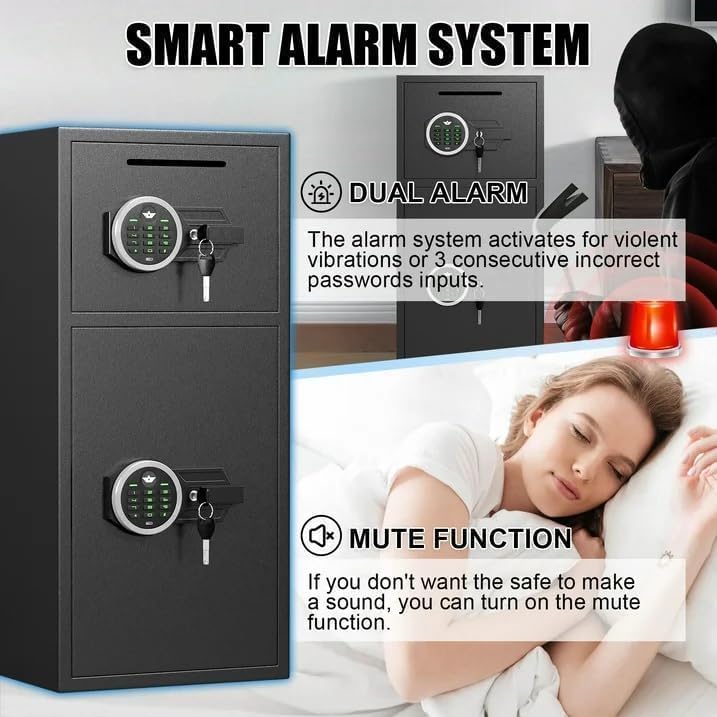
To activate or deactivate the mute function, press the "*" button on the keypad. This will silence keypad beeps and alarm sounds for discreet operation.
4.7 دوہری الارم سسٹم
The safe is equipped with a dual alarm system that activates under specific conditions:
- غلط پاس ورڈ: If three consecutive incorrect passwords are entered, the alarm will sound for a set duration (e.g., 60 seconds).
- Violent Vibration: If the safe detects violent vibrations or tampering, the alarm will activate.
The alarm sound level is approximately 70 decibels. To silence the alarm, enter the correct password or use an emergency key.
4.8 Internal LED Lights
The safe features internal LED lights to illuminate the contents. These lights typically activate automatically when the door is opened and turn off when closed.
4.9 ڈپازٹ سلاٹ کا استعمال
The front deposit slot allows for easy insertion of money or coins without needing to open the main safe door.
5 دیکھ بھال
5.1 بیٹری کی تبدیلی
Replace batteries promptly when the low battery indicator appears on the keypad to ensure continuous operation. Use the emergency key or external power if batteries are fully depleted.
5.2 صفائی
سیف کے بیرونی حصے کو نرم سے صاف کریں، ڈیamp cloth. Avoid abrasive cleaners or solvents that could damage the finish. Do not spray cleaning solutions directly onto the keypad.
5.3 کلیدی ذخیرہ
Store emergency keys in a secure location away from the safe and not inside it. This ensures access in case of forgotten passwords or battery failure.
6 خرابیوں کا سراغ لگانا
- Safe does not open with password:
- Ensure batteries are not depleted. Use external USB Type-C power or emergency key.
- Re-enter the password carefully.
- If the password is forgotten, use the emergency key to open and reset the password.
- کی پیڈ غیر جوابدہ ہے:
- بیٹری کی سطح چیک کریں اور اگر ضروری ہو تو تبدیل کریں۔
- Use the USB Type-C external power cable to provide temporary power.
- الارم غیر متوقع طور پر بجتا ہے:
- This indicates either three incorrect password attempts or detection of violent vibration.
- Enter the correct password or use the emergency key to silence the alarm.
- If the mute function is desired, activate it by pressing the "*" button.
- Safe door feels loose after mounting:
- Ensure all expansion screws are tightened securely.
- Verify the mounting surface is stable and appropriate for the safe's weight.
7. وضاحتیں
| فیچر | تفصیل |
|---|---|
| برانڈ | کاوی |
| ماڈل نمبر | XIN-KM-65 |
| پروڈکٹ کے طول و عرض (D x W x H) | 13.8"D x 13.8"W x 25.5"H |
| صلاحیت | 6.0 کیوبک فٹ |
| لاک کی قسم | الیکٹرانک امتزاج لاک |
| مواد | Reinforced Low Carbon Alloy Steel |
| شے کا وزن | 39.5 پاؤنڈ |
| چڑھنے کی قسم | Under Counter Mount (Wall/Floor Mountable) |
| پانی کی مزاحمت کی سطح | پانی مزاحم نہیں |
| بیٹریاں درکار ہیں۔ | ہاں (شامل نہیں) |
| خصوصی خصوصیات | Combination Lock, Mute Function, Dual Alarm, Internal LED Lights, Deposit Slot |
Note: While the product title includes "Waterproof", the detailed specifications indicate "Not Water Resistant". Please consider this for placement and protection of contents.
8. وارنٹی اور کسٹمر سپورٹ
Kavey is committed to providing high-quality products and excellent customer service.
- لائف ٹائم وارنٹی: مصنوعات زندگی بھر کی وارنٹی کے ساتھ آتی ہے۔
- 90-Day Unconditional Returns: Enjoy a 90-day period for unconditional returns.
- Lifetime Key Matching Service: Kavey offers a lifetime service for key matching.
- 24 گھنٹے آن لائن کسٹمر سروس: For any issues or inquiries, customer service is available 24/7.
کسٹمر سروس سے رابطہ کرنا:
If you encounter any problems with your safe, please contact Kavey customer service directly. Our experienced team will respond within 24 hours to resolve your issue.
To find the seller on Amazon:
- اپنے ایمیزون خریدار کے اکاؤنٹ میں لاگ ان کریں۔
- Find your order for the Kavey safe.
- Click "Get help" to contact the seller.


