1. تعارف
The hohem iSteady V3 Ultra is an advanced 3-axis gimbal stabilizer designed for smartphones, offering enhanced video recording capabilities. It features AI auto-tracking, a detachable touchscreen remote, a built-in extension rod, a tripod, and an integrated fill light. This manual provides detailed instructions for the proper use and maintenance of your device.
2. پیکیج کے مشمولات
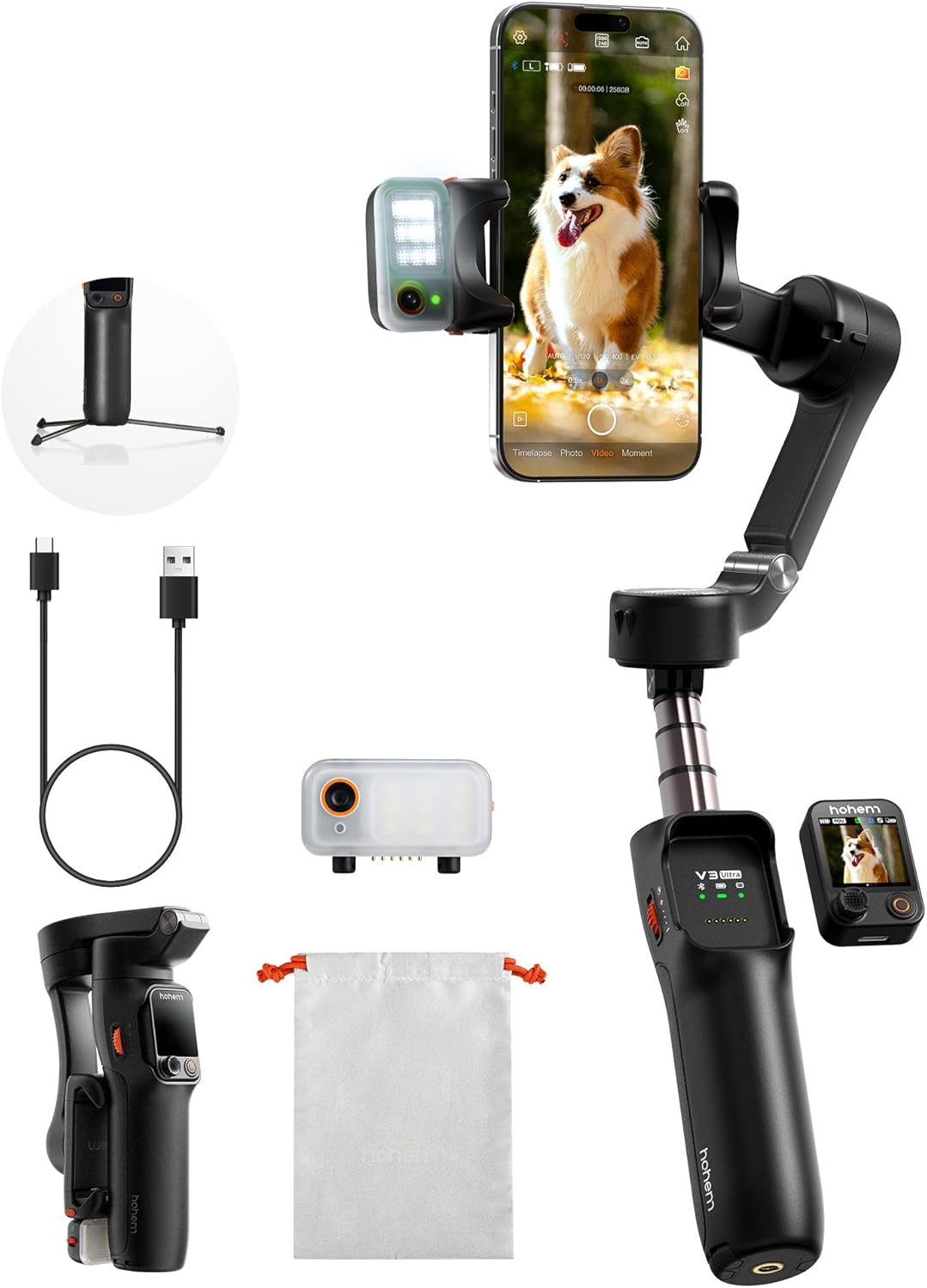
تصدیق کریں کہ نیچے دی گئی تمام اشیاء آپ کے پیکج میں موجود ہیں:
- iSteady V3 Ultra Gimbal Stabilizer
- فل لائٹ کے ساتھ مقناطیسی AI ٹریکر
- ڈی ٹیچ ایبل ٹچ اسکرین ریموٹ کنٹرولر
- USB-C چارجنگ کیبل
- ہیکس کلید
- اسٹوریج پاؤچ
- کوئیک اسٹارٹ گائیڈ
- Warranty Card and Safety Guidelines
3. سیٹ اپ
- جیمبل کو چارج کریں: Connect the USB-C charging cable to the gimbal's charging port and a power source. Ensure the gimbal is fully charged before first use. The battery indicator lights will show charging status.
- اپنے اسمارٹ فون کو ماؤنٹ کریں: فون cl کو بڑھا دیں۔amp and securely place your smartphone in the center. Ensure the phone is balanced to prevent motor strain. The gimbal supports phones up to 14.11 oz (400g).
- Attach AI Tracker and Fill Light: The magnetic AI tracker with built-in fill light can be attached to the top of your smartphone. Ensure it is securely seated.
- Attach Detachable Remote: The 1.22" touchscreen remote controller magnetically attaches to the gimbal handle. It can be detached for remote operation.
- پاور آن: جیمبل پر پاور بٹن کو دبائیں اور تھامیں جب تک کہ اشارے کی لائٹس روشن نہ ہوں۔
- App Connection (Hohem Joy): Download the "Hohem Joy" app from your smartphone's app store. Open the app and follow the on-screen instructions to connect your gimbal via Bluetooth. This enables advanced features and firmware updates.
4. آپریٹنگ ہدایات
4.1 AI آٹو ٹریکنگ
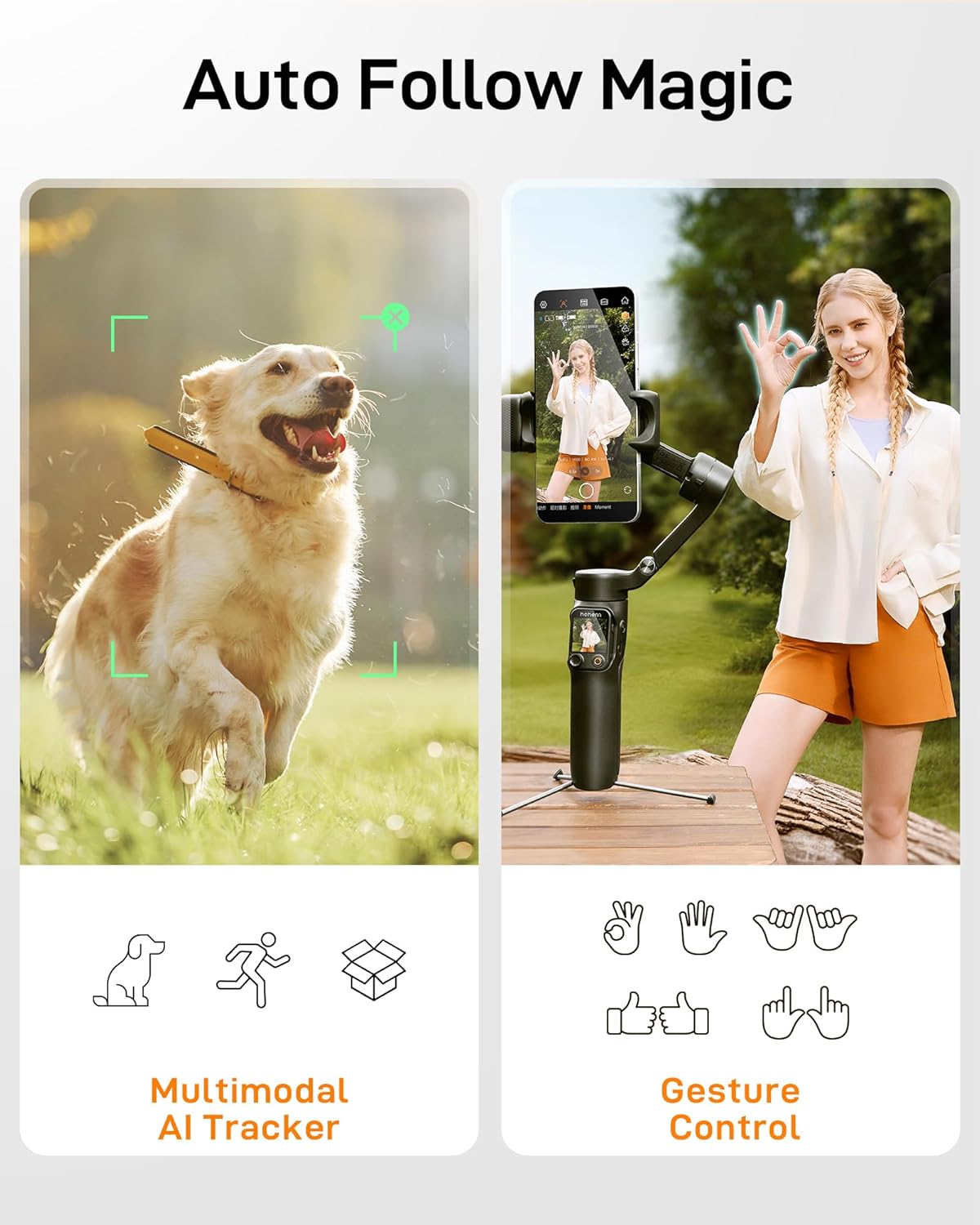
The iSteady V3 Ultra features intelligent AI tracking for faces, pets, and objects. This allows the gimbal to automatically follow your subject, keeping it centered in the frame.
- ایکٹیویشن: Activate AI tracking via the detachable touchscreen remote or the Hohem Joy app.
- موضوع کا انتخاب: The AI tracker can detect and lock onto a subject automatically.
- اشارہ کنٹرول: Use specific hand gestures to initiate or stop tracking, or to switch between landscape and portrait modes.
4.2 Detachable Touchscreen Remote Control
The 1.22" full-color touchscreen remote provides control over the gimbal from up to 33 feet (10 meters) away.
- افعال: Adjust tracking modes, preview shots, fine-tune settings, and control recording.
- لاتعلقی: The remote can be easily detached from the gimbal handle for flexible operation.

4.3 3-محور استحکام
The iSteady V3 Ultra utilizes upgraded iSteady 9.0 technology to provide smooth, stable footage across three axes (pan, tilt, roll), minimizing shakes and jitters.
- پین محور: Allows for 360° infinite rotation.
- جھکاؤ محور: Range of -35° to 45°.
- رول محور: Range of -195° to 135°.

4.4 Built-in Extension Rod and Tripod
The gimbal integrates an 8-inch extension rod and a foldable tripod for versatile shooting angles and stable placement.
- ایکسٹینشن راڈ: Extend the rod for higher or wider shots, ideal for selfies or group photos.
- تپائی: Unfold the base to use the gimbal as a stationary tripod for stable recording or time-lapses.

4.5 Smart Fill Light Control
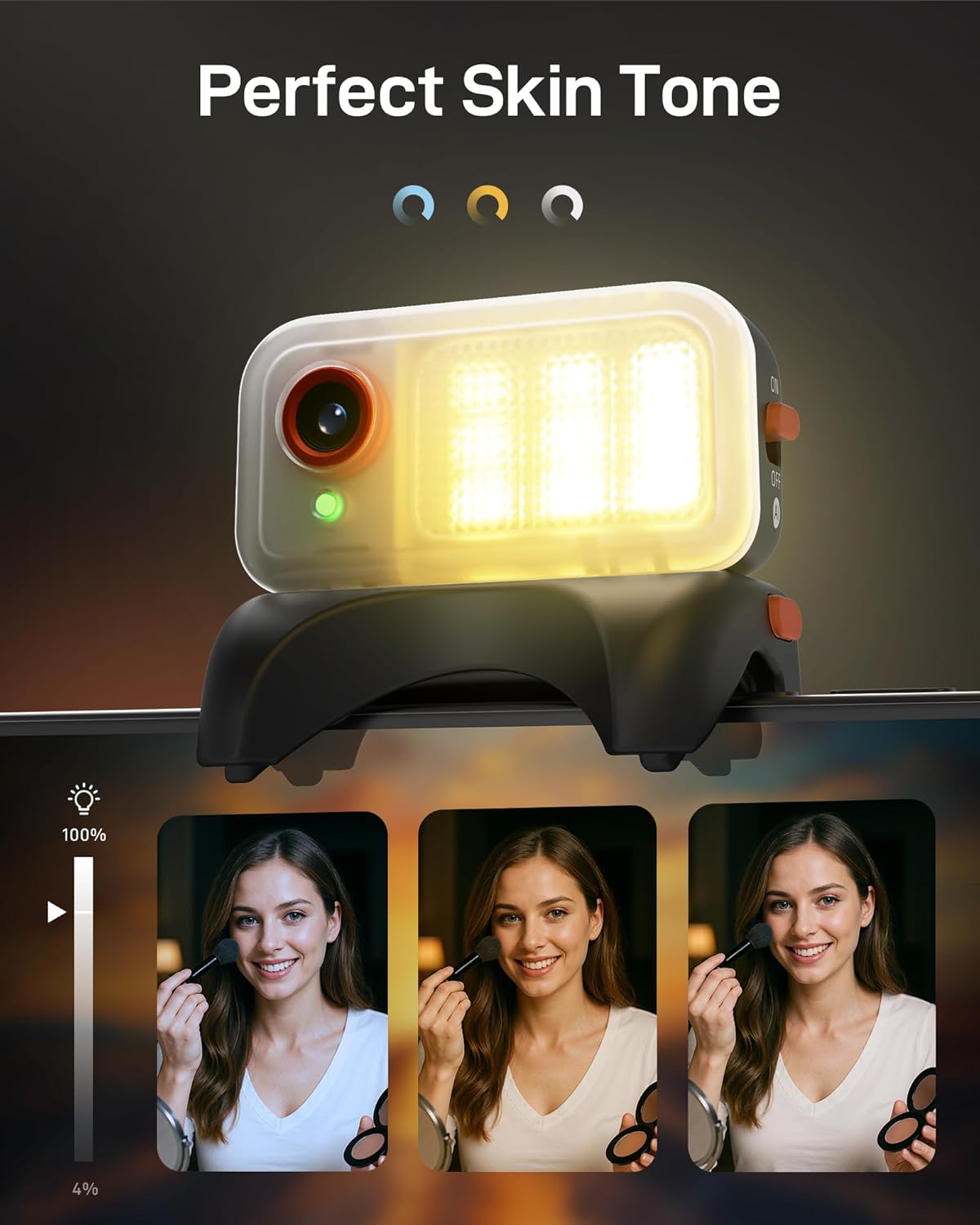
The integrated fill light provides adjustable brightness and color temperature to enhance lighting conditions for your videos and photos.
- ایڈجسٹمنٹ: Control the fill light settings remotely via the touchscreen remote or the Hohem Joy app.
- رنگ درجہ حرارت: Choose between various color temperatures (e.g., cool, neutral, warm) to match your environment.
4.6 Hohem Joy App Features
The companion Hohem Joy app unlocks the full potential of your iSteady V3 Ultra, offering creative modes and intelligent templates.
- Intelligent Templates: Access pre-set shooting modes for various scenarios.
- تخلیقی طریقوں: Explore features like Dolly Zoom, Inception, and Panorama.
- فرم ویئر اپ ڈیٹس: Keep your gimbal updated with the latest features and performance improvements.
5 دیکھ بھال
- صفائی: جمبل کو صاف کرنے کے لیے نرم، خشک کپڑا استعمال کریں۔ مائع کلینر یا سالوینٹس کے استعمال سے پرہیز کریں۔
- ذخیرہ: Store the gimbal in its storage pouch in a cool, dry place when not in use. Avoid extreme temperatures.
- بیٹری کی دیکھ بھال: بیٹری کی زیادہ سے زیادہ زندگی کے لیے، جیمبل کو باقاعدگی سے چارج کریں، چاہے اکثر استعمال میں نہ ہوں۔ لمبے عرصے تک بیٹری کو مکمل طور پر خارج کرنے سے گریز کریں۔
- موٹر انشانکن: If the gimbal appears unbalanced or drifts, perform a motor calibration through the Hohem Joy app.
6 خرابیوں کا سراغ لگانا
- Gimbal پر پاور نہیں ہے:
- Ensure the battery is charged. Connect the gimbal to a power source using the USB-C cable and try again after a few minutes.
- Gimbal is unstable or vibrating:
-
- یقینی بنائیں کہ آپ کا سمارٹ فون مناسب طریقے سے نصب اور cl میں متوازن ہے۔amp.
- Perform a motor calibration via the Hohem Joy app.
- جمبل محور کی آزادانہ نقل و حرکت کو روکنے والی کسی بھی رکاوٹ کو چیک کریں۔
- Cannot connect to Hohem Joy app:
-
- یقینی بنائیں کہ آپ کے اسمارٹ فون پر بلوٹوتھ فعال ہے۔
- جیمبل اور اپنے اسمارٹ فون دونوں کو دوبارہ شروع کریں۔
- Make sure the Hohem Joy app has necessary permissions.
- AI tracking is not working:
-
- Ensure the magnetic AI tracker is securely attached and powered on.
- Verify that the AI tracking feature is activated in the app or via the remote.
- Ensure sufficient lighting and clear visibility of the subject.
7. وضاحتیں
| فیچر | تفصیل |
|---|---|
| ماڈل | iSteady V3 Ultra |
| مصنوعات کے طول و عرض | 7.48"D x 4.84"W x 2.64"H |
| فولڈ سائز | 3.9" x 1.7" x 6.3" |
| شے کا وزن | 15.1 اونس (430 گرام) |
| زیادہ سے زیادہ پے لوڈ | 14.11 اوز (400G) |
| بیٹری | 1 لتیم آئن بیٹری (شامل) |
| بیٹری کی صلاحیت | 1600mAh (approx. 9 hours runtime) |
| چارج کرنے کا وقت | تقریبا 2.5 گھنٹے |
| استحکام | 3-Axis (iSteady 9.0) |
| Controllable Angle (Pan) | 360° Infinite |
| Controllable Angle (Roll) | -195° سے 135° |
| Controllable Angle (Tilt) | -35° سے 45° |
| اے آئی ٹریکنگ کنٹرول | Touchscreen & Gesture Control |
| AI Tracker Sensor | 2MP |
| ریموٹ کنٹرول | Detachable 1.22" Full-Color Touchscreen Remote |
| ایکسٹینشن راڈ کی لمبائی | 8 انچ (تقریبا) |
| ہم آہنگ آلات | Various smartphones including iPhone 17/16/15/14/13/12/11 Pro Max, Samsung Galaxy S21/S21 Ultra S23 Ultra, OnePlus, Huawei, etc. |

8. وارنٹی اور سپورٹ
Your hohem iSteady V3 Ultra Gimbal Stabilizer is covered by a manufacturer's warranty. Please refer to the included Warranty Card for specific terms and conditions, including warranty period and coverage details.
For technical support, troubleshooting assistance, or service inquiries, please visit the official hohem webسائٹ یا ان کے کسٹمر سروس ڈیپارٹمنٹ سے رابطہ کریں۔ آپ پر اضافی وسائل اور اکثر پوچھے گئے سوالات بھی تلاش کر سکتے ہیں۔ hohem Store on Amazon.