1. تعارف
The EPOMAKER Click Lite Wireless Gaming Mouse is designed for precision and versatility across multiple platforms. Featuring tri-mode connectivity, a high-precision PAW3311 sensor, and a lightweight ergonomic design, it offers an enhanced user experience for gaming and productivity.
2. پیکیج کے مشمولات
- 1 x Click Lite Wireless Gaming Mouse
- 1 x 2.4GHz Dongle (stored inside the mouse)
- 1 x Detachable USB-A to USB-C Cable
- 1 x کثیر لسانی صارف دستی
- Extra PTFE Stickers

3. پروڈکٹ ختمview
کلیدی خصوصیات
- ٹرائی موڈ کنیکٹیویٹی: Supports 2.4GHz wireless, Bluetooth (BT1/BT2), and USB-C wired connections.
- اعلی صحت سے متعلق سینسر: Equipped with a PAW3311 sensor, offering adjustable DPI from 800 to 12,000.
- قابل پروگرام بٹن: Features 5 customizable buttons for personalized control.
- دیرپا بیٹری: Integrated 500mAh rechargeable battery provides up to 78 hours of continuous use.
- الٹرا ہلکا پھلکا ڈیزائن: Weighs only 59 grams for comfortable extended use.
- پولنگ کی بلند شرح: Stable 1000Hz polling rate with 1ms latency.
- ایرگونومک ڈیزائن: Shaped for natural fit and fatigue-free operation.

بٹن اور اشارے
- بائیں/دائیں کلک کے بٹن: معیاری ماؤس کے بٹن۔
- اسکرول وہیل: سکرولنگ اور درمیانی کلک کی فعالیت کے لیے۔
- DPI Up/Down Buttons: Located near the scroll wheel for on-the-fly DPI adjustment.
- سائیڈ بٹن: Two programmable buttons on the left side.
- Connectivity Switch: Located on the bottom of the mouse to select 2.4G, BT1, BT2, or USB wired mode.
- Polling Rate Button: Located on the bottom of the mouse to cycle through polling rates.
- ایل ای ڈی اشارے: Provides feedback on DPI, polling rate, and connectivity status.

4. سیٹ اپ
ماؤس کو چارج کرنا
Connect the included USB-A to USB-C cable to the mouse's front USB-C port and to a power source (e.g., computer USB port, USB wall adapter). The LED indicator will show charging status.
کنیکٹیویٹی موڈز
The Click Lite mouse supports three connection modes: 2.4GHz wireless, Bluetooth, and USB-C wired. Use the switch on the bottom of the mouse to select your desired mode.
- 2.4GHz وائرلیس موڈ:
- Remove the 2.4GHz USB dongle from its storage slot on the bottom of the mouse.
- Plug the dongle into an available USB-A port on your computer.
- Slide the switch on the bottom of the mouse to the '2.4G' position. The mouse will automatically connect.
- بلوٹوتھ موڈ (BT1/BT2):
- Slide the switch on the bottom of the mouse to either 'BT1' or 'BT2' position.
- On your device, search for Bluetooth devices and select 'EPOMAKER Click Lite' to pair. The LED indicator will flash during pairing and become solid once connected.
- You can pair with two different Bluetooth devices using BT1 and BT2.
- USB-C وائرڈ موڈ:
- Connect the USB-A to USB-C cable from your computer to the mouse.
- ماؤس ایک وائرڈ ماؤس کے طور پر کام کرے گا اور بیک وقت چارج کرے گا۔
5. آپریٹنگ ہدایات
ڈی پی آئی ایڈجسٹمنٹ
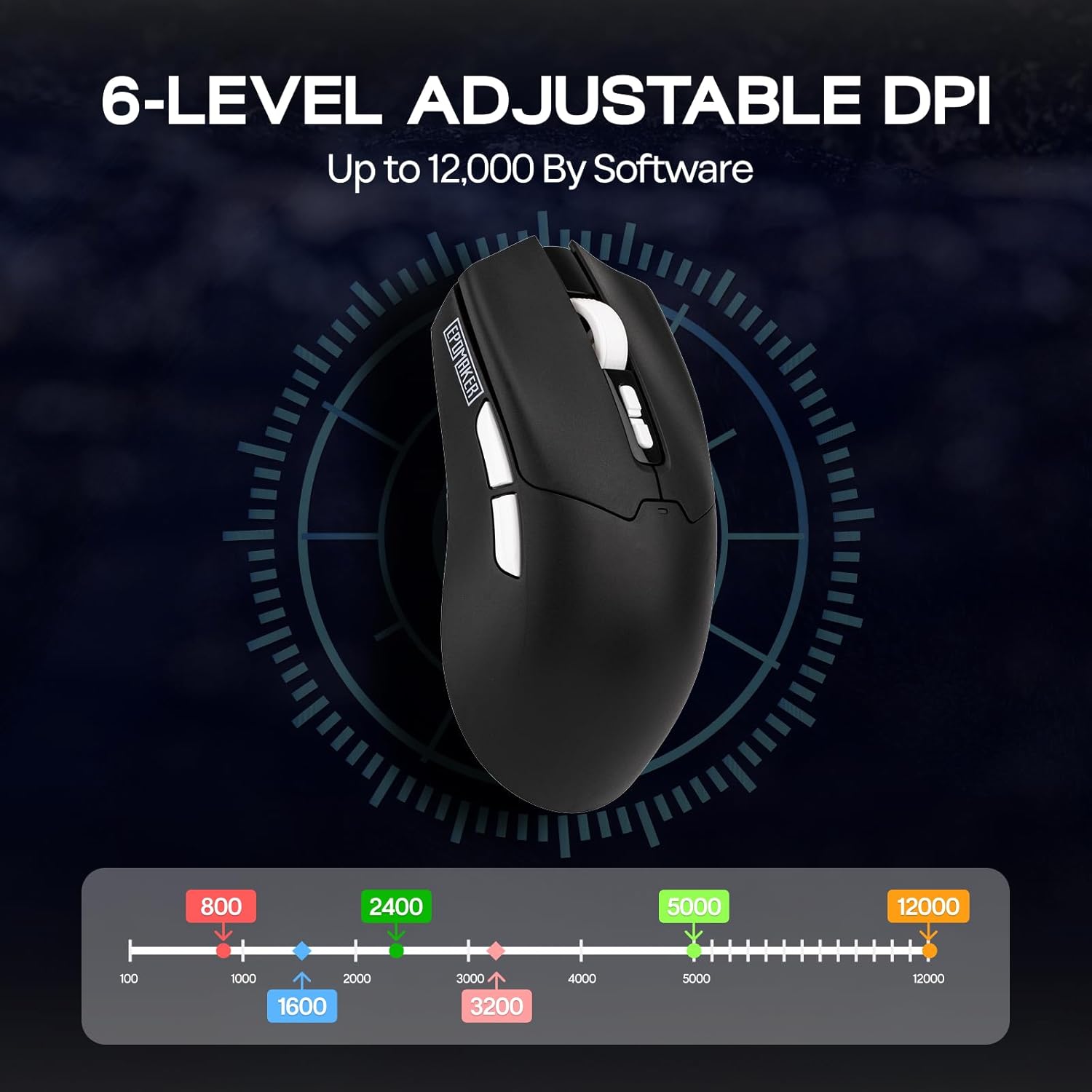
The mouse features adjustable DPI settings from 800 to 12,000. Use the DPI Up/Down buttons located behind the scroll wheel to cycle through the preset DPI levels. The LED indicator will change color to reflect the current DPI setting.
پولنگ ریٹ ایڈجسٹمنٹ
The polling rate can be adjusted using the dedicated button on the bottom of the mouse. Cycle through available polling rates (e.g., 125Hz, 250Hz, 500Hz, 1000Hz) to match your preference and optimize responsiveness.
بیٹری کی حیثیت
The mouse is equipped with a 500mAh rechargeable battery, offering up to 78 hours of continuous use on a full charge. The LED indicator will signal low battery status and charging progress.

6 سافٹ ویئر حسب ضرورت
Enhance your mouse functionality by downloading the official EPOMAKER Click Lite driver software from the EPOMAKER website. The software allows for advanced customization of buttons, DPI, and performance settings.
کلیدی ترتیبات
- Change Key Setting: 5 قابل پروگرام بٹنوں میں سے کسی کو بھی فنکشن دوبارہ تفویض کریں۔
- Rapid-fire Key: Configure a button for rapid, repeated key presses.
- Combo Keys: Assign complex key combinations to a single button.
- میکرو سیٹنگز: Create and assign custom macros for automated sequences.
- افعال: Access a library of predefined functions to assign to buttons.
- غیر فعال کلید: Deactivate specific buttons to prevent accidental presses.
DPI کی ترتیبات
Fine-tune your mouse sensitivity by adjusting DPI levels. The software allows for precise control over DPI values and associated LED colors.
کارکردگی کی ترتیبات
- Move Correction: Enable or disable Straight Correction and Ripple Correction for smoother tracking.
- نیند کی ترتیبات: Adjust the 2.4G and Bluetooth standby times to conserve battery.
- Mouse Report Rate: Set the polling rate (125Hz, 250Hz, 500Hz, 1000Hz).
- Parameter Settings (Debounce): Adjust the debounce time for click registration.

7 دیکھ بھال
- صفائی: Use a soft, dry cloth to clean the mouse surface. For optical sensor, use a cotton swab lightly dampisopropyl الکحل کے ساتھ ختم.
- ذخیرہ: ماؤس کو کسی ٹھنڈی، خشک جگہ پر براہ راست سورج کی روشنی اور انتہائی درجہ حرارت سے دور رکھیں۔
- بیٹری کی دیکھ بھال: بیٹری کو بار بار مکمل طور پر خارج کرنے سے گریز کریں۔ بیٹری کی صحت کو برقرار رکھنے کے لیے ماؤس کو باقاعدگی سے چارج کریں۔
8 خرابیوں کا سراغ لگانا
| مسئلہ | ممکنہ حل |
|---|---|
| Mouse not responding in 2.4GHz mode | Ensure the 2.4GHz dongle is securely plugged into a USB port. Check if the mouse switch is set to '2.4G'. Try a different USB port. |
| بلوٹوتھ کنکشن کے مسائل | Ensure the mouse switch is set to 'BT1' or 'BT2'. Make sure Bluetooth is enabled on your device and the mouse is in pairing mode. Remove previous pairings and re-pair. |
| DPI تبدیل نہیں ہو رہا ہے۔ | Press the DPI Up/Down buttons firmly. If using custom software settings, ensure they are applied correctly. |
| ماؤس کرسر بے ترتیب یا غیر جوابدہ | Clean the optical sensor on the bottom of the mouse. Ensure you are using the mouse on a suitable surface (not highly reflective or transparent). |
| مختصر بیٹری کی زندگی | Ensure the mouse is fully charged. Adjust sleep settings in the software to conserve power. |
9. وضاحتیں
- ماڈل: Click Lite
- کنیکٹوٹی: 2.4GHz وائرلیس، بلوٹوتھ، USB-C وائرڈ
- سینسر: PAW3311 آپٹیکل سینسر
- DPI: 800-12,000 (Adjustable)
- پولنگ کی شرح: 125Hz، 250Hz، 500Hz، 1000Hz
- بٹن: 5 قابل پروگرام بٹن
- بیٹری: 500mAh ریچارج قابل
- بیٹری کی زندگی: 78 گھنٹے تک (مسلسل استعمال)
- وزن: تقریباً 59 گرام
- طول و عرض: 4.76 x 2.5 x 0.04 انچ
- سرعت: 35 جی
- ٹریکنگ کی رفتار: 300 آئی پی ایس
- مطابقت: پی سی، میک، لینکس
10. وارنٹی اور سپورٹ
EPOMAKER products come with a standard manufacturer's warranty. For detailed warranty information, technical support, or service inquiries, please visit the official EPOMAKER webسائٹ یا ان کی کسٹمر سپورٹ ٹیم سے رابطہ کریں۔ وارنٹی کے دعووں کے لیے اپنی خریداری کی رسید اپنے پاس رکھیں۔


