1. تعارف
Thank you for choosing the SONGMICS Electric Height-Adjustable Desk, model LSD028YD02. This manual provides essential information for the safe assembly, operation, and maintenance of your new desk. This ergonomic sit-stand desk is designed to promote a healthy working posture, featuring electric height adjustment, memory presets, a sedentary reminder function, and an integrated USB-C charging port.
براہ کرم استعمال کرنے سے پہلے ان ہدایات کو احتیاط سے پڑھیں اور مستقبل کے حوالے کے لیے انہیں برقرار رکھیں۔

Image 1.1: The SONGMICS Electric Height-Adjustable Desk in an office environment, showcasing اس کا ڈیزائن اور فعالیت۔
2. حفاظتی ہدایات
- اس بات کو یقینی بنائیں کہ اسمبلی سے پہلے تمام اجزاء موجود ہیں اور بغیر کسی نقصان کے ہیں۔ اگر کوئی پرزہ غائب یا خراب ہو تو استعمال نہ کریں۔
- حادثات سے بچنے کے لیے آپریشن کے دوران بچوں اور پالتو جانوروں کو میز سے دور رکھیں۔
- Do not place hands or objects near moving parts (legs, crossbar) during height adjustment to avoid pinching.
- Ensure the power cord is not pinched or damaged. Use only the provided power adapter.
- Do not overload the desk. Refer to the specifications section for the maximum weight capacity.
- مائعات کو براہ راست کنٹرول پینل پر یا برقی اجزاء کے قریب رکھنے سے گریز کریں۔
- If the desk malfunctions, disconnect it from the power supply immediately and contact customer support.
- This desk is intended for indoor use only.
3. پیکیج کے مشمولات
Before beginning assembly, verify that all parts listed in the assembly guide are present. The main components typically include:
- Desktop sections (multiple parts for 180x80cm model)
- Desk legs and feet
- Crossbar and support beams
- Control panel and power adapter
- Cable management accessories (grommets, ties)
- Storage pouch and hook
- Assembly hardware (screws, Allen keys)
- ہدایت نامہ
4. اسمبلی کی ہدایات
Assembly is designed to be straightforward with numbered parts and clear instructions. Follow the steps provided in the included assembly manual for detailed guidance.

Image 4.1: Easy assembly process, typically involving four main stages: attaching desktop sections, mounting legs, securing the crossbar, and adding accessories.
جنرل اسمبلی کے اقدامات:
- Prepare the Desktop: Assemble the multiple desktop sections if applicable, ensuring they are securely joined.
- ٹانگیں جوڑیں: Mount the desk legs to the desktop frame according to the instructions.
- کراس بار انسٹال کریں: Secure the crossbar between the legs to provide structural stability.
- لوازمات شامل کریں: Install the control panel, cable management grommets, storage pouch, and hook.
- پاور سے رابطہ کریں: Once fully assembled, connect the power adapter to the control box and a power outlet.
5. آپریٹنگ ہدایات
5.1 کنٹرول پینل ختمview

Image 5.1: The desk's control panel, illustrating height adjustment range and key functions.
The control panel features an LED display showing the current height, along with buttons for various functions:
- ایل ای ڈی سکرین: Displays the current desk height in centimeters.
- اوپر (▲) / نیچے (▼) بٹن: Press and hold to manually adjust the desk height.
- میموری بٹن (1, 2, 3, 4): Save and recall preferred desk heights.
- Sedentary Reminder Button (Clock Icon): Activates or deactivates the sedentary reminder.
- USB-C پورٹ: ہم آہنگ آلات کو چارج کرنے کے لیے۔
5.2 اونچائی کی ایڈجسٹمنٹ
To adjust the desk height manually, press and hold the اوپر (▲) or نیچے (▼) button until the desk reaches your desired height. Release the button to stop movement.
5.3 میموری پرسیٹس سیٹ کرنا
The desk allows you to save up to four preferred heights for quick adjustment.

Image 5.2: The 4-height memory function allows for personalized ergonomic settings.
- اوپر/نیچے بٹنوں کا استعمال کرتے ہوئے ڈیسک کو اپنی مطلوبہ اونچائی پر ایڈجسٹ کریں۔
- دبائیں 'S' (Set) button (often represented by a gear icon or 'M' for Memory, depending on the model, but typically the fourth button from the right on the control panel). The LED display will show 'S-'.
- 3 سیکنڈ کے اندر، میموری بٹن میں سے ایک دبائیں (1، 2، 3، یا 4). The display will show 'S-1', 'S-2', etc., confirming the height is saved.
- محفوظ کردہ اونچائی کو یاد کرنے کے لیے، صرف اسی میموری بٹن کو دبائیں (1، 2، 3، یا 4)۔ ڈیسک خود بخود محفوظ شدہ پوزیشن پر چلا جائے گا۔
5.4 Sedentary Reminder Function
The sedentary reminder prompts you to change your posture at regular intervals. To activate or deactivate this function, press the Sedentary Reminder button (Clock Icon). When active, the desk will remind you to switch between sitting and standing positions every 15 minutes.
5.5 USB-C چارجنگ پورٹ۔
The integrated USB-C port provides convenient charging for your compatible devices.

Image 5.3: The USB-C port offers 15W fast charging for your devices.
Simply plug your USB-C compatible device into the port on the control panel to begin charging. The port supports 15W fast charging.
6. خصوصیات اور ڈیزائن
6.1 Ergonomic Flexibility
The desk's height adjustment range from 72 cm to 120 cm allows for seamless transitions between sitting and standing positions, promoting better posture and reducing discomfort during long work sessions. It is suitable for users between 150 cm and 190 cm tall.
6.2 Stable and Quiet Operation

Image 6.1: The desk features a stable steel frame, quiet motor, and has undergone extensive testing for durability.
The high-quality steel frame and motor ensure smooth and stable height adjustments, even with a load of up to 70 kg. The operating noise level is less than 48 dB, comparable to a quiet library, allowing you to maintain focus without distraction.

Image 6.2: Noise level comparison, highlighting the desk's quiet operation at less than 48 dB.
6.3 Integrated Cable Management and Accessories
The desk is equipped with features to help keep your workspace organized:
- Cable Grommets: Two integrated cable grommets allow for neat routing of power and data cables through the desktop.

Image 6.3: Two cable grommets for organized cable routing.
- کیبل ٹائیز: Three reusable cable ties are included to bundle and secure cables under the desk.

Image 6.4: Included cable ties for managing wires.
- Storage Pouch and Hook: A fabric pouch provides storage for small items, and a large hook is available for hanging bags or headphones.

Image 6.5: Convenient storage pouch and hook for accessories.
6.4 Desktop Construction
The desktop is constructed from engineered wood with quality reinforcements to prevent deformation and ensure long-term stability. A textured desk pad is also included to enhance mouse glide and protect the surface.

Image 6.6: Quality reinforcements ensure the desktop maintains its shape and stability over time.
7 دیکھ بھال
- صفائی: میز کی سطح کو نرم سے صاف کریں، ڈیamp کپڑا سخت کیمیکلز یا کھرچنے والے کلینر سے پرہیز کریں۔
- معائنہ: وقتاً فوقتاً تمام پیچ اور کنکشن چیک کریں تاکہ یہ یقینی بنایا جا سکے کہ وہ سخت ہیں۔ اگر ضروری ہو تو دوبارہ سخت کریں۔
- کیبل مینجمنٹ: Ensure cables are neatly organized and not interfering with the desk's movement.
- پاور کی ہڈی: نقصان کے کسی بھی نشان کے لیے بجلی کی ہڈی کا باقاعدگی سے معائنہ کریں۔
8 خرابیوں کا سراغ لگانا
اگر آپ کو اپنے ڈیسک کے ساتھ مسائل کا سامنا کرنا پڑتا ہے تو، مندرجہ ذیل عام ٹربل شوٹنگ کے اقدامات سے رجوع کریں:
| مسئلہ | ممکنہ وجہ | حل |
|---|---|---|
| ڈیسک حرکت نہیں کرتا۔ | Power disconnected, motor overload, control panel error. | Check power connection. Disconnect power for 10 minutes, then reconnect. Reduce weight on desk. |
| ڈیسک غیر مساوی طور پر حرکت کرتا ہے یا غیر معمولی شور کرتا ہے۔ | ناہموار بوجھ، ڈھیلے کنکشن، رکاوٹ۔ | Distribute weight evenly. Check all assembly connections. Remove any obstructions. |
| میموری فنکشن کام نہیں کر رہا ہے۔ | ترتیب دینے کا طریقہ کار غلط ہے۔ | Refer to Section 5.3 for correct memory preset instructions. |
| USB-C port not charging. | Device incompatibility, cable issue, power issue. | Ensure device is USB-C compatible. Try a different cable. Check desk power. |
اگر ان حلوں کو آزمانے کے بعد بھی مسئلہ برقرار رہتا ہے، تو مزید مدد کے لیے براہ کرم کسٹمر سپورٹ سے رابطہ کریں۔
9. وضاحتیں
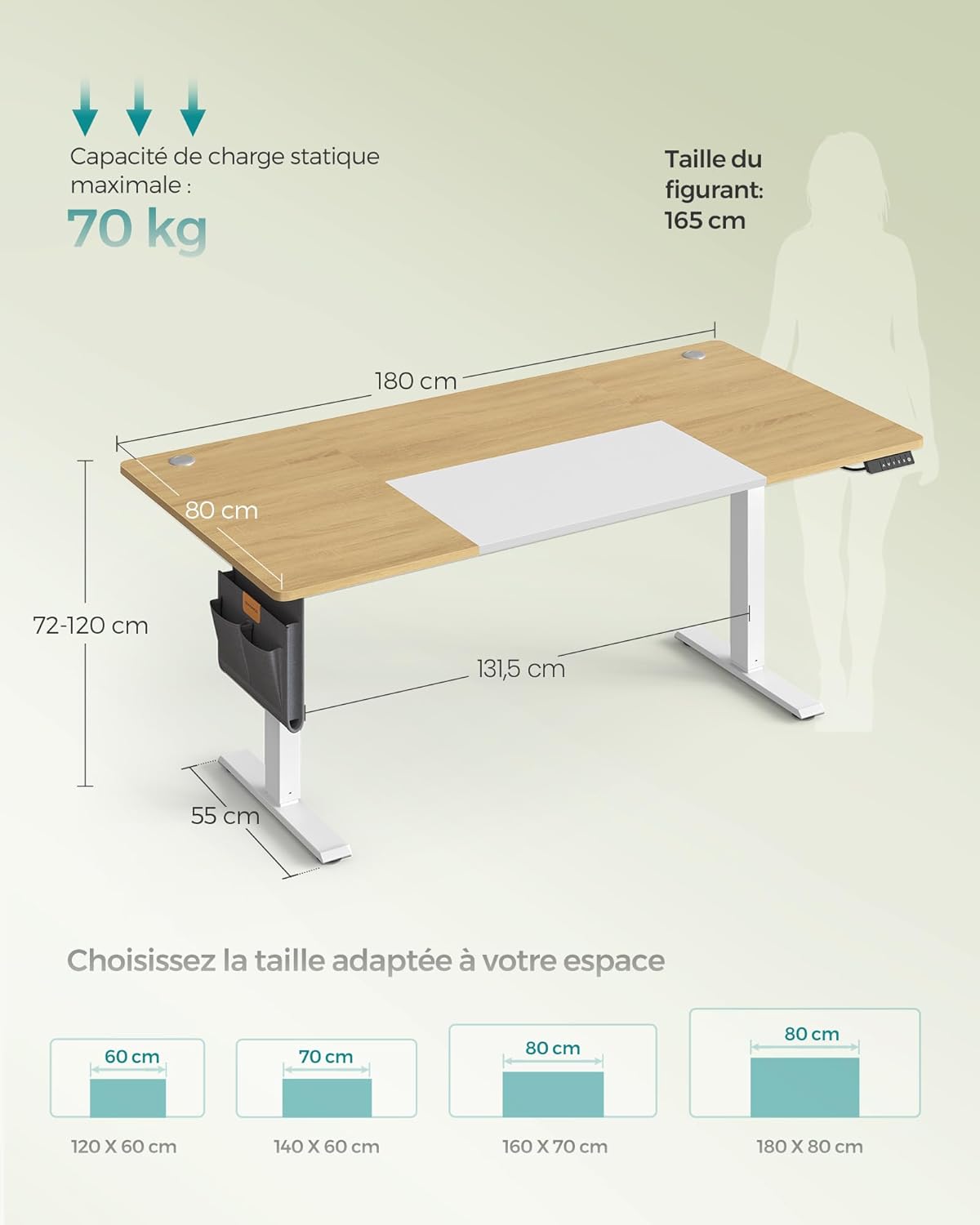
Image 9.1: Key dimensions and maximum load capacity of the desk.
| فیچر | تفصیل |
|---|---|
| ماڈل | LSD028YD02 |
| طول و عرض (L x W x H) | 180 x 80 x 72-120 سینٹی میٹر |
| اونچائی کی ایڈجسٹمنٹ کی حد | 72 سینٹی میٹر - 120 سینٹی میٹر |
| زیادہ سے زیادہ جامد لوڈ کی صلاحیت | 70 کلوگرام |
| مواد | Engineered Wood (Particleboard), Steel |
| وزن | 28 کلوگرام |
| شور کی سطح | <48 ڈی بی |
| USB-C آؤٹ پٹ | 15W فاسٹ چارجنگ |
| خصوصی خصوصیات | Ergonomic, 4-Height Memory Function, Sedentary Reminder, USB-C Port, Cable Management |
10. وارنٹی اور سپورٹ
SONGMICS products are designed for quality and durability. For warranty information, product support, or to report any issues, please refer to the contact details provided with your purchase or visit the official SONGMICS website. Please have your model number (LSD028YD02) and purchase information ready when contacting support.


