تعارف
The Volkano Galena Series Wireless Keyboard is a compact, versatile input device designed for efficiency and portability. It offers multi-device connectivity and seamless switching, making it suitable for various operating systems including Windows, Android, and MacOS. This manual provides essential information for setting up, operating, maintaining, and troubleshooting your keyboard.
پیکیج کے مشمولات
- Volkano Galena Series Wireless Keyboard
- 2 ایکس اے اے اے بیٹریاں
- ہدایت نامہ
سیٹ اپ
1. بیٹری کی تنصیب
The Volkano Galena Series Wireless Keyboard operates on two AAA batteries. These are included in the package.
- کی بورڈ کے نیچے والے حصے میں بیٹری کی ٹوکری کا احاطہ تلاش کریں۔
- کور کو کھول کر سلائیڈ کریں۔
- Insert the two AAA batteries, ensuring correct polarity (+ and - terminals).
- بیٹری کے کمپارٹمنٹ کور کو محفوظ طریقے سے بند کریں۔
2. پر / آف پاور
Locate the power switch on the keyboard. Slide it to the 'ON' position to power on the keyboard. Slide it to the 'OFF' position when not in use to conserve battery life. The keyboard features an auto-power saving mode to further extend battery life during periods of inactivity.
3. بلوٹوت جوڑی بنانا
The keyboard supports Bluetooth 5.0 for a stable wireless connection. It can be paired with up to two devices simultaneously.

Image: The Volkano Galena Series keyboard, illustrating its compact design and key features such as Bluetooth 5.0 + BT 3.0 connectivity, multi-device switching, anti-slip rubber feet, and compatibility with Windows and Android operating systems.
- یقینی بنائیں کہ کی بورڈ آن ہے۔
- On your device (Laptop, PC, Smart TV, Tablet), enable Bluetooth and search for available devices.
- دبائیں اور تھامیں۔ Fn + 1۔ key combination for the first device, or Fn + 2۔ for the second device, until the corresponding indicator light (usually above the '1' or '2' key) starts blinking, indicating pairing mode.
- Select "Volkano Galena" or a similar name from the list of available Bluetooth devices on your screen.
- Follow any on-screen prompts to complete the pairing process. The indicator light will stop blinking once successfully paired.
آپریٹنگ ہدایات
1 ملٹی ڈیوائس سوئچنگ
The keyboard allows for quick switching between two paired devices.

تصویر: ایک تفصیلی view of the Volkano Galena Series keyboard, showcasing its compact form factor and features like Bluetooth device switching, non-slip feet, a dedicated Copilot shortcut key, scissor-structure keycaps, and auto-power saving mode.
- To switch to the first paired device, press Fn + 1۔.
- To switch to the second paired device, press Fn + 2۔.
2 فنکشن کیز (Fn)
The keyboard includes multimedia and special function keys accessible by pressing the Fn متعلقہ F-keys یا دیگر نامزد کلیدوں کے ساتھ مل کر کلید۔
- Fn + F1-F12۔: Access various multimedia controls and system functions (e.g., volume, playback, screen brightness). Refer to the icons on the F-keys for specific functions.
- Fn + Q/W/E: Switch between operating system layouts (e.g., Android, Windows, iOS/MacOS).
- Copilot Shortcut Key: A dedicated key for quick access to AI assistant features on compatible operating systems.
3. ٹائپنگ کا تجربہ
The keyboard features quiet keys with a scissor structure, providing a comfortable and responsive typing experience suitable for focused environments.
دیکھ بھال
1. صفائی
- Ensure the keyboard is powered off before cleaning.
- Use a soft, dry, lint-free cloth to wipe the surface of the keyboard.
- ضدی گندگی کے لیے، ہلکے سے ڈیampur کپڑا جس میں پانی یا ہلکا، غیر کھرچنے والا کلینر۔ ضرورت سے زیادہ نمی سے بچیں۔
- صفائی کے حل کو براہ راست کی بورڈ پر نہ چھڑکیں۔
- Use compressed air to remove debris from between the keys.
2. ذخیرہ
- کی بورڈ کو براہ راست سورج کی روشنی اور انتہائی درجہ حرارت سے دور ٹھنڈی، خشک جگہ پر اسٹور کریں۔
- If storing for an extended period, remove the AAA batteries to prevent leakage.
خرابی کا سراغ لگانا
- Keyboard not powering on: Check if the batteries are correctly inserted and fully charged. Replace batteries if necessary. Ensure the power switch is in the 'ON' position.
- کی بورڈ بلوٹوتھ کے ذریعے منسلک نہیں ہو رہا ہے:
- یقینی بنائیں کہ آپ کے آلے پر بلوٹوتھ فعال ہے۔
- Make sure the keyboard is in pairing mode (indicator light blinking).
- Delete previous pairings on your device and attempt to re-pair.
- Ensure the keyboard is within the 8-10 meter Bluetooth range of your device.
- کی بورڈ اور اپنے آلے دونوں کو دوبارہ شروع کرنے کی کوشش کریں۔
- چابیاں جواب نہیں دے رہی ہیں: Check battery level. Ensure the keyboard is properly connected to your device. Clean any debris from around the keys.
- وقفہ یا تاخیر ان پٹ: Ensure there are no strong interferences (e.g., other wireless devices) nearby. Check battery level.
وضاحتیں
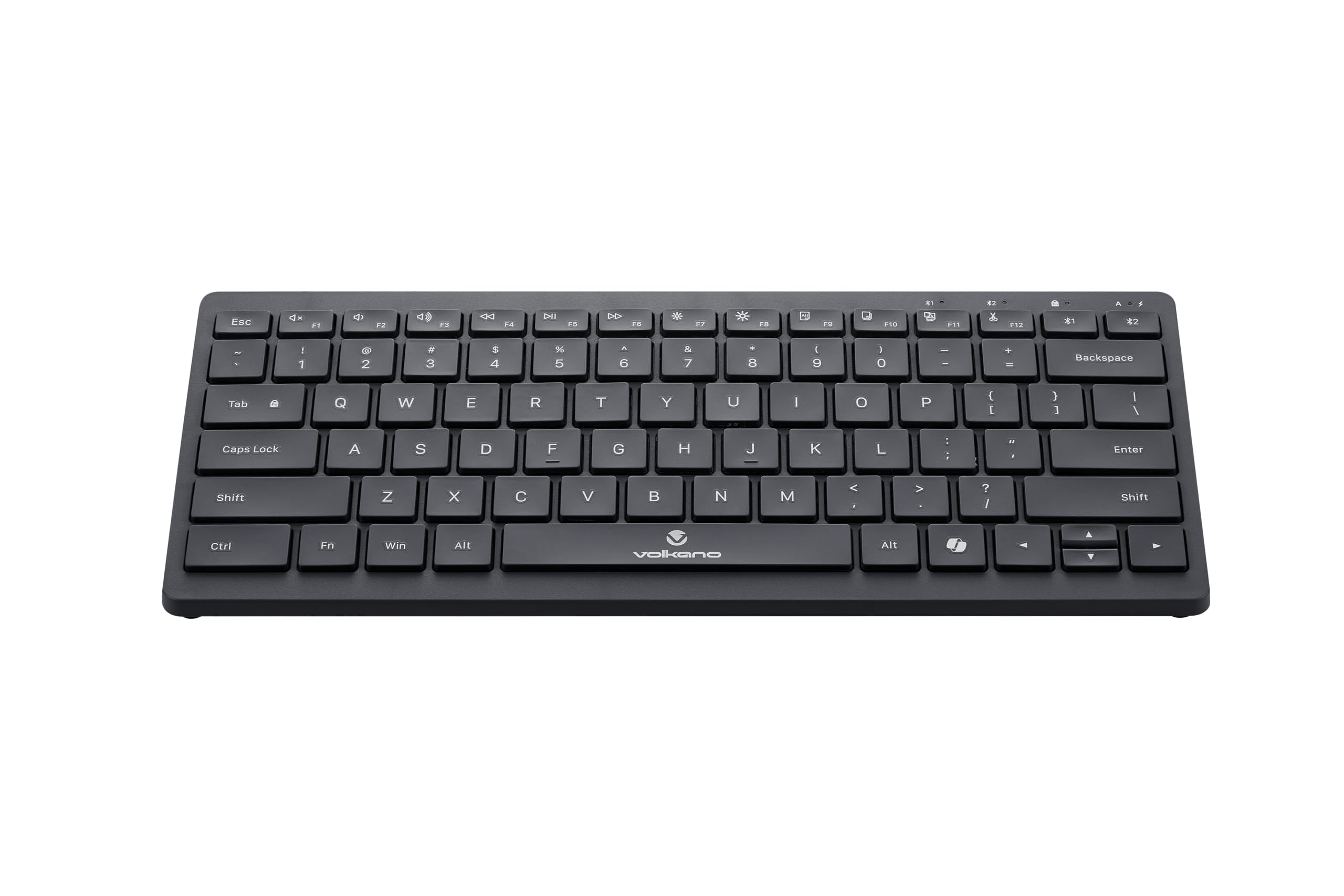
Image: A clear, angled view of the Volkano Galena Series Wireless Keyboard, highlighting its sleek black design and full key layout.
| فیچر | تفصیل |
|---|---|
| ماڈل نمبر | VK-20247-BK |
| کنیکٹوٹی | بلوٹوتھ وائرلیس ٹیکنالوجی |
| بلوٹوتھ ورژن | Bluetooth 5.0 + Bluetooth 5.0 (Dual Channel) |
| وائرلیس رینج | 8-10 میٹر |
| طاقت کا منبع | 2 x AAA الکلین بیٹریاں (شامل) |
| کلیدی قسم | Scissor Structure Keycaps |
| خصوصی خصوصیات | Quiet keys, Multi-device pairing, Instant switching, Anti-slip rubber base, Auto-power saving mode, Lightweight, Portable, Copilot Shortcut Key |
| ہم آہنگ آلات | Laptop, PC, Smart TV, Tablet (Windows, Android, MacOS) |
| طول و عرض (L x W x H) | 29.5L x 12.8W x 2.2H سینٹی میٹر |
| مواد | پلاسٹک |
| رنگ | سیاہ |
وارنٹی اور سپورٹ
1. محدود وارنٹی
This Volkano product is covered by a 12-Month Limited Coverage from the date of purchase. You can extend this coverage by an additional 12 months, for a total of 24 months, by registering your product with Volkano.
2. کسٹمر سپورٹ
For any questions, assistance, or support regarding your Volkano Galena Series Wireless Keyboard, please contact Volkano customer service through their official channels. Refer to the Volkano webرابطے کی تفصیلات کے لیے سائٹ یا مصنوعات کی پیکیجنگ۔


