1. تعارف
This manual provides detailed instructions for the setup, operation, and maintenance of your Wyze Battery Video Doorbell Wireless Camera (Model WYZEBVD). This device offers advanced home security features, including high-definition video, color night vision, two-way audio, and smart notifications for person and package detection.
The Wyze Battery Video Doorbell provides a 1:1 head-to-toe view with a 150°x150° ultra-wide field of view, allowing you to see visitors from head-to-toe and packages placed directly on your doorstep. It captures all porch arrivals and departures in 1536x1536 HD+ video, enhanced by an award-winning starlight sensor for vivid color images even in low light conditions.

Image 1.1: Wyze Battery Video Doorbell showcasing 1536x1536 Video Resolution, Color Night Vision, IP65 Weatherproof rating, Battery Powered, and Two-way Audio.
2. باکس میں کیا ہے۔
Your Wyze Battery Video Doorbell package includes the following components:
- Wyze Battery Video Doorbell
- Corner Back Plate
- USB-C چارجنگ کیبل
- Flat Back Plate
- جمپ وائر
- 2 Extension Wires
- 3 وائر گری دار میوے
- 3 Expansion Tubes
- 3 لمبی پیچ
- ڈوربل ڈیٹیچنگ پن
Additionally, a Wyze Chime Controller, Wyze Universal Wi-Fi Chime, or a Wyze Cam (all sold separately) can be used to provide chime sounds within your home.
3. سیٹ اپ
The Wyze Battery Video Doorbell is designed for easy installation in minutes, with instant Bluetooth setup and no screws needed for initial placement. Mounting hardware is included for permanent installation, and a corner plate is provided for optimal viewزاویہ
3.1 پاورنگ کے اختیارات
The doorbell offers flexible power options:
- Wire-Free: Enjoy up to 6 months of battery life. The built-in USB-C rechargeable battery allows for easy charging by detaching the doorbell and connecting it to the included USB-C Charging Cable.
- وائرڈ: For continuous power and 24/7 local recording, the doorbell can be hardwired. This option requires a Micro SD card (sold separately) for continuous recording.
3.2 Initial Setup with Wyze App
Before mounting, ensure the doorbell is fully charged. Download the Wyze app on your smartphone and follow the on-screen instructions for Bluetooth setup. The app will guide you through connecting the doorbell to your home Wi-Fi network (2.4GHz only).
Video 3.1: An introductory video demonstrating the features and ease of setup for the Wyze Battery Video Doorbell.
3.3 چڑھنا
Choose your preferred mounting method:
- چپکنے والی چڑھائی: For a screw-free installation, use the included 3M adhesive tape on the flat back plate to attach the doorbell to a clean, dry surface.
- سکرو ماؤنٹنگ: For a more permanent installation, use the provided screws and expansion tubes with either the flat or corner back plate. The corner plate helps optimize the viewing angle if your door is not flush with the wall.
4. آپریٹنگ ہدایات
4.1 لائیو View اور ریکارڈنگ
Access the live feed from your doorbell via the Wyze app. The 1536x1536 HD+ resolution provides clear video, and the 1:1 aspect ratio ensures a head-to-toe view of visitors. You can manually record video or take photos from the live view.

Image 4.1: Demonstrates the 1536x1536 HD+ video resolution, showing both a close-up of a person at the door and a wider view of a driveway.
4.2 Two-Way Audio & Auto-Response
Communicate with visitors directly through the Wyze app. Press the "talk" button to speak, or use pre-recorded auto-responses for quick interactions.
4.3 Smart Notifications & Voice Deterrence
Receive instant notifications on your phone for any detected visitors or package deliveries. The doorbell can also be configured to play a voice prompt, alerting visitors that they are being recorded, serving as a deterrent.

Image 4.2: Illustrates the AI Person & Package Detection feature, showing a person placing a package on a porch with a 'PACKAGE DETECTED' notification.

Image 4.3: Shows the Motion-Activated Voice Deterrence feature in action, with a speech bubble indicating the doorbell is informing a visitor they are being recorded.
4.4 کلر نائٹ ویژن
The doorbell's starlight sensor amplifies low light, providing vivid color images even at night, ensuring clear visibility around the clock.
5 دیکھ بھال
5.1 بیٹری چارجنگ
If operating wire-free, the doorbell's battery can last up to 6 months. When the battery is low, detach the doorbell from its mount and charge it using the included USB-C Charging Cable. Reattach once fully charged.
5.2 Local Storage
The Wyze Battery Video Doorbell supports local storage via a Micro SD card (not included) up to 256 GB. This allows for 24/7 continuous recording when the doorbell is hardwired. The microSD card must be formatted to FAT32 or exFAT.
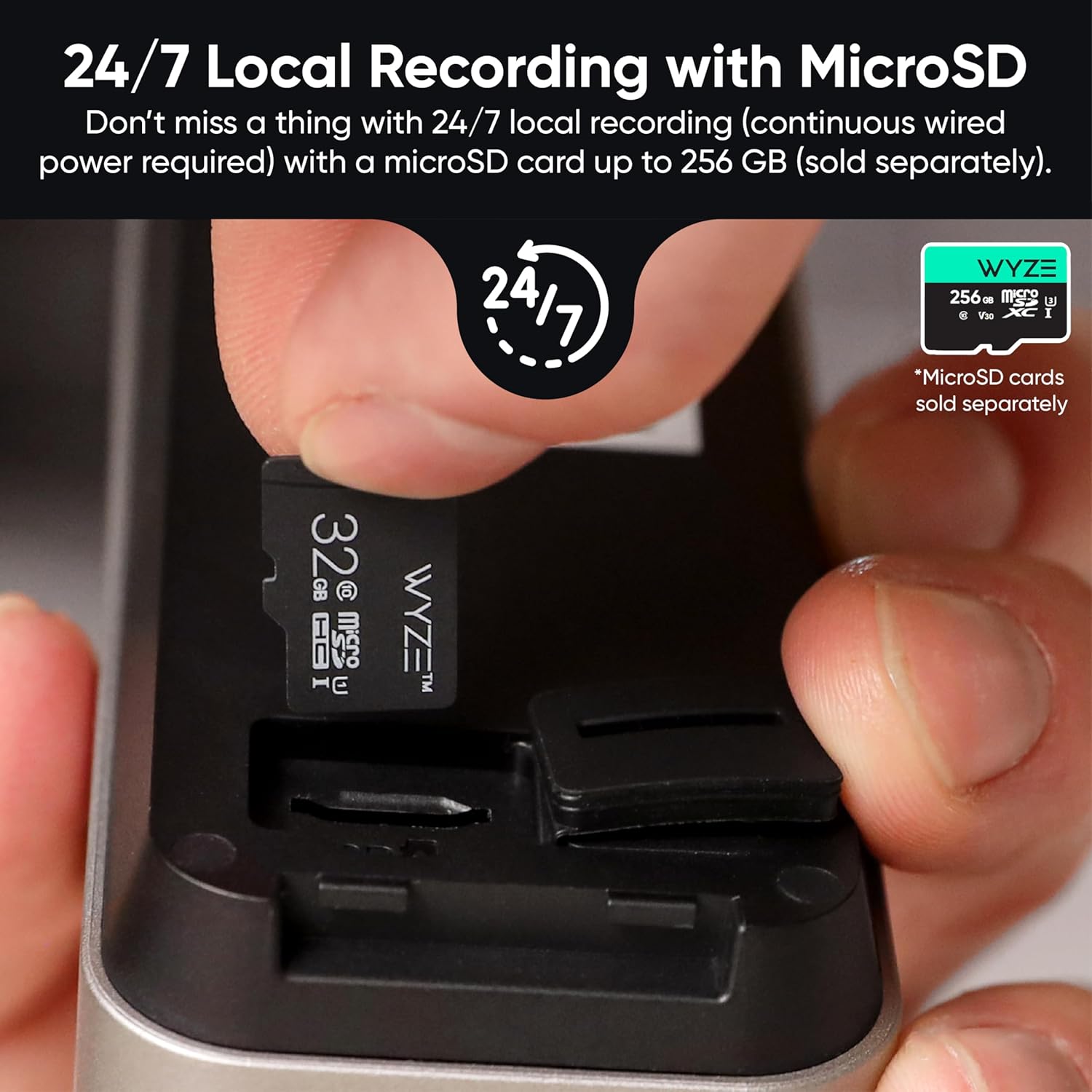
Image 5.1: Demonstrates the insertion of a Micro SD card for 24/7 local recording, highlighting that microSD cards are sold separately.
5.3 کلاؤڈ اسٹوریج
For 14 days of cloud video storage, you can subscribe to Wyze Cam Plus. No monthly fee or subscription is required for basic functionality and local storage.
6 خرابیوں کا سراغ لگانا
If you encounter issues with your Wyze Battery Video Doorbell, consider the following:
- کنیکٹوٹی: Ensure your Wi-Fi network is 2.4GHz. Check the signal strength in the Wyze app.
- بیٹری کی زندگی: Battery life can vary based on usage and environmental factors (e.g., cold weather). Ensure regular charging.
- اطلاعات: Verify app notification settings on your smartphone and within the Wyze app.
- ویڈیو کا معیار: اپنے Wi-Fi کنکشن کی رفتار چیک کریں۔ یقینی بنائیں کہ کیمرے کا لینس صاف اور رکاوٹوں سے پاک ہے۔
- مائیکرو ایسڈی کارڈ: Ensure the card is correctly inserted and formatted to FAT32 or exFAT.
For further assistance, refer to the official Wyze support resources.
7. وضاحتیں
| فیچر | تفصیل |
|---|---|
| ماڈل کا نام | WYZEBVD |
| انڈور / آؤٹ ڈور استعمال | آؤٹ ڈور |
| ہم آہنگ آلات | Smartphone, Amazon Alexa, Google Assistant, IFTTT |
| طاقت کا منبع | Battery Powered (rechargeable Lithium Ion) or Wired (12-24V AC) |
| کنیکٹیویٹی پروٹوکول | Wi-Fi (2.4GHz) |
| چڑھنے کی قسم | Doorbell Mount (adhesive or screw) |
| ویڈیو کیپچر ریزولوشن | 1536p (1536x1536 HD+) |
| رنگ | سیاہ |
| آئٹم کے طول و عرض (L x W x H) | 5.62 x 2 x 1.38 انچ |
| پانی کی مزاحمت کی سطح | پانی مزاحم (IP65) |
| فلیش میموری کی قسم | Micro SD (up to 256 GB, FAT32/exFAT) |
| کم روشنی والی ٹیکنالوجی | کلر نائٹ ویژن |
| انتباہ کی قسم | آڈیو اور موشن |
| خصوصی خصوصیت | 2 طرفہ آڈیو |
| یو پی سی | 810083475721 |
8. وارنٹی اور سپورٹ
For warranty information and customer support, please visit the official WYZE website or contact their customer service. Details regarding product registration, troubleshooting guides, and frequently asked questions are available online.


