1. پروڈکٹ ختمview اور خصوصیات
The DANFI AUDIO DF TE-2017 is a versatile record player designed for an enhanced audio experience. It combines vintage aesthetics with modern functionality, offering multiple playback and recording options.
- 3-Speed Belt Drive Turntable: Supports 33 1/3, 45, and 78 RPM vinyl records.
- وائرلیس بلوٹوتھ کنیکٹیویٹی: Stream music wirelessly from compatible devices.
- USB Recording & Playback: Convert vinyl to digital formats (MP3/WAV) and play music from USB drives (up to 64GB).
- بلٹ ان سٹیریو اسپیکر: Dual speakers with EQ technology for clear sound.
- AUX ان پٹ: Connect external audio sources via a 3.5mm cable.
- RCA Line-Out: بیرونی سے جڑیں۔ amplifiers or powered speakers for expanded audio.
- آٹو اسٹاپ فنکشن: Automatically stops the turntable at the end of a record.
- Removable Dust Cover: Protects the turntable and records from dust.

تصویر 1.1: ختمview of the DANFI AUDIO DF TE-2017 Record Player with key features highlighted.
2. باکس میں کیا ہے۔
احتیاط سے تمام اجزاء کو کھولیں اور یقینی بنائیں کہ درج ذیل اشیاء شامل ہیں:
- DANFI AUDIO DF TE-2017 Record Player
- Power Cord & Adapter (100-240V~)
- 45 RPM اڈاپٹر
- تبدیلی کی سوئی
- Turntable Slipmat
- صارف دستی (یہ دستاویز)
3. سیٹ اپ ہدایات
- Unpack the Turntable: Remove all packaging materials and place the turntable on a stable, flat surface.
- سلپ میٹ انسٹال کریں: محسوس شدہ سلپ میٹ کو ٹرنٹیبل پلیٹر پر رکھیں۔
- اسٹائلس پروٹیکٹر کو ہٹائیں: Carefully remove the white plastic stylus protector from the needle.
- پاور سے رابطہ کریں: Plug the power adapter into the DC 5V/1A port on the back of the turntable and then into a wall outlet.
- Position Dust Cover: Ensure the clear dust cover is properly seated on its hinges. It can be left open or closed during playback.

Image 3.1: The DANFI AUDIO DF TE-2017 Record Player ready for use.
4. آپریٹنگ ہدایات
4.1 ونائل ریکارڈز چلانا
- پاور آن: Rotate the 'VOLUME' knob clockwise to turn on the turntable.
- فونو موڈ منتخب کریں: Press the 'MODE' button until 'PHO' is displayed on the LED screen.
- جگہ کا ریکارڈ: Place a vinyl record on the turntable platter. For 45 RPM records, use the included adapter.
- رفتار مقرر کریں: Adjust the speed switch (33, 45, or 78 RPM) to match your record's speed.
- Enable/Disable Auto-Stop: The auto-stop switch is located near the tonearm. Set it to 'ON' for the turntable to stop automatically at the end of the record, or 'OFF' for continuous play.
- ٹونآرم کی پوزیشن: Gently lift the tonearm using the cueing lever. Move the tonearm over the desired track on the record.
- نچلے ٹونر: کیونگ لیور کا استعمال کرتے ہوئے آہستہ آہستہ ٹونآرم کو ریکارڈ پر نیچے کریں۔ میوزک بجنا شروع ہو جائے گا۔
- حجم کو ایڈجسٹ کریں: آواز کی سطح کو ایڈجسٹ کرنے کے لیے 'VOLUME' نوب کا استعمال کریں۔
- پلے بیک کو روکیں: At the end of the record (if auto-stop is off), or to stop manually, gently lift the tonearm using the cueing lever and return it to its rest.

Image 4.1: Proper placement of the tonearm on a vinyl record.
4.2 بلوٹوت وضع
- پاور آن: Rotate the 'VOLUME' knob clockwise to turn on the turntable.
- بلوٹوتھ موڈ منتخب کریں: Press the 'MODE' button until 'BT' is displayed on the LED screen. The turntable will emit an audible tone indicating it's in pairing mode.
- جوڑا آلہ: On your Bluetooth-enabled device (smartphone, tablet, etc.), search for 'TE-2017' in the Bluetooth settings and select it to pair.
- موسیقی چلائیں: Once paired, you can stream music from your device through the turntable's speakers. Use the play/pause and track skip buttons on the turntable or your device.
Video 4.2.1: Demonstration of the DANFI AUDIO DF record player in pink, showcasing its Bluetooth functionality and ease of use.
4.3 USB Recording and Playback
- USB ڈرائیو داخل کریں: Insert a USB flash drive (up to 64GB) into the USB port on the front panel.
- Record Vinyl: While playing a vinyl record in Phono mode, press the 'M' (Mode) button until 'REC' appears on the display. The recording will begin. Press 'M' again to stop recording and save the file.
- Play USB Audio: Press the 'MODE' button until 'USB' is displayed. The turntable will automatically play audio files from the USB drive. Use the control buttons (play/pause, skip) to navigate tracks.

Image 4.3.1: Visual guide for USB recording from vinyl.
4.4 AUX ان پٹ
Connect external audio devices (e.g., MP3 players, smartphones without Bluetooth) to the 'AUX' input jack on the front panel using a 3.5mm audio cable. Press the 'MODE' button until 'AUX' is displayed to play audio from the connected device.
4.5 RCA Line-Out
For enhanced sound, connect the 'RCA OUT' ports on the back of the turntable to an external amplifier or powered speakers using RCA cables. Ensure proper left and right channel connections.
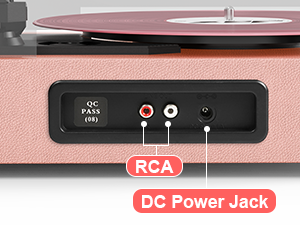
Image 4.5.1: Rear panel connections for RCA output and power.
5 دیکھ بھال
- اسٹائلس کی صفائی: Gently clean the stylus regularly with a soft brush, brushing from back to front.
- صفائی کے ریکارڈ: Use a carbon fiber brush or a record cleaning solution to keep your vinyl records free of dust and debris.
- دھول کے احاطہ کی دیکھ بھال: Wipe the dust cover with a soft, dry cloth. Avoid abrasive cleaners.
- Turntable Surface: Clean the turntable's surface with a soft, slightly damp کپڑا
- سوئی کی تبدیلی: The stylus (needle) should be replaced after approximately 300-500 hours of playback to maintain sound quality and prevent damage to your records.
6 خرابیوں کا سراغ لگانا
- کوئی طاقت نہیں: Ensure the power adapter is securely connected to both the turntable and a working wall outlet. Check the 'VOLUME' knob is turned on.
- کوئی آواز نہیں: Verify the volume is turned up. If using external speakers, ensure they are powered on and correctly connected via RCA. If in Bluetooth mode, confirm successful pairing.
- Skipping Records: Ensure the record is clean and free of dust. Check that the turntable is on a stable, level surface. The stylus might need cleaning or replacement.
- بلوٹوتھ جوڑا بنانے کے مسائل: Make sure the turntable is in 'BT' mode. Ensure your device's Bluetooth is enabled and within range. Try unpairing and re-pairing the device.
- USB Recording Failure: Check that the USB drive is formatted correctly (FAT32) and has sufficient space. Ensure the capacity is less than 64GB.
7. وضاحتیں
| فیچر | تفصیلات |
|---|---|
| مصنوعات کے طول و عرض | 14.1 x 11.2 x 4.9 انچ |
| شے کا وزن | 4.85 پاؤنڈ |
| ماڈل نمبر | TE-2017 |
| برانڈ | ڈینفی آڈیو ڈی ایف |
| زیادہ سے زیادہ گردشی رفتار | 78 RPM (33 1/3، 45، 78 RPM کو سپورٹ کرتا ہے) |
| خصوصی خصوصیات | AUX Input, Built-In Bluetooth Receiver, Digital Recorder, Dust Cover, RCA Output |
| مواد | انجینئرڈ لکڑی |
| رنگ | ہلکا گلابی |
| ہم آہنگ آلات | Headphone, MP3 Player, Personal Computer, Smartphone, Tablet |
8. وارنٹی اور سپورٹ
For warranty information and customer support, please refer to the documentation included with your product or contact DANFI AUDIO DF directly through their official webسائٹ یا کسٹمر سروس چینلز۔ وارنٹی کے دعووں کے لیے اپنی خریداری کی رسید اپنے پاس رکھیں۔
آن لائن مدد: کا دورہ کریں۔ DANFI AUDIO DF Store on Amazon اضافی مصنوعات کی معلومات اور معاون وسائل کے لیے۔


