1. پروڈکٹ ختمview
The DOOGEE Note 56 is a modern smartphone designed for daily use, featuring a powerful Octa-Core processor, a large 6150 mAh battery, and a vibrant 6.56-inch HD+ display with a 90 Hz refresh rate. This manual provides essential information for setting up, operating, and maintaining your device.

شکل 1.1: سامنے اور پیچھے view of the DOOGEE Note 56, showcasing اس کا چیکنا ڈیزائن اور کیمرہ سیٹ اپ۔
2. باکس میں کیا ہے۔
- DOOGEE Note 56 Smartphone
- پاور اڈاپٹر
- USB کیبل
- سم ایجیکٹر ٹول
- کوئیک اسٹارٹ گائیڈ
- حفاظتی کیس (علاقے کے لحاظ سے مختلف ہو سکتا ہے)
- اسکرین پروٹیکٹر (پہلے سے لاگو یا شامل)
3. سیٹ اپ
3.1 سم کارڈز اور مائیکرو ایس ڈی کارڈ داخل کرنا
The DOOGEE Note 56 supports Dual SIM functionality and MicroSD card expansion up to 2TB. Follow these steps to insert your cards:
- اپنا فون بند کردیں۔
- آلہ کے سائیڈ پر سم کارڈ ٹرے کا پتہ لگائیں۔
- سم ایجیکٹر ٹول کو ٹرے کے آگے چھوٹے سوراخ میں داخل کریں اور ٹرے کے باہر آنے تک آہستہ سے دھکیلیں۔
- Place your Nano-SIM cards and/or MicroSD card into the designated slots on the tray. Ensure they are correctly oriented.
- احتیاط سے ٹرے کو فون میں واپس دھکیلیں جب تک کہ وہ اپنی جگہ پر کلک نہ کرے۔
3.2 Powering On/Off and Initial Setup
To power on your device, press and hold the Power button until the DOOGEE logo appears. To power off, press and hold the Power button, then select 'Power off' from the options. On first use, follow the on-screen instructions to set up your language, Wi-Fi, Google account, and security features.
4. اپنے آلے کو آپریٹ کرنا
4.1 بنیادی نیویگیشن
The DOOGEE Note 56 runs on Android 16, offering an intuitive user interface. Use gestures or the navigation bar at the bottom of the screen to navigate:
- گھر: Swipe up from the bottom or tap the Home button to return to the home screen.
- پیچھے: Swipe from the left or right edge, or tap the Back button to go back to the previous screen.
- حالیہ ایپس: Swipe up and hold from the bottom, or tap the Recent Apps button to view اور کھلی ایپلی کیشنز کے درمیان سوئچ کریں۔
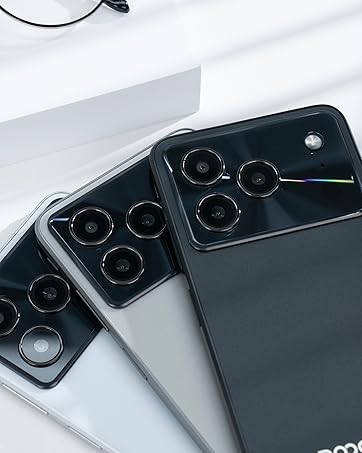
Figure 4.1: Android 16 operating system interface on the DOOGEE Note 56.
4.2 کالز اور میسجنگ
To make a call, open the Phone app, enter the number, and tap the call icon. For messaging, open the Messages app, select a contact or start a new conversation, type your message, and send.
4.3 کیمرے کے افعال
The DOOGEE Note 56 features an 8 MP rear camera and a 5 MP front camera. Open the Camera app to access various modes such as Photo, Video, Portrait, and more. Tap the shutter button to capture photos or start/stop video recording.

Figure 4.2: Camera features and AI scene recognition.
4.4 ڈسپلے کی ترتیبات
Customize your 6.56-inch HD+ 90 Hz IPS display by going to ترتیبات > ڈسپلے. Here you can adjust brightness, dark mode, screen timeout, and refresh rate for a smoother visual experience.

Figure 4.3: The 90 Hz HD+ display provides smooth visuals.
5 اسٹوریج اور کارکردگی
The DOOGEE Note 56 is equipped with 24GB RAM (3GB physical + 21GB virtual) and 64GB of internal storage, expandable up to 2TB via a MicroSD card (sold separately). This configuration ensures smooth multitasking and ample space for your apps, photos, and videos.
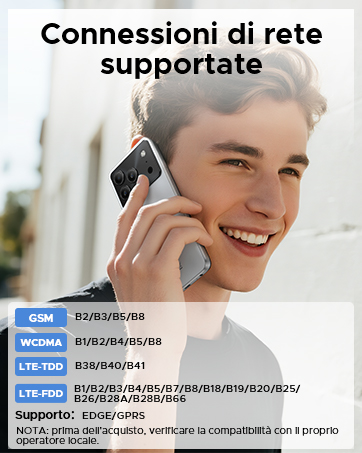
Figure 5.1: Memory configuration of the DOOGEE Note 56.
6 کنیکٹیویٹی اور سیکیورٹی
6.1 نیٹ ورک کنیکٹیویٹی
The device supports 4G LTE for fast mobile data. Ensure your SIM cards are active and correctly inserted. For Wi-Fi, go to ترتیبات > نیٹ ورک اور انٹرنیٹ > Wi-Fi and connect to your preferred network.

Figure 6.1: Supported network connections for the DOOGEE Note 56.
6.2 چہرے کی شناخت
Unlock your phone quickly and securely using Face ID. To set it up, go to سیٹنگز > سیکیورٹی > فیس انلاک and follow the on-screen instructions to register your face.
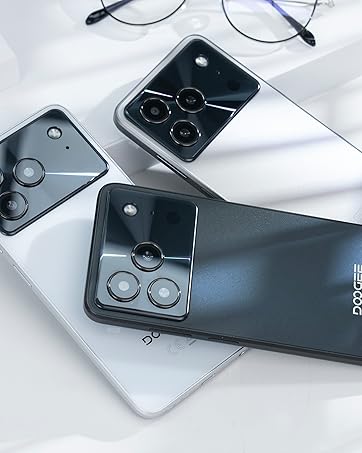
Figure 6.2: Instant facial recognition for unlocking.
6.3 OTG and GPS
The device supports OTG (On-The-Go) for connecting USB accessories like flash drives. GPS functionality provides accurate location services for navigation and location-based apps.
7. بیٹری کا انتظام
The DOOGEE Note 56 is equipped with a 6150 mAh silicon-carbon battery, offering extended usage. It supports 10W fast charging. To optimize battery life:
- اسکرین کی چمک کو ایڈجسٹ کریں۔
- پس منظر میں چلنے والی غیر استعمال شدہ ایپس کو بند کریں۔
- ضرورت پڑنے پر بیٹری سیور موڈ کو فعال کریں۔
- انتہائی درجہ حرارت سے پرہیز کریں۔
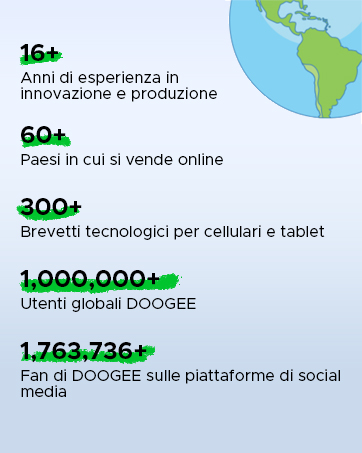
Figure 7.1: The 6150 mAh battery provides long-lasting power.

Figure 7.2: Estimated usage times on a single charge.
8 دیکھ بھال
8.1 سافٹ ویئر اپ ڈیٹس
باقاعدگی سے سافٹ ویئر اپ ڈیٹس کو چیک کریں تاکہ یہ یقینی بنایا جا سکے کہ آپ کے آلے میں تازہ ترین خصوصیات اور حفاظتی پیچ موجود ہیں۔ پر جائیں۔ ترتیبات > سسٹم > سسٹم اپ ڈیٹ اپ ڈیٹس کو چیک کرنے اور انسٹال کرنے کے لیے۔
8.2 اپنے آلے کو صاف کرنا
اپنے فون کی سکرین اور باڈی کو صاف کرنے کے لیے نرم، لنٹ سے پاک کپڑا استعمال کریں۔ سخت کیمیکلز یا کھرچنے والے مواد کے استعمال سے پرہیز کریں۔
9 خرابیوں کا سراغ لگانا
9.1 عام مسائل اور حل
- فون آن نہیں ہو رہا ہے: یقینی بنائیں کہ بیٹری چارج ہے۔ چارجر سے کم از کم 10 منٹ تک جڑیں، پھر پاور آن کرنے کی کوشش کریں۔
- ایپس کریش ہو رہی ہیں: Clear the cache of the problematic app (Settings > Apps > [App Name] > Storage & cache > Clear cache). If the issue persists, reinstall the app.
- خراب بیٹری کی زندگی: Review Section 7 for battery optimization tips.
- نیٹ ورک کنیکٹیویٹی کے مسائل: Check if SIM cards are properly inserted. Restart the phone. Verify network settings in Settings > Network & internet.
10. وضاحتیں
| فیچر | تفصیلات |
|---|---|
| ماڈل | نوٹ 56 |
| آپریٹنگ سسٹم | اینڈرائیڈ 16 |
| ڈسپلے | 6.56-inch HD+ IPS, 90 Hz |
| پروسیسر | اوکٹا کور |
| رام | 24 GB (3GB + 21GB virtual) |
| اندرونی اسٹوریج | 64 جی بی |
| قابل توسیع اسٹوریج | Up to 2 TB MicroSD |
| پیچھے والا کیمرہ | 8 MP |
| سامنے والا کیمرہ | 5 MP |
| بیٹری کی صلاحیت | 6150 ایم اے ایچ |
| چارج ہو رہا ہے۔ | 10W فاسٹ چارجنگ |
| طول و عرض | 8.45 ملی میٹر موٹائی |
| وزن | 262 گرام |
| کنیکٹوٹی | 4G, Dual SIM, Wi-Fi, Bluetooth, GPS, OTG |
| سیکورٹی | چہرے کی شناخت |
11 آفیشل پروڈکٹ ویڈیوز
Video 11.1: DOOGEE Note 56 Plus Smartphone Overview. This video highlights the ultra-thin design, camera features, and overall elegance of the Note 56 Plus, which shares many characteristics with the Note 56 model.
Video 11.2: DOOGEE Note 56 Plus Ultra-thin Smartphone. This video focuses on the slim profile and aesthetic appeal of the Note 56 Plus, demonstrating its comfortable handling and modern look.
12. وارنٹی اور سپورٹ
Your DOOGEE Note 56 smartphone comes with a limited warranty. Please refer to the warranty card included in your product packaging for specific terms and conditions. For technical support or service inquiries, please visit the official DOOGEE webسائٹ یا ان کی کسٹمر سروس سے رابطہ کریں۔
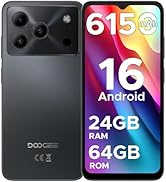
Figure 12.1: DOOGEE customer service details, including warranty and support options.


