1. تعارف
The LAUNCH CRP123I V3.0 Elite OBD2 Scanner is an advanced diagnostic tool designed for comprehensive vehicle system analysis. This device offers enhanced diagnostic capabilities for engine, anti-lock braking system (ABS), supplemental restraint system (SRS), and transmission systems, alongside a suite of reset functions and full OBD2 modes. It features a new processor, Android 8.1 operating system, a 5-inch touchscreen, and a 6000mAh rechargeable battery for efficient and reliable performance.

تصویر 1.1: ختمview of the LAUNCH CRP123I V3.0 Elite OBD2 Scanner's key features, including 4 system diagnostics and 7 special functions.
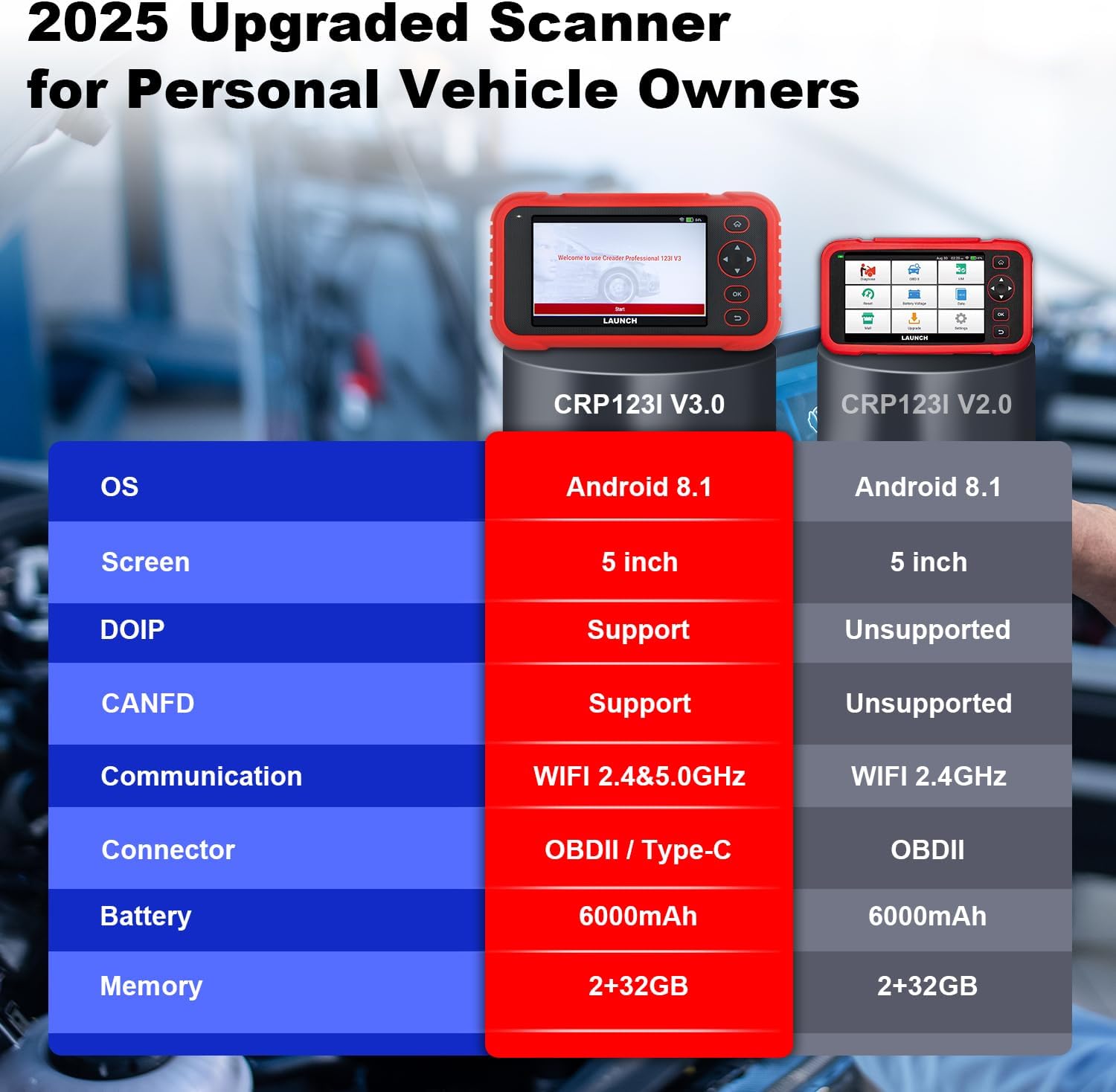
Image 1.2: Feature comparison between the CRP123I V3.0 and its predecessor, highlighting upgrades such as DOIP, CANFD, and dual-band WiFi.
2. پیکیج کے مشمولات
ان باکس کرنے پر، تصدیق کریں کہ تمام اجزاء موجود ہیں:
- CRP123I V3.0 Scan Tool
- OBDII تشخیصی کیبل
- USB کیبل
- صارف دستی
- کیرینگ کیس

Image 2.1: The complete package contents, including the scan tool, cables, user manual, and carrying case.
3. سیٹ اپ
ابتدائی سیٹ اپ اور کنکشن کے لیے ان اقدامات پر عمل کریں:
- پاور آن: Ensure the device is charged. The CRP123I V3.0 features a 6000mAh rechargeable battery.
- گاڑی سے جڑیں: Locate your vehicle's OBDII port, typically under the dashboard on the driver's side. Connect the diagnostic cable from the scanner to the vehicle's OBDII port. The device supports OBDII and Type-C connections.
- ابتدائی بوٹ اپ: The scanner will power on automatically or prompt you to press the power button. The 5-inch touchscreen will display the LAUNCH logo and then the main interface.
- نیٹ ورک کنکشن: For updates and online features, connect the device to a Wi-Fi network. The CRP123I V3.0 supports 2.4GHz and 5GHz dual Wi-Fi. Navigate to 'Settings' > 'Wi-Fi' to connect.
- سافٹ ویئر اپ ڈیٹ: It is recommended to perform a software update upon first use to ensure you have the latest features and vehicle coverage. Access the 'Upgrade' menu for one-touch lifetime free updates.
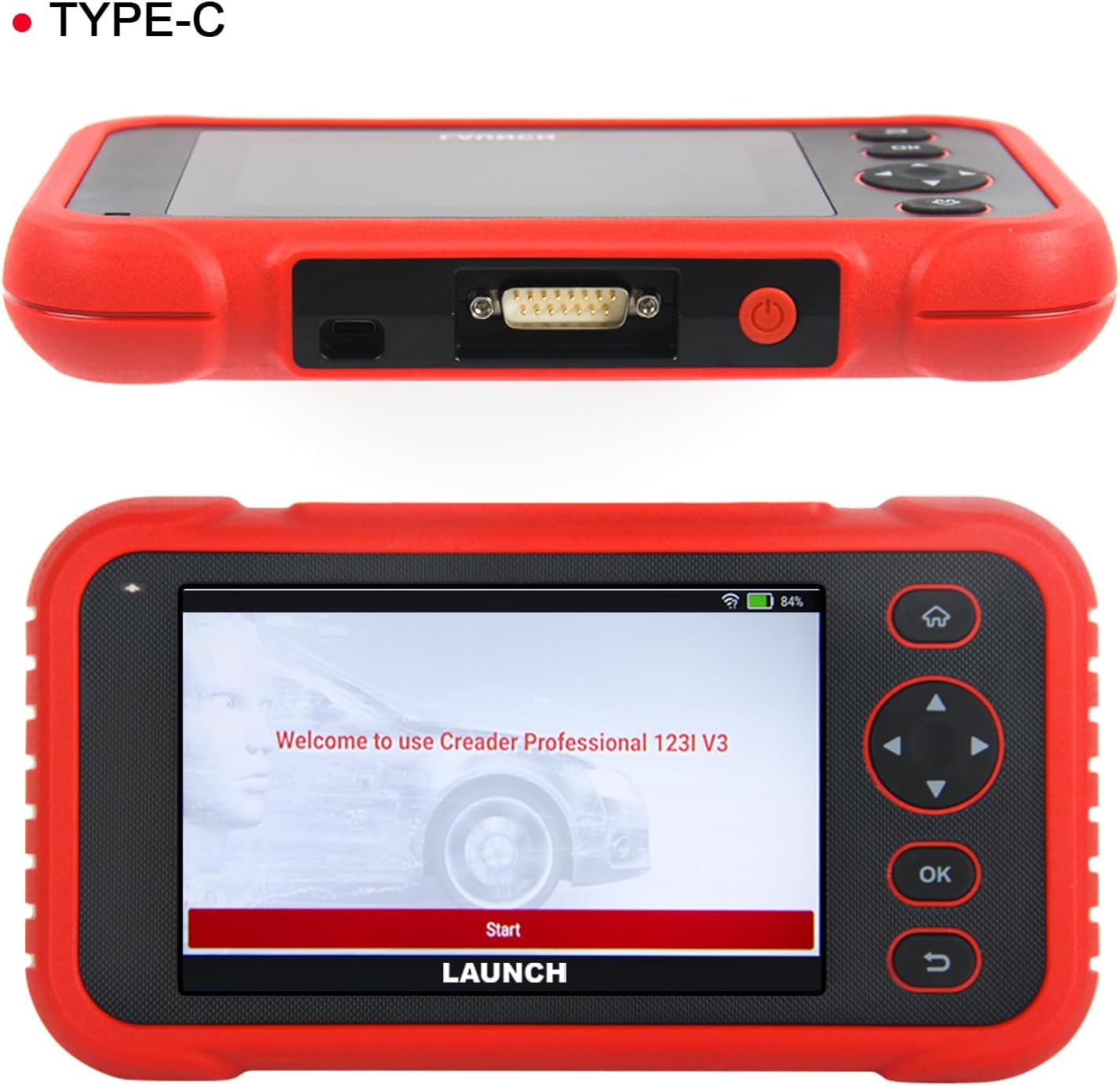
تصویر 3.1: اوپر view of the scanner showing the OBDII connector, and front view displaying the initial welcome screen.
4. آپریٹنگ ہدایات
4.1. 4-System Diagnostics
The CRP123I V3.0 allows for in-depth diagnostics of four major vehicle systems:
- انجن سسٹم: Reads and clears engine fault codes, views live data, and turns off the Malfunction Indicator Lamp (MIL)۔
- اینٹی لاک بریکنگ سسٹم (ABS): Diagnoses ABS issues, reads/clears codes, and monitors live data related to braking performance.
- Supplemental Restraint System (SRS/Airbag): Detects and clears airbag system fault codes, ensuring proper functionality of safety components.
- ٹرانسمیشن سسٹم: Analyzes transmission performance, reads/clears codes, and displays live data such as transmission temperature.

Image 4.1: Visual representation of the four OE-level systems (Engine, SRS, Transmission, ABS) that the scanner can diagnose.
4.2. 7 افعال کو دوبارہ ترتیب دیں۔
The tool provides 7 frequently used reset functions for common maintenance tasks:
- آئل ری سیٹ: تیل کی تبدیلی کے بعد تیل کی زندگی کے نظام کو دوبارہ ترتیب دیتا ہے۔
- Electric Throttle Relearn: صفائی یا تبدیلی کے بعد تھروٹل باڈی پوزیشن کو دوبارہ سیکھتا ہے۔
- Steering Angle Reset (SAS): اسٹیئرنگ اینگل سینسر کو ری سیٹ کرتا ہے۔
- ABS خون بہنا: بریکوں کی حساسیت کو بحال کرنے کے لیے ABS بریک سے خون بہانا انجام دیتا ہے۔
- Battery Matching (BMS Reset): بیٹری کی تبدیلی کے بعد بیٹری مینجمنٹ سسٹم کو ری سیٹ کرتا ہے۔
- بریک ری سیٹ (EPB): Resets the electronic parking brake pads after replacement.
- ڈی پی ایف ری سیٹ: Performs Diesel Particulate Filter regeneration.
Note: The availability of specific service functions may vary by vehicle make, model, and year.

Image 4.2: An illustration of the seven hot reset services available on the CRP123I V3.0.
4.3. Full OBDII Functions
The CRP123I V3.0 supports all 10 OBDII test modes for comprehensive emissions-related diagnostics:
- کوڈز پڑھیں: Displays Diagnostic Trouble Codes (DTCs).
- کوڈز صاف کریں: Erases DTCs and turns off the MIL.
- لائیو ڈیٹا: Shows real-time data stream from vehicle sensors.
- I/M تیاری: Checks the readiness of emission monitors.
- منجمد ڈھانچہ: Stores a snapshot of vehicle operating conditions when an emission-related fault occurs.
- O2 سینسر ٹیسٹ: O2 سینسر مانیٹر ٹیسٹ کے نتائج کو بازیافت کرتا ہے۔
- آن بورڈ مانیٹر ٹیسٹ: اخراج سے متعلق پاور ٹرین کے اجزاء اور سسٹمز کے نتائج بازیافت کرتا ہے۔
- EVAP ٹیسٹ: بخارات کے اخراج کے نظام کی جانچ شروع کرتا ہے۔
- گاڑی کی معلومات: گاڑی کی شناخت کی معلومات (VIN، CID، CVN) بازیافت کرتا ہے۔
- ڈی ٹی سی کوڈ تلاش کریں: عام اور مینوفیکچرر کے مخصوص کوڈز کے لیے تعریفیں فراہم کرتا ہے۔

Image 4.3: A comprehensive display of the professional full OBDII functions supported by the scanner.
4.4. Live Data Streams and Smog Test
Monitor up to 4 real-time data streams simultaneously on one screen. This allows for quick diagnosis and verification of repairs without switching views. The I/M Readiness function helps check emission system status, assisting in preparation for smog tests by identifying potential issues like faulty sensors or catalytic converter problems.

Image 4.4: The 4-in-1 live data graphic display feature, enabling visualization and analysis of multiple data streams.

Image 4.5: A real-time voltage monitor display, useful for assessing battery and charging system health.
4.5. Vehicle Identification and Diagnostic Reports
The scanner supports automatic VIN (Vehicle Identification Number) detection for quick vehicle identification. For vehicles that do not support AUTO VIN, you can manually input the VIN. After diagnosis, the tool can generate and allow you to share or print detailed diagnostic reports.

Image 4.6: The AUTO VIN feature, simplifying vehicle identification.

Image 4.7: The VIN scan function and options for sharing and printing diagnostic reports.
4.6. گاڑیوں کا احاطہ
The CRP123I V3.0 is compatible with all U.S. road vehicles manufactured after 1996 that comply with OBD2/EOBD/JOBD standards. This includes over 10,000 models, covering most gasoline cars, many 12V diesel vehicles, light-duty trucks, and a small range of gasoline-electric hybrid vehicles. It also supports AutoAuth for FCA SGW to access 2018+ FCA SGW-equipped models.

Image 4.8: An illustration of the extensive vehicle coverage across different regions and vehicle types.
5 دیکھ بھال
To ensure optimal performance and access to the latest features and vehicle compatibility, regularly update the scanner's software. The CRP123I V3.0 offers lifetime free software updates.
- سافٹ ویئر اپ ڈیٹس: Connect the device to Wi-Fi and navigate to the 'Upgrade' section on the main menu to download and install available updates.
- صفائی: آلے کو صاف کرنے کے لیے نرم، خشک کپڑا استعمال کریں۔ کھرچنے والے کلینر یا سالوینٹس سے پرہیز کریں۔
- ذخیرہ: Store the scanner in its carrying case in a cool, dry place when not in use.

Image 5.1: The 'Lifetime Free Updated' feature ensures the scanner remains current with the latest vehicle data and functions.
6 خرابیوں کا سراغ لگانا
If you encounter issues with the CRP123I V3.0, consider the following:
- ڈیوائس آن نہیں ہو رہی ہے: Ensure the battery is charged or the device is properly connected to the vehicle's OBDII port.
- کنکشن کے مسائل: Verify the OBDII cable is securely connected to both the scanner and the vehicle. Ensure the vehicle's ignition is on.
- گاڑی سے کوئی رابطہ نہیں: Check if your vehicle is OBDII compliant (generally 1996 and newer for U.S. vehicles). Ensure the vehicle's battery has sufficient voltage.
- Function Not Working: Some functions are vehicle-specific. Confirm compatibility for your vehicle's make, model, and year.
- سست کارکردگی: Ensure the device has sufficient memory. Perform regular software updates.
For specific fault code definitions, use the built-in DTC Library or the Fault Codes Google Search feature.

Image 6.1: The DTC Search function, providing quick access to fault code explanations via Google.
7. وضاحتیں
| کارخانہ دار | لانچ کریں۔ |
| ماڈل | CRP123I |
| آپریٹنگ سسٹم | اینڈرائیڈ 8.1 |
| اسکرین کا سائز | 5 Inches (720P) |
| یادداشت | 32 جی بی |
| بیٹری | 6000mAh لتیم آئن (شامل) |
| کنیکٹوٹی | 2.4 & 5GHz Dual WiFi, OBDII / Type-C |
| تعاون یافتہ پروٹوکول | CANFD & DoIP, OBD2/EOBD/JOBD |
| شے کا وزن | 2.27 پاؤنڈ |
| پیکیج کے طول و عرض | 9.84 x 7.09 x 2.76 انچ |
| آٹوموٹو فٹ کی قسم | یونیورسل فٹ |
8. وارنٹی اور سپورٹ
The LAUNCH CRP123I V3.0 Elite OBD2 Scanner comes with a 5-year warranty. Enjoy lifetime free software updates to keep your diagnostic tool current with the latest features and vehicle compatibility. For any inquiries, technical assistance, or support, please contact our dedicated customer service team.
کسٹمر سپورٹ ای میل: nina@hilson.com.cn
Our 24/7 professional service team is committed to providing one-on-one customer service to ensure your satisfaction.


