1. پروڈکٹ ختمview
The Baseus BS1 NC Semi-in-Ear Noise Cancelling Earbuds offer a blend of comfort and advanced audio technology. Featuring Adaptive Hybrid Active Noise Cancellation (ANC), Hi-Res Audio with LDAC support, and a lightweight design, these earbuds are engineered for extended listening and clear communication. They are also equipped with a 6-microphone AI system for clear calls and IP55 water and dust resistance.

Image: Baseus BS1 NC Semi-in-Ear Noise Cancelling Earbuds and their charging case in black.
2. پیکیج کے مشمولات
یقینی بنائیں کہ تمام اشیاء پیکیج میں موجود ہیں:
- Baseus Bass BS1 NC Semi-in-Ear Earbuds (Left and Right)
- چارجنگ کیس
- USB-C چارجنگ کیبل
- کوئیک اسٹارٹ گائیڈ

Image: The complete retail package for the Baseus BS1 NC Earbuds, showing the earbuds, charging case, USB-C cable, and quick start guide.
3. ایئربڈز اور کیس کو چارج کرنا
For optimal performance, fully charge the earbuds and charging case before first use.
3.1 ایئربڈز کو چارج کرنا
- ایئربڈز کو چارجنگ کیس میں رکھیں۔ اس بات کو یقینی بنائیں کہ وہ اپنے متعلقہ سلاٹوں میں صحیح طریقے سے بیٹھے ہوئے ہیں (بائیں کے لیے L، دائیں کے لیے R)۔
- Close the charging case. The earbuds will begin charging automatically.
3.2 کیس چارج کرنا
- فراہم کردہ USB-C چارجنگ کیبل کو کیس پر چارجنگ پورٹ سے جوڑیں۔
- کیبل کے دوسرے سرے کو USB پاور اڈاپٹر (شامل نہیں) یا کمپیوٹر کے USB پورٹ سے جوڑیں۔
- The LED indicator on the case will show the charging status:
- سبز: 75% - 100% charged
- پیلا: 25% - 75% charged
- سرخ: Below 25% charged
- A full charge for the case provides up to 40 hours of total playtime for the earbuds (with ANC off). A 10-minute charge can provide up to 2 hours of playback.

Image: The Baseus BS1 NC Earbuds resting in their open charging case, highlighting the 40-hour total playtime and rapid charging capabilities.
4. جوڑا بنانا اور کنیکٹیویٹی
4.1 ابتدائی جوڑا
- چارجنگ کیس کھولیں۔ ایئربڈز خود بخود پیئرنگ موڈ میں داخل ہو جائیں گے۔
- اپنے آلے پر (اسمارٹ فون، ٹیبلیٹ، کمپیوٹر)، بلوٹوتھ کو فعال کریں۔
- تلاش کریں۔ "Baseus Bass BS1 NC" in the list of available Bluetooth devices.
- Select "Baseus Bass BS1 NC" to connect. A voice prompt will confirm successful pairing.
4.2 خودکار دوبارہ کنکشن
Once paired, the earbuds will automatically reconnect to the last connected device when removed from the charging case and within Bluetooth range.
4.3 ملٹی پوائنٹ کنکشن
The Baseus BS1 NC supports Baseus Smart-Connect (BSC) technology, allowing simultaneous connection to two devices. This enables seamless switching between audio sources without manual re-pairing.
To use multipoint connection:
- Pair the earbuds with your first device.
- پہلی ڈیوائس کی بلوٹوتھ سیٹنگز سے ایئربڈس کو منقطع کریں (جوڑا نہ بنائیں)۔
- ایئربڈز کو اپنے دوسرے آلے کے ساتھ جوڑیں۔
- ایئربڈز کو اس کی بلوٹوتھ سیٹنگز سے پہلے ڈیوائس سے دوبارہ جوڑیں۔ ایئربڈز کو اب دونوں ڈیوائسز سے منسلک ہونا چاہیے۔
آڈیو مواد چلانے یا کال موصول کرنے والے آلے پر خود بخود سوئچ کر دے گا۔
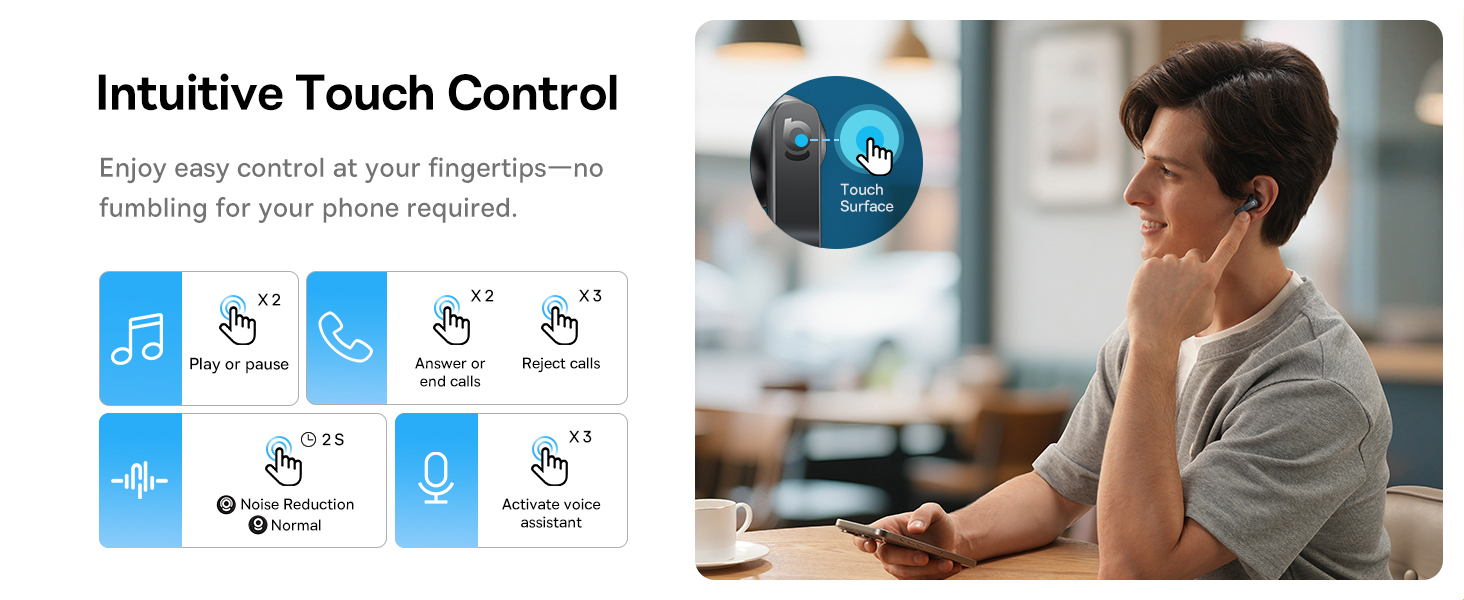
Image: A visual representation of the Baseus BS1 NC Earbuds connected to both a laptop and a smartphone, showcasing the instant multipoint connection feature.
5. ایئربڈز پہننا
The Baseus BS1 NC earbuds feature a semi-in-ear design for comfortable, pressure-free wear. For optimal sound quality and noise cancellation, ensure a proper fit.
- بائیں (L) اور دائیں (R) ایئربڈز کی شناخت کریں۔
- ہر ایک ایئربڈ کو اپنے کان کی نالی میں آہستہ سے داخل کریں۔
- Adjust the earbud until it feels secure and comfortable. The stem should point slightly forward or downward.

Image: A person wearing the Baseus BS1 NC Earbuds, illustrating their ergonomic and lightweight design for all-day comfort.
6. آپریٹنگ ہدایات
6.1 ٹچ کنٹرولز
The earbuds feature intuitive touch controls on their stems. The following are default functions, which may be customizable via the Baseus app:
| ایکشن | فنکشن |
|---|---|
| دو بار تھپتھپائیں (بائیں یا دائیں ایئربڈ) | موسیقی چلائیں/روکیں، کال کا جواب دیں/ختم کریں۔ |
| Triple-tap (Left or Right Earbud) | Reject call, Activate voice assistant |
| دبائیں اور پکڑیں (2 سیکنڈ) | Switch Noise Control Mode (ANC/Normal/Transparency) |

Image: An illustration detailing the intuitive touch controls on the Baseus BS1 NC Earbuds for various functions like play/pause, call management, noise reduction, and voice assistant activation.
6.2 شور کنٹرول موڈز
The Baseus BS1 NC earbuds offer three noise control modes:
- Adaptive Hybrid ANC (Active Noise Cancellation): عمیق سننے کے تجربے کے لیے محیطی شور کو کم کرتا ہے۔ شور والے ماحول کے لیے مثالی۔
- شفافیت موڈ: آپ کو اپنے آڈیو سے لطف اندوز ہونے کے دوران آپ کو اپنے اردگرد کی باتیں سننے کی اجازت دیتا ہے۔ شہری ترتیبات یا گفتگو میں آگاہی کے لیے مفید ہے۔
- نارمل موڈ: Standard audio playback without active noise cancellation or transparency features.
Switch between modes by pressing and holding the touch area on either earbud for 2 seconds.

Image: A cutaway diagram of a Baseus BS1 NC earbud in an ear, illustrating the semi-in-ear fit and the availability of Adaptive Noise Cancelling and Transparency Mode.
6.3 Hi-Res Audio with LDAC
These earbuds support LDAC technology, enabling high-resolution audio transmission for a detailed and rich sound experience. Ensure your device supports LDAC and activate it in your device's Bluetooth settings for the best audio quality.

Image: The Baseus BS1 NC Earbuds surrounded by sound waves, emphasizing features like Hi-Res Audio, SuperBass 2.0, and 13mm dynamic drivers for powerful sound.
6.4 6-Mic AI Clear Calls
The earbuds are equipped with 6 microphones and AI noise isolation technology to ensure your voice is clear during calls, even in noisy environments. Wind noise reduction further enhances call clarity outdoors.
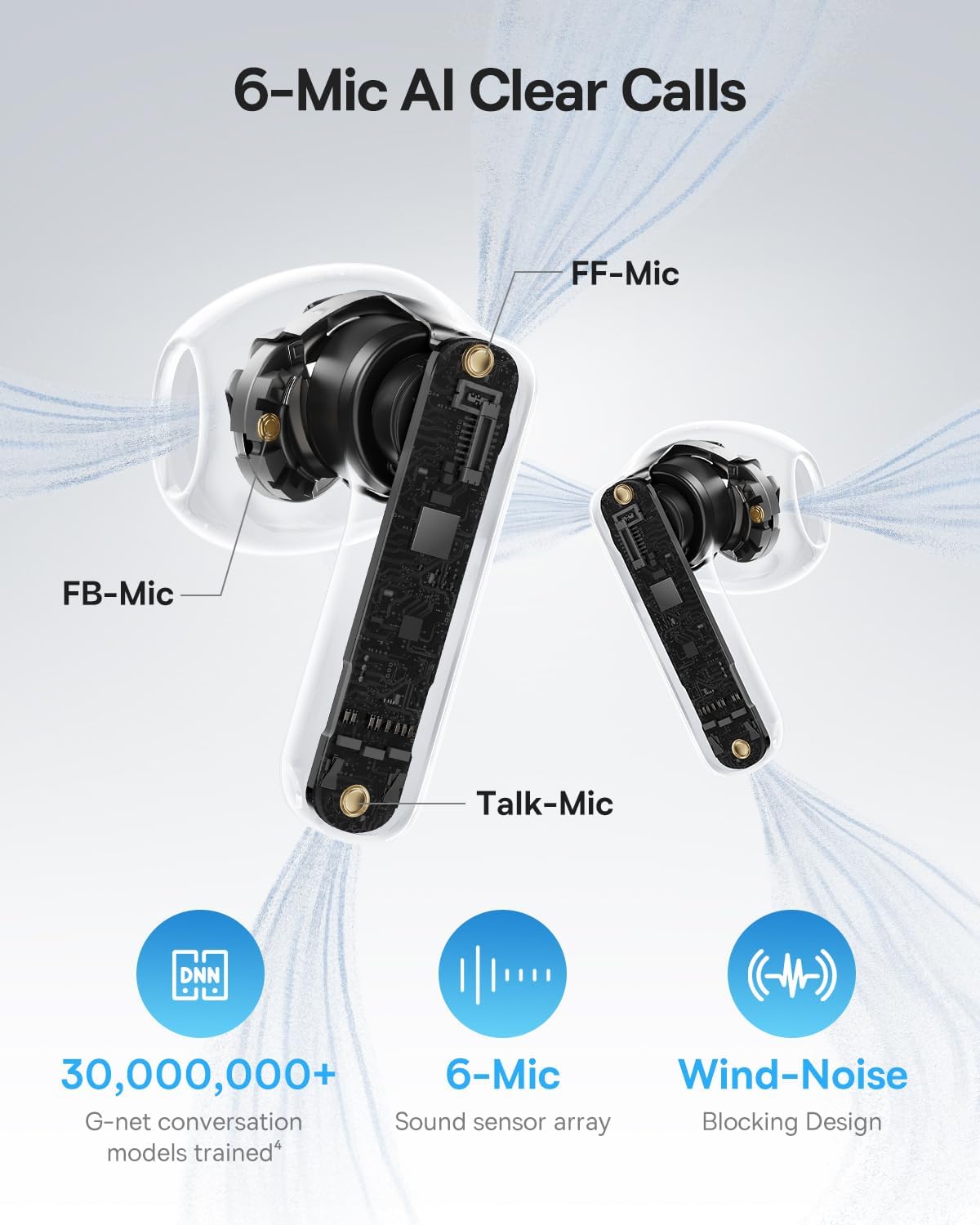
Image: A detailed diagram of the Baseus BS1 NC earbud, highlighting the placement of the FF-Mic, FB-Mic, and Talk-Mic, which contribute to the 6-Mic AI Clear Call technology and wind-noise blocking design.
6.5 اسمارٹ ایپ کنٹرول
Download the dedicated Baseus app for enhanced control and customization options. The app allows you to:
- Adjust Bass Boost levels.
- Select from various EQ Modes.
- Control Spatial Acoustics settings.
- Use the "Find Your Earbuds" feature.
Note: In guest mode, no account creation or permissions are required to customize features, but GPS access is needed to locate lost earbuds.

Image: A smartphone displaying the Baseus app interface, which offers various sound control options including Bass Boost, EQ Modes, Spatial Acoustics, and a "Find Your Earbuds" function.
7. دیکھ بھال اور دیکھ بھال
7.1 صفائی
- ائیر بڈز اور چارجنگ کیس کو نرم، خشک، لنٹ سے پاک کپڑے سے باقاعدگی سے صاف کریں۔
- سخت کیمیکلز ، صفائی سالوینٹس ، یا مضبوط ڈٹرجنٹ استعمال نہ کریں۔
- Gently remove any earwax or debris from the earbud mesh and charging contacts using a small, soft brush or cotton swab.
7.2 پانی اور دھول کی مزاحمت (IP55)
The earbuds are rated IP55, meaning they are protected against limited dust ingress and low-pressure water jets from any direction. This makes them suitable for workouts and light rain exposure.
- ایئربڈز کو پانی میں نہ ڈوبیں۔
- چارجنگ کیس میں واپس رکھنے سے پہلے یقینی بنائیں کہ ایئربڈز خشک ہیں تاکہ چارجنگ رابطوں کو نقصان نہ پہنچے۔
- چارجنگ کیس پانی سے بچنے والا نہیں ہے۔

Image: The Baseus BS1 NC Earbuds shown with water droplets, signifying their IP55 rating for dust and water resistance.
7.3 اسٹوریج
ایئربڈز کو ان کے چارجنگ کیس میں محفوظ کریں جب ان کی حفاظت اور چارج رکھنے کے لیے استعمال میں نہ ہوں۔
8 خرابیوں کا سراغ لگانا
If you encounter issues with your Baseus BS1 NC earbuds, refer to the following common solutions:
- آواز/کنکشن کا کوئی مسئلہ نہیں:
- یقینی بنائیں کہ ایئربڈز چارج ہیں۔
- Verify Bluetooth is enabled on your device and "Baseus Bass BS1 NC" is selected.
- Try placing earbuds back in the case, closing it, and then reopening to reset the connection.
- اپنی بلوٹوتھ سیٹنگز میں ڈیوائس کو بھول جائیں اور دوبارہ جوڑیں۔
- ایک ایئربڈ کام نہیں کر رہا:
- یقینی بنائیں کہ دونوں ایئربڈز چارج ہیں۔
- Place both earbuds back in the case, close, and reopen.
- چارجنگ کانٹیکٹس کو دونوں ایئربڈز پر اور کیس کے اندر سے صاف کریں۔
- خراب آواز کا معیار:
- یقینی بنائیں کہ ایئربڈز آپ کے کانوں میں مناسب طریقے سے بیٹھے ہیں۔
- کسی بھی رکاوٹ کو دور کرنے کے لیے ایئربڈ میش کو صاف کریں۔
- Check your device's audio settings and ensure LDAC is enabled if supported.
- ANC مؤثر نہیں ہے:
- Ensure ANC mode is activated via touch control or the Baseus app.
- Adjust the earbuds for a better seal in your ears.
9. وضاحتیں
| فیچر | تفصیل |
|---|---|
| ماڈل کا نام | Baseus Bass BS1 NC |
| شور کنٹرول | Adaptive Noise Cancellation, Environmental Noise Cancellation, Hybrid Noise Cancellation |
| کنیکٹوٹی ٹیکنالوجی | بلوٹوتھ 6.0، وائرلیس |
| وائرلیس کمیونیکیشن ٹیکنالوجی | بلوٹوتھ 6.0 |
| بلوٹوتھ رینج | 10 میٹر |
| آڈیو ڈرائیور کی قسم | متحرک ڈرائیور |
| آڈیو ڈرائیور کا سائز | 13 ملی میٹر |
| تعدد رسپانس | 40 KHz |
| آڈیو دیر | 60 ملی سیکنڈز |
| بیٹری لائف (ایئر بڈز) | 7 Hours (ANC off) |
| کل پلے ٹائم (کیس کے ساتھ) | 40 Hours (ANC off) |
| چارج کرنے کا وقت (تیز چارج) | 2 گھنٹے پلے بیک کے لیے 10 منٹ |
| پانی کی مزاحمت کی سطح | IP55 (صرف ایئربڈز) |
| کنٹرول کی قسم | ٹچ کنٹرول |
| مواد | Acrylonitrile Butadiene Styrene (ABS)، پولی کاربونیٹ (PC) |
| آئٹم کا وزن (ایئر بڈز) | 4 گرام فی ایئربڈ |
| Product Dimensions (Earbuds) | 1.2 x 0.7 x 0.7 انچ |
| ہم آہنگ آلات | Devices with Bluetooth Audio Capability, including iOS, Android, Windows, Mac OS and Switch. |
10. سرکاری پروڈکٹ ویڈیو
Watch the official product video for a visual guide on the Baseus BS1 NC Earbuds:
Video: An official product video from Baseus showcasing the features and usage of the Baseus BS1 NC Semi-in-Ear True Wireless Earbuds.
11. وارنٹی اور سپورٹ
For warranty information, technical support, FAQs, and further assistance, please visit the official Baseus support center.
Refer to the Quick Start Guide included in your package for a direct link or visit the Baseus webسائٹ
Note: Protection plans may be available for purchase separately.


