1. تعارف
This user manual provides comprehensive instructions for the installation, operation, and maintenance of your NIVIAN NVS-MINICURTAIN-WR-KIT WiFi Roller Shutter Controller. This device is designed to integrate motorized blinds and awnings into your smart home system, offering control via the Tuya Smart app, an included RF remote, and voice assistants like Amazon Alexa and Google Assistant. Please read this manual thoroughly before use to ensure proper functionality and safety.
2. حفاظتی معلومات
- بجلی کی تنصیب: Installation should only be performed by a qualified electrician or a person with sufficient knowledge of electrical systems. Ensure the main power supply is disconnected before installation.
- والیومtagای مطابقت: تصدیق کریں کہ پاور سپلائی والیومtage matches the device's specifications (100-240V AC, 50/60Hz).
- اوورلوڈ تحفظ: Do not exceed the maximum current rating of 3A. The device includes overvoltagای تحفظ.
- مواد کی حفاظت: The device is constructed with flame-retardant materials for enhanced safety.
- ماحولیات: آلے کو نمی، انتہائی درجہ حرارت، یا سنکنرن ماحول کے سامنے نہ رکھیں۔
- بچے اور پالتو جانور: آلے اور اس کے اجزاء کو بچوں اور پالتو جانوروں کی پہنچ سے دور رکھیں۔
3. پیکیج کے مشمولات
پیکیج میں درج ذیل اشیاء ہونی چاہئیں۔
- NIVIAN NVS-MINICURTAIN-WR-KIT WiFi Roller Shutter Controller
- آر ایف ریموٹ کنٹرول
- صارف دستی (یہ دستاویز)
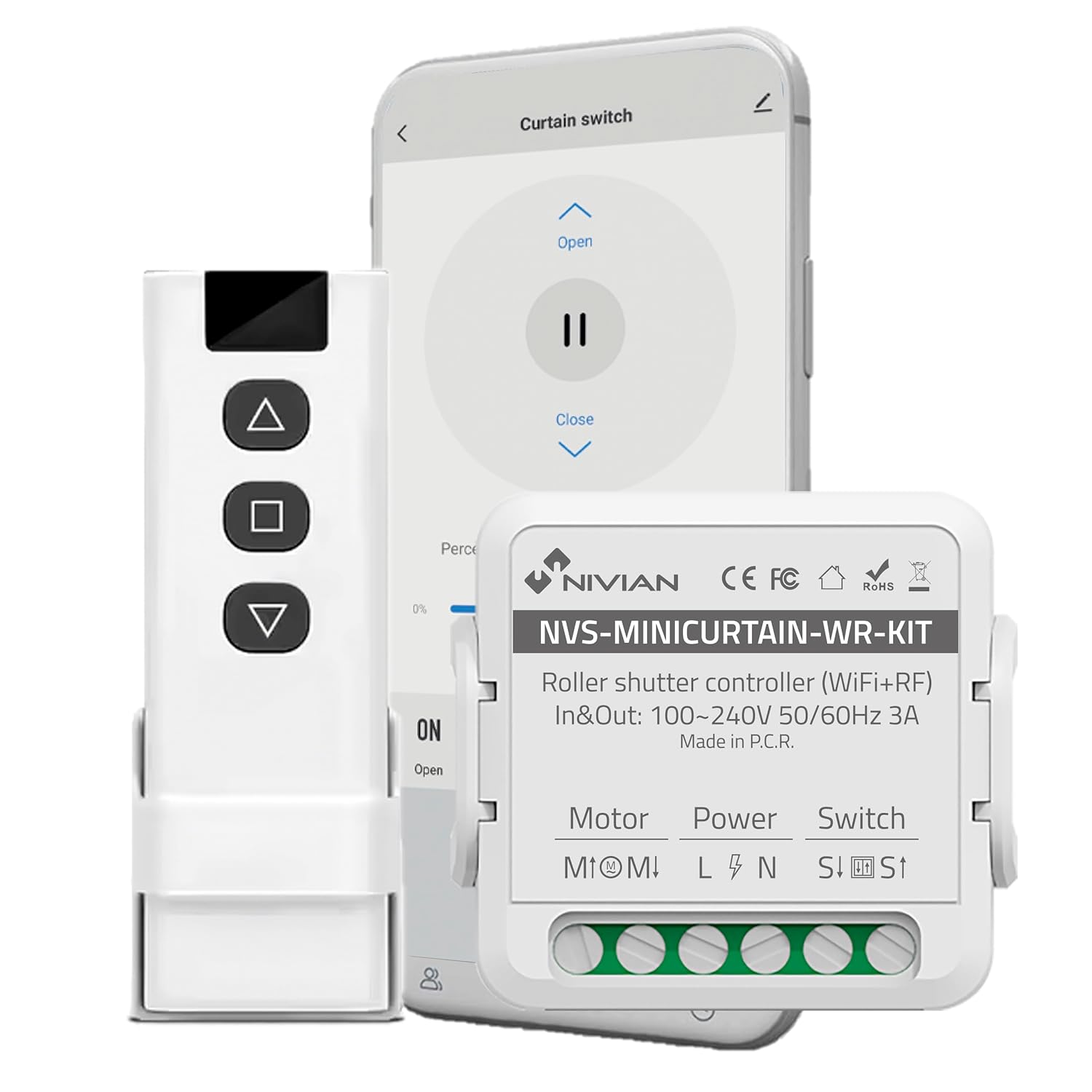
Image 3.1: Contents of the NIVIAN NVS-MINICURTAIN-WR-KIT package, showing the smart controller, RF remote, and a smartphone interface.
4. پروڈکٹ ختمview
The NIVIAN NVS-MINICURTAIN-WR-KIT is a compact smart switch designed to control motorized roller shutters and awnings. It integrates WiFi connectivity for app control and RF for the included remote. Key features include:
- وائی فائی کنیکٹیویٹی: Control via Tuya Smart app from anywhere.
- آر ایف ریموٹ کنٹرول: Convenient local control with the included RF remote.
- وائس کنٹرول: ایمیزون الیکسا اور گوگل اسسٹنٹ کے ساتھ ہم آہنگ۔
- شیڈولنگ اور ٹائمر: Automate opening and closing times.
- سمارٹ منظرنامے: Create custom automation rules based on conditions.
- توانائی کی نگرانی: Track power consumption of connected motors.
- کومپیکٹ ڈیزائن: Easily integrates behind existing wall switches.

تصویر 4.1: ختمview of the controller's features and compatibility.
5. سیٹ اپ اور انسٹالیشن
5.1 وائرنگ ڈایاگرام
Before proceeding with installation, ensure the main power supply to the circuit is turned OFF at the breaker. This device is designed to be installed behind an existing manual wall switch for motorized blinds/awnings. The controller has terminals for Motor (M1, M2), Power (L, N), and Switch (S1, S2).

تصویر 5.1: مثال کے طور پرample of the controller installed with an existing wall switch.
- پاور منقطع کریں: Turn off the main power supply to the circuit at your home's electrical panel.
- رسائی کی وائرنگ: Remove the existing wall switch plate and switch to access the wiring.
- موٹر تاروں کو جوڑیں: Connect the motor's UP and DOWN wires to the M1 and M2 terminals on the controller.
- Connect Power Wires: Connect the Live (L) and Neutral (N) wires from your power supply to the L and N terminals on the controller.
- Connect Switch Wires: Connect the wires from your existing manual wall switch to the S1 and S2 terminals on the controller.
- محفوظ آلہ: Carefully place the controller inside the wall box, ensuring no wires are pinched. Reinstall the wall switch and plate.
- بجلی کی بحالی: مین پاور سپلائی کو دوبارہ آن کریں۔
5.2 App Pairing (Tuya Smart)
- اپلی کیشن ڈاؤن لوڈ کریں: Download the "Tuya Smart" or "Smart Life" app from your smartphone's app store (iOS/Android).
- رجسٹر/لاگ ان: ایپ کھولیں اور ایک نئے اکاؤنٹ کے لیے رجسٹر ہوں یا اگر آپ کے پاس پہلے سے موجود ہے تو لاگ ان کریں۔
- جوڑا بنانے کا موڈ درج کریں: Power on the controller. The indicator light on the controller should blink rapidly (usually 2 times per second) to indicate it's in pairing mode. If not, press and hold the reset button (or the manual switch for 5-10 seconds) until it blinks rapidly.
- ڈیوائس شامل کریں: In the Tuya Smart app, tap the "+" icon in the top right corner to add a device. Select "Curtain Switch" or "Curtain Module" from the device list.
- وائی فائی سے جڑیں: Follow the on-screen instructions to connect the device to your 2.4GHz WiFi network. Enter your WiFi password.
- تکمیل: Once connected, the device will appear in your app. You can rename it for easier identification.
5.3 RF Remote Pairing
The included RF remote control is pre-paired with the controller. If you need to re-pair or pair additional RF remotes:
- جوڑا بنانے کا موڈ درج کریں: Briefly press the pairing button on the controller (or press the manual switch 4 times quickly). The indicator light will blink slowly.
- ریموٹ بٹن دبائیں: Within 5 seconds, press any button on the RF remote you wish to pair.
- تصدیق: The controller's indicator light will stop blinking, confirming successful pairing.
6. آپریٹنگ ہدایات
The NIVIAN controller offers multiple ways to operate your motorized blinds or awnings:

Image 6.1: Multiple control modes for the roller shutter controller.
6.1 Tuya اسمارٹ ایپ کنٹرول
- Open the Tuya Smart app and select your roller shutter device.
- You will see options to "Open," "Close," or "Pause" the blinds.
- ایک فیصدtage slider allows you to set the opening/closing position precisely.

Image 6.2: Controlling roller shutters via the Tuya Smart app.
6.2 آر ایف ریموٹ کنٹرول
- Use the "Up" button to open the blinds.
- Use the "Down" button to close the blinds.
- Use the "Stop/Pause" button to halt the blinds at any desired position.
6.3 وائس کنٹرول (الیکسا/گوگل اسسٹنٹ)
To enable voice control, link your Tuya Smart account to Amazon Alexa or Google Assistant through their respective apps. Once linked, you can use commands such as:
- "Alexa, open [Device Name] blinds."
- "Hey Google, close [Device Name] blinds."
- "Alexa, set [Device Name] blinds to 50%."
6.4 Manual Wall Switch Control
The existing manual wall switch connected to the controller will continue to function normally, allowing for traditional physical control of your blinds.
7. اسمارٹ فیچرز اور آٹومیشن
7.1 شیڈولنگ اور ٹائمر
Within the Tuya Smart app, you can set schedules for your blinds to open or close at specific times on chosen days. This is ideal for daily routines or simulating presence when away.
7.2 Smart Scenarios
Create custom automation rules (scenarios) in the Tuya Smart app. These can be triggered by various conditions:
- Weather Changes: Automatically close blinds if the weather forecast predicts strong sun or rain.
- Location Changes: Open blinds when you arrive home.
- دن کا وقت: Adjust blinds based on sunrise/sunset.
- ڈیوائس کی حیثیت: Integrate with other smart devices (e.g., close blinds when a smart light turns on).

Image 7.1: Creating smart home automation scenarios.

Image 7.2: Simulating presence by raising and lowering blinds remotely.
7.3 توانائی کی نگرانی
The controller provides energy consumption reports and graphs within the Tuya Smart app, allowing you to monitor and manage the power usage of your connected motors.
8 دیکھ بھال
- صفائی: Use a dry, soft cloth to clean the device. Do not use harsh chemicals or abrasive cleaners.
- فرم ویئر اپ ڈیٹس: Periodically check the Tuya Smart app for available firmware updates to ensure optimal performance and security.
- Battery Replacement (RF Remote): If the RF remote's range or responsiveness decreases, replace its battery (type usually CR2032, check remote for specifics).
9 خرابیوں کا سراغ لگانا
| مسئلہ | ممکنہ وجہ | حل |
|---|---|---|
| آلہ ایپ کے ساتھ جوڑا نہیں بنا رہا ہے۔ | Incorrect WiFi password, 5GHz WiFi network, device not in pairing mode. | Ensure correct 2.4GHz WiFi password. Confirm device indicator is blinking rapidly. Reset device and try pairing again. |
| Blinds not responding to app/remote. | No power to controller, incorrect wiring, RF remote battery low, WiFi disconnected. | Check power supply. Verify wiring connections. Replace RF remote battery. Check WiFi connection in app. |
| Blinds move in the wrong direction. | Motor wires (M1/M2) are reversed. | Disconnect power and swap the M1 and M2 motor wires. |
| صوتی کنٹرول کام نہیں کر رہا ہے۔ | Tuya account not linked to Alexa/Google, incorrect device name, internet connectivity issues. | Ensure Tuya account is linked. Use the exact device name. Check internet connection. |
10. وضاحتیں
| ماڈل نمبر | NVS-MINICURTAIN-WR-KIT |
| ان پٹ/آؤٹ پٹ والیومtage | 100-240V AC، 50/60Hz |
| ریٹیڈ کرنٹ | 3A |
| وائرلیس کنیکٹیویٹی | WiFi 2.4GHz, RF |
| آپریٹنگ موڈ | آن-آف آن |
| رابطہ کی قسم | عام طور پر کھولیں۔ |
| کنیکٹر کی قسم | پلگ ان |
| سوئچ کی قسم | پش بٹن |
| ٹرمینل کی قسم | پیچ |
| مواد | Acrylonitrile Butadiene Styrene (ABS) |
| طول و عرض (L x W x H) | 40 x 40 x 20 ملی میٹر |
| وزن | 70 گرام |
| اصل | چین |
11. وارنٹی اور سپورٹ
NIVIAN products are designed for reliability and performance. For warranty information, technical support, or to access additional resources, please visit the official NIVIAN webسائٹ یا کسٹمر سروس سے رابطہ کریں۔