1. تعارف
Thank you for choosing the Grundig 50 GKU 700 50-inch 4K Ultra HD Smart Google TV. This manual provides essential information for the safe and efficient use of your new television. Please read these instructions thoroughly before operating the device and retain them for future reference.
2. اہم حفاظتی معلومات
برقی جھٹکا، آگ، یا چوٹ کے خطرے کو کم کرنے کے لیے، ہمیشہ ان بنیادی حفاظتی احتیاطی تدابیر پر عمل کریں:
- طاقت کا منبع: Connect the TV only to an AC power outlet of the specified voltage.
- وینٹیلیشن: مناسب وینٹیلیشن کو یقینی بنائیں۔ وینٹیلیشن کے سوراخوں کو مسدود نہ کریں۔
- پانی اور نمی: ٹی وی کو بارش یا نمی کے سامنے نہ رکھیں۔ ٹی وی پر مائعات سے بھری اشیاء، جیسے گلدان، نہ رکھیں۔
- صفائی: صفائی سے پہلے ٹی وی کو پاور آؤٹ لیٹ سے ان پلگ کریں۔ نرم، خشک کپڑا استعمال کریں۔ مائع کلینر یا ایروسول کلینر استعمال نہ کریں۔
- جگہ کا تعین: ٹی وی کو ایک مستحکم سطح پر رکھیں۔ اسے براہ راست سورج کی روشنی میں یا گرمی کے ذرائع کے قریب رکھنے سے گریز کریں۔
- سروسنگ: اس پروڈکٹ کو خود پیش کرنے کی کوشش نہ کریں۔ تمام سروسز کو اہل سروس اہلکاروں کے حوالے کریں۔
- پاور کی ہڈی: بجلی کی ہڈی کو چلنے یا چوٹکی ہونے سے بچائیں، خاص طور پر پلگ، سہولت رسیپٹیکلز، اور اس مقام پر جہاں وہ آلات سے باہر نکلتے ہیں۔
3. پیکیج کے مشمولات
براہ کرم چیک کریں کہ تمام اشیاء آپ کے پیکیج میں موجود ہیں:
- Grundig 50 GKU 700 50-inch 4K Ultra HD Smart Google TV
- ریموٹ کنٹرول
- پاور کیبل
- ٹی وی اسٹینڈ (2 ٹکڑے)
- ٹی وی اسٹینڈ کے لیے پیچ
- صارف دستی (یہ دستاویز)
- کوئیک اسٹارٹ گائیڈ

تصویر 1: سامنے والا view of the Grundig 50 GKU 700 TV with its stand. The screen displays a scenic landscape with mountains and a lake. The TV features a slim bezel and the Grundig logo at the bottom center.
4. سیٹ اپ
4.1 ٹی وی اسٹینڈ کو منسلک کرنا
- Carefully place the TV screen-down on a soft, flat surface (e.g., a blanket or foam) to prevent damage.
- بائیں اور دائیں اسٹینڈ کے ٹکڑوں کی شناخت کریں۔
- ہر اسٹینڈ کے ٹکڑے کو ٹی وی کے نچلے حصے میں متعلقہ سلاٹس کے ساتھ سیدھ میں رکھیں۔
- فراہم کردہ پیچ کا استعمال کرتے ہوئے اسٹینڈز کو محفوظ کریں۔ یقینی بنائیں کہ وہ مضبوطی سے سخت ہیں۔
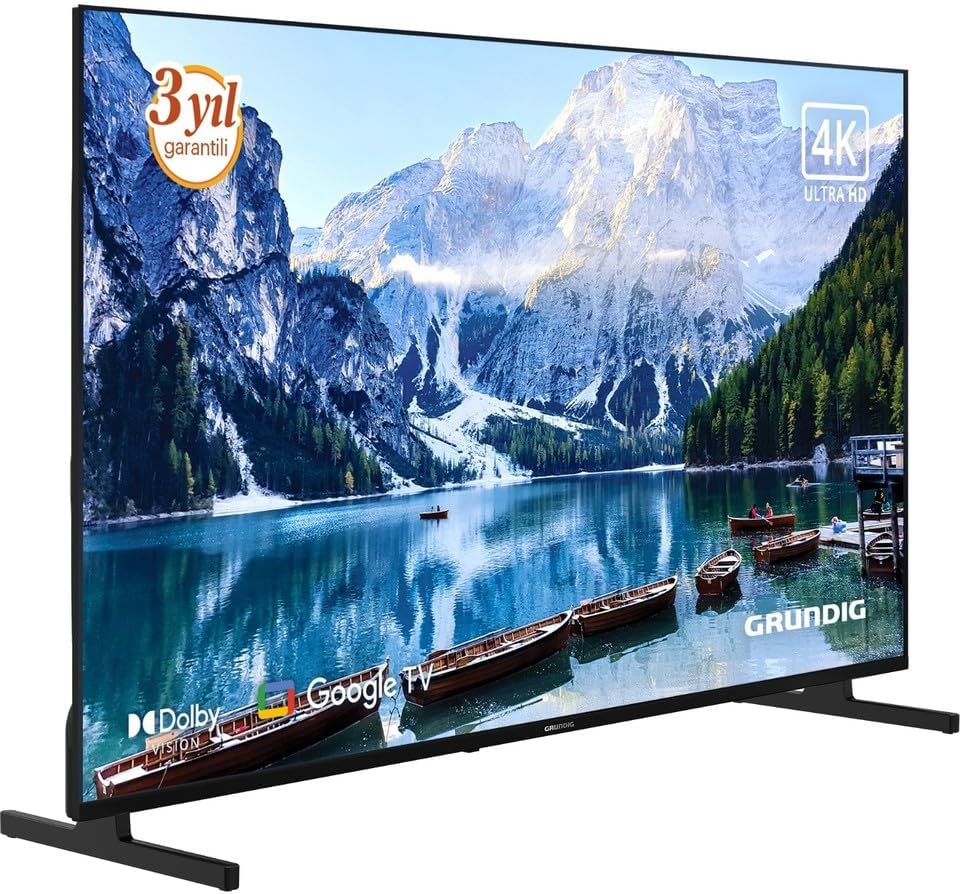
تصویر 2: زاویہ سامنے view of the Grundig 50 GKU 700 TV, showcasing its slim design and the attached stand. The screen displays a vibrant image, highlighting the 4K Ultra HD capability.
4.2 کنیکٹنگ پاور
- Locate the power input port on the back of the TV.
- Connect the power cable securely to the TV.
- پاور کیبل کے دوسرے سرے کو دیوار کے آؤٹ لیٹ میں لگائیں۔

تصویر 3: کلوز اپ view of the power input port located on the back of the Grundig TV, labeled "AC IN". A caution label regarding electric shock is visible nearby.
4.3 بیرونی آلات کو جوڑنا
Your Grundig TV offers various connection options:
- HDMI: For connecting Blu-ray players, game consoles, set-top boxes, etc. (HDMI 1, HDMI 2, HDMI 3 ports available).
- USB: میڈیا چلانے کے لیے USB سٹوریج کے آلات کو جوڑنے کے لیے files. (USB 1, USB 2 ports available).
- Satellite/Antenna: For connecting a satellite dish or terrestrial antenna.
- ایتھرنیٹ (LAN): وائرڈ انٹرنیٹ کنکشن کے لیے۔

تصویر 4: تفصیلی view of the connectivity panel on the back of the Grundig TV, showing multiple ports including USB, HDMI (HDMI 1/ARC, HDMI 2, HDMI 3), satellite/antenna input, and an Ethernet (LAN) port.

تصویر 5: Full rear view of the Grundig 50 GKU 700 TV, showing the overall design of the back panel and the central area where the power and input ports are located.
4.4 ابتدائی سیٹ اپ وزرڈ
After connecting power and turning on the TV for the first time, a setup wizard will guide you through:
- زبان کا انتخاب۔
- نیٹ ورک کنکشن (وائی فائی یا ایتھرنیٹ)۔
- Google account sign-in (for Google TV features).
- Channel scanning (for satellite or terrestrial broadcasts).
آپ کا ٹی وی چلانا
5.1 ریموٹ کنٹرول اوورview
The remote control allows you to access all functions of your TV. Insert two AAA batteries (not included) into the remote control, ensuring correct polarity.

تصویر 6: سامنے والا view of the Grundig TV remote control. Key buttons include Power, Google Assistant (microphone), Settings, Input, Navigation Pad with OK button, Volume, Channel, Home, Mute, Netflix, YouTube, Prime Video, and Apps buttons, along with numeric keys.

تصویر 7: زاویہ دار view of the Grundig TV remote control, showing its ergonomic design and the layout of its buttons.
- پاور بٹن: ٹی وی کو آن یا آف کرتا ہے۔
- گوگل اسسٹنٹ بٹن: مواد تلاش کرنے یا ٹی وی کو کنٹرول کرنے کے لیے صوتی کنٹرول کو فعال کرتا ہے۔
- Navigation Pad (Up/Down/Left/Right) and OK: مینو نیویگیشن اور انتخاب کے لیے۔
- والیوم (+/-): حجم کی سطح کو ایڈجسٹ کرتا ہے۔
- Channel (Up/Down): ٹی وی چینلز بدلتے ہیں۔
- ہوم بٹن: Google TV ہوم اسکرین پر واپس آجاتا ہے۔
- ان پٹ بٹن: Selects input sources (HDMI, USB, Satellite, etc.).
- Netflix, YouTube, Prime Video, Apps Buttons: Direct access to streaming services and the app menu.
5.2 گوگل ٹی وی انٹرفیس
Your TV runs on Google TV, providing a personalized experience with content recommendations, access to a vast library of apps from the Google Play Store, and integrated Google Assistant functionality.
- ہوم اسکرین: تجویز کردہ مواد، انسٹال کردہ ایپس، اور ترتیبات تک فوری رسائی دکھاتا ہے۔
- ایپس: Download and manage your favorite streaming services and applications.
- وائس کنٹرول: Use the Google Assistant button on your remote to search for movies, check the weather, or control smart home devices.
6 دیکھ بھال
6.1 ٹی وی کی صفائی
- صاف کرنے سے پہلے ہمیشہ ٹی وی کو ان پلگ کریں۔
- اسکرین اور کیبنٹ کو صاف کرنے کے لیے نرم، خشک، لنٹ فری کپڑا استعمال کریں۔
- اسکرین پر ضدی نشانات کے لیے، ہلکے سے ڈیampur کپڑے میں پانی یا خصوصی سکرین کلینر (یقینی بنائیں کہ یہ ایل ای ڈی اسکرینوں کے لیے محفوظ ہے) اور آہستہ سے صاف کریں۔ مائع کو براہ راست اسکرین پر نہ چھڑکیں۔
- کھرچنے والے کلینر، موم یا سالوینٹس کے استعمال سے پرہیز کریں۔
6.2 سافٹ ویئر اپ ڈیٹس
Your TV may receive software updates periodically to improve performance and add new features. Ensure your TV is connected to the internet to receive these updates. You can usually check for updates in the TV's settings menu under "System" or "About".
7 خرابیوں کا سراغ لگانا
اگر آپ کو اپنے ٹی وی کے ساتھ مسائل کا سامنا ہے، تو درج ذیل عام مسائل اور حل دیکھیں:
7.1 کوئی طاقت نہیں۔
- Check if the power cable is securely plugged into both the TV and the wall outlet.
- کسی دوسرے آلے میں پلگ لگا کر تصدیق کریں کہ وال آؤٹ لیٹ کام کر رہا ہے۔
- ریموٹ کنٹرول پر یا ٹی وی پر ہی پاور بٹن دبائیں۔
7.2 No Picture, But Sound is Present
- Ensure the correct input source is selected (e.g., HDMI 1, Satellite).
- Check the connections of external devices.
- Try restarting the TV and any connected devices.
7.3 No Sound, But Picture is Present
- والیوم لیول چیک کریں اور یقینی بنائیں کہ TV خاموش نہیں ہے۔
- If using external audio devices (soundbar, receiver), ensure they are properly connected and powered on.
- TV مینو میں آڈیو سیٹنگز چیک کریں۔
7.4 ریموٹ کنٹرول کام نہیں کر رہا ہے۔
- درست قطبیت کو یقینی بناتے ہوئے بیٹریوں کو نئی سے تبدیل کریں۔
- یقینی بنائیں کہ ریموٹ اور ٹی وی کے IR سینسر کے درمیان کوئی رکاوٹ نہیں ہے۔
- If it's a Bluetooth remote, try re-pairing it with the TV (refer to TV settings for pairing instructions).
7.5 نیٹ ورک کنکشن کے مسائل
- For Wi-Fi, ensure the router is on and within range. Try restarting the router.
- For wired connection, ensure the Ethernet cable is securely connected to both the TV and the router.
- Check network settings in the TV menu.
8. وضاحتیں
| فیچر | تفصیلات |
|---|---|
| برانڈ | گرونڈیگ |
| ماڈل کا نام | GE5T00 |
| ماڈل سال | 2025 |
| اسکرین کا سائز | 50 انچ |
| ڈسپلے ٹیکنالوجی | ایل ای ڈی LCD |
| قرارداد | 4K (3840 x 2160 پکسلز) |
| پہلو کا تناسب | 16:9 |
| ریفریش ریٹ | 60 Hz |
| آپریٹنگ سسٹم | گوگل ٹی وی |
| کنیکٹوٹی ٹیکنالوجی | USB, HDMI, Ethernet, Satellite/Antenna |
| شامل اجزاء | پاور کیبل |
| مصنوعات کے طول و عرض | 190.5 x 5.08 x 480.06 سینٹی میٹر |
| پروڈکٹ کا وزن | 500 گرام |
| ASIN | B0FSG93693 |
9. وارنٹی اور سپورٹ
Your Grundig 50 GKU 700 TV comes with a manufacturer's warranty. Please refer to the warranty card included in your package for specific terms and conditions. For technical support, service inquiries, or to register your product, please visit the official Grundig website or contact their customer service department. Contact information can typically be found on the Grundig webسائٹ یا آپ کے TV کے ساتھ فراہم کردہ دستاویزات میں۔
آن لائن مدد: www.grundig.com۔


