1. تعارف اور اوورview
Thank you for choosing the EWEADN V102 Wired Keyboard. This 98-key compact keyboard is designed for both gaming and productivity, offering a blend of functionality, comfort, and dynamic aesthetics. It features a dedicated media knob, an integrated display screen, and customizable RGB backlighting. This manual provides essential information for setting up, operating, maintaining, and troubleshooting your new keyboard.
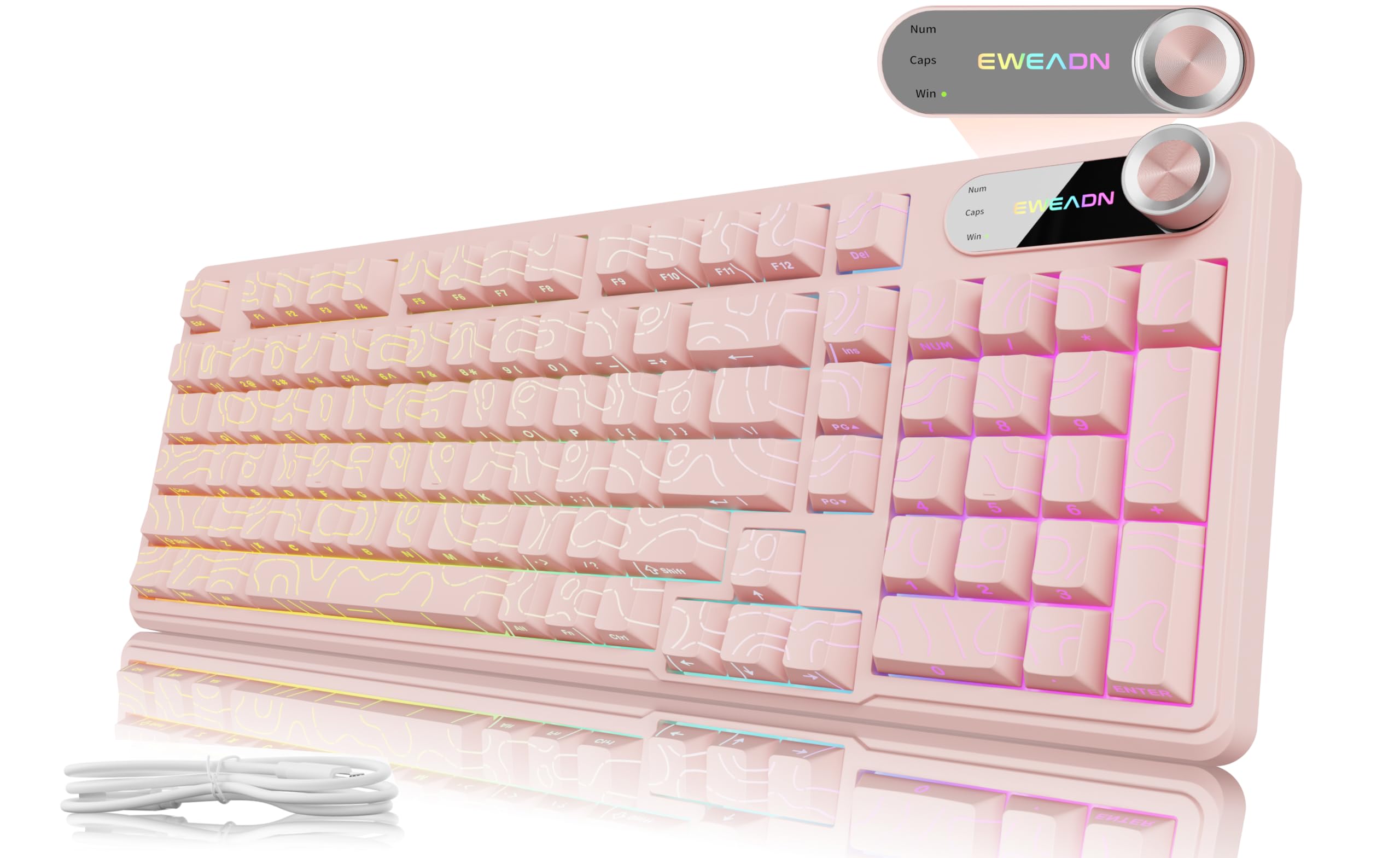
Figure 1: EWEADN V102 Wired Keyboard, Light Pink variant.
2. باکس میں کیا ہے۔
تمام اشیاء کی موجودگی کو یقینی بنانے کے لیے براہ کرم پیکیج کے مواد کو چیک کریں:
- EWEADN V102 Keyboard x 1
- USB Type-C کیبل x 1
- ہدایت نامہ x 1

Figure 2: Included USB Type-C cable for keyboard connection.
3. سیٹ اپ ہدایات
- کی بورڈ کو جوڑیں: Plug the USB Type-C cable into the port on the keyboard and the other end into an available USB port on your computer or device. The keyboard is plug-and-play, requiring no additional drivers for basic functionality.
- ٹائپنگ زاویہ کو ایڈجسٹ کریں: The keyboard features 2-stage adjustable feet on the underside. Flip them out to achieve your preferred typing angle for enhanced comfort.
- سسٹم کی مطابقت: The EWEADN V102 is compatible with Windows, Mac, Android, iOS, Xbox, PS4, and PS5. For Mac users, switch to Mac layout by pressing ایف این + ایس. For Windows, press ایف این + اے۔.

Figure 3: Dual-System Connection for Windows and Mac layouts.

شکل 4: ایرگونومک آرام کے لیے ایڈجسٹ ایبل ٹائپنگ اینگل۔
4. آپریٹنگ ہدایات
4.1. Dedicated Knob & Display Screen
The smart rotary knob and built-in display screen provide intuitive control and real-time status updates:
- Backlight Mode Control: Press the knob once to cycle through 12 different RGB backlight modes.
- چمک ایڈجسٹمنٹ: Rotate the knob to adjust the backlight brightness (5 levels).
- ملٹی میڈیا موڈ: پکڑو ایف این + نوب to switch to multimedia mode. In this mode, rotating the knob controls volume, and pressing it mutes/unmutes audio.
- ڈسپلے سکرین: The screen shows the EWEADN logo and indicators for Caps Lock, Num Lock, and Win Lock status.

Figure 5: Smart Screen Display showing keyboard status.

Figure 6: Multi-Function Control Knob for lighting and multimedia.
4.2. Dynamic RGB Backlighting
Customize your keyboard's lighting with these shortcuts:
- بیک لائٹ ٹوگل کریں: دبائیں FN + بیک اسپیس to turn the backlight ON/OFF.
- روشنی کے اثرات کو تبدیل کریں: دبائیں FN + INS to cycle through 12 stunning RGB lighting effects.
- چمک کو ایڈجسٹ کریں: دبائیں FN + PGUP چمک بڑھانے کے لیے، FN + PGDN چمک کو کم کرنے کے لیے (5 درجے)۔
- Adjust Lighting Speed: دبائیں FN + "-" to decrease speed, FN + "+" to increase speed (5 levels).

Figure 7: RGB Backlight controls and effects.
4.3. 98-Key Compact Layout
The 98% layout provides a full-featured experience, including a numeric keypad, while maintaining a compact footprint to save desk space.

Figure 8: Compact 98-key layout for efficiency.
5 دیکھ بھال
5.1. Spill Resistant Design
The EWEADN V102 keyboard features a spill-resistant design to protect against accidental liquid spills. In case of a spill, gently wipe the liquid off the surface and allow the keyboard to air dry completely before continued use. Avoid submerging the keyboard in water.

Figure 9: Spill-resistant design for enhanced durability.
6 خرابیوں کا سراغ لگانا
If you encounter any issues with your EWEADN V102 keyboard, please refer to the following common troubleshooting steps:
- کی بورڈ جواب نہیں دے رہا ہے: Ensure the USB Type-C cable is securely connected to both the keyboard and your device. Try plugging it into a different USB port.
- بیک لائٹ کام نہیں کر رہی: Check if the backlight is turned off using FN + بیک اسپیس. کے ساتھ چمک کو ایڈجسٹ کریں۔ FN + PGUP/PGDN.
- Incorrect Key Layout (Mac/Windows): Verify that the correct system layout is selected (ایف این + اے۔ ونڈوز کے لیے، ایف این + ایس for Mac).
- نوب کی فعالیت: If the knob is not controlling lighting or multimedia as expected, ensure you are in the correct mode (press or hold ایف این + نوب to switch).
- وقفے وقفے سے رابطہ: Ensure the cable is not damaged and try connecting directly to your device without any hubs or adapters.
If the problem persists after trying these steps, please contact EWEADN customer support for further assistance.
7. وضاحتیں
| برانڈ | EWEADN |
| ماڈل | V102 |
| لے آؤٹ | 98-Key Compact |
| کنیکٹوٹی | وائرڈ (USB Type-C) |
| بیک لائٹنگ | Dynamic RGB (12 effects, 5 brightness levels, 5 speed levels) |
| خصوصی خصوصیات | Dedicated Media Knob, Display Screen (Caps/Num/Win Lock), Spill Resistant, Adjustable Typing Angles |
| ہم آہنگ آلات | Laptop, PC (Windows, Mac, Android, iOS, Xbox, PS4, PS5) |
| شے کا وزن | 2.25 پاؤنڈ |
| پیکیج کے طول و عرض | 17.56 x 6.97 x 2.36 انچ |
| مواد | پلاسٹک |
8. وارنٹی اور سپورٹ
Your EWEADN V102 keyboard is covered by a return policy allowing returns or replacements within 30 days of purchase. For any product inquiries, technical support, or warranty claims, please contact EWEADN customer service.
- ای میل سپورٹ: ewadnkeyboard@outlook.com
- آن لائن مدد: Visit the EWEADN Store on Amazon and click 'Ask a question'.
Figure 10: EWEADN Customer Support Information.


