1. تعارف
Thank you for choosing the KAIWEETS KC200D Digital Clamp Meter. This device is a compact, high-precision instrument designed for electrical measurements in various settings, including home, commercial, and industrial environments. It features True RMS technology for accurate readings of complex waveforms, Non-Contact Voltage (NCV) detection for enhanced safety, and a clear backlit LCD for easy readability. This manual provides essential information for safe and effective use of your clamp میٹر
2. حفاظتی معلومات
To ensure safe operation, please read and understand all safety warnings and operating instructions before using this instrument. Failure to observe these warnings can result in serious injury or death.
- ہمیشہ مقامی اور قومی حفاظتی ضابطوں پر عمل کریں۔
- اگر میٹر خراب ہو یا ٹیسٹ لیڈز پر موصلیت خراب ہو تو اسے استعمال نہ کریں۔
- درجہ بندی والیوم سے زیادہ لاگو نہ کریں۔tage, as marked on the meter, between terminals or between any terminal and ground. The maximum operating voltage 600V ہے۔
- والیوم کے ساتھ کام کرتے وقت انتہائی احتیاط برتیں۔tages 60V DC یا 30V AC RMS سے اوپر۔ یہ جلدtages ایک جھٹکا خطرہ لاحق ہے۔
- Keep your fingers behind the finger guards on the test leads during use.
- میٹر کو دھماکہ خیز گیس، بخارات یا دھول کے ماحول میں نہ چلائیں۔
- Remove the test leads from the circuit before changing functions.
- Always turn off the power to the circuit under test before connecting or disconnecting the test leads.
- Ensure the battery cover is securely closed before operating the meter.
3. پیکیج کے مشمولات
Verify that all items listed below are present and undamaged:
- 1 x KAIWEETS KC200D Digital Clamp میٹر
- 1 ایکس صارف دستی
- 1 ایکس اسٹوریج بیگ
- 2 x ٹیسٹ لیڈز (سرخ اور سیاہ)
- 2 x AAA 1.5V بیٹریاں
4. پروڈکٹ ختمview
The KAIWEETS KC200D is designed for ease of use and durability. Familiarize yourself with the main components:
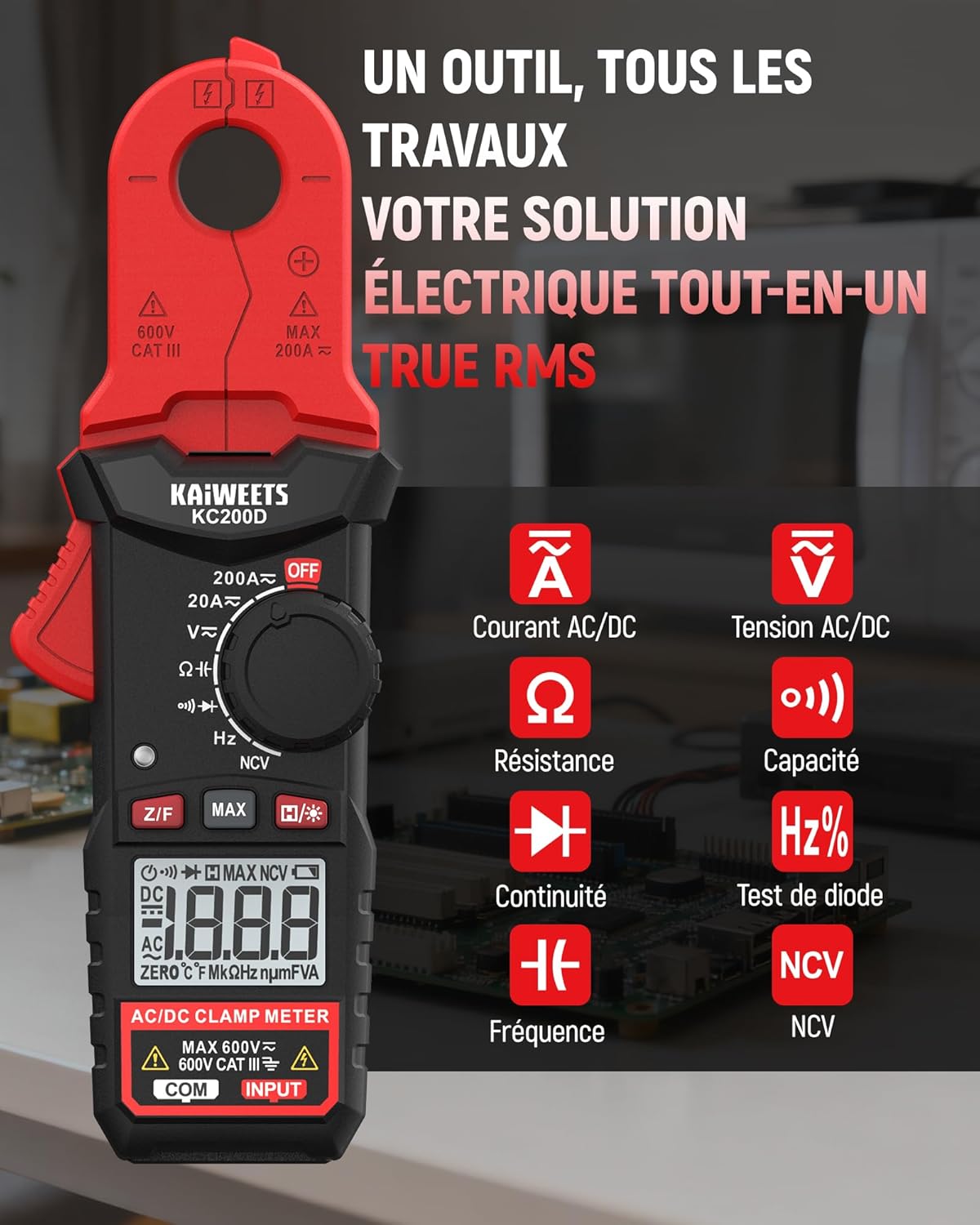
تصویر 4.1: KAIWEETS KC200D Clamp Meter with its various measurement functions highlighted, including AC/DC Current, AC/DC Voltage, Resistance, Capacitance, Frequency, Diode Test, Continuity, and NCV.
4.1 کلیدی اجزاء
- Clamp جبڑا: غیر رابطہ AC/DC موجودہ پیمائش کے لیے استعمال کیا جاتا ہے۔
- فنکشن ڈائل: پیمائش کے طریقوں کو منتخب کرنے کے لیے روٹری سوئچ۔
- LCD ڈسپلے: پیمائش کی ریڈنگز، اکائیاں، اور اشارے دکھاتا ہے۔
- بٹن: For special functions like Data Hold, MAX/MIN, DC Zero, Backlight, and NCV.
- ان پٹ ٹرمینلز: والیوم کے لیے ٹیسٹ لیڈز کو جوڑنے کے لیےtage، مزاحمت، اہلیت، تعدد، ڈایڈڈ، اور تسلسل کی پیمائش۔
5. سیٹ اپ
5.1 بیٹری کی تنصیب
The KC200D requires two AAA 1.5V batteries (included).
- یقینی بنائیں کہ میٹر آف ہے۔
- میٹر کے پچھلے حصے میں بیٹری کے ڈبے کو تلاش کریں۔
- بیٹری کے کمپارٹمنٹ کور کو کھولنے کے لیے سکریو ڈرایور استعمال کریں۔
- Insert the two AAA batteries, observing the correct polarity (+ and -).
- بیٹری کے کمپارٹمنٹ کور کو تبدیل کریں اور اسے سکرو سے محفوظ کریں۔
5.2 ٹیسٹ لیڈز کو جوڑنا
ٹیسٹ لیڈز کی ضرورت کی پیمائش کے لیے (جلدtage, resistance, capacitance, frequency, diode, continuity):
- Insert the red test lead into the "INPUT" terminal.
- Insert the black test lead into the "COM" (Common) terminal.
6. آپریٹنگ ہدایات
Always select the appropriate function before making any measurement. Turn the function dial to the desired measurement mode.
6.1 AC/DC موجودہ پیمائش (Clamp)
cl استعمال کریں۔amp jaw for non-contact current measurement. This method is ideal for safely measuring current without breaking the circuit.

تصویر 6.1: سی ایلamp jaw of the KC200D measuring current on a single electrical wire, demonstrating its compact design and precision.
- فنکشن ڈائل کو کی طرف موڑ دیں۔ 20A or 200A position for AC current, or 20A = or 200A = for DC current.
- cl دبائیںamp جبڑے کو کھولنے کے لئے ٹرگر.
- Encircle only ایک conductor with the clamp جبڑے cl نہ کروamp around multiple wires, as this will result in an inaccurate reading.
- For DC current measurement, press the Z/F button to zero the display before clamping
- LCD ڈسپلے پر موجودہ قدر پڑھیں۔
6.2 AC/DC والیومtage پیمائش
حجم کی پیمائش کرنے کے لئےtage, use the test leads.
- فنکشن ڈائل کو کی طرف موڑ دیں۔ V~ (AC والیومtage) یا V= (DC والیومtagای) پوزیشن۔
- Connect the red test lead to the positive side of the circuit and the black test lead to the negative side (or ground).
- جلد پڑھیںtagLCD ڈسپلے پر ای ویلیو۔
6.3 مزاحمتی پیمائش
مزاحمت کی پیمائش کرنے سے پہلے اس بات کو یقینی بنائیں کہ سرکٹ ڈی انرجائزڈ ہے۔
- فنکشن ڈائل کو کی طرف موڑ دیں۔ Ω پوزیشن
- ٹیسٹ لیڈز کو جزو کے پار جوڑیں تاکہ پیمائش کی جائے۔
- LCD ڈسپلے پر مزاحمتی قدر پڑھیں۔
6.4 صلاحیت کی پیمائش
Discharge capacitors completely before measurement to avoid damage to the meter or injury.
- فنکشن ڈائل کو کی طرف موڑ دیں۔ اہلیت position (often shared with Diode/Continuity, press FUNC to cycle).
- کیپسیٹر کے پار ٹیسٹ لیڈز کو جوڑیں۔
- LCD ڈسپلے پر اہلیت کی قدر پڑھیں۔
6.5 تعدد کی پیمائش
تعدد کی پیمائش کے لیے:
- فنکشن ڈائل کو کی طرف موڑ دیں۔ ہرٹج٪ پوزیشن
- ٹیسٹ لیڈز کو اس سرکٹ میں جوڑیں جہاں فریکوئنسی کی پیمائش کی جانی ہے۔
- LCD ڈسپلے پر فریکوئنسی ویلیو پڑھیں۔
6.6 ڈایڈڈ ٹیسٹ
یقینی بنائیں کہ ڈایڈڈ سرکٹ سے منقطع ہے۔
- فنکشن ڈائل کو کی طرف موڑ دیں۔ ڈایڈڈ position (often shared with Capacitance/Continuity, press FUNC to cycle).
- Connect the red test lead to the anode and the black test lead to the cathode.
- آگے والی جلدtage drop will be displayed for a good diode. Reverse the leads; the display should show OL (Open Loop).
6.7 مسلسل ٹیسٹ
یقینی بنائیں کہ سرکٹ غیر فعال ہے۔
- فنکشن ڈائل کو کی طرف موڑ دیں۔ تسلسل position (often shared with Diode/Capacitance, press FUNC to cycle).
- ٹیسٹ لیڈز کو جزو یا تار سے جوڑیں۔
- اگر تسلسل (کم مزاحمت) ہے، تو میٹر ایک قابل سماعت بیپ خارج کرے گا۔
6.8 غیر رابطہ والیومtage (NCV) کا پتہ لگانا
The NCV function allows for quick and safe detection of live AC voltage براہ راست رابطے کے بغیر۔

تصویر 6.2: The KC200D performing Non-Contact Voltage (NCV) detection near an electrical outlet, showing visual indicators for low and high voltagای موجودگی.
- فنکشن ڈائل کو کی طرف موڑ دیں۔ این سی وی پوزیشن
- Bring the top end of the meter near the conductor or outlet.
- The meter will emit an audible beep and illuminate LED indicators, with frequency increasing as voltage طاقت بڑھ جاتی ہے۔
6.9 خصوصی افعال

تصویر 6.3: The KC200D highlighting its user-friendly functions: MAX for peak value, Z/F for DC current zeroing, H for data hold, backlight for low-light conditions, and auto-off for battery saving.
- Data Hold (H/* button): ڈسپلے پر کرنٹ ریڈنگ کو منجمد کرنے کے لیے دبائیں۔ جاری کرنے کے لیے دوبارہ دبائیں۔
- MAX/MIN (MAX button): Press to display the maximum or minimum measured value. Press again to cycle.
- DC Current Zero (Z/F button): For DC current measurements, press this button before clamping to zero out any residual readings.
- Backlight (H/* long press): Long press the H/* button to turn the display backlight ON or OFF for improved visibility in low-light conditions.
- خودکار بند: The meter automatically powers off after approximately 15 minutes of inactivity to conserve battery life. Press any button or rotate the function dial to wake it up.
7 دیکھ بھال
7.1 صفائی
میٹر کو خشک، نرم کپڑے سے صاف کریں۔ کھرچنے والے یا سالوینٹس کا استعمال نہ کریں۔
7.2 بیٹری کی تبدیلی
When the battery indicator appears on the LCD, replace the batteries as described in the Setup section (5.1 Battery Installation).
7.3 اسٹوریج
If the meter is not used for an extended period, remove the batteries to prevent leakage and damage. Store the meter in its carrying bag in a cool, dry place.
8 خرابیوں کا سراغ لگانا
| مسئلہ | ممکنہ وجہ | حل |
|---|---|---|
| میٹر آن نہیں ہے۔ | مردہ بیٹریاں؛ بیٹری کی غلط تنصیب | بیٹریاں تبدیل کریں؛ بیٹری کی قطبیت کی جانچ کریں۔ |
| Inaccurate current reading | Multiple conductors in clamp jaw; DC current not zeroed | یقینی بنائیں کہ صرف ایک کنڈکٹر cl ہے۔amped; Press Z/F button for DC current |
| "OL" ظاہر ہوا (اوورلوڈ) | Measurement exceeds range; Open circuit (for continuity/resistance) | Select a higher range (if available); Check circuit connections |
| NCV کا پتہ نہیں ہے۔ | کوئی AC والیوم نہیں۔tage present; Meter not close enough to source | AC والیوم کی تصدیق کریں۔tage presence; Move meter closer to the live conductor |
9. وضاحتیں
Technical specifications for the KAIWEETS KC200D Digital Clamp میٹر:
| فیچر | تفصیلات |
|---|---|
| ماڈل نمبر | KC200D |
| ڈسپلے | 2000 شمار، بیک لِٹ LCD |
| AC کرنٹ | 20A/200A (±(2.5% + 5 digits)) |
| ڈی سی کرنٹ | 20A/200A (±(2.5% + 5 digits)) |
| AC جلدtage | 2V/20V/200V/600V (±(1.0% + 5 digits)) |
| ڈی سی والیومtage | 200mV/2V/20V/200V/600V (±(0.5% + 5 digits)) |
| مزاحمت | 200Ω/2kΩ/20kΩ/200kΩ/2MΩ/20MΩ (±(1.0% + 5 digits)) |
| اہلیت | 2nF/20nF/200nF/2µF/20µF/200µF/2mF/20mF (±(4.0% + 5 digits)) |
| تعدد | 2Hz/20Hz/200Hz/2kHz/20kHz/200kHz/2MHz/20MHz (±(1.0% + 3 digits)) |
| ڈایڈڈ ٹیسٹ | جی ہاں |
| تسلسل ٹیسٹ | جی ہاں |
| NCV کھوج | جی ہاں |
| بجلی کی فراہمی | 2 x AAA 1.5V بیٹریاں |
| حفاظتی درجہ بندی | CAT III 600V, Pollution Level: 2 |
| طول و عرض | 20.7 x 11.3 x 4.7 سینٹی میٹر (پیکیج) |
| وزن | 308 گرام (پیکیج) |
10. وارنٹی اور سپورٹ
KAIWEETS products are designed for reliability and performance. For warranty information, technical support, or service inquiries, please refer to the contact information provided on the KAIWEETS official website or contact your local distributor. Please retain your purchase receipt as proof of purchase for warranty claims.


