

VEVOR KF-H2C,KF-H2D Counting Scale
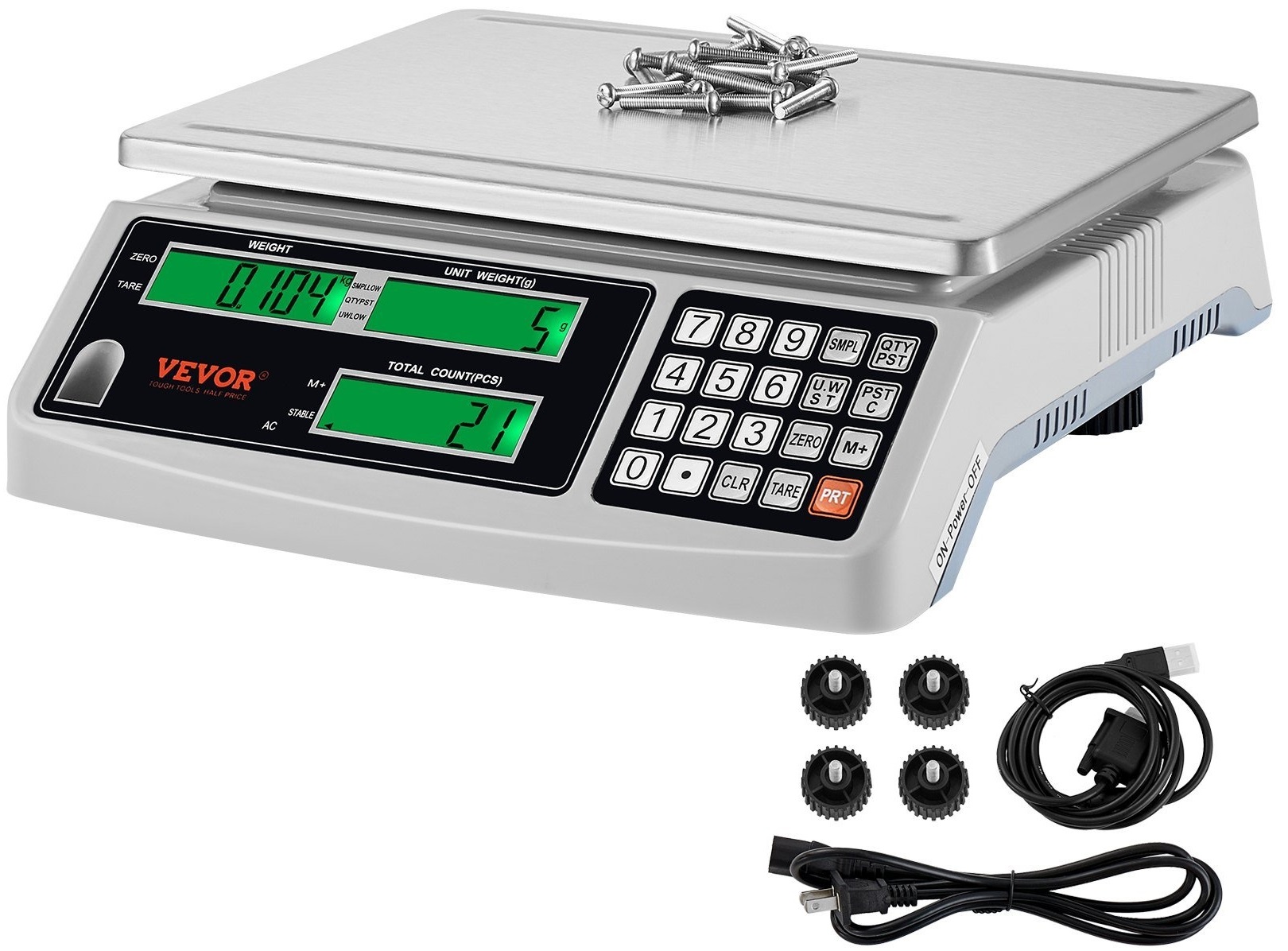
وضاحتیں
- ماڈل: KF-H2C / KF-H2D
- فنکشن: Autozero; Counting; ADD; TARE; Backlight
- طاقت: DC 6V/4AH rechargeable battery
- بجلی کی کھپت: DC 38 mA (DC 58 mA with backlight)
- صلاحیت: 1 گرام - 30.009 کلوگرام
- یونٹ کا انتخاب: Kg/g/lb
مصنوعات کے استعمال کی ہدایات
- مین ٹیکنیکل فنکشن
- فنکشن: Autozero; Counting; ADD; TARE; بیک لائٹ
- طاقت: DC 6V/4AH rechargeable battery
- بجلی کی کھپت: ڈی سی 38 ایم اے (ڈی سی 58 ایم اے کے ساتھ بیک لائٹ)
- کم بجلی کا الارم: جب یہ ظاہر کرتا ہے "()" کا مطلب ہے ضرورت چارج کرنا اگر اب بھی استعمال کرتے رہیں تو پیمانے کو توڑنا آسان ہے۔
- تکنیکی ڈیٹا
- صلاحیت: 1 گرام - 30.009 کلوگرام
- یونٹ کا انتخاب: کے لیے متعلقہ بٹن دبائیں۔ کلو، جی، یا ایل بی یونٹس میں سے انتخاب کریں۔
- گنتی
- گنتی سے پہلے: ایس حاصل کریںampتعین کرنے کے لئے یونٹ کا وزن یا پی سیز۔
- جب یونٹ وزن نامعلوم ہے:
- ایس ڈالوampاسی کے ساتھ پلیٹ پر متعلقہ سامان کی لیس وزن
- Eg, for unit G, put 30 pcs of screws of the same weight on پلیٹ.
- s کی تعداد درج کریں۔amples (eg, PCS 30) to display weight, یونٹ وزن، اور کل شمار.
- پلیٹ میں سامان شامل کرنا جاری رکھیں؛ کل وزن اور شمار کرے گا تبدیلی جبکہ یونٹ کا وزن مستقل رہتا ہے۔
اکثر پوچھے گئے سوالات
- سوال: میں کیسے جان سکتا ہوں کہ اسکیل کب چارج کرنا ہے؟
- A: کم طاقت کا الارم کب اشارہ کرے گا۔ چارج کرنے کی ضرورت ہے. اگر نظر انداز کیا جائے تو یہ پیمانے کو نقصان پہنچا سکتا ہے۔
- سوال: میں یونٹ (کلوگرام/ گرام/ ایل بی) کا انتخاب کیسے کروں؟
- A: منتخب کرنے کے لیے متعلقہ بٹن دبائیں۔ کلو، جی، یا ایل بی یونٹس کے درمیان۔
''
ٹیکنیکل سپورٹ اور ای وارنٹی سرٹیفکیٹ www.vevor.com/support
گنتی کا پیمانہ یوزر مینوئل
ماڈل: KF-H2C / KF-H2D
ہم آپ کو مسابقتی قیمت کے ساتھ ٹولز فراہم کرنے کے لیے پرعزم ہیں۔ "آدھی قیمت کو بچائیں"، "آدھی قیمت" یا ہمارے ذریعہ استعمال کیے جانے والے کسی دوسرے اسی طرح کے تاثرات صرف اس بچت کے تخمینے کی نمائندگی کرتے ہیں جو آپ کو بڑے بڑے برانڈز کے مقابلے ہمارے ساتھ کچھ ٹولز خریدنے سے فائدہ ہو سکتا ہے اور یہ ضروری نہیں کہ ہماری طرف سے پیش کردہ ٹولز کی تمام اقسام کا احاطہ کیا جائے۔ آپ کو یاد دلایا جاتا ہے کہ جب آپ ہمارے ساتھ آرڈر دے رہے ہیں تو احتیاط سے تصدیق کریں۔
اصل میں سب سے بڑے برانڈز کے مقابلے میں نصف کی بچت۔
ماڈل: KF-H2C / KF-H2D
گنتی کا پیمانہ
(تصویر صرف حوالہ کے لیے ہے، براہ کرم اصل چیز کا حوالہ دیں)
مدد چاہیے؟ ہم سے رابطہ کریں! مصنوعات کے سوالات ہیں؟ تکنیکی مدد کی ضرورت ہے؟ براہ مہربانی بلا جھجھک ہم سے رابطہ کریں:
ٹیکنیکل سپورٹ اور ای وارنٹی سرٹیفکیٹ www.vevor.com/support
یہ اصل ہدایت ہے، براہ کرم کام کرنے سے پہلے تمام دستی ہدایات کو بغور پڑھیں۔ VEVOR ہمارے صارف دستی کی واضح تشریح محفوظ رکھتا ہے۔ پروڈکٹ کی ظاہری شکل آپ کو موصول ہونے والی پروڈکٹ سے مشروط ہوگی۔ براہ کرم ہمیں معاف کر دیں کہ اگر ہماری پروڈکٹ پر کوئی ٹیکنالوجی یا سافٹ ویئر اپ ڈیٹ ہو تو ہم آپ کو دوبارہ مطلع نہیں کریں گے۔
-1-
مین ٹیکنیکل فنکشن
A. مین ٹیکنیکل فنکشن۔
1. فنکشن:
آٹو صفر؛ گنتی شامل کریں TARE بیک لائٹ
2. طاقت
AC 220-240V (±10%) 50Hz ± 1 Hz
AC 110V (±10%) 60Hz ± 1 Hz
DC 6V/4AH ریچارج ایبل بیٹری
3 بجلی کی کھپت
DC 38 mA DC 58 mA بیک لائٹ کے ساتھ
4. واٹ 0.4 ڈبلیو بیک لائٹ کے ساتھ 5. کم پاور الارم
When it shows (
) کا مطلب ہے چارج کرنے کی ضرورت ہے۔ اگر اب بھی استعمال کرتے رہیں تو یہ آسان ہے۔
broke the scale.
B. تکنیکی ڈیٹا
صلاحیت 1
صلاحیت
(n)
(e) (d)
(زیادہ سے زیادہ) (منٹ) صفر ٹیر (زیادہ سے زیادہ) اوورلوڈ (زیادہ سے زیادہ +9e)
15000.0g 15000.0g 0.5g 0.5g 15000.0g 10g ±300g 0~15000.0g
15004.5 گرام
30,000kg 30,000kg 1g 1g 30,000kg 20g ±600g 0~30,000kg
30.009 کلو
NotesFS= MAX WEIGHT of division
اضافی تبصرہ
When the division 1g, generally the unit is KG(eg 1g, 2g, 5g), When the
division<1g, generally the unit is G(eg 0.1g, 0.2g, 0.5g)
-2-
آپریشن کی ہدایات
C. Operation instructions.
1. استعمال کرنے سے پہلے
(1) براہ کرم اسکیل کو فلیٹ اور مضبوط جگہ پر رکھیں۔ یہ ایک ہی سطح پر یقینی بنانے کے لیے چار پاؤں کو سخت یا ڈھیلا کر سکتا ہے۔ اس پر ایک سطح کی گیند ہے. (2) اسے مخالف ماحول جیسے تیز ہوا اور دھوپ میں استعمال نہ کریں۔ (3).براہ کرم اکیلے پاور سپلائیر استعمال کریں۔ (4) جب آپ آن کریں تو پلیٹ میں کچھ بھی نہ رکھیں۔ (5) وزن کرتے وقت، براہ کرم کوشش کریں کہ اچھی چیز کو پلیٹ کے بیچ میں رکھیں، اس سے زیادہ نہ کریں۔ (6) 15-20 منٹ کے بعد پیمانہ آن کریں وزن زیادہ بہتر ہے۔
(7) دکھائیں۔
سب سے پہلے چارج کرنے کی ضرورت ہے.
2. ڈسپلے:
A: جب یونٹ KG ہو گا تو وزن تصویر کے طور پر 0.000 ظاہر کرے گا:

or
-3-
B: جب یونٹ G ہے، وزن تصویر کے طور پر 0.0 ظاہر کرے گا:
or
(1) وزن
6 digital for the goods weight and add weight and the left digital can display[- ]
(2).UNIT WEIGHT
یونٹ کے وزن اور اضافے کے اوقات کے لیے 5 ڈیجیٹل۔ پوائنٹ تبدیل ہو سکتا ہے۔
(3) مقدار
سامان کے ٹکڑوں کے لیے 6 ڈیجیٹل
3.Symbol” ”
(1). or Net or Taremeans has been cut the weight of packing (2). or Zeromeans no weight (3).+ or M+means ADD (4). or Stable or ~: Means on stable (5).SMPLOWmeans sample کافی نہیں ہے. ایس کا وزنampپلیٹ پر le min s کے وزن سے کم ہے۔ample، براہ کرم اس علامت کو غائب کرنے والے ٹکڑے یونٹ شامل کریں۔ (6) QTYPST UWLOWجب آپ کے سیٹ کے مطابق پی سی ایس کم ہو تو یہ الارم اور QTYPST UWLOW ہو جائے گا۔
(7)۔
مطلب بجلی کم ہے، چارج کرنے کی ضرورت ہے۔
تبصرہ
اعلی صحت سے متعلق گنتی کا پیمانہ: کم از کم sampلی وزن = 20 ڈی منٹ یونٹ وزن =
0.2d ( d=division) counting scale Min sample وزن = 40d کم سے کم یونٹ وزن = 0.8d ( d = تقسیم)
-4-
KEYBOARDFUNCTION
4. کی بورڈ
سونا
(RS-232 کے بغیر)
(RS-232 کے ساتھ)

4.1 جامع کلیدی فنکشن کی تفصیل
+نمبر کیز0-2کنورٹ یونٹس
نمبرز کیز 4–6 چمک کو ایڈجسٹ کریں۔
+ الارم لانگ کی اوپری اور نچلی حدیں سیٹ کریں۔
الارم سیٹنگ داخل کرنے کے لیے دبائیں بند کرنے کے لیے دبائیں سیٹ کرنے کے لیے دبائیں۔
الارم پریس کی اوپری اور نچلی حدود کے باہر کے اندر سیٹ کرنے کے لیے
الارم پریس کی اوپری اور نچلی حدود کی بالائی حدود مقرر کرنے کے لیے
تصدیق کرنے کے لیے الارم دبائیں۔
4.2 فنکشن کلید
: جب یونٹ کا وزن نامعلوم ہو تو s ہونے والی اشیاء کی تعداد سیٹ کریں۔ampقیادت
:When the unit weight is knownConfirm the input weight:Use this key to set the alarm value when a fixed number of alarms are required
-5-
: الارم فنکشن کو غیر فعال کریں۔
:Add up the quantity of goods :Cancel the total amount of the accumulated items :Remove the weight of tare :Return the scale to zero as far as possible :Clear the number :Print the current weight, single weight, quantity ,and the cumulative data (Note: with the RS232)
فنکشن
5. فنکشن
5.1 آن آف بٹن
"" پر آن/آف رکھو کا مطلب ہے آن کرنا۔
"O" پر آن/آف کرنے کا مطلب ہے پاور آف۔
5.2. Auto Backlight
Press, when it displays “
"دبائیں۔
میں دکھاؤں گا"
رکھو
goods on the plateweight >10d, the light is on auto, when it is zero, the light is
auto off.
ہر وقت روشنی
دبائیں
when it displays”
"دبائیں۔
یہ ظاہر کرے گا ""، سب پر روشنی
وقت
Light off all the time press, when it display “off all the time.
"دبائیں۔
یہ ""، روشنی کو ظاہر کرے گا۔
When you turn off the scale, it will memory what you have chosen
-6-
5.3.Kg/g/lb یونٹ منتخب کریں۔
دبائیں
ڈسپلے کب ہے"
"پھر دبائیں
، یونٹ "کلوگرام" ہے۔
دبائیں
ڈسپلے کب ہے"
" پھر دبائیں، یونٹ "g" ہے۔
دبائیں
ڈسپلے کب ہے"
"پھر دبائیں، یونٹ "lb" ہے۔
5.4. گنتی
5.4.1 گنتی سے پہلے، آپ کو کچھ s حاصل کرنے کی ضرورت ہے۔amples pcs یا یونٹ کا وزن جاننے کے لیے (1) جب یونٹ کا وزن معلوم نہ ہو۔
ایس رکھوampپلیٹ پر متعلقہ سامان کی تعداد (ہر ایک کا وزنample must be the same): Eg (A): when the unit is G, put 30pcs screws of each same weight on the plate, It will display:
وزن
یونٹ وزن کل شمار
[ 53.1g ] [ 0 ]
[0]
s کے PCS "30" کو داخل کریں۔amples (Screws)، یہ ظاہر کرے گا:
وزن
یونٹ وزن کل شمار
[53.1 گرام]
[30]
[0]
پھر دبائیں، یہ ظاہر کرے گا:
وزن
یونٹ وزن کل شمار
[53.1 گرام]
[1.77 گرام]
[30]
At this moment you can continue to put the more goods (eg: screws) on the plate, the Total weight & Total count will change constantly, the unit weight won’t be changed.
Eg (B): when the unit is KG, put 30pcs screws of each same weight on the plate, It will display:
وزن
یونٹ وزن کل شمار
[ 0.053kg ] [ 0 ]
[0]
-7-
s کے PCS "30" کو داخل کریں۔amples (Screws)، یہ ظاہر کرے گا:
وزن
یونٹ وزن کل شمار
[0.053 کلوگرام]
[30]
[0]
پھر دبائیں، یہ ظاہر کرے گا:
وزن
یونٹ وزن کل شمار
[0.053 کلوگرام]
[1.766 گرام]
[30]
At this moment you can continue to put the more goods (eg screws) on the plate, the Total weight & Total count will change constantly, the unit weight won’t be changed.
(2) Know the unit weight(eg screws)
جب آپ جانتے ہیں کہ ایک سکرو کا وزن 1.766 گرام ہے،
A: if the unit is G, Input the unit weight 1.766, it will display:
[0.0 گرام]
[1.766g] [0]
Then Press, and put the more goods(eg:30 pcs screws) on the plate,
[53.0g] [1.766g] [30] If at this moment you continue to put the more pcs, the Total weight & Total count on the window will change constantly, the unit weight won’t change. B:If the unit is KG, Input the unit weight 1.766, it will display:
[0.000 کلوگرام]
[1.766g] [0]
پھر دبائیں۔
, and put the more goods(eg:30 pcs screws) on the plate,
[0.053 کلوگرام] [1.766 گرام] [30]
آخر میں، جب آپ پلیٹ میں موجود تمام سامان اتار دیتے ہیں، یونٹ کی کھڑکی پھر بھی
قیمت دکھاتا ہے، آپ دبا سکتے ہیں۔
.
-8-
ایسample is more, the precision is more high
NULL پوائنٹ
When you using the scale, sometimes the weight window is not [0.0], you can
دبائیں
to make it into [0.0], Zero range =capacity ×+ 4%
5.4.2 گنتی کے سامان کی پیکنگ ہے۔
(1).When the packing box /carton weight is unknown (eg the unit is KG)
has. Put the packing box of 500g on the plate, it will display
[0.500 کلوگرام]
[0]
[0]
b. دبائیں
، یہ ظاہر کرے گا۔
OR At this moment you can follow 5.4.1 to continue the counting. When the packing box/carton weight is unknown (eg the unit is G) a. Put the packing box of 500g on the plate, It will display
[500.0 گرام]
[0]
[0]
ب دبائیں، یہ ظاہر کرے گا:
[0.0 گرام]
[0]
[0]
-9-
Clear the TARE history Take down the goods and package on the plate, the weight will be [- 0.500kg ] on the basis of KG or [- 500.0g ] on the basis of G, Press, The weight will be [0.0], and this to TARE will disappear.
(2) on the plate, it will display 0.000(it means tared),
and at this moment you start to follow the way of 5.4.1 for counting. (3).1-B. When The weight of packing box/carton is known (eg the unit is G)
There is nothing on the plate, it display [0.0 g] [0] [0] The packing box is 500g, Input 5000, it will display [0.0g ] [5000] [0] Press, it will display [-500.0g] [—-] [—-]
Attention: when weight window display “0.0”(it means the unit is G), input the weight of packing box must be 10 times of the actual weight. (eg:500g package box, you need to input 5000)
اس وقت آپ سب سے پہلے اس پیکنگ باکس کو رکھ سکتے ہیں، یہ G کی بنیاد پر "0.0" یا KG کی بنیاد پر "0.000" ظاہر کرے گا، اس کا مطلب ہے کہ دونوں ٹیرڈ ہیں۔ پھر گنتی جاری رکھنے کے لیے 5.4.1 کے مرحلے پر عمل کرنا شروع کریں۔ پلیٹ میں پیکنگ باکس/کارٹن سمیت کچھ سامان موجود ہے۔
- 10 -
Eg Packing box is 500g, on the basis of KG, packing box(500g)+goods(30PCS screws)= 0.553kg, it will display
[0.553kg] [0] [0]
Input the weight 1.766 of one screw, press, it will display
[0.553kg] [1.766g] [313]
Input 500(packing box is 500g
)
[553.0g] [1.766g] [313]
Input 5000(actual packing box is 500g), Press the key, it will display
[53.0g] [1.766g] [30] Attention: When weight window display “0.0” (it means the unit is G), input the weight of packing box must be 10 times of the actual weight.(eg:500g package box, you need to input 5000) Clear the TARE history
سامان اتار کر پلیٹ میں پیک کریں، وزن [-
0.500kg], press, The weight will be [0.0].
5.5. شامل کریں۔
99Times ADD، 6 ڈیجیٹل
5.5.1 بار بار گنتی کی مقدار ADD
5.1.1.1 پی سی ایس ایڈ
Put the goods on the plate, follow as 5.4.1 counting, then press
، دہرائیں۔
5.1.1.1، پھر دبائیں۔
,on the unit weight window will show [2], it means, 2
- 11 -
times ADD. THE Total COUNT(PCS) will show the two times pcs.(eg put 10pcs
screws on the plate, input 10, press SMPL, press
ایک بار، پھر اتار
10pcs screws, put again another 10pcs screws, press
دوبارہ کل گنتی
اس 20 پی سیز کو ظاہر کرے گا کہ وہ پہلی بار ہیں اور دوسری بار کی گنتی ہے، یقیناً،
کل وزن پہلی بار + دوسری بار ہے)
جب آپ تمام سامان کی گنتی ختم کرتے ہیں، تو پلیٹ میں کوئی سامان نہیں ہوتا، دبائیں
کل وزن اور اوقات اور مقدار کو چیک کرنے کے لیے۔ دبائیں
اور
کو
ADD کی تاریخ کو صاف کریں۔
5.5.2 وزن میں اضافہ
Eg the unit is G
سامان کو 500 گرام کی طرح پلیٹ میں رکھیں، دبائیں
یہ 500.0 سیکنڈ کے لیے [1] [0] [5] ظاہر کرے گا، پھر [500.0] [0] [0]
پھر سامان اتار کر پلیٹ میں ایک اور گڈز رکھیں جیسے 100 گرام، دبا دیں۔
یہ 600.0 سیکنڈ کے لیے [2g] [0] [5] ظاہر کرے گا، پھر [100.0g] [0] [0] تک۔
لیکن جب آپ ان سامان کو اتاریں تو دبا دیں۔
دوبارہ، آپ صرف چیک کر سکتے ہیں
کل قیمت اب بھی ہے: [600.0g] [2] [0]، یقیناً، آپ لگانا جاری رکھ سکتے ہیں۔
اس پر نئے سامان، گنتی کے لیے دبائیں.
آخر میں جب آپ ADD ختم کر لیتے ہیں، تو پلیٹ میں کوئی سامان نہیں ہوتا، دبائیں۔
کو
Check the total weight. Press
ADD کی تاریخ کو صاف کرنے کے لیے۔
Eg the basis is KG
سامان کو 500 گرام کی طرح پلیٹ میں رکھیں، دبائیں
یہ 0.500 سیکنڈ کے لیے [1kg] [0] [5] ظاہر کرے گا، پھر [0.500] [0] [0]
پھر سامان اتار کر پلیٹ میں ایک اور گڈز رکھیں جیسے 100 گرام، دبا دیں۔
یہ 0.600 سیکنڈ کے لیے [2kg] [0] [5] ظاہر کرے گا، پھر [0.100g] [0] [0] تک۔
- 12 -
لیکن جب آپ ان سامان کو اتاریں تو دبا دیں۔
دوبارہ، آپ صرف چیک کر سکتے ہیں
کل قیمت اب بھی ہے: [0.600kg] [2] [0]، یقیناً، آپ نیا لگانا جاری رکھ سکتے ہیں
اس پر سامان، دبائیں
گنتی کے لیے
آخر میں جب آپ ADD ختم کر لیتے ہیں، تو پلیٹ میں کوئی سامان نہیں ہوتا، دبائیں۔
کو
check the total weight. Press
ADD کی تاریخ کو صاف کرنے کے لیے۔
5.6۔ مقدار کا الارم
Eg If over the goods of 30pcs on the plate, you want alarm.
سب سے پہلے 30 پی سیز داخل کریں، دبائیں۔
، یہ ظاہر کرے گا۔
[0.000] [0] [30] for 3 seconds,
پھر دکھائیں [0.000] [0] [0]
Put the goods on the plate, when counting (follow the way of 5.4.1 eg: put 10pcs
goods on the plate, input 10, press
، پھر مزید سامان ڈالنا جاری رکھیں
یہ)، جب پی سیز 30pcs سے زیادہ ہو تو یہ الارم ہو جائے گا۔
دبائیں
اور
مقدار کے الارم کو منسوخ کرنے کے لیے۔
5.7. انشانکن
1. اسکیل آن کریں، جب ونڈو "0" دکھائے، 52411 ان پٹ کریں اور دبائیں
کیلیبریشن موڈ میں داخل ہونے کے لیے کلید۔
2. دبائیں
زیادہ سے زیادہ صلاحیت کا انتخاب کرنے کے لیے، تصدیق کے لیے دبائیں، سابق کے لیےampلی:
30kg, input “30000”, press to confirm
3. دبائیں
ڈویژن کا انتخاب کرنے کے لیے، تصدیق کے لیے دبائیں، سابق کے لیےample, جب آپ
دبائیں
continuously, it will display “1,2,5,10,” then you choose the division
آپ کی ضرورت ہے. پھر دبائیں.
- 13 -
4. دبائیں
نقطہ کی پوزیشن کا انتخاب کرنے کے لیے، مسلسل دبانے کے بعد، یہ ظاہر ہوتا ہے۔
"0""1""2""3""4""0" آپ اپنی مطلوبہ پوزیشن کا انتخاب کر سکتے ہیں، پھر دبائیں
تصدیق کرنے کے لیے"0″ کا مطلب ہے "0"، "1" کا مطلب ہے "0.0" "2" کا مطلب ہے "0.00"، "3" کا مطلب ہے "0.000"،
"4" کا مطلب ہے "0.0000" اگر آپ کو صلاحیت، تقسیم اور پوائنٹ کو تبدیل کرنے کی ضرورت نہیں ہے، تو آپ کر سکتے ہیں
براہ راست دبا سکتا ہے۔
اگلے مرحلے میں داخل ہونے کے لیے
5.Weight window will show the data which poise will load on scale(If you what change load poise, you could input the data you will load on scale). press
,the unit price window will display “LOAD”, then put load/weight, finally press
تصدیق کرنے کے لیے
5.8 اوپری اور نچلی حد کے الارم
5.8.1 الارم کی اقسام کا انتخاب
دیر تک دبائیں
ترتیبات میں داخل کرنے کے لئے کلید. سنگل ویٹ ونڈو دکھاتا ہے:
خشک صفائی
غیر فعال کرنے کے لیے بند دکھاتا ہے، دبانے سے
حد سے باہر کے لیے ظاہر کرتا ہے۔
الارم، دبانا
اندر اندر الارم، اور دبانے کے لیے IN دکھاتا ہے۔
UP دکھاتا ہے۔
صرف اوپری حد کے الارم کے لیے۔ دبائیں
بچانے اور باہر نکلنے کے لیے۔
مختصر دبائیں
مقدار کی اوپری حد مقرر کرنے کی کلید۔
5.8.2Inputting Alarm Values (Note: Long-press the
الارم کو چالو کرنے کی کلید،
اوپر والے پہلے قدم کی طرح)
مختصر دبائیں
(A-FF-O-dn) ڈسپلے کرتے ہوئے ترتیبات میں داخل ہونے کی کلید۔ وزن
ونڈو الارم کی قسمیں دکھاتی ہے: A-OUT رینج سے باہر کے الارم کی نشاندہی کرتا ہے، A-IN اندرونِ حد کے الارم کی نشاندہی کرتا ہے، A-UP صرف اوپری حد کے الارم کی نشاندہی کرتا ہے۔
- 14 -
A. جب مقدار کی ونڈو DN دکھاتی ہے تو کم حد کی قیمت درج کریں، دبائیں
تصدیق کرنے اور اگلے مرحلے پر جانے کے لیے۔ B. جب سنگل ویٹ ونڈو UP دکھاتا ہے تو اوپری حد کی قیمت درج کریں، دبائیں
تصدیق کرنے اور باہر نکلنے کے لیے۔
5.8.3 دبائیں
الارم کو غیر فعال کرنے اور اوپری اور نچلی حد کو دوبارہ ترتیب دینے کے لیے
اقدار
5.9.UART ترتیبات 5.9.1پاور آن کرنے اور صفر کرنے کے بعد، دبائیں۔ کلید کے بعد عددی کلید 8۔ وزن والی ونڈو بیرونی پرنٹر موڈ کی نشاندہی کرتے ہوئے "پرنٹ" دکھائے گی۔ 5.9.2پاور آن کرنے اور صفر کرنے کے بعد، .key دبائیں اس کے بعد عددی کلید9۔ وزن والی ونڈو کمپیوٹر کی طرف اشارہ کرتے ہوئے "PC" دکھائے گی۔
ڈیٹا اپ لوڈ موڈ، جسے ایکسل کا استعمال کرتے ہوئے کمپیوٹر پر اپ لوڈ کیا جا سکتا ہے۔
سپریڈ شیٹس
5.10 پرنٹنگ فنکشن (نوٹ: RS232 کے ساتھ)
جب UART "پرنٹ" موڈ پر سوئچ کرتا ہے:
5.10.1سنگل پرنٹ
جب وزن صفر نہ ہو، موجودہ وزن، یونٹ وزن، اور مقدار کو پرنٹ کرنے کے لیے پرنٹ کی کو دبائیں۔ فارمیٹ مندرجہ ذیل ہے:
- 15 -
5.10.2 جمع شدہ پرنٹ
جب ایک سے زیادہ وزن جمع ہو جائیں تو سب سے پہلے آئٹمز کا وزن، یونٹ وزن اور مقدار کو ایڈجسٹ کریں، جمع کرنے کے لیے بار بار Add کی دبائیں، پھر پرنٹ کی کو دبائیں تاکہ آئٹمز کا وزن، یونٹ وزن اور مقدار کو متعدد بار پرنٹ کریں۔ "پرنٹ" موڈ میں، پرنٹنگ کے بعد "PRT" کلید کو دبانے سے جمع خود بخود صاف ہو جائے گا، یا جمع کو صاف کرنے کے لیے مجموعہ کلید "M+"+"CLR" کو دبائیں۔ پرنٹنگ فارمیٹ مندرجہ ذیل ہے:
6. کمپیوٹر ڈیٹا اپ لوڈ فنکشن (نوٹ: RS232 کے ساتھ)
جب UART "PC" موڈ پر سوئچ کرتا ہے، کمپیوٹر کو اسکیل سے منسلک کرنے کے لیے RS232 سے HID پروٹوکول ڈیٹا کیبل کا استعمال کریں (نوٹ: RS232 پورٹس کے ساتھ گنتی اسکیل اس ڈیٹا کیبل کے ساتھ آتے ہیں)۔ کمپیوٹر پر ایکسل اسپریڈشیٹ کھولیں جب الیکٹرانک اسکیل پاور آن اور زیرو ہوجائے، وزنی اشیاء کو اسکیل پر رکھیں۔ جب وزن مستحکم ہو جائے گا، تو "بیپ" کی آواز آئے گی، اور کمپیوٹر ایکسل اسپریڈشیٹ خود بخود وزن کا ڈیٹا لکھے گا جو الیکٹرانک پیمانے پر وزن والی ونڈو میں ظاہر ہوتا ہے۔ پیمانے سے اشیاء کو ہٹا دیں، اور صفر پر واپس آنے کے بعد، دوبارہ وزن کریں. ایکسل سپریڈ شیٹ وزن کا دوسرا ڈیٹا لکھے گی (پرنٹ کی کو دبانے کی ضرورت نہیں)۔ فارمیٹ مندرجہ ذیل ہے:
- 16 -
7. توجہ:
1. Keep away from the rain and wash by water if happens, please dry it, and find it cannot work, return to the seller to repair).
2. Please do not store in the high temperature and wet place. 3. Do not let insects into the body. 4. Do not heavy shock and overload. 5. No need using for a long time. please clear it, and take it into the bag, and
charge it each 3 months. Reload it before using . 6. If you have good advise please feel free to tell us.
- 17 -
Common trouble shootingWW
8. Common trouble shooting:
کوئی پریشانی نہیں۔
Turn 1 on, show “LB
"اور الارم
مطلب
LOW BATTERY (POWER)
Turn 2 on, show “ED WEIGHING ERROR
"
REASON بیٹری کی طاقت نہیں ہے۔
بیٹری ٹوٹ گئی۔
سیل لائن سیلنگ آف لوڈ کریں۔
کسی چیز کے ساتھ سیل ٹچ لوڈ کریں۔
لوڈ سیل ٹوٹ گیا۔
پی سی بی ٹوٹ گیا۔
بہت گیلے
بہت ڈیوٹی
3
Turn on, hop counting
تبدیل کرنے پر وزن ونڈو نمبر
cannot weigh
کچھ لوڈ سیل لائن کے ساتھ سیل ٹچ لوڈ کریں۔
بند - بند
لوڈ سیل ٹوٹ گیا۔
جب
وزن کی کھڑکی
4 charging, co number on changing
unting
چارج نہیں کر سکتے؟
PCB BROKEN Adapter
ڈیجیٹل 8 نہیں۔
5
مکمل شو
Digital 8 not full show, or less
الیکٹرانک سرکٹ شارٹ LCD ٹوٹ گیا۔
ڈرائیو ٹوٹ گئی۔
the key is stuck
the key cannot spring
واپس
6
key cannot work
Press the key can’t work
اہم الیکٹرانک سرکٹ شارٹ
پی سی بی ٹوٹ گیا۔
کلیدی بورڈ
CORRODES
لوڈ سیل لائن اور پی سی بی
7 کوئی وزن نہیں۔
کوئی وزن نہیں
broken link
سیل لائن لوڈ کریں۔
ریچارج کرنے کا مشورہ دیں۔
بیٹری تبدیل کریں
دوبارہ سیل کرنا
چیکنگ
لوڈ سیل کو تبدیل کریں۔
پی سی بی کو تبدیل کریں پی سی بی کو خشک کریں اور لوڈ کریں۔
سیل الکحل کی صفائی کا استعمال کرتے ہوئے پی سی بی کو نیچے لے جاتا ہے۔
first, then dry it
چیکنگ
دوبارہ سیل کرنا
لوڈ سیل کو تبدیل کریں۔
پی سی بی کو تبدیل کریں۔
change the adapter
ربڑ سے موصل تار کا لنک ایک ساتھ استعمال کرتے ہوئے ایل ای ڈی کو تبدیل کریں۔
ڈسپلے بورڈ کی جانچ پڑتال کو تبدیل کریں
کلید کو تبدیل کرنا
ربڑ سے موصل تار کا لنک ایک ساتھ استعمال کرنا
پی سی بی کو تبدیل کریں کلید کو تبدیل کریں۔
بورڈ
جانچ پڑتال
دوبارہ سیل کرنا
- 18 -
can’t turn
آن / آف دبائیں
8
we
button, can’t turn on
جب آن کریں
DID DID DID
جب DI DI DI کو آن کریں۔
9 تمام آوازیں
ہر وقت آواز
وقت
آواز کو چالو کریں
10 normal, but no words
11 شو "8" تمام کو آن کریں۔
وقت
turn on the sound normal, but no words
when turn on the scale, all the window
show 8, can not weighing, and the sound it is normal When charging AC light is working, but can not charge
نہیں کر سکتے
12
ریچارج
جب چارجنگ AC لائٹ کام نہیں کرتی ہے،
LCD کے لیے کوئی backlight 13 نہیں ہے۔
Turn on, there is no light for the LCD
سیلنگ - آف لوڈ سیل ٹوٹ گیا۔
پی سی بی نے آن/آف بٹن کو توڑ دیا۔
ٹوٹا ہوا چیک کریں کہ بیٹری کی طاقت کافی ہے۔
پی سی بی ٹوٹا ہوا چیک کریں کہ بیٹری کی طاقت کافی ہے۔
پی سی بی ٹوٹ گیا ڈسپلے بورڈ کو چیک کریں۔
پی سی بی کا لنک ٹھیک ہے ڈسپلے بورڈ ٹوٹا ہوا ہے ڈسپلے بورڈ کو چیک کریں۔
پی سی بی کا لنک ٹھیک ہے۔
ڈسپلے بورڈ ٹوٹ گیا
Adapter Battery broken
adapter adapter charging connect broken the charging connect to the PCB link off PCB BROKEN Battery broken power save function check the LCD part if have sealing-off LCD Broken
لوڈ سیل کو تبدیل کریں۔
پی سی بی کو تبدیل کریں آن/آف کو تبدیل کریں۔
بٹن لو
وولٹ، ریچارج
بیٹری ٹوٹ گئی اسے تبدیل کریں ,V<5.25V
پی سی بی لو کو تبدیل کریں۔
وولٹ، ریچارج بیٹری ٹوٹی ہوئی اسے تبدیل کریں، V<5.25V پی سی بی کو تبدیل کریں
آف کریں، ڈسپلے بورڈ کے لنک کو دوبارہ جوڑ دیں۔
ڈسپلے بورڈ کو تبدیل کریں
آف کریں، ڈسپلے بورڈ کے لنک کو دوبارہ جوڑ دیں۔
ڈسپلے بورڈ کو تبدیل کریں
change the adapter
بیٹری تبدیل کریں
change the adapter take down recharging change the connect part
دوبارہ سیل کرنا
پی سی بی کو تبدیل کریں بیٹری کو تبدیل کریں بیک لائٹ کو دوبارہ ترتیب دیں۔
فنکشن
دوبارہ سیل کرنا
LCD تبدیل کریں۔
- 19 -
اشیاء
تفصیل
1 فروخت کا علاقہ شمالی امریکہ
2 نام
گنتی کا پیمانہ
3 ماڈل
KF-H2D
4 پیرامیٹر
درجہ بندی(s): AC110V/60HzCapacity: 30kgDivision: 1gRS232
اشیاء
تفصیل
1 فروخت کا علاقہ شمالی امریکہ
2 نام
گنتی کا پیمانہ
3 ماڈل
KF-H2C
4 پیرامیٹر
درجہ بندی(s): AC110V/60HzCapacity: 30kgDivision: 1gRS232
اشیاء
تفصیل
1 فروخت کا علاقہ یورپ
2 نام
گنتی کا پیمانہ
3 ماڈل
KF-H2C
4 پیرامیٹر
درجہ بندی(s): AC220-240V/50HzCapacity: 30kgDivision: 1g RS232
اشیاء
تفصیل
1 فروخت کا علاقہ آسٹریلیا
2 نام
گنتی کا پیمانہ
3 ماڈل
KF-H2C
4 پیرامیٹر
درجہ بندی(s): AC220-240V/50HzCapacity: 30kgDivision: 1g RS232
- 20 -
اشیاء
تفصیل
1 فروخت کا علاقہ شمالی امریکہ
2 نام
گنتی کا پیمانہ
3 ماڈل
KF-H2C
4 پیرامیٹر
درجہ بندی: AC110V/60HzCapacity: 30kgDivision: 1g
اشیاء
تفصیل
1 فروخت کا علاقہ یورپ
2 نام
گنتی کا پیمانہ
3 ماڈل
KF-H2C
4 پیرامیٹر
درجہ بندی(s): AC220-240V/50HzCapacity: 30kgDivision: 1g
اشیاء
تفصیل
1 فروخت کا علاقہ شمالی امریکہ
2 نام
گنتی کا پیمانہ
3 ماڈل
KF-H2C
4 پیرامیٹر
درجہ بندی(s): AC110V/60HzCapacity: 15kgDivision: 0.5g RS232
- 21 -
مینوفیکچرر: شنگھائیموکسینمویویوزیانگونگسی پتہ: شوانگچینگلو 803nong11hao1602A-1609shi، baoshanqu، شنگھائی 200000 CN۔ AUS میں درآمد شدہ: SIHAO PTY LTD. 1 روکیوا اسٹریٹ اسٹوڈوڈ NSW 2122 آسٹریلیا USA میں درآمد کیا گیا: Sanven Technology Ltd. Suite 250, 9166 Anaheim Place, Rancho Cucamonga, CA 91730
EC REP E-CrossStu GmbH Mainzer Landstr.69, 60329 Frankfurt am Main۔ YH کنسلٹنگ لمیٹڈ۔
UK REP C/O YH کنسلٹنگ لمیٹڈ آفس 147، سنچورین ہاؤس، لندن روڈ، اسٹینز اپون-تھیمز، سرے، TW18 4AX
- 22 -
ٹیکنیکل سپورٹ اور ای وارنٹی سرٹیفکیٹ www.vevor.com/support
-1-
Technical support and electronic warranty certificate www.vevor.com/support
Counting balance USER MANUAL
ماڈل: KF-H2C / KF-H2D
ہم آپ کو مسابقتی قیمت کے ساتھ ٹولز فراہم کرنے کے لیے پرعزم ہیں۔ "آدھی قیمت کو بچائیں"، "آدھی قیمت" یا ہمارے ذریعہ استعمال کیے جانے والے کسی دوسرے اسی طرح کے تاثرات صرف اس بچت کے تخمینے کی نمائندگی کرتے ہیں جو آپ کو بڑے بڑے برانڈز کے مقابلے ہمارے ساتھ کچھ ٹولز خریدنے سے فائدہ ہو سکتا ہے اور یہ ضروری نہیں کہ ہماری طرف سے پیش کردہ ٹولز کی تمام اقسام کا احاطہ کیا جائے۔ آپ کو یاد دلایا جاتا ہے کہ جب آپ ہمارے ساتھ آرڈر دے رہے ہیں تو احتیاط سے تصدیق کریں۔
اصل میں سب سے بڑے برانڈز کے مقابلے میں نصف کی بچت۔
-2-
ماڈل: KF-H2C / KF-H2D
گنتی کا پیمانہ
(تصویر صرف حوالہ کے لیے ہے، براہ کرم اصل چیز کا حوالہ دیں)
مدد چاہیے؟ ہم سے رابطہ کریں! مصنوعات کے سوالات ہیں؟ تکنیکی مدد کی ضرورت ہے؟ براہ مہربانی بلا جھجھک ہم سے رابطہ کریں:
ٹیکنیکل سپورٹ اور ای وارنٹی سرٹیفکیٹ www.vevor.com/support
یہ اصل ہدایت ہے، براہ کرم کام کرنے سے پہلے تمام دستی ہدایات کو بغور پڑھیں۔ VEVOR ہمارے صارف دستی کی واضح تشریح محفوظ رکھتا ہے۔ پروڈکٹ کی ظاہری شکل آپ کو موصول ہونے والی پروڈکٹ سے مشروط ہوگی۔ براہ کرم ہمیں معاف کر دیں کہ اگر ہماری پروڈکٹ پر کوئی ٹیکنالوجی یا سافٹ ویئر اپ ڈیٹ ہو تو ہم آپ کو دوبارہ مطلع نہیں کریں گے۔
-1-
ONE. Main technical function.
1. فنکشن:
Auto Zero; Count; ADD; TARE; Backlight
2. طاقت:
AC 220-240V (±10%) 50Hz ± 1Hz AC
110V (± 10%) 60Hz ± 1Hz
Rechargeable Battery DC 6V / 4AH
3 طاقت کا استعمال
38mA DC DC 58mA with backlight
4. Watt 0.4W with backlight 5. Low power alarm
When the indicator (
) is displayed, this means that it needs to be loaded. If you
keep using it, it is easy to break the scale.
B. Technical data
Capacity 1:
صلاحیت
(n)
(f) (d)
(زیادہ سے زیادہ)
(min) zero Tare (max) Overload (max+9e)
15000 .0 15000 .0 0.5 0.5
0 ~ 1500 0.0
15000.0 گرام 10 گرام ±300 گرام
g
g
gg
g
30,000 کلوگرام
30,000
0 سے 30,000 تک
1 g 1 g 30,000 kg 20g ±600g
kg
kg
1500 4.5 g 30,009 kg
Notes: FS = MAXIMUM WEIGHT; d = division
اضافی نوٹ
When division 1 g, the unit is usually KG (e.g. 1 g, 2 g, 5 g), when division < 1 g, the unit is usually G (e.g. 0.1 g, 0.2 g, 0.5 g)
-2-
C. Instructions for use.
1. استعمال کرنے سے پہلے
(1). Please place the scale on a flat and firm place. You can tighten or loosen the four feet to make sure they are on the same level. there is a level ball on it. (2). Do not use it in harsh environments such as strong wind and sun. (3). Please use only the electricity supplier. (4). Do not put anything on the plate when you turn it on. (5). When weighing, try to place the food in the center of the plate as best as possible, without overloading it. (6). Turn on the scale after 15 to 20 minutes, the weighing is better.
(7) . Show
must first be loaded.
2. ڈسپلے:
A: When the unit is KG, the weight will display 0.000 as shown in the picture:
or
-3-
B: When the unit is G, the weight will display 0.0 as shown in the picture:
or (1). WEIGHT
6 digital for goods weight and add weight and the left digital can display [- ]
(2). UNIT WEIGHT
5 digital for unit weight and adding times. The point is they can change.
(3). QUANTITY
6digital for goods pieces
3. Symbol “ ”
(1). or Net or Tare: means the package weight has been reduced (2). or Zero means no weight (3).+ or M+ means ADD (4). or Stable or ~: Means on stable (5). SMPLOW: means the sample is not enough. the sample weight on the plate is less than the minimum sample weight, please add the pieces, this symbol will disappear. (6). QTYPST UWLOW When the pieces number is low as you set, it will alarm and QTYPST UWLOW .
(7)۔
Means power is low, need to charge.
نوٹ کیا
-4-
High precision counting scale: Minimum sample weight = 20d Minimum unit weight = 0.2d (d= division )
counting scale: Minimum sample weight = 40d Minimum unit weight = 0.8d (d= division )
4. کی بورڈ
OR
(Without RS-232) (with RS-232)
4.1 جامع کلیدی فنکشن کی تفصیل
+ Numeric keys (0 to 2) convert units. + Numeric keys (4 to 6) adjust brightness. + set the upper and lower limits of the alarm. Long press to enter the alarm setting. Press to close. Press to set the outside of the upper and lower limits of the alarm. Press to set the inside of the upper and lower limits of the alarm. Press to set the upper limits of the alarm. Press to confirm.
4.2 فنکشن کلید
-5-
: When the unit weight is unknown, set the number of items to be sampایل. ای. ڈی.
: When the unit weight is known, confirm the entered weight; : Use this key to set the alarm value when a fixed number of alarms is required;
: Turn off the alarm function;
: Add up the quantity of goods; : Cancel the total amount of accumulated items; : Remove the tare weight; : Reset the scale to zero as much as possible; : Clear the number; : Print the current weight, single weight, quantity, and cumulative data. (Note: with RS232)
5. فنکشن
5.1. ON-OFF button n
Switching ON/OFF to “ ” means turning on.
“Turn ON/OFF” also means power off.
5.2. Auto Backlight
Press , when it displays “
» press
, I will display ” “
. Place the goods on the plate, weight > 10d, light is
automatically on, when it is at zero, the light is automatically off.
ہر وقت روشنی
-6-
Press when it displays “
“, press it will display
” “, the light will be on permanently.
Lights off all the time
Press , when it displays “
» Press , it will display “
“, the light will go out all the time.
When you turn off the scale, it remembers what you chose
5.3. Unit Kg/g/lb to choose
Press , when is displayed “
» then press , the unit is
“kg”.
Press , when is displayed “
» then press , the unit is
“g”.
Press , when is displayed “
» then press , the unit is
“lb”.
5.4. Counting 5.4.1 Before counting, you must obtain samples to know the number of pieces or unit weight. (1) When the unit weight is unknown
ایس رکھیںamples of the relevant goods on the plate (the weight of each sample must be the same): For example (A): when the unit is G, place 30 screws of the same weight on the plate. It will display:
Weight Unit weight Total number
[ 53.1 گرام ] [ 0 ] [ 0 ]
Enter the PCS “30” of the sample s(Vis), it will display:
Weight Unit weight Total number
[53.1 گرام] [ 3 0] [0]
-7-
then on , it will display:
Weight Unit weight Total number
[ 53.1 g ] [ 1.77 g ]
[30]
At this time, you can continue to put more goods (eg: screws) on the plate, the total weight and total number will constantly change, the unit weight will not be changed. For example (B): when the unit is KG, put 30 screws of the same weight on the plate. The following message will be displayed:
Weight Unit weight Total number
[ 0.053 کلوگرام ] [ 0 ] [ 0 ]
Enter the PCS “30” of the sample s (screw), it will display:
Weight Unit weight Total number
[0.053 کلوگرام] [ 3 0] [0]
then on , it will display:
Weight Unit weight Total number
[ 0.053 kg ] [ 1.766 g ]
[30]
At this time, you can continue to put more goods (eg screws) on the plate, the total weight and total number will constantly change, the unit weight will not be changed.
(3) Now know the unit weight (e.g. screws)
When we know that the weight of a screw is 1.766 g,
A: If the unit is G, I enter the unit weight 1.766, it will display:
[0.0 g] [1.766 g] [0]
Then press , and place as many products (eg: 30 screws) on the plate,
[ 53.0 گرام ] [ 1.766 گرام ] [ 3 0 ]
-8-
If at this time you continue to put more pieces, the total weight and total number on the window will constantly change, the unit weight will not change.
B: If the unit is KG , I input the unit weight 1.766, it will display: [0.0 00 kg] [ 1.766 g ] [0] Then press , and put the most goods (for example: 30 screws) on the plate, [ 0.053 kg ] [ 1.766 g ] [ 3 0 ] Finally, when you remove all the goods from the plate, the unit window still displays the value, you can press .
ایسample is larger, the accuracy is higher
ZERO POINT When using the scale, sometimes the weight window is not [0.0], you can press to change it to [0.0], Zero range = capacity × + 4%
5.4.2 Counting packed goods
(1). When the weight of the packing box/carton is unknown (for example, the unit is KG) a. Put the 500g packing box on the plate, it will display [0.500kg] [0] [0] b. Press , I will display it
-9-
OR At this time, you can follow 5.4.1 to continue counting. When the weight of the packing box/carton is unknown (for example, the unit is G) a. Put the 500g packing box on the plate, It will display [500.0g] [0] [0] b. Press , it will display: [0.0g] [0] [0] Clear TARE History
Take out the goods and pack them on the plate, the weight will be [-0.500kg] based on KG or [-500.0g] based on G, press , the weight will be [0.0] and this TARE will disappear. (2). 1-A. When the weight of the packaging box/carton is known (for example, the unit is KG) There is nothing in the plate, it is displayed [0.00 0 ] [0] [0]
- 10 -
The packaging box is 500g, enter 500, it will be displayed
[0.00 0] [ 50 0] [0]
Pres [TARE], it will display
[- 0.500 ] [—-] [—-] Then place this packing box on the plate, it will display 0.000 (this means tared), and at this time you start to follow the method of 5.4.1 to count. (3).1-B. When the weight of the packing box/carton is known (by
example, the unit is G)
There is nothing on the plate, it is displayed
[0.0 g] [0] [0]
The packaging box weighs 500g, enter 5000, it will be displayed
[0.0 g] [50 0 0] [0]
دبائیں
, it will display
[- 500.0 g ] [—-] [—-]
Attention: When the weighing window displays “0.0” (it means the unit is G), the weight of the packing box should be 10 times the actual weight. (For example: for a 500 g packing box, you should input 5000) At this time, you can first place the packing box, it will display “0.0” based on G or “0.000” based on KG, which means both are tared. Then start to follow step 5.4.1 to continue counting.
There are some goods including the packing box/carton on the plate. For example, the packing box weighs 500g, based on KG, packing box (500g) + goods (30 screws) = 0.553kg, it will display [0.553kg] [0] [0]
Enter the weight 1.766 of a screw, press , it will display
[0.553 kg] [1.766 g] [313]
- 11 -
Input 500 (the packing box weighs 500g), press , it will display
[ 0.053kg ] [ 1.766g ] [ 30 ] For example, the packing box weighs 500g, based on G, packing box (500g) + goods (30 screws) = 553.1g , it will display [ 553.0g ] [ 0 ] [ 0 ]
Input the weight 1.766 of a screw , press , it will display
[ 553.0g ] [ 1.766g ] [ 313 ] Input 5000 (the actual weight of the packing box is 500g ), press
the key, it will display
[ 53.0g ] [ 1.766g ] [ 30 ] Attention: when the weight window displays “0.0” (this means the unit is G), the weight of the packing box should be 10 times the actual weight (for example: for a 500g packing box, you should enter 5000). Clear TARE history
Remove the goods and pack them on the plate, the weight will be [- 0.500
kg], press ,The weight will be [0.0].
5.5. شامل کریں۔
99 times ADD, 6 digital
5.5.1 Repeat Count ADD Quantity
5.1.1.1 ADDING PCS
Place the goods on the plate, follow the counting as shown in
point 5.4.1, then press
, Repeat 5.1.1.1, then press
,on
the unit weight window, [2] will be displayed, that means, 2 times ADD. The number
total (PCS) will display both parts. (e.g., place 10 screws on the
plate, enter 10, press SMPL, press once, then remove 10 screws,
- 12 -
put back 10 more screws, press again. The total number will show 20 pieces is the 1st time and the number of 2nd time , of course, the total weight is the 1st time + the 2nd time) When you finish counting all the goods , there is nothing in the plate, Press to check the total weight, times and quantities. Press
and to clear the ADD history. 5.5.2 Weight ADD For example, the unit is G
Put the goods into the plate as 500g, press It will display [ 500.0 ] [1] [0] for 5 seconds, then to [ 500.0 ] [0] [0] Then remove the goods, put another goods into the plate, for example 100g, press It will display [ 600.0g ] [2] [0] for 5 seconds, then to [ 100.0g ] [0] [0]. But when you remove these goods, press again, you can just check the total value is still: [ 600.0g ] [2] [0], of course, you can continue to put the new goods into it, press to count. Finally, when you finish ADD, there is nothing in the plate, Press to check the total weight. Press to clear the ADD history. For example, the base is KG Put the goods in the plate Like 500g, press It will display [ 0.500 kg ] [1] [0] for 5 seconds, then to [ 0.500 ] [0] [0] Then remove the goods, put another goods on the plate, for example 100g, press
- 13 -
It will display [ 0.600 kg ] [2] [0] for 5 seconds, then to [ 0.100 g ] [0] [0]. But when you take out these goods, press again, you can just check the total value is still: [ 0.600 kg ] [2] [0], of course, you can continue to put the new goods in it, press to count. Finally, when you finish ADHD, there is nothing in the plate, Press to check the total weight. Press to clear ADD history.
5.6۔ مقدار کا الارم
سابق کے لیےample, if the quantity of goods in the plate exceeds 30 pieces,
you want to trigger an alarm.
First, enter 30 coins, press
، یہ ظاہر کرے گا۔
[0.000] [0] [30] for 3 seconds,
پھر دکھائیں [0.000] [0] [0]
Put the goods on the plate, when counting (follow the method of
سابق کے لیے 5.4.1ample: place 10 pieces of goods on the plate, enter 10,
press , then continue to put more goods in it), when the
If the number of coins exceeds 30 coins, an alarm is triggered.
Press and to cancel the quantity alarm.
5.7. انشانکن
1. Turn on the scale, when the window displays “0”, enter 52411 and press the key to enter calibration mode.
- 14 -
2. Press to choose the maximum capacity, press to confirm, for example: 30 kg, enter “30000”, press to confirm 3. Press to choose the division, press to confirm, for example, when you press continuously, “1, 2, 5, 10” is displayed, then choose the division you want. Then press . 4. Press to choose the point position, after pressing continuously, it displays “0”, “1”, “2”, “3”, “4”, “0”, you can choose the position you need, then press to confirm. “0” means “0”, “1” means “0.0”, “2” means “0.00”, “3” means “0.000”, “4” means “0.0000” (If you don’t need to change the capacity, division and point, you can directly press to go to the next step 5. The weight window will display the data that the weight will be loaded on the scale (if you want to change the load weight, you can input the data that you will load on the scale). Press , the unit price window will display “LOAD”, then input the load/weight, finally press to confirm.
5.8. Upper and lower limit alarms
5.8.1 Alarm types selection Long press the key to enter the settings. The
single weight window displays: Press OFF to turn off, press
OUT to display the out of range alarm, press IN to display
- 15 -
the alarm in the range and press UP to display the
upper limit alarm only. Press to save and exit.
Short press the key to set the upper limit of the quantity. 5.8.2 Entering alarm values (Note: Long press the
key to activate the alarm, as in the first step above)
Short press the key to enter the settings and display (A-FF-O-dn). The weight window displays the alarm types: A-OUT indicates an out-of-range alarm, A-IN indicates an in-range alarm, A-UP indicates only an upper limit alarm. A. When the quantity window displays DN, enter the lower limit value, press to confirm and go to the next step. B. When the single weight window displays UP, enter the upper limit value, press to confirm and exit.
5.8.3 Press to deactivate the alarm and reset the upper and lower limit values.
5.9. UART Settings 5.9.1 After powering up and zeroing, press the . key followed by the number 8 key. The weight window will display “print” indicating external printer mode. 5.9.2 After powering up and zeroing, press the . key followed by the number 9 key. The weighing window will display “PC” indicating computer data download mode, which
- 16 -
can be downloaded to the computer using Excel spreadsheets
.
5. 10 .Print function (Note: with RS232 ) When the UART enters “print” mode:
5. 10 .1 Single print
When the weight is not zero, press the Print key to print the current weight, unit weight and quantity. The format is as follows:
5.10.2
نقوش
مجموعی
When multiple weights are accumulated, first adjust the weight, unit weight and quantity of the items, press the A dd key repeatedly to accumulate, and then press the Print key to print the weight, unit weight and quantity of the items repeatedly. In “Print” mode, press the “PRT” key after printing to automatically clear the accumulation, or press the “M+”+”CLR” combination key to clear the accumulation. The print format is as follows:
- 17 -
6. Computer data download function (Note: with RS232 )
When the UART switches to “PC” mode, use an RS232 to HID protocol data cable to connect the computer to the scale (Note: Counting scales with RS232 ports are supplied with this data cable). Open an Excel spreadsheet on the computer After the electronic scale is powered on and zeroed, place the items to be weighed on the scale. When the weight stabilizes, a “beep” will sound, and the computer’s Excel spreadsheet will automatically write the displayed weight data to the weighing window of the electronic scale. Remove the items from the scale, and after it returns to zero, weigh again. The Excel spreadsheet will write the second weight data (no need to press the Print key). The format is:
7 . Caution:
7. Keep away from rain and water washing ( if this happens , Please dry it easily , and find it can not work , return to seller for repair ) .
8. Please do not store in high temperature and humid place . 9. Do not let insects enter the body .
- 18 -
10. Do not subject to strong shock or overload. 11. No need to use it for a long time. Please erase it,
and put it in the bag, and charge it every 3 months. Recharge it before using it. 12. If you have any good advice, please let us know.
- 19 -
8. Routine troubleshooting:
نہیں
WORRY
To light up,
ڈسپلے
1
“LB” and
الارم
LOW BATTERY MEANS
(پاور)
آن کریں،
2
ڈسپلے "
وزن کی خرابی
ای ڈی »
3
Turn on, count the
چھلانگ
Weight window number changes, cannot
وزن
4
When charging, counting
Weight window number changes, cannot
لوڈ
Digital 8 5 is not
مکمل
Digital 8 is not complete, or less
the key does not
کلید دبائیں
6
کام کرتا ہے
نہیں کر سکتے
REASON Battery without power
Broken battery
LOAD CELL LINE SEALING
– OFF LOAD CELL
IN CONTACT WITH SOMETHING BROKEN LOAD
CELL BROKEN PCB TOO WET
TOO STRONG LOAD
CELL IN CONTACT WITH SOMETHING
LOAD CELL LINE SEALING – OFF BROKEN
لوڈ سیل
BROKEN PCB
اڈاپٹر
electronic short circuit
Broken LCD display Broken disk
Key is stuck Key can’t return
ADVISOR CHARGING
بیٹری تبدیل کریں
RE-CLOSING
چیک کریں۔
CHANGE LOAD CELL
CHANGE PCB DRY PCB and
load cell disassemble PCB using alcohol cleaner first, then
dry it CHECK RE-CLOSING
تبدیلی لوڈ سیل CHANGE PCB change adapter using rubber insulated wire connecting together change LED change display board check change key
- 20 -
نہیں
فنکشن
واپس
short circuit of the key electronic circuit
using a rubber insulated wire connecting together
BROKEN PCB
پی سی بی کو تبدیل کریں۔
KEYBOARD CORROSION
CHANGE THE KEYBOARD
the cell line of
load and PCB link are
تصدیق
ٹوٹا ہوا
کوئی نہیں
7
وزن
no weight
LOAD CELL LINE SEALING
- بند
RE-CLOSURE
LOAD CELL CHANGE CELL
ٹوٹا ہوا
ڈمپ
BROKEN PCB
پی سی بی کو تبدیل کریں۔
the on/off button CHANGE THE BUTTON
ٹوٹ گیا ہے
آن/آف
CHECK THAT THE
8
can’t turn on
press the on/off button,
آن نہیں کر سکتے
BATTERY POWER IS QUITE
ہائی
کم VOLTAGE, CHARGING
BROKEN BATTERY
CHANGE IT, V<5.25V
BROKEN PCB
پی سی بی کو تبدیل کریں۔
CHECK THAT THE
when we turn on DI DI when we turn on DI DI 9 DI its all the DI its all the time
وقت
BATTERY POWER IS QUITE
ہائی
کم VOLTAGE, RECHARGE
BROKEN BATTERY CHANGE IT, V<5.25V
BROKEN PCB
پی سی بی کو تبدیل کریں۔
turn on the sound normally 10, but no
الفاظ
turn on the sound normally, but
الفاظ نہیں
check that the connection between the display panel and the PCB is ok ٹوٹا ہوا
ڈسپلے پینل
turn off, connect the billboard link
change the billboard
11
Turn on the show “8” all the
وقت
when the scale is turned on, all windows display 8, cannot weigh, and the noise is normal
check that the connection between the display panel and the PCB is ok ٹوٹا ہوا
ڈسپلے پینل
turn off, connect the billboard link
change the billboard
12 cannot When charging, the
اڈاپٹر
change the adapter
- 21 -
ریچارج
AC light works, but cannot charge
When the AC charging indicator light does not work,
13
no backlight
for the LCD screen
Turn on, there is no light on the
LCD اسکرین
Broken battery
adapter plug adapter broken charging connection
چارج کنکشن
to PCB link is disabled BROKEN PCB
Broken battery power saving function
check if LCD part
is sealed
Broken LCD screen
بیٹری تبدیل کریں
change adapter disassemble charging change
connection part
re-sealing CHANGE PCB change battery reset backlight
فنکشن RE-SEAL CHANGE LCD SCREEN
Items 1 Sale Territory 2 Name 3 Model
4 پیرامیٹر
تفصیل
شمالی امریکہ
KF-H2D Counting Scale Rated Power: 110V AC/60Hz, Capacity: 30kg, Division: 1g, RS 232
Items Territory of 1 sale 2 Name 3 Model
Description North America KF-H2C Counting Scale
- 22 -
4 پیرامیٹر
Rated power: 110 V AC/60 Hz, capacity: 30 kg, division: 1 g, RS 232
Items 1 Sale Territory 2 Name 3 Model
4 پیرامیٹر
تفصیل
یورپ
Counting Scale KF-H2C Rated power: 220-240 V AC/50 Hz, capacity: 30 kg, division: 1 g, RS 232
Items 1 Sale Territory 2 Name 3 Model
4 پیرامیٹر
تفصیل
آسٹریلیا
Counting Scale KF-H2C Rated power: 220-240V AC/50Hz, Capacity: 30kg, Division: 1g, RS 232
Items 1 Sale Territory 2 Name 3 Model
4 پیرامیٹر
تفصیل
شمالی امریکہ
KF-H2C Counting Scale Rated Power: 110V AC/60Hz, Capacity: 30kg, Division: 1g
- 23 -
Items 1 Sale Territory 2 Name 3 Model
4 پیرامیٹر
تفصیل
یورپ
Counting Scale KF-H2C Rated power: 220-240 V AC/50 Hz, capacity: 30 kg, division: 1 g
Items 1 Sale Territory 2 Name 3 Model
4 پیرامیٹر
تفصیل
شمالی امریکہ
KF-H2C Counting Scale Rated power: 110V AC/60Hz, Capacity: 15kg, Division: 0.5g, RS 232
- 24 -
Manufacturer: Shanghaimuxinmuyeyouxiangongsi Address: Shuangchenglu 803nong11hao1602A-1609shi, baoshanqu, Shanghai 200000 CN. Imported into Australia: SIHAO PTY LTD. 1 ROKEVA STREETWOOD NSW 2122 Australia Imported into the USA: Sanven Technology Ltd. Suite 250, 9166 Anaheim Place, Rancho Cucamonga, CA 91730
EC REP E-CrossStu GmbH Mainzer Landstr.69, 60329 Frankfurt am Main۔ YH کنسلٹنگ لمیٹڈ۔
UK REP C/O YH کنسلٹنگ لمیٹڈ آفس 147، سنچورین ہاؤس، لندن روڈ، اسٹینز اپون-تھیمز، سرے، TW18 4AX
- 25 -
Technical Support and Electronic Warranty Certificate www.vevor.com/support
-1-
Technischer Support und E-Garantie-Certifikat www.vevor.com/support
Zählwaage BENUTZERHANDBUCH
ماڈل: KF-H2C / KF-H2D
ہم آپ کو مسابقتی قیمت کے ساتھ ٹولز فراہم کرنے کے لیے پرعزم ہیں۔ "آدھی قیمت کو بچائیں"، "آدھی قیمت" یا ہمارے ذریعہ استعمال کیے جانے والے کسی دوسرے اسی طرح کے تاثرات صرف اس بچت کے تخمینے کی نمائندگی کرتے ہیں جو آپ کو بڑے بڑے برانڈز کے مقابلے ہمارے ساتھ کچھ ٹولز خریدنے سے فائدہ ہو سکتا ہے اور یہ ضروری نہیں کہ ہماری طرف سے پیش کردہ ٹولز کی تمام اقسام کا احاطہ کیا جائے۔ آپ کو یاد دلایا جاتا ہے کہ جب آپ ہمارے ساتھ آرڈر دے رہے ہیں تو احتیاط سے تصدیق کریں۔
اصل میں سب سے بڑے برانڈز کے مقابلے میں نصف کی بچت۔
-2-
ماڈل: KF-H2C / KF-H2D
گنتی کا پیمانہ
(Das Bild dient nur als References, bitte beziehen Sie sich auf das tatsächliche Objekt)
مدد چاہیے؟ ہم سے رابطہ کریں! مصنوعات کے سوالات ہیں؟ تکنیکی مدد کی ضرورت ہے؟ براہ مہربانی بلا جھجھک ہم سے رابطہ کریں:
ٹیکنیکل سپورٹ اور ای وارنٹی سرٹیفکیٹ www.vevor.com/support
یہ اصل ہدایت ہے، براہ کرم کام کرنے سے پہلے تمام دستی ہدایات کو بغور پڑھیں۔ VEVOR ہمارے صارف دستی کی واضح تشریح محفوظ رکھتا ہے۔ پروڈکٹ کی ظاہری شکل آپ کو موصول ہونے والی پروڈکٹ سے مشروط ہوگی۔ براہ کرم ہمیں معاف کر دیں کہ اگر ہماری پروڈکٹ پر کوئی ٹیکنالوجی یا سافٹ ویئر اپ ڈیٹ ہو تو ہم آپ کو دوبارہ مطلع نہیں کریں گے۔
دستاویزات / وسائل
 |
VEVOR KF-H2C,KF-H2D Counting Scale [پی ڈی ایف] یوزر مینوئل sku4, sku10, KF-H2C KF-H2D Counting Scale, KF-H2C KF-H2D, Counting Scale, Scale |